
1. Introduction
The Pyle PDWM4120 is a professional UHF wireless microphone system designed for clear audio transmission across various applications. This system provides wireless freedom and high-quality sound for karaoke, public address (PA) systems, speeches, weddings, church events, and other stage or studio performances. Featuring four handheld microphones and a receiver base with multiple connectivity options, it ensures reliable performance and ease of use.
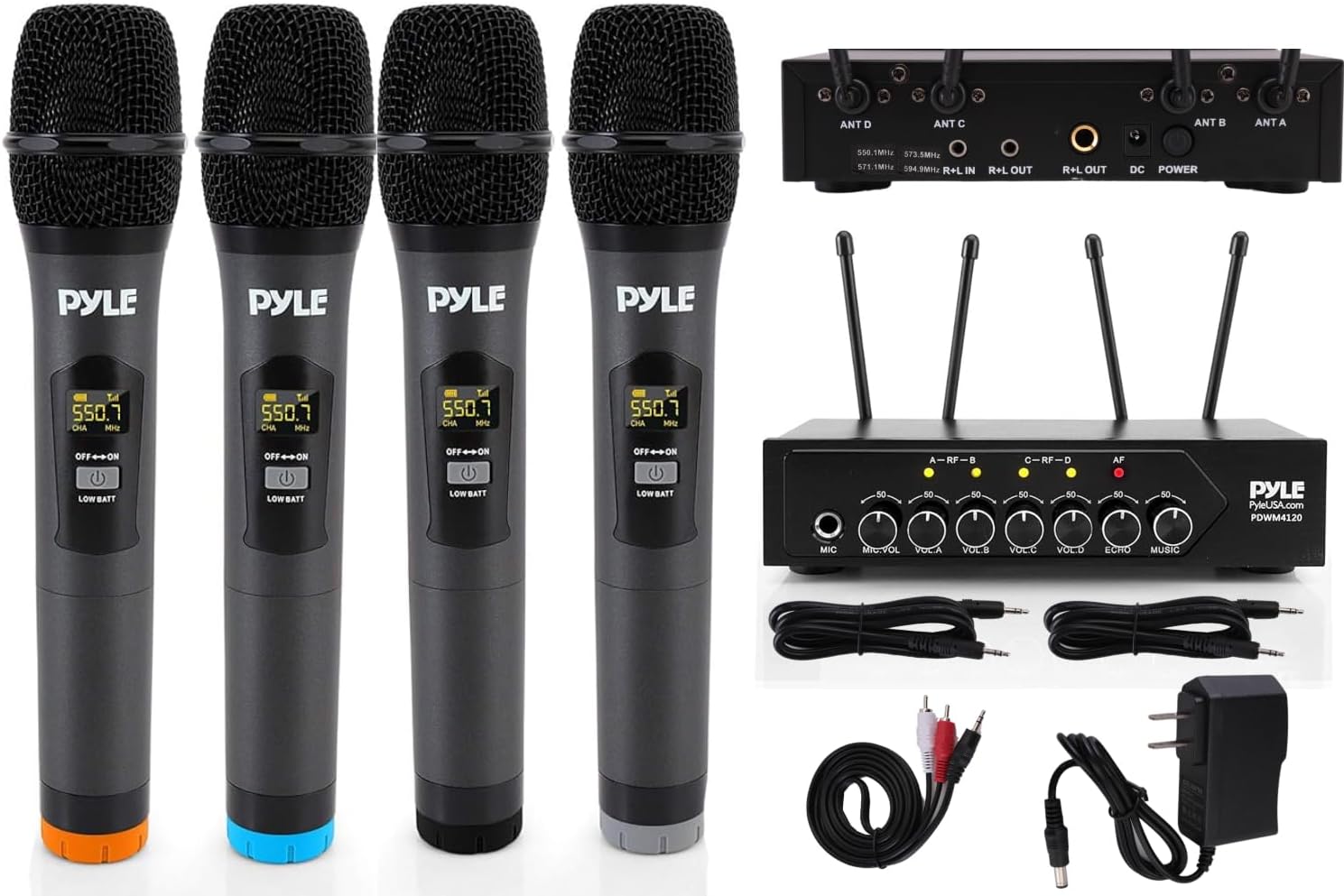
Figure 1: Pyle PDWM4120 UHF Wireless Microphone System Overview
2. What's in the Box
The Pyle PDWM4120 system includes the following components:
- Microphone Receiver Base
- (4) Wireless Handheld Microphones
- RCA-to-Aux (3.5mm) Cable (4.6 ft)
- Aux (3.5mm) Audio Cable (3.3 ft)
- 1/4'' -inch (6.3mm) Audio Cable (3.3 ft)
- Power Adapter

Figure 2: Package Contents
3. System Overview & Controls
The system consists of a central receiver unit and four wireless handheld microphones. The receiver features individual volume controls for each microphone, along with master volume, echo, and music volume adjustments. It also includes integrated antennas for extended wireless range and a digital display for selectable mic frequencies.

Figure 3: Receiver Front and Rear Panels
4. Setup Instructions
- Powering the Receiver: Connect the included power adapter to the DC 12V input on the rear panel of the receiver and plug it into a power outlet.
- Connecting Antennas: Attach the two antennas to the ANT A and ANT B connectors on the rear of the receiver. Ensure they are securely fastened.
- Connecting to an Audio System:
- Wired Connection: Use the provided 1/4'' -inch (6.3mm) audio cable or RCA-to-Aux (3.5mm) cable to connect the receiver's 1/4'' -inch (6.3mm) unbalanced mixed output or Aux (3.5mm) audio output jacks to your amplifier, stereo, audio processor, DJ mixer, or PA system.
- Bluetooth Connection: The receiver has Bluetooth 4.2 for wireless music streaming. Enable Bluetooth on your external device (smartphone, tablet, laptop) and search for 'Pyle' to pair.
- Microphone Battery Installation: Each handheld microphone requires (2) x 'AA' batteries (not included). Unscrew the bottom portion of each microphone to access the battery compartment and insert the batteries, observing correct polarity.
- Powering On: Turn on the receiver using the power ON/OFF switch. Then, turn on each handheld microphone using its power switch. The microphones will automatically connect to the receiver.
Video 1: Portable UHF Wireless Microphone System - PDWM4120 Setup Guide
5. Operating Instructions
- Volume Control: Adjust the independent channel volume controls (VOL.A, VOL.B, VOL.C, VOL.D) on the receiver for each microphone to balance vocal levels. The receiver also features master volume, echo, and music volume adjustments.
- Frequency Selection: The system offers 50 selectable UHF channels per microphone. Use the digital display on the microphones to view and select frequencies if interference is encountered.
- Bluetooth Music Streaming: Once paired via Bluetooth, you can stream music directly from your external device through the receiver.
- Voice-Over/Talk-Over Ability: This feature allows for convenient microphone voice-over or talk-over functionality when streaming music via Bluetooth.
- Acoustic Pop Filter: The built-in acoustic pop filter helps reduce plosive sounds and breath noise for crisp audio clarity.

Figure 4: Independent Channel Volume Control
Video 2: Pyle UHF Wireless Microphone System Overview
6. Maintenance
- Battery Replacement: Replace 'AA' batteries in the microphones when the low battery indicator appears on the microphone's digital display.
- Cleaning: Regularly wipe down the microphones and receiver with a soft, dry cloth. For hygiene, the microphone grilles can be carefully unscrewed and cleaned.
- Storage: Store the system in a cool, dry place away from direct sunlight and extreme temperatures when not in use.
7. Troubleshooting
- No Sound:
- Ensure the receiver is powered on and connected correctly to your audio system.
- Check if microphones are powered on and have fresh batteries.
- Verify all volume controls on the receiver and your audio system are turned up.
- Interference/Poor Sound Quality:
- Try changing the frequency on the microphones. The system offers 50 channels for selection.
- Ensure the antennas on the receiver are fully extended and positioned for optimal reception.
- Move the receiver closer to the microphones or away from potential sources of interference (e.g., Wi-Fi routers, other wireless devices).
- Microphone Not Connecting:
- Ensure both the receiver and microphone are powered on.
- Check microphone batteries.
- If frequencies were manually changed, ensure the microphone and receiver are on compatible channels.
8. Specifications
| Feature | Specification |
|---|---|
| Wireless Operation | UHF Band |
| Transmitter Frequency | Selectable (50 Channels) |
| Microphone Element/Type | Dynamic |
| Pickup/Polar Pattern | Uni-Directional |
| Wireless Operating Range | Up to 165'+ ft |
| Frequency Stability | 95DB |
| Transmitted Power | 10mW |
| Dynamic Range | >95DB |
| Construction Material | Metal Alloy Receiver Base, Half Engineered ABS & Half Metal Mics |
| Mics Battery Operated | (2) x 'AA' Batteries (Each) |
| Power Supply | 120/240V (12V Power Adapter) |
| Handheld Mic Size (L x W x H) | 9.8'' x 2.2'' x 2.2'' -inches (Each) |
| Mic Receiver Base Size (L x W x H) | 7.5'' x 3.6'' x 1.7'' -inches |
| Connectivity Technology | Bluetooth 4.2 |
| Item Weight | 4.86 pounds |
9. Warranty and Support
For detailed warranty information, technical support, or service inquiries, please refer to the official Pyle USA website or contact their customer service directly. Keep your purchase receipt for warranty claims.


