
Introduction
This manual provides essential instructions for the safe installation, operation, and maintenance of your AQUAPRO 15-inch Sand Filter and 1HP Single Speed Pump Combo. Please read this manual thoroughly before attempting to install or operate the equipment. Retain this manual for future reference.
Safety Information
WARNING: Risk of Electric Shock or Electrocution.
- Always disconnect power to the pump before performing any service or maintenance.
- Ensure all electrical connections are made by a qualified electrician and comply with local codes.
- Do not operate the pump if the electrical cord is damaged.
- Keep children away from the equipment.
- Never operate the pump dry. Ensure the pump is primed with water before starting.
- Do not exceed the maximum operating pressure of the filter.
Setup
1. Unpacking and Component Identification
Carefully unpack all components and verify that all parts are present. The package should include the sand filter tank, multi-port valve, pressure gauge, pump, pump base, and necessary plumbing connections.
2. Placement
Position the filter and pump on a firm, level surface, preferably concrete, as close to the pool as possible. Ensure adequate drainage and protection from direct weather exposure. Allow sufficient space around the unit for servicing.
3. Sand Filling
- Remove the multi-port valve and internal standpipe from the filter tank.
- Cover the open end of the standpipe to prevent sand from entering.
- Carefully pour the recommended amount of filter sand (typically #20 silica sand) into the tank. Ensure the standpipe remains centered.
- Fill the tank with water to just above the laterals to cushion the sand as it is added.
- Once filled, remove the standpipe cover and reinsert the multi-port valve, ensuring it seats properly on the standpipe.
4. Plumbing Connections
Connect the pump outlet to the filter's "PUMP" port on the multi-port valve. Connect the filter's "RETURN" port to the pool return line. Connect the pump's suction side to the pool skimmer/main drain line. Ensure all connections are tight to prevent leaks.
5. Electrical Connection
Connect the pump to a properly grounded electrical outlet protected by a Ground Fault Circuit Interrupter (GFCI). Consult a qualified electrician for proper wiring if necessary.
6. Initial Priming
Before starting the pump, ensure the pool water level is adequate. Open all suction and return valves. Fill the pump strainer basket with water. Set the multi-port valve to the "BACKWASH" position. Turn on the pump. Once water flows steadily from the backwash line, run for 2-3 minutes, then turn off the pump. Proceed to "Rinse" mode.
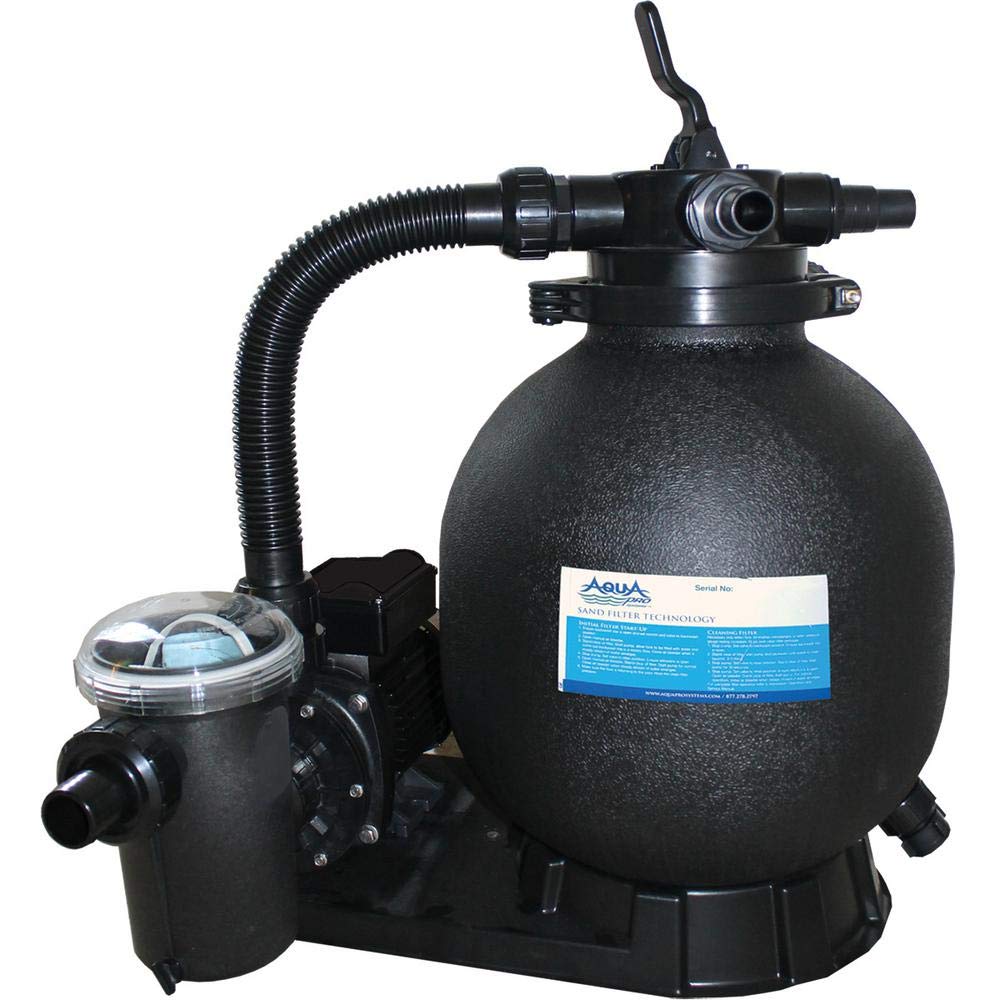
Image: The AQUAPRO 15-inch Sand Filter and 1HP Single Speed Pump Combo, model APA1063075LBS, is shown installed on a gravel bed next to an above-ground pool. Hoses connect the pump and filter to the pool's skimmer and return lines. The filter tank is black, and the pump motor is visible on the base.
Operating
Multi-Port Valve Functions
The multi-port valve controls the water flow through the filter system. Always turn off the pump before changing valve positions.
- FILTER: Normal filtering mode. Water flows through the sand bed, trapping debris, and returns to the pool.
- BACKWASH: Cleans the filter sand. Water flows in reverse through the sand bed, dislodging trapped debris, and exits through the waste port.
- RINSE: Used after backwashing to settle the sand bed and flush out any remaining dirty water from the waste line before returning to filter mode.
- WASTE/DRAIN: Bypasses the filter, sending water directly out the waste port. Used for vacuuming heavy debris directly to waste or lowering pool water level.
- RECIRCULATE/BYPASS: Bypasses the filter, circulating water directly back to the pool. Used when the filter is not needed, or for chemical distribution.
- CLOSED: Shuts off all flow to the filter and pump. Do not operate the pump in this position.
Daily Operation
Set the multi-port valve to "FILTER". Ensure all valves are open and the pump is primed. Turn on the pump. Run the filter system for 8-12 hours daily, or as recommended for your pool size and usage.
Backwashing Procedure
- Turn off the pump.
- Set the multi-port valve to "BACKWASH".
- Turn on the pump. Observe the sight glass (if present) or the waste discharge. Backwash until the water runs clear (typically 2-3 minutes).
- Turn off the pump.
- Set the multi-port valve to "RINSE".
- Turn on the pump. Rinse for 30-60 seconds.
- Turn off the pump.
- Set the multi-port valve back to "FILTER".
- Turn on the pump to resume normal filtration.
Maintenance
Regular Cleaning
- Skimmer Basket: Check and empty the skimmer basket daily or as needed to ensure proper water flow to the pump.
- Pump Strainer Basket: Turn off the pump, close all valves, and remove the pump lid. Empty and clean the strainer basket regularly (weekly or bi-weekly). Re-prime the pump after cleaning.
Sand Replacement
Filter sand typically lasts 3-5 years, depending on usage and water chemistry. Replace the sand when filtering efficiency decreases significantly, even after backwashing. Refer to the "Sand Filling" section for replacement procedure.
Winterization
Before freezing temperatures arrive, drain all water from the pump, filter, and plumbing lines. Disconnect hoses, remove the drain plug from the filter tank, and remove the pump drain plugs. Store the pump in a dry, warm place. Cover the filter tank to protect it from elements.
Troubleshooting
| Problem | Possible Cause | Solution |
|---|---|---|
| Low water flow / High pressure gauge reading | Clogged filter sand; dirty skimmer/pump basket; closed valves. | Backwash the filter; clean skimmer/pump baskets; ensure all valves are open. |
| Cloudy pool water | Insufficient filtration time; dirty filter sand; improper water chemistry. | Increase filtration time; backwash/rinse filter; test and adjust pool chemistry. |
| Pump not priming / Air in system | Low pool water level; air leak on suction side; dirty pump basket. | Ensure adequate pool water level; check all suction connections for leaks; clean pump basket and re-prime. |
| Pump not starting | No power; tripped GFCI; motor issue. | Check power supply; reset GFCI; consult a qualified technician if motor issues persist. |
Specifications
| Feature | Specification |
|---|---|
| Brand | Aquapro |
| Model Number | APA1063075LBS |
| Filter Diameter | 15 inches |
| Pump Horsepower | 1 HP |
| Filter Material | Sand (requires #20 silica sand) |
| Pool Type | Above Ground |
| UPC | 816965014972 |
Warranty and Support
This AQUAPRO product is covered by a manufacturer's warranty. Please refer to the warranty card included with your purchase for specific terms and conditions. For technical support, replacement parts, or warranty claims, please contact your retailer or the AQUAPRO customer service department. Keep your proof of purchase for warranty validation.