
Introduction
The Benro BK15 is a versatile accessory designed for smartphones, functioning as both a mini tabletop tripod and an extendable selfie stick. It includes a smartphone adapter and a removable Bluetooth remote for convenient hands-free operation. This manual provides instructions for proper setup, usage, and maintenance of your BK15.
Product Overview

Figure 1: Benro BK15 components including the main unit, smartphone clamp, Bluetooth remote, and carrying pouch.
- Main Unit: Functions as both the tripod base and extendable selfie stick.
- Smartphone Clamp: Adjustable holder for securing your smartphone.
- Bluetooth Remote: Detachable remote for wireless photo and video capture.
- Carrying Pouch: For convenient storage and transport.
Setup Instructions
1. Attaching the Smartphone Clamp
- Locate the smartphone clamp and the screw mount on top of the main unit.
- Align the clamp's screw hole with the screw mount.
- Rotate the clamp clockwise until it is securely fastened to the main unit. Ensure it is tight to prevent your phone from wobbling.
2. Pairing the Bluetooth Remote

Figure 2: Detachable Bluetooth remote control.
- Remove the Bluetooth remote from its slot on the main unit.
- Press and hold the button on the remote for approximately 5 seconds until the LED indicator starts blinking. This indicates it is in pairing mode.
- On your smartphone, go to Bluetooth settings and search for available devices.
- Select "Benro BK15" (or similar name) from the list to pair. The LED on the remote will stop blinking once successfully paired.
- To turn off the remote and conserve battery, press and hold the button for 5 seconds.
Operating Instructions
1. Using as a Mini Tripod

Figure 3: Benro BK15 configured as a mini tripod.
- Fold out the three legs at the base of the main unit to form a stable tripod.
- Place your smartphone into the adjustable clamp. Ensure it is held firmly.
- Adjust the ball head to achieve your desired angle for photos or videos. Tighten the knob on the ball head to secure the position.
- Use the Bluetooth remote to capture photos or start/stop video recording from a distance.
2. Using as a Selfie Stick

Figure 4: Benro BK15 extended as a selfie stick.
- Ensure the tripod legs are folded back into the handle.
- Extend the telescoping center column to your desired length (up to 32 inches / 81 cm).
- Secure your smartphone in the clamp.
- Hold the unit by the handle and use the Bluetooth remote to capture selfies or group shots.
Maintenance
- Keep the unit clean by wiping it with a soft, dry cloth.
- Avoid exposing the unit to extreme temperatures or moisture.
- Store the unit in its carrying pouch when not in use to protect it from dust and scratches.
- Ensure the Bluetooth remote is securely placed in its slot or stored separately to prevent loss.

Figure 5: Benro BK15 carrying pouch.
Troubleshooting
Bluetooth Remote Not Connecting:
- Ensure the remote is charged or has a fresh battery.
- Verify the remote is in pairing mode (blinking LED).
- Check your smartphone's Bluetooth settings to ensure it's enabled and searching for devices.
- Try unpairing and re-pairing the remote if issues persist.
Phone Not Stable in Clamp:
- Ensure the clamp is fully tightened onto the tripod/selfie stick.
- Verify your phone is within the supported clamp range (48-100mm).
- Make sure the phone is centered in the clamp for optimal balance.
Specifications
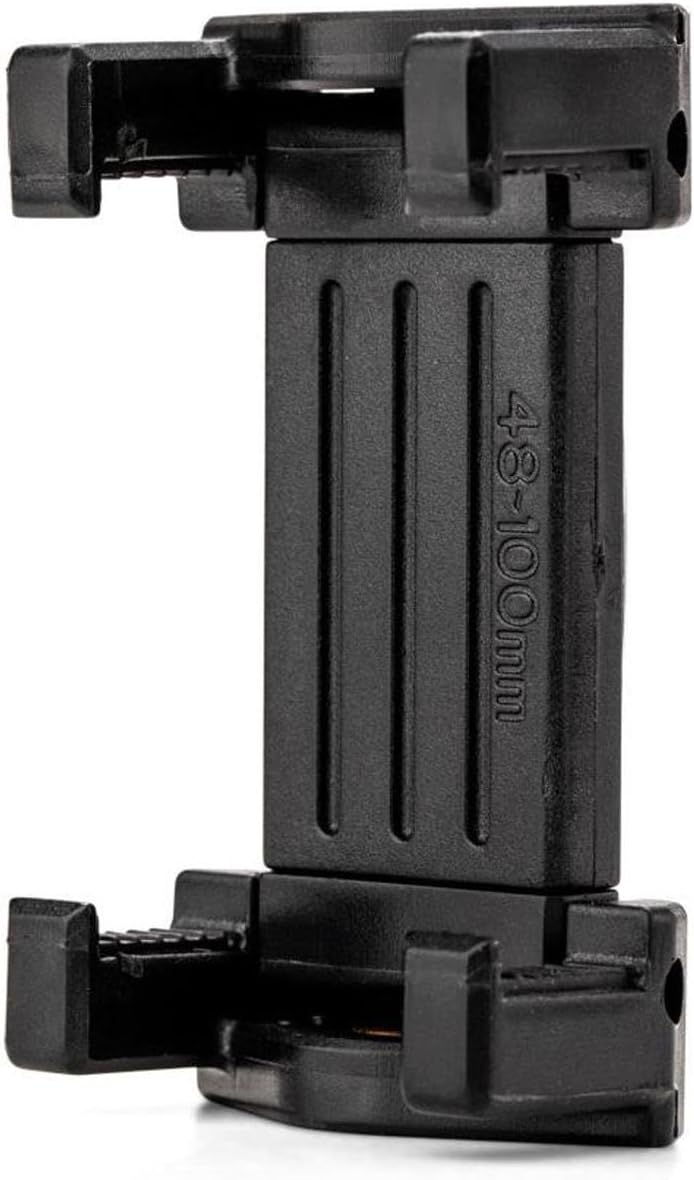
Figure 6: Smartphone clamp with width range indication.
| Feature | Detail |
|---|---|
| Product Dimensions | 3.94 x 4.33 x 6.3 inches |
| Item Weight | 0.19 kg (0.42 lb) |
| Model Number | BK15 |
| Material | Aluminum |
| Color | Black |
| Compatible Devices | Smartphones (Clamp range: 48-100mm / 1.9"-3.9") |
| Maximum Height (Selfie Stick) | 32 inches (81 cm) |
| Weight Limit | 0.5 kg (1.1 lb) |
| Tripod Head Type | Ball Head |
| Batteries | 1 Lithium Ion battery required (for remote) |
Warranty Information
A standard limited warranty of 3 years is provided from the date of purchase for the original owner. If you register the product online, the warranty is extended by 2 additional years, totaling 5 years in applicable regions. Please refer to the official Benro website for detailed warranty terms and registration procedures.
Support
For further assistance, product registration, or to view additional products, please visit the official Benro website or contact customer support.
Official Benro Store: Benro Amazon Store

