
Introduction
This manual provides comprehensive instructions for the safe and effective use of your TIMTAM Power Massager Pro. This handheld percussion device is designed for deep tissue muscle recovery, featuring 5 programmed settings to assist with various muscle groups and recovery needs. Please read this manual thoroughly before operating the device and retain it for future reference.
Safety Information
For your safety and to prevent damage to the device, observe the following precautions:
- Use with caution on injured or inflamed areas. Consult a doctor before use.
- Keep away from face and sensitive areas.
- Do not use while sleeping or if unconscious.
- Charge and store the device in a cool, dry place.
- Do not immerse the device in water or any other liquid.
- Avoid dropping the device or subjecting it to excessive force to prevent damage.
- Statements regarding dietary supplements have not been evaluated by the FDA and are not intended to diagnose, treat, cure, or prevent any disease or health condition.
Package Contents
Verify that all items are present in the package:
- TIMTAM Power Massager Pro Unit
- Rechargeable Lithium-Ion Battery
- Battery Charger (DC 15V, 1A)
- Various Massage Tips (e.g., spherical, conical, flat)
- Travel Bag

Image: The TIMTAM Power Massager Pro unit displayed alongside its included accessories, which consist of various massage tips, a rechargeable battery, and a power adapter.
Setup
1. Charging the Battery
- Connect the charger to a power outlet and to the battery.
- Allow the battery to fully charge before first use. The indicator light on the charger will change when charging is complete.
- It is recommended to leave the battery charging even after the indicator light shows full charge to ensure optimal performance.
2. Attaching Massage Tips
- Ensure the device is powered off.
- Select the desired massage tip.
- Align the tip with the attachment point on the device and push firmly until it clicks into place.
- To remove, twist and pull the tip gently.
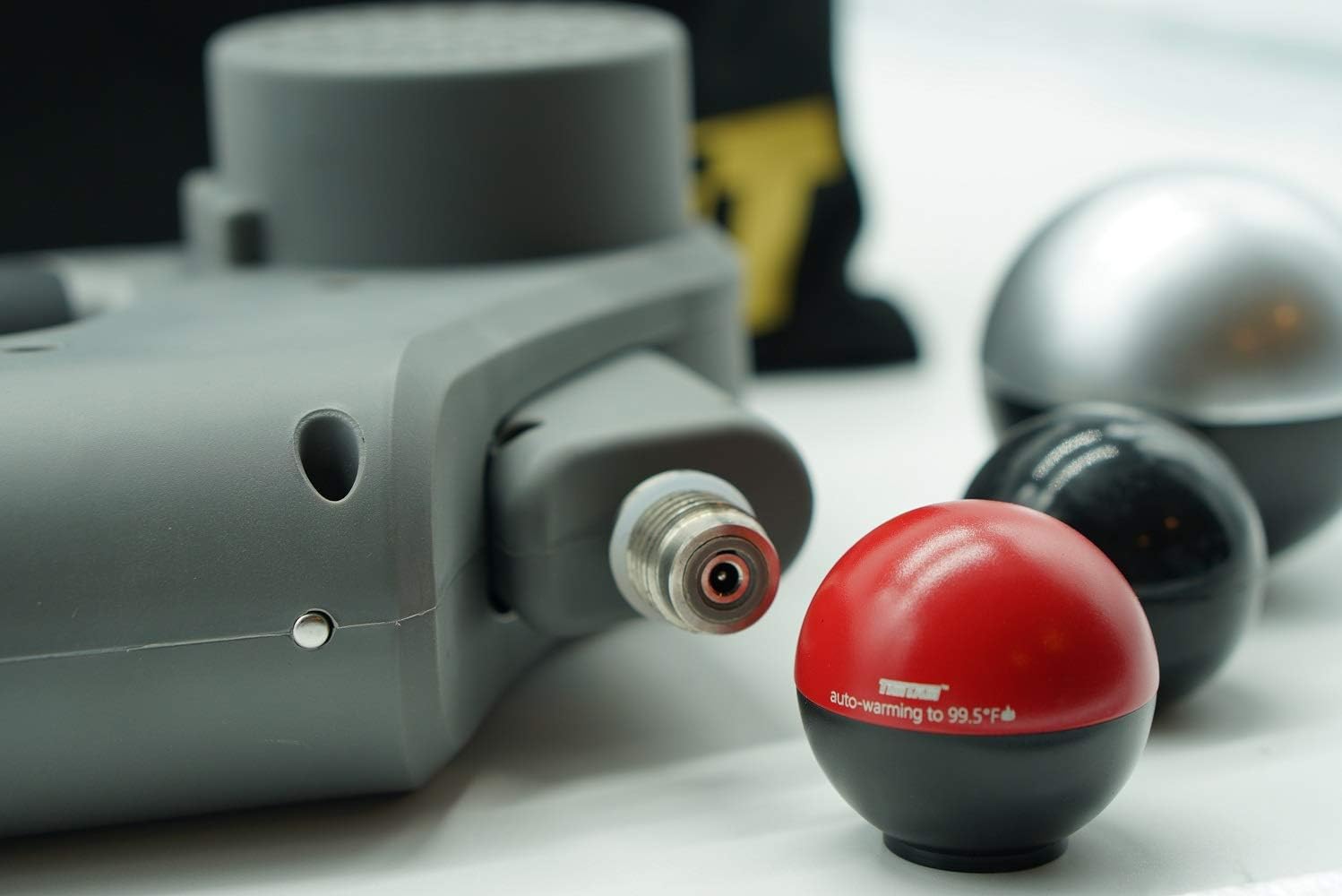
Image: A close-up view of the TIMTAM Power Massager Pro's attachment mechanism, showing a red spherical massage tip with "auto-warming to 99.5°F" text, ready for use.
3. Inserting the Battery
- With the device powered off, align the battery with the battery compartment at the base of the handle.
- Push the battery firmly into the compartment until it is securely seated.
- To remove the battery, press the release button (if present) and pull the battery out with firm grip.
Operating Instructions
1. Powering On/Off
- To power on, press and hold the power button located on the device handle.
- To power off, press and hold the power button again. Ensure the device is fully powered down to prevent battery drain.
2. Changing Settings/Modes
- The TIMTAM Power Massager Pro features 5 programmed settings.
- Once powered on, short press the power button to cycle through the available settings.
- Observe the display screen for the current setting indication.
3. Application Techniques
- Apply the massage tip to the desired muscle area.
- Move the device slowly over the muscle, applying light to moderate pressure.
- Avoid bony areas, joints, and sensitive regions.
- Use for short durations (1-2 minutes) per muscle group, adjusting as needed.

Image: A woman demonstrating the use of the TIMTAM Power Massager Pro on her upper leg, targeting muscle recovery after exercise.

Image: A man using the TIMTAM Power Massager Pro on his neck and shoulder area, with the device's display showing "Neck" as the targeted area.
Maintenance
1. Cleaning the Device
- Ensure the device is powered off and unplugged before cleaning.
- Wipe the device with a slightly damp cloth. Do not use abrasive cleaners or immerse in water.
- Clean massage tips with mild soap and water, then dry thoroughly before reattaching.
2. Battery Care
- Store the battery in a cool, dry place when not in use.
- Recharge the battery regularly, even if not frequently used, to maintain its lifespan.
- If the device is merely turned off but not fully powered down, the battery may drain. Ensure complete shutdown for storage.
3. Storage
- Store the massager and its accessories in the provided travel bag to protect them from dust and damage.
- Keep out of reach of children and pets.
Troubleshooting
| Problem | Possible Cause | Solution |
|---|---|---|
| Device does not turn on. | Battery is not charged or not inserted correctly. | Ensure battery is fully charged and securely inserted. |
| Device turns off unexpectedly during use. | Low battery or accidental press of the power button. | Recharge the battery. Adjust grip to avoid accidental power button presses. |
| Massage tip is difficult to attach/remove. | Incorrect alignment or debris in the attachment mechanism. | Ensure proper alignment. Clean the attachment area. Apply gentle twist and pull motion. |
| Heat feature is not noticeable. | The heat feature provides subtle warming, not intense heat. | This is normal operation. The auto-warming feature is designed for gentle warmth. |
Specifications
- Brand: TIMTAM
- Model Number: 742288746200
- Power Source: Battery Powered (1 Lithium Ion battery included)
- Material: Plastic
- Item Weight: 4 Pounds
- Use For: Whole Body
- Date First Available: November 18, 2019

Image: The main unit of the TIMTAM Power Massager Pro, showcasing its ergonomic design and the prominent 'T' logo.
Warranty and Support
Specific warranty information for the TIMTAM Power Massager Pro is not provided in this document. For details regarding warranty coverage, terms, and conditions, please refer to the official TIMTAM website or contact their customer support directly.
For technical assistance, troubleshooting beyond this manual, or to inquire about replacement parts, please contact TIMTAM customer support through their official channels. Contact information can typically be found on the product packaging or the manufacturer's website.
You may also visit the TIMTAM Store on Amazon for additional product information and support resources.