
W-KING D8 mini-1
W-KING D8 mini-1 Bluetooth Speaker User Manual
Model: D8 mini-1 | Brand: W-KING
Introduction
The W-KING D8 mini-1 is a powerful and portable Bluetooth speaker designed for both indoor and outdoor use. It features robust sound output, IPX6 waterproofing, and multiple connectivity options, ensuring a versatile audio experience. This manual provides detailed instructions for setting up, operating, maintaining, and troubleshooting your speaker.
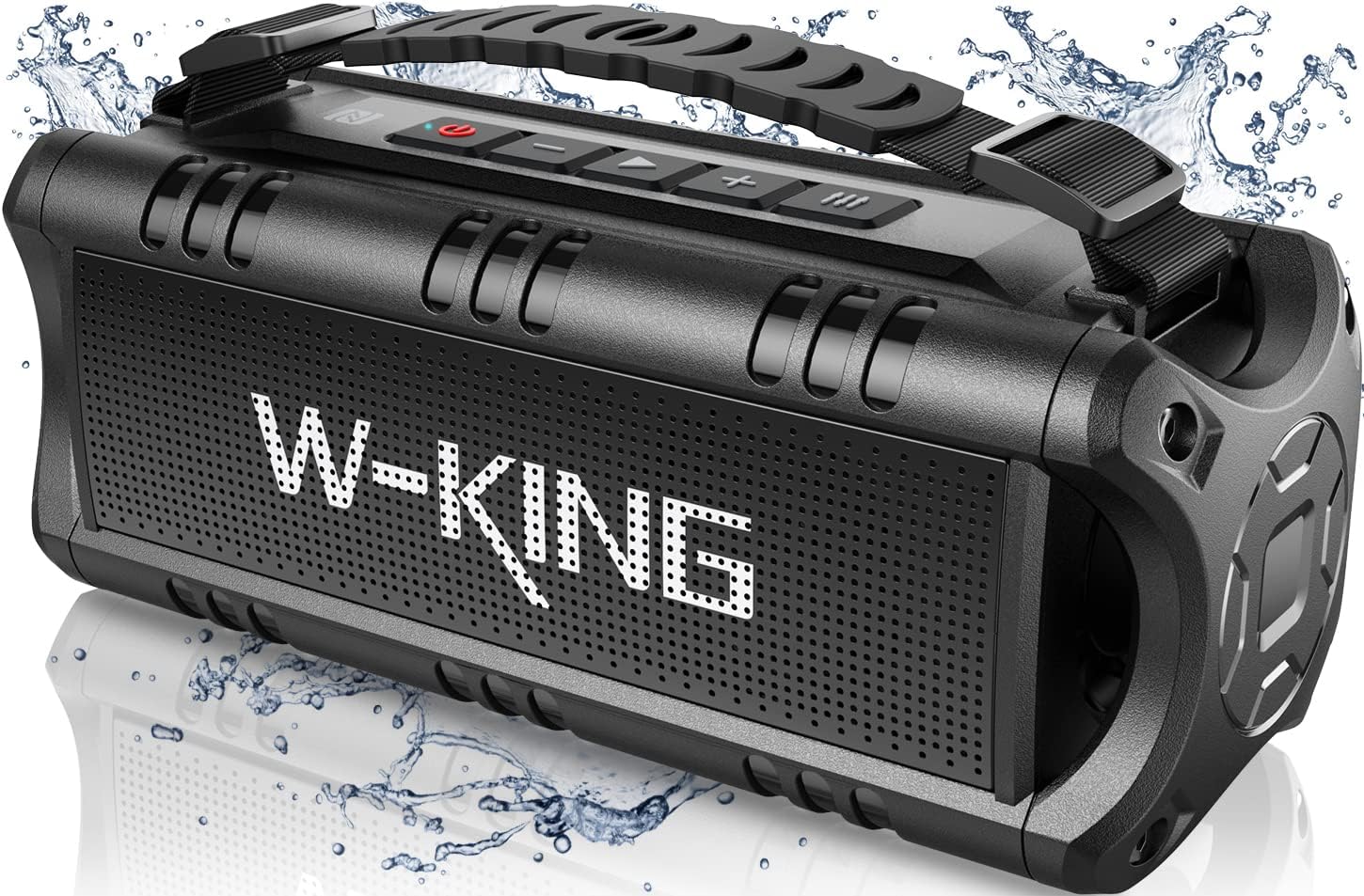
Image: The W-KING D8 mini-1 Bluetooth Speaker, showcasing its rugged design and handle.
What's in the Box
Upon unboxing your W-KING D8 mini-1 speaker, please ensure all the following components are present:
- 1 x W-KING D8 mini-1 Wireless Bass Speaker
- 1 x User Manual (this document)
- 1 x USB-C Charging Cable
- 1 x 3.5mm Audio Cable (AUX Cable)

Image: The W-KING D8 mini-1 speaker, its packaging, USB-C charging cable, 3.5mm audio cable, and user manual.
Setup
1. Charging the Speaker
Before first use, fully charge the speaker. Use the provided USB-C charging cable and a 5V/2A power adapter (not included). A full charge takes approximately 4 hours. The battery lasts up to 24 hours at the lowest volume.
- Connect the USB-C cable to the speaker's charging port (Port 10 in the button layout diagram).
- Connect the other end to a compatible USB power adapter.
- The charging indicator will show the charging status.

Image: A person relaxing outdoors with the W-KING D8 mini-1 speaker, illustrating its long battery life.
2. Powering On/Off
- To power on, press and hold the Power ON/OFF button (Button 5) for a few seconds until you hear an audible prompt.
- To power off, press and hold the Power ON/OFF button again until the speaker shuts down.
3. Bluetooth Pairing
The W-KING D8 mini-1 uses Bluetooth 5.0 for stable and efficient wireless connection.
- Ensure the speaker is powered on and in Bluetooth pairing mode (indicated by a flashing LED).
- On your device (smartphone, tablet, laptop), enable Bluetooth and search for available devices.
- Select "W-KING D8 mini-1" from the list of devices.
- Once connected, the speaker will provide an audible confirmation, and the LED indicator will become solid.

Image: The W-KING D8 mini-1 speaker connected via Bluetooth to a smartphone, illustrating its various connectivity options including USB, TF Card, NFC, and AUX.
4. True Wireless Stereo (TWS) Pairing
For an enhanced stereo experience, you can pair two W-KING D8 mini-1 speakers together.
- Ensure both W-KING D8 mini-1 speakers are powered on and not connected to any other Bluetooth device.
- On one speaker, press and hold the TWS pairing button (refer to button layout if available, otherwise assume a dedicated button or combination). The speakers will search for each other.
- Once paired, you will hear an audible confirmation. The LED indicators on both speakers will change to indicate a successful TWS connection.
- Now, connect your device to one of the speakers via Bluetooth as described in step 3. Audio will play through both speakers in stereo.

Image: Two W-KING D8 mini-1 speakers being used by people on bicycles, demonstrating the 10-meter pairing range and True Wireless Stereo capabilities.
Operating Instructions
Button Layout and Functions

Image: A detailed close-up of the W-KING D8 mini-1 speaker's control panel, highlighting the various buttons and ports with numerical labels.
| No. | Button/Port | Function |
|---|---|---|
| 1 | EQ button | Switches between Indoor and Outdoor EQ modes. |
| 2 | Volume + / Next track | Short press for next track, long press to increase volume. |
| 3 | Play / Pause | Plays or pauses audio. Answers/ends calls. |
| 4 | Volume - / Previous track | Short press for previous track, long press to decrease volume. |
| 5 | Power ON / OFF | Press and hold to power the speaker on or off. |
| 6 | NFC | Near Field Communication for quick pairing (Android only). |
| 7 | USB drive port | For playing audio from a USB flash drive. |
| 8 | 3.5mm AUX | For wired audio connection using the included 3.5mm audio cable. |
| 9 | Reset | Small pinhole for resetting the device. |
| 10 | Type-C charging port | For charging the speaker. |
| 11 | TF card slot | For playing audio from a TF (MicroSD) card. |
EQ Modes
The D8 mini-1 features two equalizer (EQ) modes to optimize sound for different environments:
- Indoor Mode: Provides a softer, richer bass sound, ideal for enclosed spaces.
- Outdoor Mode: Delivers brighter, clearer audio, designed to project sound effectively in open environments.
Press the EQ button (Button 1) to switch between these modes.

Image: A split image showing the W-KING D8 mini-1 speaker in an indoor setting (on a coffee table) and an outdoor setting (next to a hammock), illustrating the two EQ modes.
Hands-Free Calling
The built-in microphone allows for hands-free calls when connected via Bluetooth.
- To answer an incoming call, short press the Play/Pause button (Button 3).
- To end a call, short press the Play/Pause button (Button 3) again.
- To reject an incoming call, press and hold the Play/Pause button (Button 3).

Image: A woman on a video call with the W-KING D8 mini-1 speaker nearby, demonstrating its hands-free calling capability.
Key Features
Powerful Audio Performance
The W-KING D8 mini-1 delivers 30W RMS output with a 60W peak, providing rich bass and clear highs. It features two precision acoustic drivers and proprietary passive bass radiators for enhanced sound quality without distortion. A built-in Digital Signal Processor (DSP) refines audio for optimal clarity and balance.

Image: An X-ray view of the W-KING D8 mini-1 speaker, highlighting its internal acoustic drivers, passive radiators, and DSP, with a "60W PEAK" overlay.
Durable and Waterproof Design
With an IPX6 waterproof rating, the D8 mini-1 is resistant to strong water jets and splashes, making it suitable for outdoor environments. Its robust, unibody construction and protective rubber padding ensure durability against impacts and drops.

Image: The W-KING D8 mini-1 speaker placed on a paddleboard in water, demonstrating its IPX6 waterproof capability and rugged shell.
Portability and Battery Life
Designed for portability, the speaker features a lightweight build and an adjustable, detachable strap for easy carrying. The high-capacity 5000mAh rechargeable battery provides up to 24 hours of playtime on a single charge, making it ideal for extended outdoor adventures.

Image: The W-KING D8 mini-1 speaker on a wooden table next to a smartphone, highlighting its compact size and detachable/adjustable strap.
Maintenance
- Cleaning: Use a soft, dry cloth to clean the speaker's exterior. For stubborn dirt, a slightly damp cloth can be used. Do not use harsh chemicals or abrasive cleaners.
- Storage: Store the speaker in a cool, dry place away from direct sunlight and extreme temperatures.
- Battery Care: To prolong battery life, fully charge the speaker at least once every month if not in regular use. Avoid completely draining the battery frequently.
- Water Exposure: While IPX6 waterproof, avoid prolonged submersion. After exposure to water, wipe the speaker dry before charging.
Troubleshooting
| Problem | Possible Cause | Solution |
|---|---|---|
| Speaker does not power on. | Low battery. | Charge the speaker fully. |
| Cannot pair via Bluetooth. | Speaker not in pairing mode; device Bluetooth off; too far from speaker; previously paired device connected. | Ensure speaker is in pairing mode. Turn on device Bluetooth. Move device closer. Disconnect from other devices. |
| No sound or low volume. | Volume too low on speaker or device; incorrect input mode; audio cable not fully inserted. | Increase volume on both speaker and device. Check input mode (Bluetooth, AUX, TF, USB). Ensure cables are securely connected. |
| Sound distortion. | Volume too high; audio source quality is poor. | Reduce volume. Try a different audio source or file. |
| TWS pairing fails. | Speakers too far apart; one speaker already connected to a device. | Ensure speakers are close to each other. Disconnect both speakers from any Bluetooth devices before initiating TWS pairing. |
| Speaker unresponsive. | Temporary software glitch. | Use a small pin to press the Reset button (Button 9). |
Specifications
| Feature | Detail |
|---|---|
| Model Name | D8 mini-1 |
| Brand | W-KING |
| Speaker Type | Portable Bass Bluetooth Speaker |
| Output Power | 30W RMS (60W Peak) |
| Connectivity | Bluetooth 5.0, USB Flash Drive, TF Card, 3.5mm AUX, NFC (Android only) |
| Bluetooth Range | Up to 66 feet (approx. 20 meters) |
| Waterproof Rating | IPX6 |
| Battery Capacity | 5000 mAh |
| Playtime | Up to 24 hours (at lowest volume) |
| Charging Time | Approx. 4 hours (with 5V/2A adapter) |
| Input Voltage | 5 Volts |
| Dimensions | 25.4 x 9.4 x 9.4 cm |
| Included Components | Speaker, USB-C Charging Cable, 3.5mm Audio Cable, User Manual |
Warranty and Support
W-KING provides customer support for its products. For any issues not covered in this manual, or for warranty inquiries, please contact W-KING customer service. Refer to the contact information provided with your purchase or visit the official W-KING website for support details.
W-KING offers 24-hour email support to ensure a risk-free purchase experience.
Related documentsD8 mini-1


Ask a question about this manual
Ask about setup, troubleshooting, compatibility, parts, safety, or missing instructions. Manuals+ will review the question and use this page’s manual context to help answer it.