
CYCPLUS A2PRO
CYCPLUS Portable Electric Air Compressor User Manual
Model: A2PRO / A2PLUS
Brand: CYCPLUS
1. Introduction
The CYCPLUS Portable Electric Air Compressor is a versatile, wireless, and rechargeable device designed for inflating tires of bicycles, motorcycles, cars, and various balls. Featuring a digital pressure gauge and automatic shut-off, it provides convenient and precise inflation. Its compact design and powerful 150 PSI output make it an essential tool for on-the-go inflation needs.

Image: The CYCPLUS Portable Electric Air Compressor shown with its included accessories, including the main unit, air hose, and various nozzles.
2. Package Contents
Please verify that all items are present in the package:
- Packaging Box
- Inflator (Main Unit)
- Type-C Charging Cable
- Non-slip Mat
- Air Tube (Hose)
- User Manual
- Storage Bag
- Screws (x2)
- Screwdriver
- Velcro Strap
- Bike Mount
- Ball Needle
- Presta Valve Converter

Image: A visual representation of all components included in the CYCPLUS product package, clearly labeled.
3. Safety Information
- Noise Level: The inflator produces a significant sound during operation. It is recommended to keep pets and infants away from the device during use. Avoid using it in quiet environments late at night.
- Automatic Shut-off: For safety and to prevent overheating, the pump will automatically shut off after 10 minutes of continuous inflation. If more inflation is needed, allow the device to cool down before resuming.
- Appropriate Use: This device is suitable for inflating various tires and balls. However, it is not designed for products requiring a large airflow and low air pressure, such as SUPs, air cushions, large balloons, or yoga balls.
- Tubeless Tires: Tubeless tires can be topped up with air, but the inflator cannot inflate completely empty tubeless tires from scratch.
- General Safety: Do not overinflate tires beyond their recommended pressure. Keep the device out of reach of children. Do not expose the device to extreme temperatures, direct sunlight for prolonged periods, or water.
4. Charging the Device
The CYCPLUS Portable Electric Air Compressor is equipped with 2*2600 mAh batteries. A full charge takes approximately 2 hours.
- Upon receiving the pump, ensure it is fully charged before its first use.
- Connect the provided Type-C charging cable to the charging port on the inflator and to a suitable USB power source.
- The indicator light will illuminate during charging and turn green once the device is fully charged.
- If the device will not be used for an extended period (e.g., two months or more), it is recommended to charge the pump periodically to prevent battery deterioration.
- For optimal battery health, store the pump fully charged after each use.

Image: This image highlights the large battery capacity of the inflator, showing it can inflate approximately 2 car tires, 12 motorcycle tires, 16 bicycle tires, or 48 balls on a single charge.
5. Initial Setup
Before operating the inflator, ensure the air tube (hose) is properly connected.
- Locate the air tube. The CYCPLUS inflator features a built-in hose storage design.
- Pull the hose out from its storage slot.
- Securely screw the end of the air tube into the designated port on the inflator. Ensure it is tightened to prevent air leakage during inflation.

Image: The inflator's built-in hose design, allowing for convenient storage and easy access.
6. Operating Instructions
The CYCPLUS inflator offers a simple 3-step operation for efficient inflation.
- Connect to Valve: Securely connect the appropriate adapter (Shrader, Presta, or ball needle) to the air tube, then attach it to the tire valve or ball. Ensure a tight seal to prevent air loss.
- Power On & Read Pressure: Press the power button to turn on the device. The digital display will show the current pressure of the connected item in real-time.
- Set Desired Pressure: Use the '+' and '-' buttons to adjust the target pressure. Refer to your tire's sidewall or product specifications for recommended pressure values.
- Start Inflation: Press the power button again to begin inflation. The pump will automatically stop once the preset pressure is reached.
LED Emergency Light: The inflator includes a built-in LED light. Press the light button to turn it on, which can be useful for inflation in low-light conditions or as an emergency signal.

Image: A user holding the CYCPLUS inflator while it is connected to and inflating a bicycle tire.

Image: This graphic illustrates the fast inflation capability, showing a 195/55R15 car tire inflating from 2.0 Bar to 2.5 Bar in under 2 minutes, with the auto-shutoff feature.
7. Pressure Modes and Units
The CYCPLUS inflator supports various pressure measurement units to suit different requirements:
- PSI (Pounds per Square Inch)
- BAR
- KPA (Kilopascals)
- kg/cm² (Kilograms per Square Centimeter)
To switch between these units, press the 'M' button on the device. The selected unit will be displayed on the digital screen.
8. Maintenance
- Cleaning: Wipe the exterior of the device with a soft, dry cloth. Do not use abrasive cleaners or immerse the device in water.
- Storage: Store the inflator in a cool, dry place, away from direct sunlight and extreme temperatures. Ensure the air tube is properly stored in its designated slot to prevent damage.
- Battery Care: As mentioned in the charging section, charge the device every two months if not in regular use to maintain battery health. Store the device fully charged.
- Hose and Adapters: Periodically check the air tube and adapters for any signs of wear or damage. Replace if necessary to ensure proper sealing and inflation performance.
9. Troubleshooting
| Problem | Possible Cause | Solution |
|---|---|---|
| Device does not turn on. | Battery is depleted. | Charge the device fully using the provided Type-C cable. |
| Air leakage during inflation / Tire not inflating. | Loose connection of air tube or adapter; damaged O-rings. | Ensure the air tube is securely screwed into the inflator and the adapter is tightly connected to the valve. Check the O-rings on the hose for wear and replace if necessary. |
| Pump automatically stops before reaching target pressure. | Safety auto-shutoff activated (after 10 minutes of continuous operation). | This is a normal safety feature. Allow the device to cool down for a few minutes, then resume inflation if needed. |
| Inaccurate pressure reading. | Sensor calibration needed; improper connection. | Ensure the connection to the valve is secure. Turn the device off and on again to reset the sensor. If issues persist, contact customer support. |
| Device overheats. | Prolonged continuous use. | The device has an automatic shut-off to prevent overheating. Allow it to cool down completely before further use. |
10. Specifications
| Feature | Detail |
|---|---|
| Model Number | A2 |
| Dimensions (L x W x H) | 5.5 x 5.3 x 18 cm |
| Weight | 380 Grams |
| Material | Plastic |
| Power Source | Battery Powered (4 Lithium metal batteries included) |
| Battery Capacity | 2*2600 mAh |
| Charging Time | Approximately 2 hours |
| Maximum Pressure | 150 PSI |
| Airflow Capacity | 150 cubic feet per minute |
| Operating Mode | Manual (with auto-stop) |
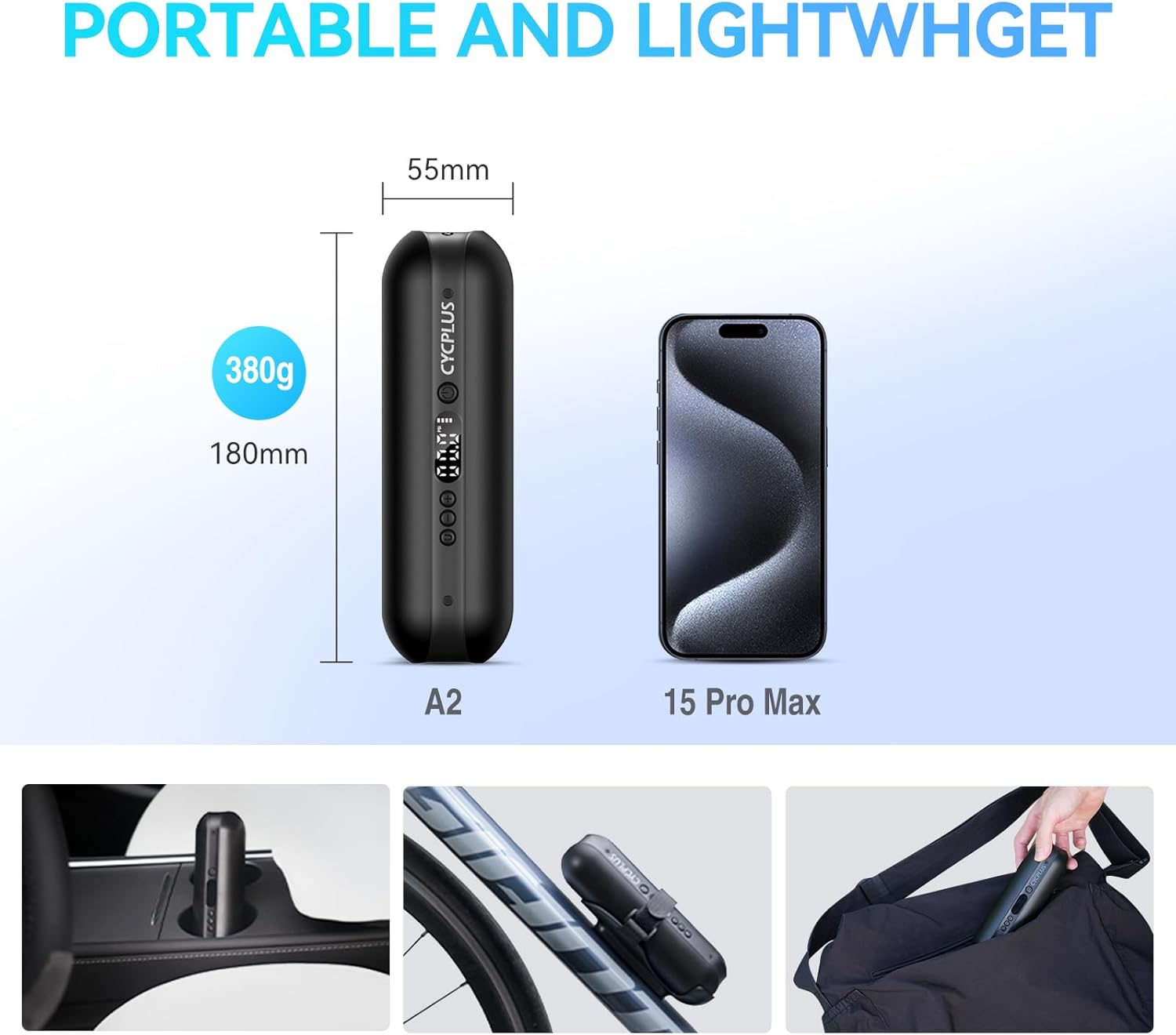
Image: The inflator's compact and lightweight design (180mm, 380g) is shown in comparison to a smartphone, emphasizing its portability and ease of carrying in a bag or mounted on a bike.

Image: The included bike mount allows for convenient storage of the air pump directly on a bicycle, making it easy to carry without being a burden during rides.
11. Warranty and Support
CYCPLUS is committed to customer satisfaction and provides professional technical support for its products.
- Warranty Coverage: The product comes with a one-year coverage from the date of purchase.
- Customer Support: For any concerns, technical assistance, or warranty claims, please contact CYCPLUS customer support. They offer 24/7 support to address your inquiries promptly and efficiently.
- Contact Information: Refer to the product packaging or the official CYCPLUS website for the most up-to-date customer service contact details.
Related documentsA2PRO


Ask a question about this manual
Ask about setup, troubleshooting, compatibility, parts, safety, or missing instructions. Manuals+ will review the question and use this page’s manual context to help answer it.