
1. Product Overview
The LG RH9V71WH is a 9kg capacity heat pump dryer designed for efficient and gentle drying of various fabric types. Featuring advanced heat pump technology, a Dual Inverter compressor, and an Auto Cleaning Condenser, this appliance offers significant energy savings and enhanced convenience.
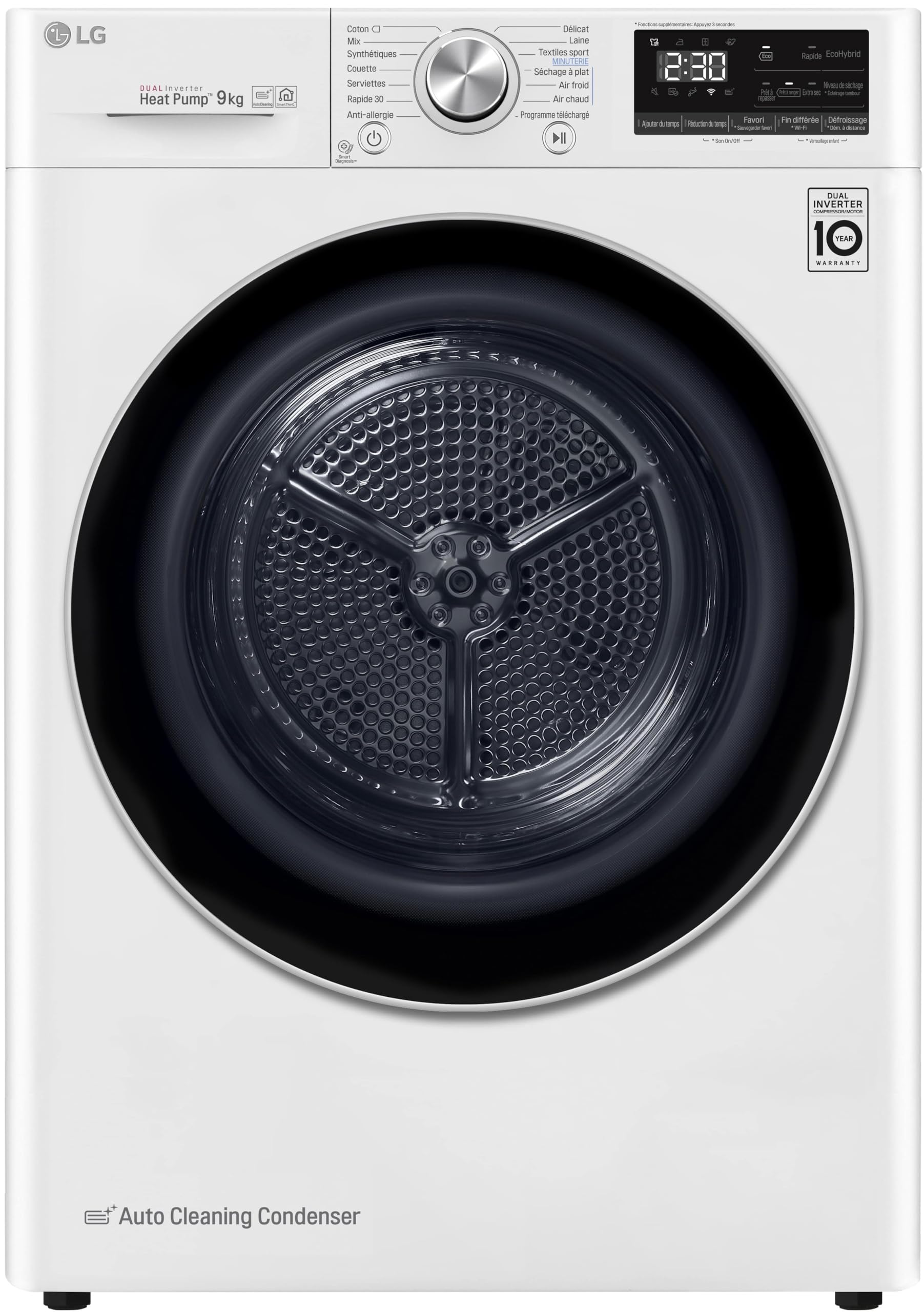
Front view of the LG RH9V71WH 9kg Heat Pump Dryer, showing the control panel, drum, and 'Auto Cleaning Condenser' label.
Key Features:
- 9kg Capacity: Suitable for large laundry loads.
- Heat Pump Technology: Innovative heat management system for energy efficiency and gentle drying.
- Dual Inverter Compressor: Provides quiet operation and extended durability, backed by a 10-year warranty.
- Auto Cleaning Condenser: Automatically cleans the condenser for consistent drying performance and reduced maintenance.
- Smart Diagnosis: Allows for remote troubleshooting via a smartphone application.
- Stainless Steel Drum: Durable 121-liter drum for quiet and effective drying cycles.
- Energy Efficiency Class A+++: High energy rating for reduced electricity consumption.
- Low Noise Level: Operates at 62 dB for a quieter home environment.
2. Safety Instructions
Read all instructions before using the appliance to prevent risks of fire, electric shock, or injury to persons.
General Safety:
- Keep the area around the exhaust opening and adjacent surrounding areas free from the accumulation of lint, dust, and dirt.
- Do not dry articles that have been previously cleaned in, washed in, soaked in, or spotted with gasoline, dry-cleaning solvents, or other flammable or explosive substances.
- Do not allow children to play on or in the appliance. Close supervision of children is necessary when the appliance is used near children.
- Do not reach into the appliance if the drum is moving.
Electrical Safety:
- Ensure the dryer is properly grounded.
- Do not operate the dryer with a damaged power cord or plug.
- Do not use an extension cord or adapter with this appliance.
Installation Safety:
- Install the dryer on a firm, level floor.
- Ensure adequate ventilation around the appliance.
- Do not install or store the appliance where it will be exposed to the weather.
3. Setup
Unpacking:
- Remove all packaging materials, including the base packaging and any protective films.
- Check for any damage during transit. If damaged, do not install and contact your retailer.
Location Requirements:
- Place the dryer on a solid, level surface to prevent vibration and noise.
- Ensure there is sufficient space around the dryer for proper air circulation.
- Avoid direct sunlight or heat sources.
Electrical Connection:
- Connect the dryer to a dedicated, grounded electrical outlet.
- Ensure the voltage and frequency match the specifications listed on the appliance's rating label.
Water Drainage:
This condensation dryer collects water in an integrated tank located in the control panel. After each use, the water tank must be emptied.
- Pull out the water tank gently.
- Empty the collected water into a sink.
- Reinsert the water tank until it clicks into place.
4. Operating Instructions
Control Panel Overview:
The control panel features a program selector dial, an LED display, and various function buttons. The LED display shows the remaining drying time and other cycle information.
Drying Programs:
Turn the program selector dial to choose from the following drying programs:
- Cotton: For cotton items like T-shirts, underwear, and towels.
- Mixed Load: For a combination of cotton and synthetic fabrics.
- Synthetics: For synthetic fabrics such as polyester and nylon.
- Delicates: For delicate items requiring gentle drying.
- Wool: Specific program for wool items.
- Sportswear: For activewear and sportswear.
- Duvet: For large items like duvets and blankets.
- Towels: Optimized for drying towels.
- Quick 30: A rapid drying cycle for small loads.
- Anti-Allergy: Helps reduce allergens in laundry.
- Time Dry: Allows manual setting of drying time.
- Rack Dry: For items that need to be dried flat on a drying rack (requires accessory).
- Cool Air: For refreshing items without heat.
- Warm Air: For gentle warming or airing.
- Downloaded Cycle: Access additional cycles via the LG ThinQ app.
Cycle Options:
Press the corresponding buttons to select additional options:
- Add Time: Increase the drying time.
- Reduce Time: Decrease the drying time.
- Favorite: Save frequently used settings.
- Delay End: Set a delayed end time for the cycle (up to 19 hours).
- Anti-Crease: Reduces wrinkles by periodically tumbling clothes after the cycle ends.
- Remote Start (Wi-Fi): Start or monitor the dryer remotely using the LG ThinQ app.
- Drying Level: Adjust the desired dryness level (e.g., Iron Dry, Cupboard Dry, Extra Dry).
Starting a Cycle:
- Load the dryer with laundry, ensuring not to overload.
- Close the dryer door firmly.
- Turn the program selector dial to choose the desired drying program.
- Select any additional options as needed.
- Press the Start/Pause button to begin the cycle.
- The dryer will automatically stop once the selected dryness level is reached. An end-of-cycle chime will sound.
5. Maintenance
Regular maintenance ensures optimal performance and extends the lifespan of your dryer.
Cleaning the Lint Filter:
Clean the lint filter after every load to maintain drying efficiency and prevent fire hazards.
- Open the dryer door.
- Pull out the lint filter located inside the door opening.
- Remove any accumulated lint by hand or with a soft brush.
- Reinsert the clean lint filter firmly.
Emptying the Water Condensate Tank:
Empty the water tank after each drying cycle.
- Gently pull out the water tank from its compartment on the control panel.
- Pour the collected water into a drain.
- Push the water tank back into its position until it is securely seated.
Auto Cleaning Condenser:
The LG RH9V71WH features an Auto Cleaning Condenser, which automatically flushes lint from the condenser with water collected during the drying cycle. This reduces the need for manual cleaning and helps maintain consistent drying performance. No user intervention is typically required for condenser cleaning.
Cleaning the Exterior:
Wipe the exterior surfaces of the dryer with a soft, damp cloth. Do not use abrasive cleaners or solvents.
6. Troubleshooting
Before contacting customer service, review the following common issues and solutions.
| Problem | Possible Cause | Solution |
|---|---|---|
| Dryer does not start | Power cord unplugged; Door not closed properly; Circuit breaker tripped. | Check power connection; Ensure door is latched; Reset circuit breaker. |
| Clothes not drying properly | Lint filter clogged; Overloaded dryer; Incorrect program selected; Water tank full. | Clean lint filter; Reduce load size; Select appropriate program; Empty water tank. |
| Excessive noise or vibration | Dryer not level; Items caught in drum; Shipping bolts not removed. | Adjust leveling feet; Check drum for foreign objects; Ensure all shipping bolts are removed. |
| Water tank full indicator on | Water tank needs emptying. | Empty the water condensate tank. |
Smart Diagnosis:
The Smart Diagnosis feature allows you to troubleshoot problems with your appliance using a smartphone. If you experience an issue, follow the instructions in the LG ThinQ app or contact LG customer support for guidance on using this feature to identify potential faults remotely.
7. Specifications
| Feature | Specification |
|---|---|
| Model Number | RH9V71WH |
| Brand | LG |
| Type | Heat Pump Dryer |
| Capacity | 9 Kilograms |
| Drum Volume | 121 Liters |
| Drum Material | Stainless Steel |
| Color | White |
| Energy Efficiency Class | A+++ |
| Annual Energy Consumption | 194 kWh/year |
| Noise Level | 62 dB |
| Residual Moisture Class | A |
| Weight | 57 Kilograms |
| First Available Date | February 21, 2020 |
8. Warranty Information
This LG Heat Pump Dryer comes with a comprehensive warranty. Specifically, the Dual Inverter Compressor is covered by a 10-year warranty, reflecting its durability and LG's commitment to quality.
For detailed warranty terms and conditions, including coverage for other components and service procedures, please refer to the warranty card included with your product or visit the official LG website.
9. Customer Support
If you encounter any issues that cannot be resolved using the troubleshooting guide or the Smart Diagnosis feature, please contact LG Customer Support.
- Visit the official LG website for support resources, FAQs, and contact information.
- Have your model number (RH9V71WH) and serial number ready when contacting support.