
1. Introduction
This manual provides instructions for the Club 3D CAC-1120 Mini DisplayPort to DisplayPort 1.4 Bi-Directional Cable. This cable is designed to connect devices with a Mini DisplayPort output to a DisplayPort input, or vice-versa, supporting high-resolution video and audio transmission.
The CAC-1120 cable supports DisplayPort 1.4, HBR3, and DSC 1.2 standards, enabling resolutions up to 8K at 60Hz and 4K at 144Hz. It is compatible with older DisplayPort standards (DP 1.2 and DP 1.1) and features a secure latch-release connector design for stable performance.

Figure 1: The Club 3D CAC-1120 cable, featuring a Mini DisplayPort connector on one end and a DisplayPort connector on the other. This cable facilitates bi-directional signal transmission.
2. Setup Instructions
The Club 3D CAC-1120 cable is designed for plug-and-play functionality, requiring no software installation. Follow these steps to connect your devices:
- Identify Ports: Locate the Mini DisplayPort output on your source device (e.g., laptop, PC) and the DisplayPort input on your display device (e.g., monitor, projector, TV).
- Connect Source: Insert the Mini DisplayPort end of the CAC-1120 cable into the Mini DisplayPort output of your source device.
- Connect Display: Insert the DisplayPort end of the CAC-1120 cable into the DisplayPort input of your display device. Ensure the latch on the DisplayPort connector clicks into place for a secure connection.
- Power On Devices: Power on both your source device and your display device. The display should automatically detect the signal.
- Bi-Directional Use: This cable is bi-directional. You can also connect a DisplayPort source to a Mini DisplayPort display, if both devices support this configuration.

Figure 2: An illustration demonstrating the connection of the CAC-1120 cable from a laptop or PC to a monitor, enabling high-resolution video output.
Note on Latch-Release Connector: The DisplayPort connector features a latching mechanism for a secure connection. To disconnect, press the release button on the connector before pulling it out to prevent damage to the port or cable.
3. Operating the Cable
Once connected, the Club 3D CAC-1120 cable facilitates the transmission of ultra-high-definition audio and video. Key operational features include:
- High Resolution Support: Supports video resolutions up to 8K (7680x4320) at 60Hz and 4K UHD (3840x2160) at 144Hz, utilizing Display Stream Compression (DSC) 1.2.
- High Dynamic Range (HDR): Compatible with HDR content for enhanced contrast and color depth.
- Audio Pass-Through: Transmits uncompressed digital audio, supporting 7.1, 5.1, or 2 channels.
- Bandwidth: Delivers 32.4 Gbps bandwidth for optimal performance with high-resolution displays.
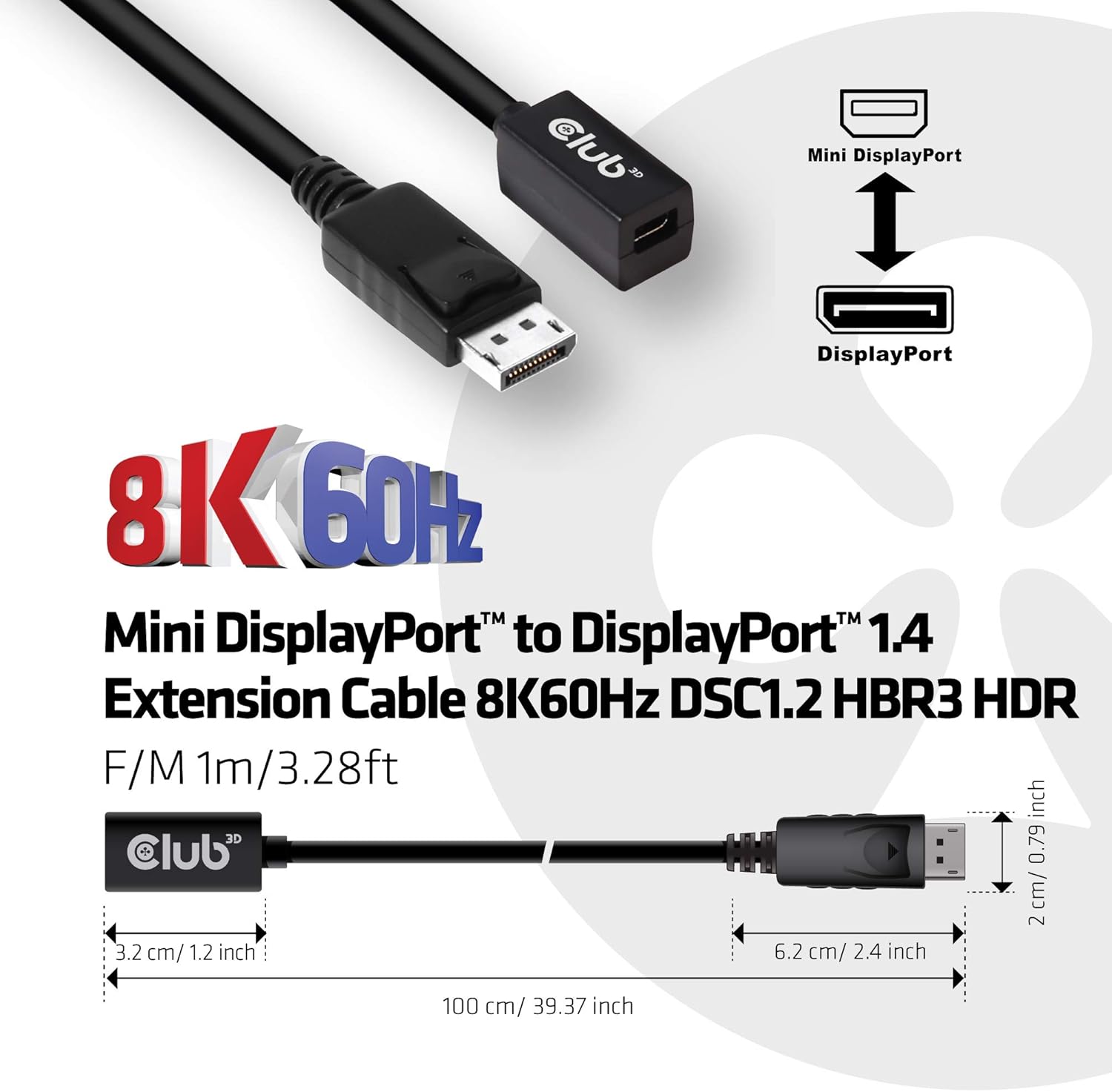
Figure 3: A detailed diagram illustrating the cable's specifications, including its support for 8K 60Hz resolution and physical dimensions.
Product Video: Club 3D DisplayPort Cable
Video Description: This video provides a visual overview of the Club 3D DisplayPort cable, highlighting its universal compatibility, ultra-fast 8K display performance, and professional-grade construction. It demonstrates how the cable connects to various devices and showcases its secure latching mechanism. The video also mentions key features such as 32.4 Gbps bandwidth, support for up to 32 audio channels, and the 2-year warranty.
4. Maintenance
To ensure the longevity and optimal performance of your Club 3D CAC-1120 cable, follow these maintenance guidelines:
- Handle with Care: Avoid bending the cable sharply or placing heavy objects on it, as this can damage the internal wiring.
- Clean Connectors: Periodically inspect the connectors for dust or debris. Use a soft, dry cloth or compressed air to gently clean them if necessary.
- Proper Storage: When not in use, coil the cable loosely and store it in a clean, dry place away from extreme temperatures.
- Disconnect Safely: Always press the release button on the DisplayPort connector before unplugging to prevent damage to the latching mechanism or device port.

Figure 4: An exploded view illustrating the professional-grade internal construction of the CAC-1120 cable, including its PVC jacket, alloy wire braid, tinned copper conductors, Mylar shielding, and filler for durability and signal integrity.
5. Troubleshooting
If you encounter issues with your Club 3D CAC-1120 cable, refer to the following common troubleshooting steps:
- No Signal/Blank Screen:
- Ensure both ends of the cable are securely connected. Press the DisplayPort latch button to ensure it's fully seated.
- Verify that your source device is powered on and outputting a signal.
- Check your display's input settings to ensure the correct DisplayPort input is selected.
- Test the cable with another source or display if available to rule out device-specific issues.
- Flickering/Intermittent Signal:
- Ensure the cable is not excessively bent or kinked.
- Reduce the resolution or refresh rate in your source device's display settings to see if the issue persists.
- Check for electromagnetic interference from other electronic devices.
- No Audio:
- Verify that audio output is enabled on your source device and directed to the DisplayPort.
- Check your display's audio settings and volume levels.
- Ensure your display or connected audio system supports audio pass-through via DisplayPort.
- Resolution/Refresh Rate Not as Expected:
- Confirm that both your source device and display support the desired resolution and refresh rate.
- Update graphics drivers on your source device.
- Ensure the cable is rated for the desired performance (CAC-1120 supports DP 1.4, 8K@60Hz, 4K@144Hz).
6. Specifications
The following table outlines the key technical specifications for the Club 3D CAC-1120 Mini DisplayPort to DisplayPort 1.4 Bi-Directional Cable:
| Feature | Detail |
|---|---|
| Brand | Club 3D |
| Model Number | CAC-1120 |
| Connector Type | Mini DisplayPort (Male) to DisplayPort (Female) |
| Cable Type | DisplayPort 1.4 / HBR3 |
| Bi-Directional | Yes |
| Supported Resolutions | Up to 8K (7680x4320) @ 60Hz, 4K UHD (3840x2160) @ 144Hz with DSC 1.2 |
| Data Transfer Rate | 32.4 Gigabits Per Second (HBR3) |
| Audio Support | Uncompressed digital 7.1, 5.1, or 2 channels |
| Special Features | HDR support, Latch-Release DisplayPort Connector |
| Cable Length | 1 meter (3.28 feet) |
| Item Weight | 42 Grams (1.48 ounces) |
| Dimensions (LxWxH) | 5.71 x 5.71 x 1.77 inches (Product packaging dimensions) |
| Compliance | RoHS compliant |
7. Warranty and Support
Warranty: The Club 3D CAC-1120 cable comes with a 2-year manufacturer's warranty. This warranty covers defects in materials and workmanship under normal use. Please retain your proof of purchase for warranty claims.
Customer Support: For technical assistance, troubleshooting beyond this manual, or warranty inquiries, please contact Club 3D customer support. Visit the official Club 3D website for contact information and additional resources.
For more information, you can visit the Club 3D Store on Amazon.

Figure 5: The Club 3D product packaging, highlighting its commitment to environmental responsibility with a stamp indicating it is printed on environmentally friendly paper.