
Douk Audio DZ078_US
Douk Audio G4 Mono Channel Digital Power Amplifier User Manual
Model: DZ078_US
1. Introduction
The Douk Audio G4 is a versatile mono channel digital power amplifier designed to deliver 100W of output power. It can function as either a full-frequency amplifier or a subwoofer amplifier, making it suitable for various audio setups. Featuring 3.5mm AUX and RCA inputs, it offers broad compatibility with different audio devices. Its compact size and robust aluminum chassis make it an ideal choice for home and desktop audio systems.

Figure 1: Front view of the Douk Audio G4 amplifier.
2. Safety Information
- Do not expose this device to rain or moisture.
- Do not disassemble the unit. Refer all servicing to qualified personnel.
- Ensure proper ventilation around the amplifier to prevent overheating.
- Use only the provided power supply or a compatible one within the specified voltage range (DC 12-24V).
- Avoid placing the amplifier near heat sources or in direct sunlight.
3. Package Contents
Please check the package for the following items:
- 1 x G4 Mono Amplifier
- 1 x 19V Power Supply
- 1 x Instruction Manual

Figure 2: Contents included in the Douk Audio G4 package.
4. Product Overview
4.1 Front Panel

Figure 3: Front panel controls and indicators.
- Power Indicator: Illuminates when the amplifier is powered on.
- Power / Volume Knob: Rotates to adjust the output volume. Press to power the unit on or off.
4.2 Rear Panel

Figure 4: Rear panel connections and switch.
- AUX Input: 3.5mm stereo audio input.
- RCA Input: Stereo RCA audio input.
- B/M Switch: Selects between Subwoofer Mode (B) and Full-Frequency Mode (M).
- Speaker Output: Connects to passive speakers or subwoofers.
- DC 12-24V: Power input jack.
5. Setup
Follow these steps to set up your Douk Audio G4 amplifier:
- Connect Audio Source: Connect your audio source (e.g., DAC, Preamp, Phone, MP3 player, TV, PC) to either the 3.5mm AUX input or the RCA input on the rear panel of the G4 amplifier.
- Connect Speakers/Subwoofer: Connect your passive speakers or subwoofer to the speaker output terminals on the rear panel. Ensure correct polarity (+ to + and - to -). The G4 can drive passive 3-10 inch full-frequency speakers or 4-12 inch subwoofers.
- Select Mode: Use the B/M switch on the rear panel to select the desired mode:
- B (Subwoofer Mode): For connecting to a passive subwoofer (frequency range 20-200Hz).
- M (Full-Frequency Mode): For connecting to passive full-range speakers (frequency range 20-20kHz).
- Connect Power: Plug the provided 19V power supply into the DC 12-24V input jack on the rear panel, then plug the power supply into a wall outlet.
- Power On: Press the Power/Volume knob on the front panel to turn on the amplifier. The power indicator light will illuminate.
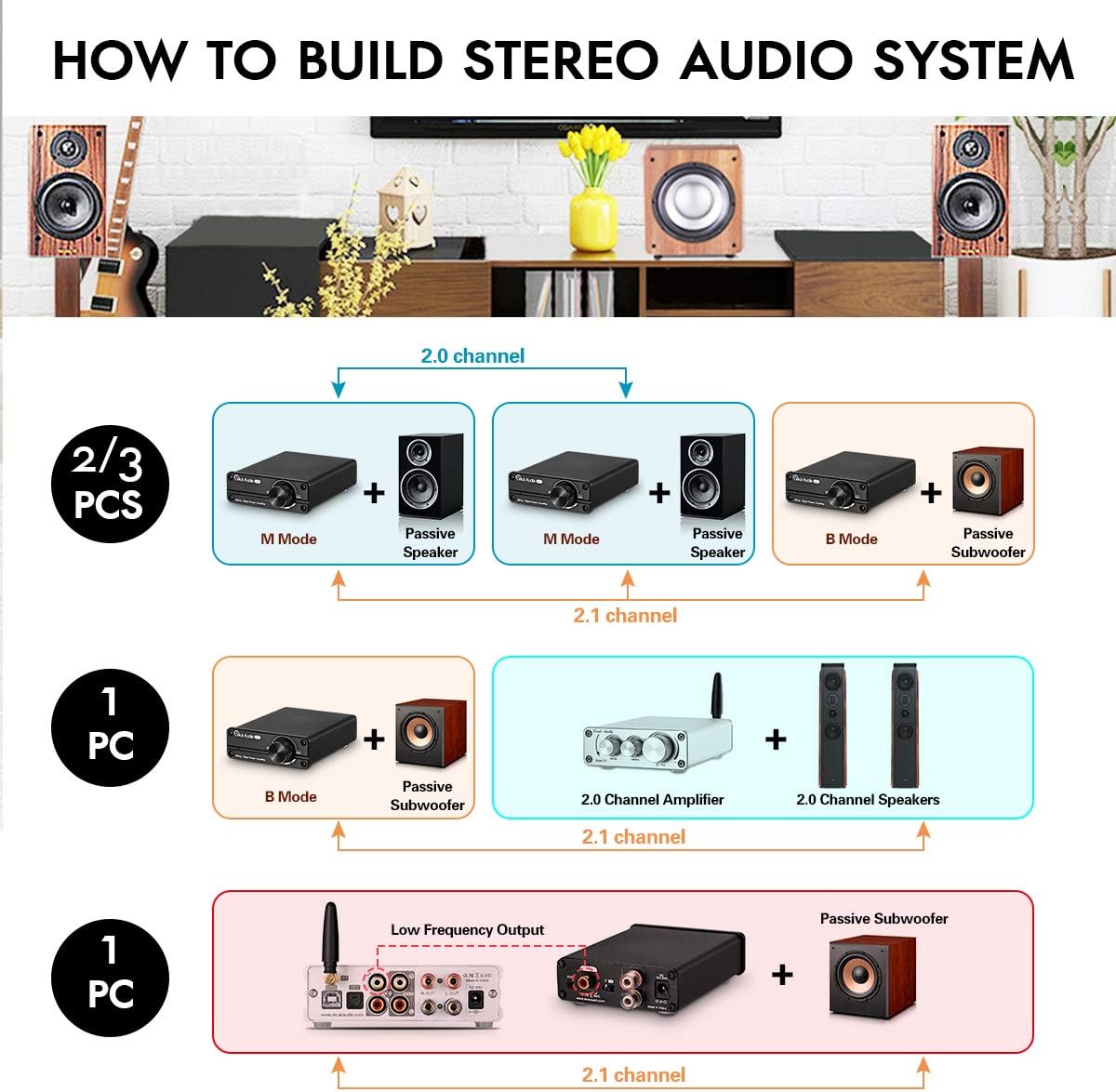
Figure 5: Examples of audio system configurations using the G4 amplifier.
Video 1: Overview of the Douk Audio G4 Subwoofer Amp 100W, demonstrating its features and connections.
6. Operation
Once set up, operating the G4 amplifier is straightforward:
- Volume Control: Rotate the Power/Volume knob clockwise to increase the volume and counter-clockwise to decrease it.
- Power On/Off: Press the Power/Volume knob to toggle the amplifier on or off.
- Mode Selection: Ensure the B/M switch on the rear panel is set correctly for your connected speakers (B for subwoofer, M for full-frequency).
7. Maintenance
To ensure the longevity and optimal performance of your Douk Audio G4 amplifier, follow these maintenance guidelines:
- Cleaning: Use a soft, dry cloth to clean the exterior of the amplifier. Do not use liquid cleaners or aerosols.
- Ventilation: Keep the ventilation openings clear of dust and obstructions.
- Storage: If storing the unit for an extended period, disconnect it from power and store it in a cool, dry place.
8. Troubleshooting
| Problem | Possible Cause | Solution |
|---|---|---|
| No sound output | Power not connected; incorrect input selected; volume too low; speaker wires loose; incorrect B/M switch setting. | Check power connection; ensure audio source is playing; increase volume; re-check speaker wire connections; verify B/M switch is in the correct position for your speakers. |
| Distorted sound | Volume too high; input signal too strong; speaker impedance mismatch. | Reduce volume; lower the output level from the audio source; ensure speakers are within the recommended impedance range. |
| Humming/Noise | Ground loop; interference from other electronics; faulty cables. | Try a different power outlet; move amplifier away from other electronic devices; replace audio cables. |
| Power indicator off | No power; unit off. | Check power supply connection to amplifier and wall outlet; press Power/Volume knob to turn on. |
9. Specifications
| Feature | Specification |
|---|---|
| Model | G4 (DZ078_US) |
| Output Power | 100 Watts |
| Number of Channels | 1 (Mono) |
| Op-Amp Chip | 2 x NE5532 |
| Power Amplifier Chip | TI TPA3116 |
| Input Interface | 3.5mm AUX, RCA |
| Output Interface | Speaker Output Terminals |
| Working Voltage | DC 12V-24V |
| Material | Aluminum |
| Dimensions (L x W x H) | 105mm x 85mm x 30mm (approx. 4.13 x 3.35 x 1.18 inches) |
| Item Weight | 8.5 ounces (240g) |
10. Warranty and Support
Douk Audio products are designed for reliability and performance. For warranty information and technical support, please refer to the contact details provided in your product packaging or visit the official Douk Audio website. Keep your purchase receipt as proof of purchase for warranty claims.
Related documentsDZ078_US


Ask a question about this manual
Ask about setup, troubleshooting, compatibility, parts, safety, or missing instructions. Manuals+ will review the question and use this page’s manual context to help answer it.