1. Introduction
This manual provides detailed instructions for the setup, operation, and maintenance of your Ceihoit Mini HD DVD Player. Please read this manual thoroughly before using the device to ensure proper functionality and longevity.

Image 1.1: The Ceihoit Mini HD DVD Player with included accessories and a connected television displaying content.
2. Package Contents
Verify that all items are present in the package:
- Ceihoit Mini HD DVD Player (Model DVP-507)
- Remote Control (AAA batteries not included)
- HDMI Cable
- RCA Cable (AV Cable)
- Power Adapter
- User Manual

Image 2.1: The DVD player positioned on a media stand, highlighting the included HDMI and RCA cables for connectivity.
3. Setup Instructions
3.1 Connecting to a Display Device
The DVD player supports both HDMI and RCA (AV) connections for video and audio output.
3.1.1 HDMI Connection (Recommended for HD)
- Connect one end of the HDMI cable to the HDMI OUT port on the DVD player.
- Connect the other end of the HDMI cable to an available HDMI IN port on your TV or projector.
- Select the corresponding HDMI input on your TV/projector using its remote control.
3.1.2 RCA (AV) Connection
- Connect the yellow plug of the RCA cable to the VIDEO OUT (yellow) port on the DVD player.
- Connect the white plug to the AUDIO L (white) port on the DVD player.
- Connect the red plug to the AUDIO R (red) port on the DVD player.
- Connect the other ends of the RCA cable to the corresponding VIDEO IN and AUDIO IN ports on your TV.
- Select the corresponding AV input on your TV using its remote control.
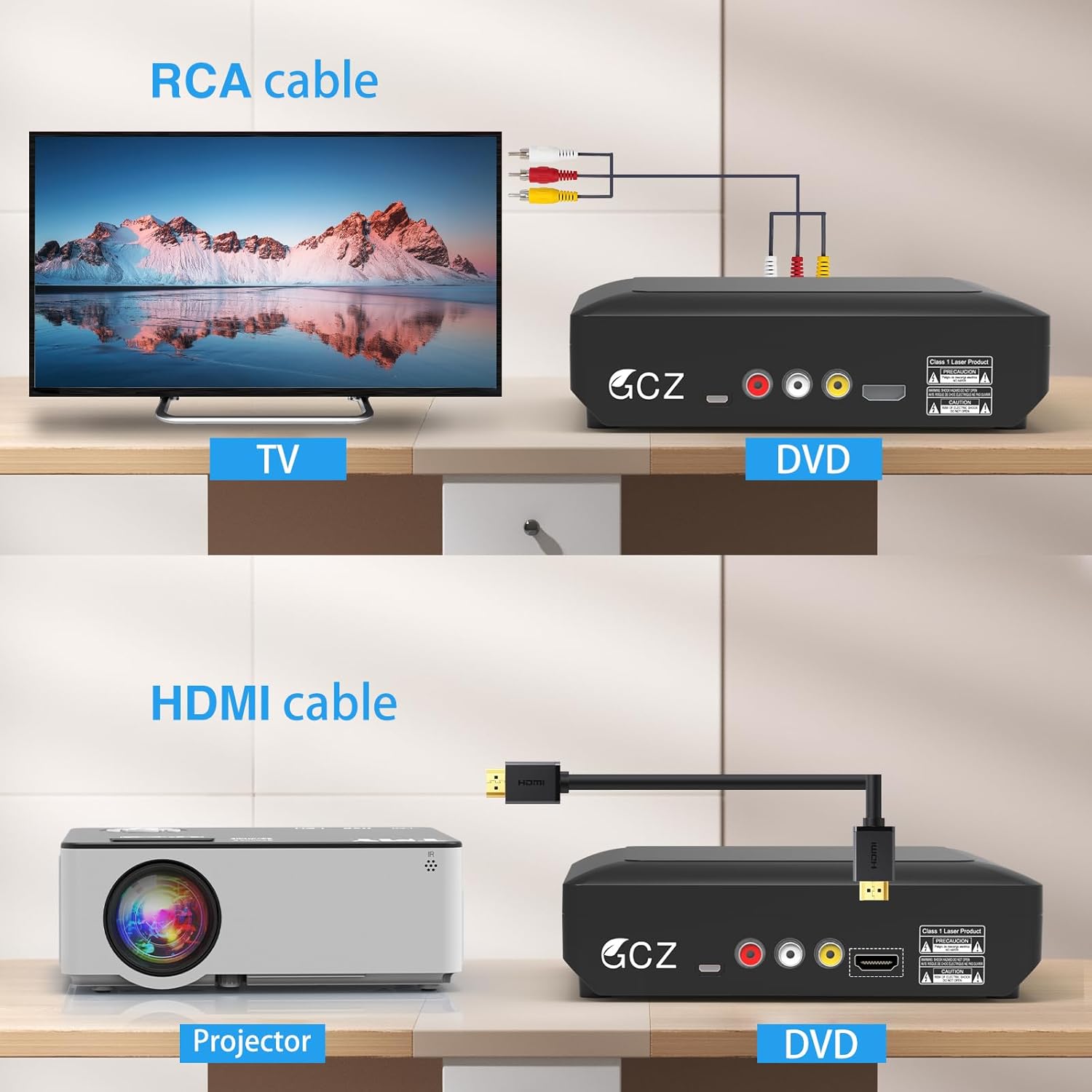
Image 3.1: Visual guide for connecting the DVD player to a television via RCA cables and to a projector via an HDMI cable.
3.2 Power Connection
- Connect the power adapter to the DC IN port on the DVD player.
- Plug the power adapter into a standard electrical outlet.
3.3 Remote Control Setup
Insert two AAA batteries (not included) into the remote control, observing the correct polarity.
4. Operating Instructions
4.1 Powering On/Off
Press the Power button on the front panel of the player or on the remote control to turn the unit on or off.
4.2 Disc Playback
The Ceihoit Mini HD DVD Player supports a wide range of disc formats, including DVDs from all regions (1/2/3/4/5/6, excluding CPRM), DVD+R, DVD+RW, DVD-R, DVD-RW, VCD, CD, and HDCD. It also plays MP3/WMA/JPEG files on CD-R/RW discs. Blu-ray Discs are not supported.
- Gently insert a disc into the disc tray with the label side facing up.
- The player will automatically load the disc and begin playback. If a menu appears, use the remote control to navigate.
- Use the Play, Pause, Stop, Fast Forward, Rewind, and Skip buttons on the remote control to manage playback.

Image 4.1: Overview of the various media formats supported by the DVD player, including music, image, disc, and video formats.
4.3 USB Playback
The player features a USB 2.0 port for playing digital media files directly from a USB flash drive. It supports USB sticks up to 16GB.
- Supported Video Formats: AVI, MPG, MPEG4, VOB (up to 720*480/576 resolution). MP4 files are not supported via USB.
- Supported Audio Formats: MP3, WMA, OGG.
- Supported Image Formats: JPG, JPEG.
- Insert a USB flash drive into the USB port on the front of the player.
- The player will detect the USB drive and display a menu.
- Use the remote control to navigate through folders and select the desired file for playback.

Image 4.2: A user inserting a USB flash drive into the front USB port of the DVD player, demonstrating USB input support.
4.4 Breakpoint Memory Function
The player features a breakpoint memory function, which allows it to resume playback from where it was last stopped, even after the unit has been powered off.
5. Maintenance
5.1 Cleaning the Player
- Wipe the exterior of the player with a soft, dry cloth. Do not use liquid cleaners or abrasive materials.
- Keep the disc tray free of dust and debris.
5.2 Disc Care
- Handle discs by their edges to avoid fingerprints and scratches.
- Store discs in their cases when not in use.
- Clean discs with a soft, lint-free cloth, wiping from the center outwards.
5.3 General Handling
- Place the player on a stable, level surface with adequate ventilation.
- Avoid exposing the player to direct sunlight, high temperatures, humidity, or excessive dust.
- Do not block ventilation openings.
6. Troubleshooting
If you encounter issues with your DVD player, refer to the following common problems and solutions:
| Problem | Possible Cause | Solution |
|---|---|---|
| No power | Power cable not connected; Power outlet not active | Ensure power cable is securely connected; Try a different outlet |
| No picture | Incorrect input selected on TV; Loose video cable connection | Select correct HDMI/AV input on TV; Check HDMI/RCA cable connections |
| No sound | Loose audio cable connection; TV volume muted/low | Check HDMI/RCA audio cable connections; Adjust TV volume |
| Disc not playing | Disc is dirty or scratched; Unsupported disc format; Disc inserted incorrectly | Clean disc; Ensure disc is supported (not Blu-ray); Insert disc label-side up |
| USB drive not recognized | USB drive capacity too large; Unsupported file system; USB 3.0 drive | Use USB drive up to 16GB; Ensure FAT32 format; Use USB 2.0 drive |
| Remote control not working | Batteries depleted or incorrectly inserted; Obstruction between remote and player | Replace batteries (AAA); Ensure clear line of sight to player's IR sensor |
7. Specifications
| Feature | Detail |
|---|---|
| Brand | Ceihoit |
| Model Name | DVP-507 |
| Item Model Number | ogrecxc-003 |
| Product Dimensions | 7.28 x 5.98 x 1.69 inches |
| Item Weight | 1.85 pounds (0.84 Kilograms) |
| Media Type Supported | CD, DVD, SVCD, VCD, DVD+R, DVD+RW, DVD-R, DVD-RW, HDCD, MP3/WMA/JPEG on CD-R/RW discs (Does not support Blu-ray Discs) |
| Special Features | Anti-Shock, Region Free (1/2/3/4/5/6, except CPRM), Breakpoint Memory |
| Resolution | 1920x1080 (1080p up-conversion) |
| Connector Type | HDMI, RCA |
| Connectivity Technology | HDMI |
| Audio Output Mode | Stereo |
| USB Port | USB 2.0 (Supports up to 16GB USB sticks; Video files 720*480/576 AVI/MPG/MPEG4/VOB; Does not support USB 3.0 or MP4 via USB) |
| Video Signal System | AUTO/NTSC/PAL |
8. Warranty and Support
8.1 Warranty Information
This Ceihoit DVD Player typically comes with a 1-year limited warranty from the date of purchase. Please retain your proof of purchase for warranty claims. The warranty covers manufacturing defects but does not cover damage caused by misuse, accidents, or unauthorized modifications.
8.2 Customer Support
For technical assistance, troubleshooting beyond this manual, or warranty inquiries, please contact Ceihoit customer support:
- Email: ceihoit@126.com
Please provide your model number (DVP-507 or ogrecxc-003) and a detailed description of the issue when contacting support.


