
1. Introduction
This manual provides essential information for the safe and effective operation, maintenance, and troubleshooting of your VONROC Radial Miter Saw MS502AC. Please read these instructions carefully before using the tool and keep them for future reference. This radial miter saw is designed for precise cutting of wood and wood-like materials.
2. Safety Instructions
Always observe basic safety precautions to reduce the risk of fire, electric shock, and personal injury. Familiarize yourself with all controls and proper use of the tool.
- Personal Safety: Always wear appropriate personal protective equipment (PPE) including safety glasses, hearing protection, and a dust mask. Do not wear loose clothing or jewelry that could get caught in moving parts.
- Work Area Safety: Keep your work area clean and well-lit. Cluttered or dark areas invite accidents. Do not operate power tools in explosive atmospheres, such as in the presence of flammable liquids, gases, or dust.
- Electrical Safety: Ensure the power supply matches the specifications on the tool's rating plate. Avoid body contact with earthed or grounded surfaces. Do not expose power tools to rain or wet conditions.
- Tool Use and Care: Do not force the tool. Use the correct tool for your application. Disconnect the plug from the power source before making any adjustments, changing accessories, or storing power tools.
- Blade Safety: Ensure the blade is sharp and correctly installed. Never attempt to remove jammed material while the blade is moving. Always use the blade guard.
3. Product Overview and Components
The VONROC MS502AC Radial Miter Saw features a powerful motor, a 254mm blade, integrated laser guide, LED work light, and adjustable table extensions for versatile cutting operations.

Figure 3.1: Overview of the VONROC Radial Miter Saw MS502AC. This image displays the complete saw with its main components, including the motor housing, blade guard, handle, base, and table extensions.
- Motor Housing: Contains the 2000W motor.
- Blade Guard: Retractable guard for safety during operation.
- Handle: Ergonomic grip for control.
- Base and Turntable: Provides stability and allows for miter angle adjustments.
- Table Extensions: Extendable supports for longer workpieces.
- Laser Guide: Projects a line onto the workpiece for precise cutting.
- LED Work Light: Illuminates the cutting area.
- Dust Collection Bag: Attaches to the dust port for debris collection.
- Workpiece Clamp: Secures the material during cutting.
4. Setup
Proper setup ensures safe and accurate operation of your miter saw.
4.1 Unpacking and Assembly
- Carefully remove all components from the packaging.
- Inspect the saw for any damage that may have occurred during transit. Do not operate a damaged tool.
- Mount the saw securely to a stable workbench using appropriate fasteners.
- Attach the dust collection bag to the dust port.
4.2 Installing the Saw Blade
The saw comes with a pre-mounted 254mm blade. If a blade change is necessary, follow these steps:
- Disconnect the saw from the power supply.
- Engage the spindle lock to prevent the blade from rotating.
- Use the provided wrench to loosen the blade retaining bolt.
- Carefully remove the old blade, noting its rotation direction.
- Install the new 254mm blade (60 teeth recommended for fine cuts) ensuring the teeth point in the correct direction for cutting.
- Tighten the blade retaining bolt securely and release the spindle lock.
4.3 Adjusting Table Extensions
The adjustable table extensions provide support for longer workpieces.
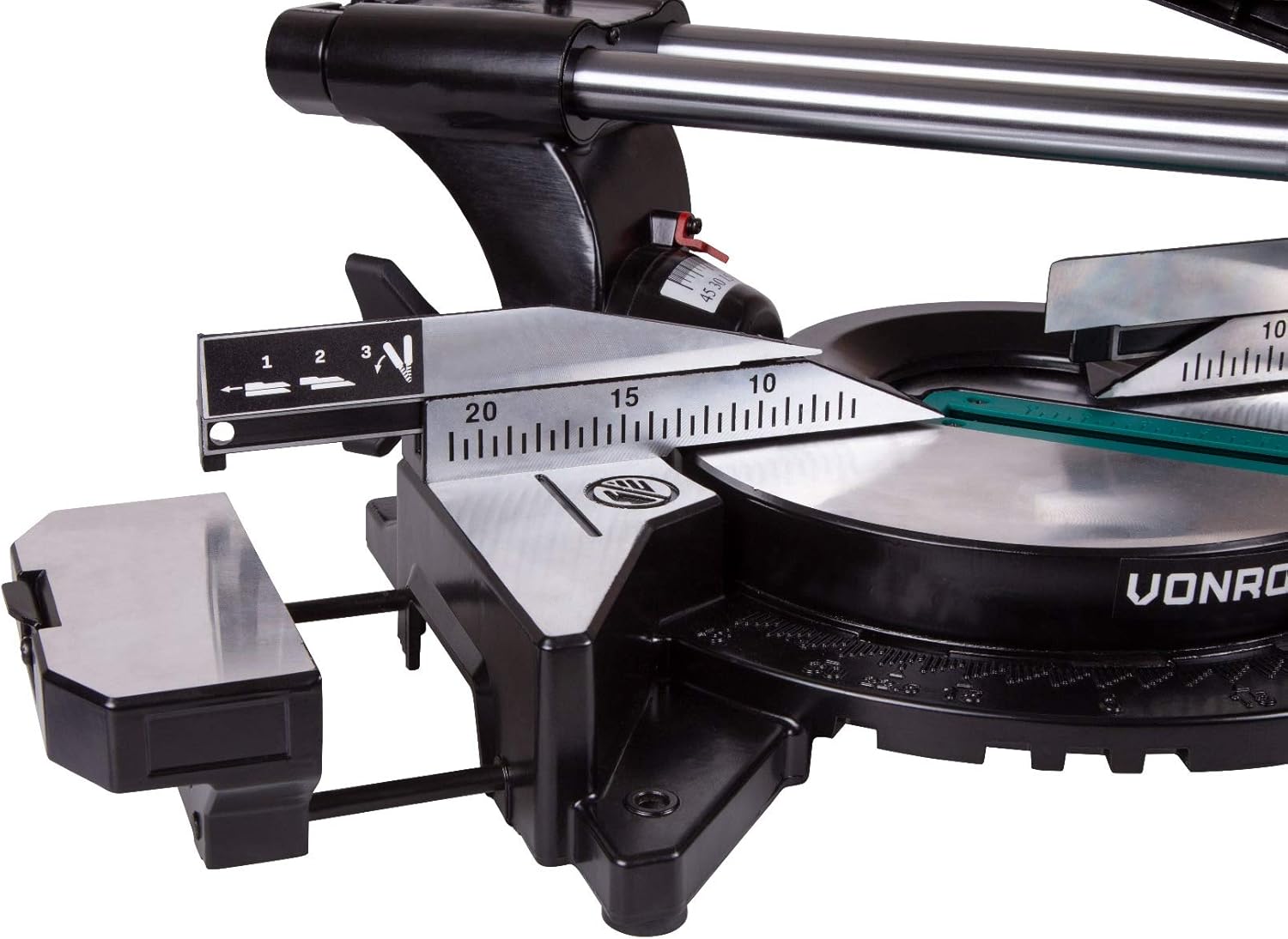
Figure 4.1: Detail of the adjustable table extension. This image shows the extendable support arms that can be pulled out to support longer workpieces, enhancing stability and safety during cuts.
- Loosen the locking knobs for the table extensions.
- Pull out the extensions to the desired length to support your workpiece.
- Tighten the locking knobs to secure the extensions in place.
5. Operating Instructions
This section details how to operate your VONROC Radial Miter Saw for various cutting tasks.
5.1 Basic Operation

Figure 5.1: User operating the VONROC Radial Miter Saw. This image illustrates the saw in action, with a user carefully guiding the blade through a wooden workpiece, demonstrating a typical cutting scenario.
- Place the workpiece firmly against the fence and secure it with the workpiece clamp.
- Ensure the blade guard is functioning correctly.
- Switch on the laser guide and LED light for improved visibility and cut line indication.
- Start the saw using the power switch. The soft start electronics will ensure a smooth power-up.
- Slowly lower the saw head into the workpiece, allowing the blade to reach full speed before making contact.
- Push the saw head through the workpiece at a controlled, steady rate.
- Once the cut is complete, release the power switch and allow the blade to stop completely before raising the saw head.
5.2 Miter Cuts
Miter cuts are angled cuts across the face of the workpiece.

Figure 5.2: Miter angle adjustment on the saw. This image shows the saw's turntable being rotated to set a miter angle, with an arrow indicating the range of motion from -45° to +45°.
- Loosen the miter lock handle.
- Rotate the turntable to the desired miter angle (e.g., 0°, 15°, 22.5°, 30°, 45°).
- Lock the turntable securely in place.
- Proceed with the cut as described in Basic Operation.
5.3 Bevel Cuts
Bevel cuts are angled cuts through the thickness of the workpiece.

Figure 5.3: Bevel angle adjustment on the saw. This image illustrates the saw head tilting to set a bevel angle, with an arrow indicating the 0° to 45° range of motion.
- Loosen the bevel lock knob.
- Tilt the saw head to the desired bevel angle (up to 45°).
- Lock the saw head securely in place.
- Proceed with the cut as described in Basic Operation.
5.4 Compound Cuts
Compound cuts involve both a miter and a bevel angle simultaneously.
- Set the desired miter angle as described in Section 5.2.
- Set the desired bevel angle as described in Section 5.3.
- Ensure both angles are securely locked.
- Proceed with the cut as described in Basic Operation.
5.5 Using the Laser Guide and LED Light

Figure 5.4: Close-up of the laser guide and LED work light. This image highlights the integrated laser projecting a red line for cut guidance and the LED light illuminating the cutting area for enhanced precision and visibility.
The integrated laser projects a clear line onto your workpiece, indicating the exact cutting path. The LED light illuminates the work area, which is particularly useful in dimly lit environments. Activate these features using their respective switches before starting a cut.
6. Maintenance
Regular maintenance ensures the longevity and optimal performance of your miter saw.
- Cleaning: After each use, disconnect the saw from power and clean off dust and debris using a brush or compressed air. Pay special attention to the blade guard, motor vents, and sliding mechanisms.
- Blade Inspection: Regularly inspect the saw blade for sharpness, damage, or missing teeth. Replace dull or damaged blades immediately.
- Lubrication: Periodically lubricate the sliding guide arms and pivot points with a suitable lubricant to ensure smooth operation.
- Dust Bag: Empty the dust collection bag regularly to maintain effective dust extraction.
7. Troubleshooting
This section addresses common issues you might encounter with your miter saw.
| Problem | Possible Cause | Solution |
|---|---|---|
| Saw does not start | No power supply; Faulty switch; Overload protection activated | Check power connection; Contact service center; Allow motor to cool down |
| Blade not cutting smoothly or burning wood | Dull or damaged blade; Incorrect blade for material; Feed rate too fast | Replace blade; Use appropriate blade; Reduce feed rate |
| Inaccurate cuts | Loose fence or miter/bevel settings; Blade wobble; Workpiece not secured | Tighten all adjustments; Check blade installation; Secure workpiece firmly |
| Excessive vibration | Loose blade; Damaged blade; Unstable mounting | Check blade tightness; Replace blade; Secure saw to workbench |
| Laser guide not visible | Laser switch off; Batteries depleted (if applicable); Excessive ambient light | Turn on laser; Replace batteries; Work in a less brightly lit area |
8. Specifications
Technical data for the VONROC Radial Miter Saw MS502AC.
| Feature | Specification |
|---|---|
| Model | MS502AC |
| Power Input | 2000W |
| Voltage | 230V |
| No-load Speed | 4500 rpm |
| Blade Diameter | 254 mm |
| Max. Cutting Width (90°) | 340 mm |
| Max. Cutting Depth (90°) | 90 mm |
| Miter Angles | 0°, 15°, 22.5°, 30°, 45° (left/right) |
| Bevel Angles | 0° to 45° (left) |
| Dimensions (L x W x H) | 82 x 48 x 41 cm |
| Weight | 14.3 kg |
| Special Features | Soft Start, Laser Guide, LED Work Light, Depth Adjustment |
| Certification | CE |
9. Warranty and Support
VONROC products are designed and manufactured to high-quality standards. For warranty information, please refer to the documentation provided with your purchase or visit the official VONROC website. For technical support, spare parts, or service inquiries, please contact VONROC customer service through their official channels.
Always ensure to use genuine VONROC spare parts and accessories to maintain product performance and warranty validity.