
Beko SIM3122T
Beko SIM 3122 T Steam Iron User Manual
Model: SIM3122T | Brand: Beko
Introduction
This manual provides detailed instructions for the Beko SIM 3122 T Steam Iron. It covers technical specifications, setup, operation, maintenance, and troubleshooting to ensure optimal performance and longevity of your appliance. Please read this manual carefully before first use and keep it for future reference.
Product Overview

Figure 1: Front view of the Beko SIM 3122 T Steam Iron, showcasing its turquoise and white design, water tank, and control panel.

Figure 2: Side view highlighting the temperature dial and steam buttons for easy access and control during ironing.

Figure 3: Underside view of the iron, showing the ceramic soleplate with evenly distributed steam vents for smooth gliding and effective steam delivery.
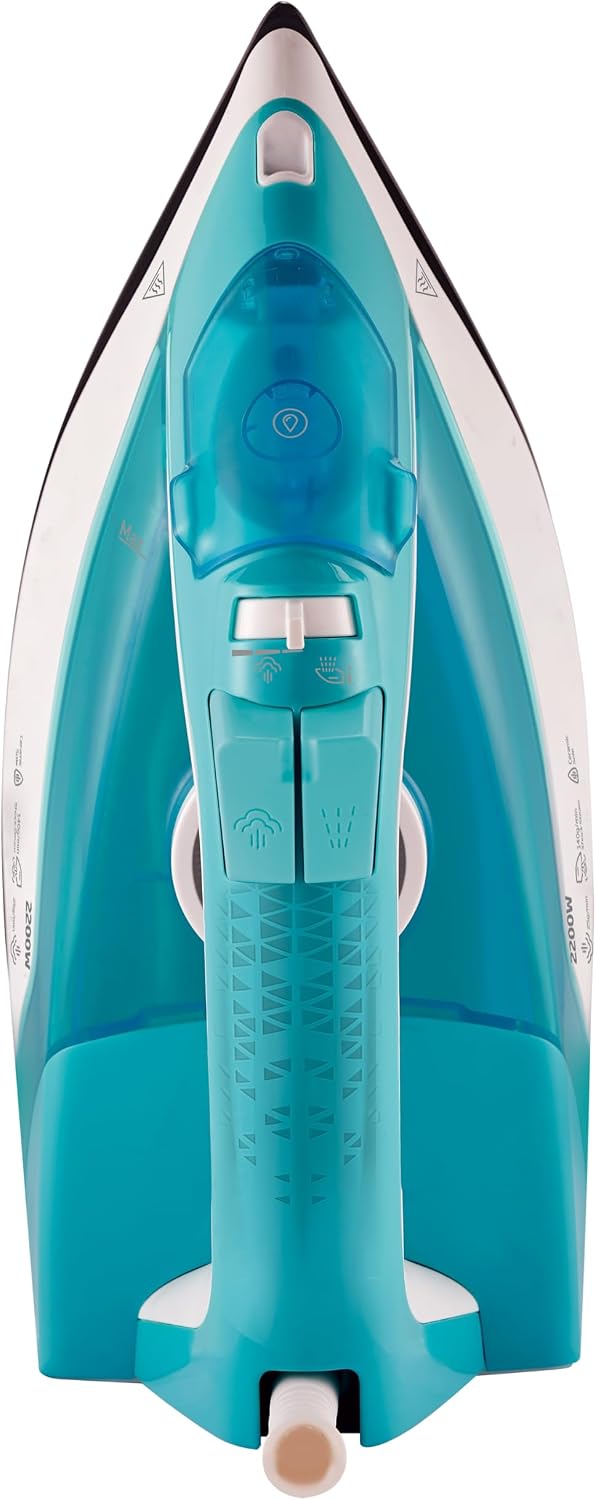
Figure 4: Top-down view of the iron, illustrating the ergonomic handle and the layout of the steam and spray buttons.
Safety Instructions
Always follow basic safety precautions when using electrical appliances to reduce the risk of fire, electric shock, and injury to persons.
- Do not immerse the iron, cord, or plug in water or other liquids.
- Always turn the iron off and unplug it from the outlet when filling with water, emptying, or when not in use.
- Do not operate the iron with a damaged cord or plug, or if the iron has been dropped or damaged.
- Keep the iron and its cord out of reach of children.
- Use the iron only for its intended household use.
- Never leave the iron unattended while it is connected to the power supply.
Setup
Before First Use
- Remove all packaging materials and labels from the iron.
- Wipe the soleplate with a soft, damp cloth to remove any residue.
- It is normal for a slight odor or smoke to occur during the first few uses as manufacturing residues burn off. This will disappear after a short time.
Filling the Water Tank
- Ensure the iron is unplugged from the power outlet.
- Open the water tank inlet cover.
- Fill the water tank with clean tap water up to the 'MAX' indicator line (Capacity: 240 ml). Do not overfill.
- Close the water tank inlet cover securely.
- For areas with hard water, it is recommended to use a mixture of 50% tap water and 50% distilled water. Do not use perfumed water, water from tumble dryers, or chemically descaled water.
Operating Instructions
Temperature Setting
- Plug the iron into a suitable power outlet (220-240V / 50-60Hz).
- Turn the temperature dial to the desired setting according to the fabric type. Refer to the garment's care label.
- The indicator light will illuminate, indicating the iron is heating up. It will turn off when the set temperature is reached.
Steam Ironing
- Ensure the water tank is filled.
- Set the temperature dial to the steam zone (usually marked with a steam symbol or 'MAX'). Steam is only generated at higher temperatures.
- Continuous Steam: Adjust the steam control slider to the desired steam level. The iron will continuously emit steam. (Up to 25 g/min)
- Shot of Steam: Press the 'Shot of Steam' button for an extra burst of steam to remove stubborn creases. (Up to 110 g/min)
Dry Ironing
- Ensure the water tank is empty or the steam control slider is set to '0' (no steam).
- Set the temperature dial to the desired setting.
- Proceed with ironing as usual.
Vertical Steam Ironing
- Hold the iron in a vertical position, close to the garment (e.g., hanging curtains, clothes on a hanger).
- Press the 'Shot of Steam' button repeatedly to release bursts of steam.
- This function is ideal for refreshing garments and removing wrinkles from delicate fabrics that cannot be ironed horizontally.
Anti-Drip System
The anti-drip system prevents water from leaking from the soleplate when the iron's temperature is too low for steam production. This helps to avoid water stains on your garments.
Automatic Shut-off
For enhanced safety, the iron features an automatic shut-off function. If left stationary in a horizontal position for approximately 30 seconds, or in a vertical position for approximately 8 minutes, the heating element will automatically turn off. The indicator light will flash to signal this. To restart heating, simply move the iron.
Maintenance
Cleaning the Soleplate
- Allow the iron to cool completely.
- Wipe the soleplate with a damp cloth and a non-abrasive cleaner if necessary.
- Do not use abrasive pads, scouring powders, or harsh chemicals as they can damage the ceramic coating.
Anti-Calc Function
The integrated anti-calc system helps to prevent the build-up of limescale inside the iron, prolonging its lifespan and maintaining steam performance. This system works automatically and does not require manual intervention for its primary function.
Self-Clean Function
To remove loose scale particles and impurities from the steam chamber:
- Fill the water tank to the MAX level.
- Set the temperature dial to MAX and plug in the iron.
- Once the indicator light turns off, unplug the iron.
- Hold the iron horizontally over a sink.
- Press and hold the 'Self-Clean' button (if available, otherwise use the steam burst button repeatedly while shaking gently) until all the water has emptied from the tank, carrying out impurities.
- Plug the iron back in and let it heat up to dry the soleplate. Unplug and store once cool.
- Perform this function every 2-4 weeks depending on water hardness.
Storage
- Always empty the water tank after each use to prevent limescale build-up and leakage.
- Allow the iron to cool completely before storing.
- Store the iron upright on its heel rest to protect the soleplate.
Troubleshooting
| Problem | Possible Cause | Solution |
|---|---|---|
| Iron does not heat up. | Not plugged in; power outage; automatic shut-off activated. | Check power connection; check circuit breaker; move the iron to reactivate. |
| No steam or insufficient steam. | Water tank empty; temperature too low; steam control set to '0'; calc build-up. | Fill water tank; set temperature to steam zone; adjust steam control; perform Self-Clean. |
| Water leaking from soleplate. | Temperature too low for steam; water tank overfilled; anti-drip system malfunction. | Increase temperature; do not overfill; if problem persists, contact support. |
| White flakes coming from soleplate. | Limescale build-up. | Perform Self-Clean function. Use distilled water or a mix in hard water areas. |
| Iron sticks to fabric. | Soleplate dirty; temperature too high for fabric. | Clean soleplate; adjust temperature according to fabric care label. |
Specifications
| Feature | Specification |
|---|---|
| Model Number | SIM3122T |
| Power | 2200 Watts |
| Voltage | 220 - 240 Volts |
| Frequency | 50 - 60 Hz |
| Continuous Steam Output | Up to 25 g/min |
| Shot of Steam Output | Up to 110 g/min |
| Water Tank Capacity | 240 Milliliters |
| Soleplate Material | Ceramic |
| Dimensions (L x W x H) | 14.3 x 12.7 x 28.6 cm |
| Weight | 1 Kilogram |
| Special Features | Automatic Shut-off, Anti-Drip, Anti-Calc, Self-Clean |
Warranty and Support
This Beko product is designed for reliable performance. For information regarding warranty coverage, please refer to the warranty card included with your purchase or visit the official Beko website for your region.
For technical support, troubleshooting assistance beyond this manual, or to inquire about spare parts, please contact Beko customer service. Contact details can typically be found on the Beko official website or on your product's packaging.
Return Policy: The standard return policy for this product is 30 days for refund or replacement, as per the seller's terms.
Related Documents - SIM3122T
 |
Beko Steam Iron User Manual (SIM 3122 T, SIM 3124 D, SIM 3126 R) Comprehensive user manual for Beko Steam Iron models SIM 3122 T, SIM 3124 D, and SIM 3126 R. Includes safety instructions, operation guides, cleaning, and maintenance tips. |
 |
Beko Steam Iron SIM3122T User Manual Comprehensive user manual for Beko Steam Iron models SIM3122T, SIM3124 D, and SIM3126 R. Includes operating instructions, safety warnings, maintenance tips, and troubleshooting guidance. |
 |
Beko SPA 9130 B Steam Iron User Manual - Guide and Safety Instructions Comprehensive user manual for the Beko SPA 9130 B Steam Iron. Includes operating instructions, safety precautions, cleaning guides, troubleshooting, and guarantee information. |
 |
Beko Steam Iron SIM 8130 Series User Manual Comprehensive user manual for the Beko Steam Iron SIM 8130 P, SIM 8130 R, and SIM 8130 V models. Provides instructions on operation, safety, maintenance, and troubleshooting. |
 |
Beko Steam Iron SIM 3024 B User Manual This document provides instructions for the Beko Steam Iron SIM 3024 B, covering its operation, safety precautions, and maintenance. It includes information in Lithuanian, Latvian, and Estonian. |
 |
Beko SPA7131P Steam Iron User Manual Comprehensive user manual for the Beko SPA7131P Steam Iron, covering safety instructions, operation, cleaning, maintenance, and troubleshooting. |
Ask a question about this manual
Ask about setup, troubleshooting, compatibility, parts, safety, or missing instructions. Manuals+ will review the question and use this page’s manual context to help answer it.