1. Introduction
This manual provides detailed instructions for the DollaTek ZK-DP2 15W USB Step Up/Down Power Module. This adjustable constant voltage and constant current (CVCC) converter features an LCD digital tube display, supporting both step-up and step-down voltage conversion. It is designed for various applications requiring adjustable power output from a USB or DC input.
2. Product Overview
The DollaTek ZK-DP2 module is a compact and versatile power solution. It includes an LCD display for real-time monitoring of output voltage, current, and power. The module features two potentiometers for adjusting output voltage and current, and two buttons for control and display functions.

Figure 1: DollaTek ZK-DP2 Power Module with key dimensions. The module measures approximately 72mm in length, 35mm in width, and 15mm in height, with an 8mm handle extension.
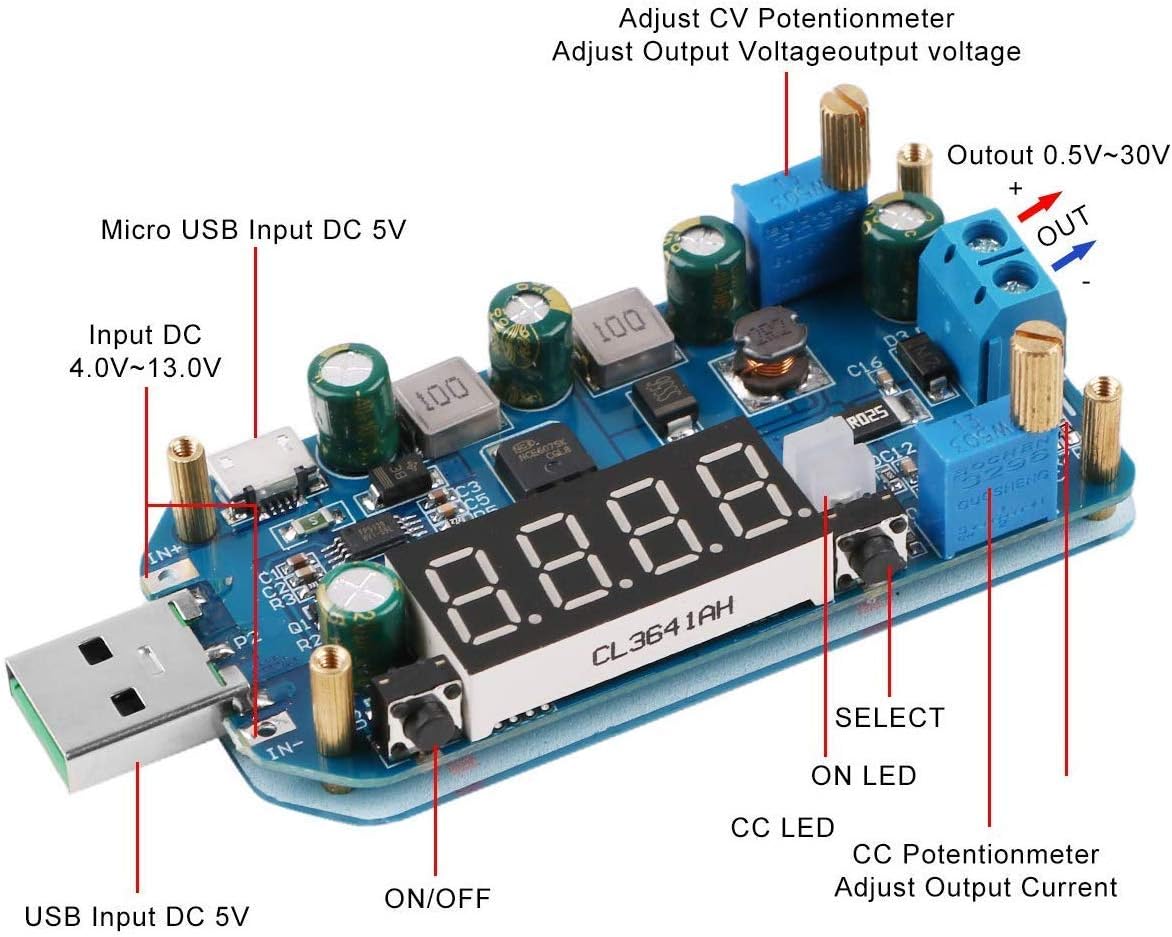
Figure 2: Detailed view of the DollaTek ZK-DP2 module showing input/output terminals, potentiometers, and buttons. Key components include USB Input DC 5V, Input DC 4.0V-13.0V, Micro USB Input DC 5V, ON/OFF button, SELECT button, ON LED, CC LED, CC Potentiometer (Adjust Output Current), CV Potentiometer (Adjust Output Voltage), and Output terminals (Out 0.5V-30V).
2.1 Controls and Indicators
- Left Button (ON/OFF):
- Short press: Toggles output ON/OFF. In calibration mode, it acts as a 'minus' adjustment.
- Long press: Sets the power-on default output state (ON/OFF).
- Right Button (SELECT):
- Short press: Toggles display between output voltage, output current, output power, or cycles through all three (wheel display).
- Long press: Enters or exits calibration mode.
- CV Potentiometer: Adjusts the output voltage.
- CC Potentiometer: Adjusts the output current limit.
- LCD Display: Shows input voltage, output voltage, current, power, and capacity.
- ON LED: Indicates when the output is active.
- CC LED: Indicates when the module is operating in constant current mode.
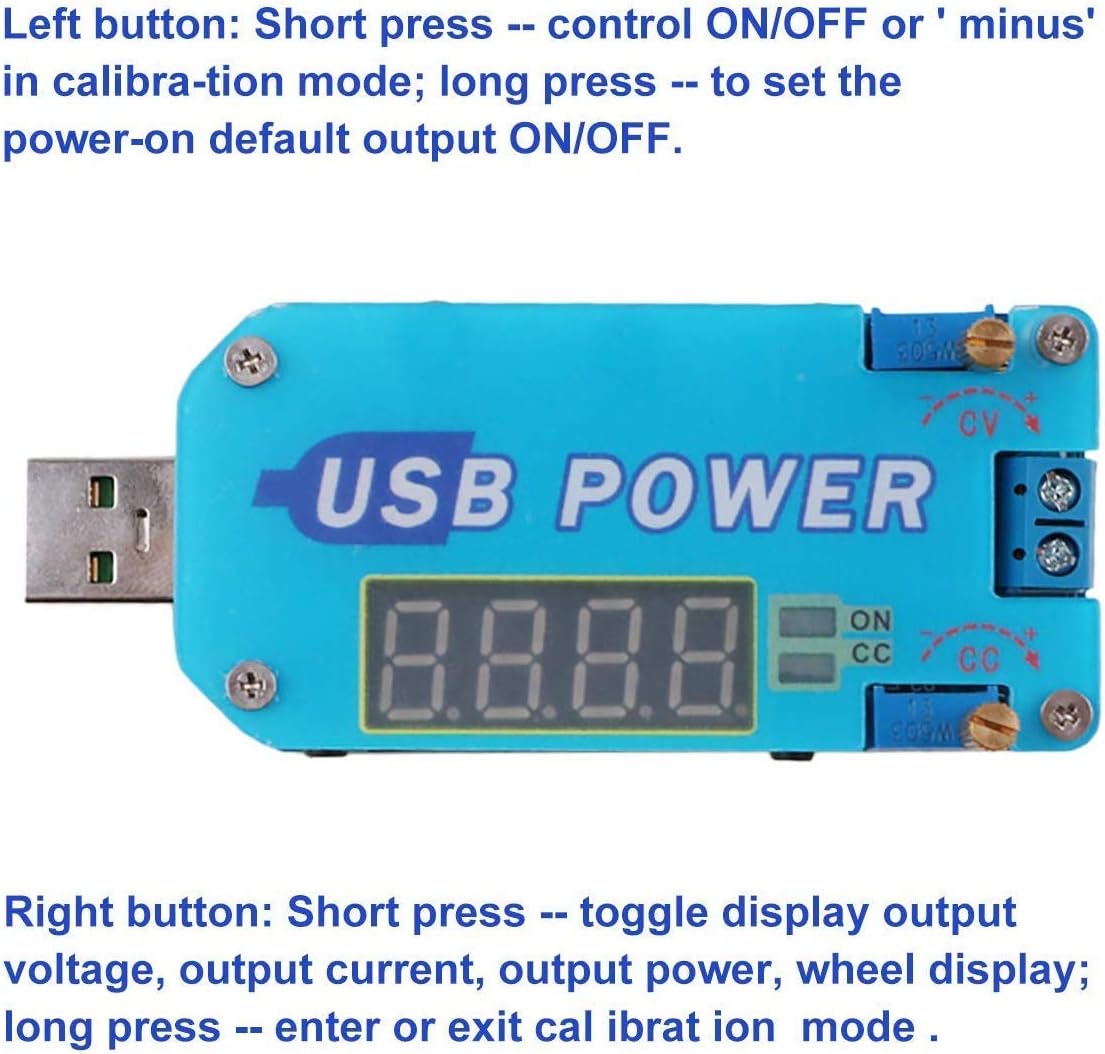
Figure 3: Close-up view illustrating the functions of the left and right buttons on the DollaTek ZK-DP2 module.
3. Specifications
| Parameter | Value |
|---|---|
| Product Name | CVCC Buck-Boost Voltage Converter |
| Product Number | ZK-DP2 |
| Input Voltage (Pad) | DC 4.0V - 13.0V |
| Input Voltage (USB) | DC 5.0V |
| Output Voltage | DC 1V - 30.0V |
| Output Current | 2A (max) |
| Output Power | 15W (max) |
| Voltage Display Accuracy | +/- 0.1V |
| Voltage Display Resolution | 0.01V |
| Current Display Range | 0 ~ 2.2A |
| Current Display Accuracy | +/- 0.05A |
| Current Display Resolution | 0.001A |
| Power Display Accuracy | 0.00W ~ 15.0W |
| Protection Temperature Threshold | 100 ℃ |
| Conversion Efficiency | 94% |
| Working Current | 30mA |
| Operating Temperature Range | -20 ℃ ~ 85 ℃ |
| Dimensions | 1.95 x 4 x 1.95 cm |
| Weight | 58 grams |
4. Setup
Follow these steps to set up your DollaTek ZK-DP2 power module:
- Input Connection: Connect the power source to the module using one of the following methods:
- USB Input: Plug the module's USB connector into a standard 5V USB power source.
- Micro USB Input: Connect a Micro USB cable to the Micro USB port on the module for a 5V input.
- Pad Input: Use the screw terminals labeled 'IN+' and 'IN-' to connect a DC power source between 4.0V and 13.0V. Ensure correct polarity.
- Output Connection: Connect your load device to the output screw terminals labeled 'OUT+' and 'OUT-'. Ensure correct polarity.
- Initial Check: Before connecting a sensitive load, it is recommended to verify the output voltage and current settings using a multimeter.
5. Operating Instructions
Once the module is powered on, the LCD display will show the current operating parameters. Use the potentiometers and buttons to control the output.
5.1 Adjusting Output Voltage and Current
- Voltage Adjustment: Turn the CV Potentiometer (usually labeled 'CV') to adjust the desired output voltage. Turn clockwise to increase voltage, counter-clockwise to decrease.
- Current Limit Adjustment: Turn the CC Potentiometer (usually labeled 'CC') to set the maximum output current. This acts as a current limit. When the load draws current exceeding this limit, the module will enter constant current mode, indicated by the CC LED.
5.2 Display Modes
Short press the Right Button (SELECT) to cycle through the display modes:
- Output Voltage (V)
- Output Current (A)
- Output Power (W)
- Automatic cycling through Voltage, Current, and Power.
5.3 Output ON/OFF Control
Short press the Left Button (ON/OFF) to toggle the output power ON or OFF. The ON LED indicates the output status.
5.4 Power-On Default Output State
To set whether the output is ON or OFF by default when the module is powered on, long press the Left Button (ON/OFF).
5.5 Quick Charge Protocol Support
The module supports quick charge protocols such as QC2.0, QC3.0, AFC, FCP, and SCP, allowing for efficient charging of compatible devices when used with a suitable power source.
6. Protection Features
The DollaTek ZK-DP2 module incorporates several protection mechanisms to ensure safe operation:
- Overvoltage Protection (OVP): The module automatically disables the output if the output voltage exceeds 30.5V.
- Overcurrent Protection (OCP): The module automatically disables the output if the output current exceeds 2A.
- Overpower Protection (OPP): The module automatically disables the output if the output power exceeds 15W. The display will show "OPP".
- Overtemperature Protection (OTP): The module automatically disables the output if the internal temperature exceeds 100 ℃. The display will show "OTP".
7. Troubleshooting
- Output Disabled with "OPP" Display: This indicates Overpower Protection has been triggered. Reduce the load power and then short press the "ON/OFF" button to re-enable the output.
- Output Disabled with "OTP" Display: This indicates Overtemperature Protection has been triggered. Reduce the load power or allow the module to cool down, then short press the "ON/OFF" button to re-enable the output.
- No Current Display or Inaccurate Current Reading at Low Current: The module may show a large display error when the output current is below 0.05A. It may not display current if the current is between 10mA and 40mA. This is normal behavior due to the measurement resolution.
- No Output: Check input power connection and voltage. Ensure the output is enabled (ON LED should be lit). Verify that no protection features (OVP, OCP, OPP, OTP) have been triggered.
8. Maintenance
The DollaTek ZK-DP2 power module is designed for low maintenance. Keep the module clean and free from dust and moisture. Avoid exposing it to extreme temperatures or direct sunlight. Do not attempt to disassemble the module, as this may void any warranty and could cause damage.
9. Warranty and Support
This product is covered by the standard manufacturer's warranty. For warranty claims or technical support, please contact your retailer or the manufacturer directly. Keep your purchase receipt as proof of purchase.