
1. Important Safety Information
Read all instructions carefully before using this appliance to ensure safe operation and to prevent property damage. Keep this manual for future reference.
- Microwave Energy: Do not attempt to operate this oven with the door open or if the door is damaged. Do not place any object between the oven front face and the door.
- Grounding Instructions: This appliance must be grounded. Connect only to a properly grounded outlet.
- Superheated Liquids: Liquids such as water, coffee, or tea can be overheated beyond the boiling point without appearing to boil. This can result in very hot liquids suddenly boiling over when a spoon or other utensil is inserted into the liquid.
- Flammable Materials: Do not store or use flammable materials near the oven.
- Children: Close supervision is necessary when the appliance is used by or near children.
2. Product Overview
The BLACK+DECKER EM044KIN-P is a 1.6-Cu. Ft. over-the-range microwave oven designed for efficient cooking and convenience. It features 1000 watts of cooking power, multiple power levels, and various cooking programs.
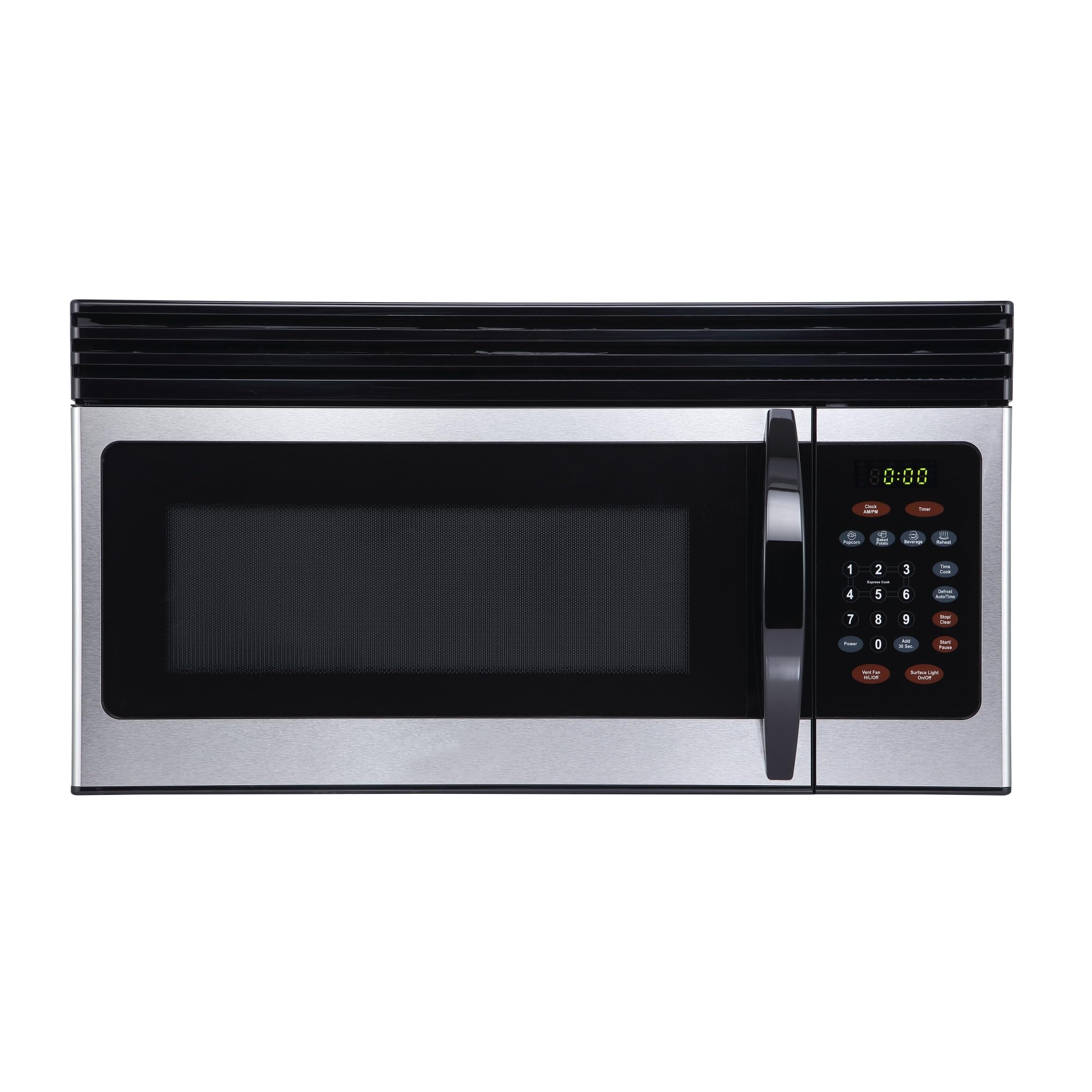
Image: Front view of the BLACK+DECKER EM044KIN-P Over-the-Range Microwave with its door open, revealing the interior cavity and glass turntable. The control panel is visible on the right side.
3. Setup and Installation
This microwave oven is designed for over-the-range installation. Proper installation requires adherence to local electrical codes and building regulations. It is recommended to have the appliance installed by a qualified professional due to its weight and the complexity of mounting it above a cooking range.
3.1 Pre-Installation Checklist
- Ensure the mounting surface is structurally sound to support the microwave's weight (approximately 55.1 lbs).
- Verify that the electrical outlet meets the required specifications (120 Volts, 1000 Watts).
- Confirm adequate clearance above the cooking surface as per installation guidelines.
Detailed installation instructions, including mounting templates and hardware requirements, are provided in the separate installation guide that accompanies the product. Please refer to that document for step-by-step procedures.
4. Operating Instructions
Familiarize yourself with the control panel to effectively use your microwave oven.
4.1 Setting the Clock
- Press the Clock/AMPM button.
- Enter the current time using the number pad.
- Press the Clock/AMPM button again to confirm.
4.2 Basic Microwave Cooking
- Place food in a microwave-safe container on the glass turntable.
- Close the oven door securely.
- Enter the desired cooking time using the number pad.
- Press the Start/Pause button to begin cooking.
4.3 Adjusting Power Levels
Your microwave has 10 power levels. To adjust the power level during cooking:
- Enter the desired cooking time.
- Press the Power button.
- Enter the desired power level (1-10) using the number pad. (e.g., '9' for 90% power).
- Press the Start/Pause button.
4.4 Express Cooking
For quick heating, press any number from 1 to 6 for 1 to 6 minutes of cooking at 100% power. Press the Add 30 Sec. button to add 30 seconds of cooking time at 100% power.
4.5 One-Touch Cooking Programs
Use these pre-programmed settings for common food items:
- Popcorn: Press the Popcorn button.
- Baked Potato: Press the Baked Potato button.
- Beverage: Press the Beverage button.
- Reheat: Press the Reheat button.
Follow the on-screen prompts or refer to the label inside the door for specific weight or quantity selections for each program.
4.6 Defrosting
The microwave offers a defrost function to thaw frozen foods.
- Press the Defrost Auto/Time button.
- Enter the weight of the food in pounds or the desired defrost time.
- Press the Start/Pause button.
4.7 Child Safety Lock
To prevent accidental use, especially by children:
- To Activate: Press and hold the Stop/Clear button for 3 seconds. An indicator will appear on the display.
- To Deactivate: Press and hold the Stop/Clear button again for 3 seconds.
4.8 Vent Fan and Surface Light
- Vent Fan: Press the Vent Fan HI/LO/OFF button to cycle through high, low, and off settings for the exhaust fan.
- Surface Light: Press the Surface Light ON/OFF button to turn the cooktop light on or off.
5. Maintenance and Cleaning
Regular cleaning and maintenance will ensure the longevity and optimal performance of your microwave oven.
5.1 Interior Cleaning
- Clean the interior cavity with a mild detergent and a soft cloth after each use.
- For stubborn stains, place a bowl of water with lemon slices inside and microwave for 2-3 minutes to loosen residue, then wipe clean.
- The glass turntable can be removed and washed in warm, soapy water or in the dishwasher. Ensure it is completely dry before placing it back in the oven.
5.2 Exterior Cleaning
- Wipe the exterior surfaces with a soft, damp cloth. For stainless steel finishes, use a specialized stainless steel cleaner.
- Avoid abrasive cleaners or scouring pads, as they can scratch the surface.
5.3 Filter Maintenance
Refer to your installation guide for instructions on cleaning or replacing the grease filters and charcoal filters (if applicable) for the vent system.
6. Troubleshooting
If you encounter issues with your microwave, consult the following common problems and solutions before contacting customer service.
| Problem | Possible Cause | Solution |
|---|---|---|
| Oven does not start | Door not closed properly; Power cord unplugged; Blown fuse/tripped circuit breaker; Child lock activated. | Ensure door is latched; Check power connection; Reset breaker/replace fuse; Deactivate child lock. |
| Food not heating evenly | Food not stirred/rotated; Incorrect power level/time; Turntable not rotating. | Stir or rearrange food; Adjust settings; Check turntable for obstructions. |
| Light bulb not working | Bulb is burnt out. | Replace the bulb (refer to the full manual for bulb type and replacement instructions). |
| Excessive steam inside oven | High moisture content in food. | This is normal for some foods. Ensure proper ventilation. |
7. Specifications
Key technical specifications for the BLACK+DECKER EM044KIN-P microwave oven.
| Feature | Specification |
|---|---|
| Model Number | EM044KIN-P |
| Capacity | 1.6 Cubic Feet |
| Wattage | 1000 Watts |
| Voltage | 120 Volts |
| Product Dimensions (D x W x H) | 16.4"D x 29.9"W x 15"H |
| Item Weight | 55.1 Pounds |
| Material | Stainless Steel |
| Installation Type | Over-the-Range |
| Number of Power Levels | 10 |
| Controller Type | Touch |
| Special Feature | Child Safety Lock |
8. Warranty and Support
8.1 Limited Warranty
This BLACK+DECKER EM044KIN-P microwave oven comes with a 1-year limited warranty from the date of purchase. This warranty covers defects in materials and workmanship under normal household use. It does not cover damage resulting from misuse, accident, alteration, lack of proper care, or normal wear and tear.
For full warranty details and conditions, please refer to the warranty card included with your product or visit the official BLACK+DECKER website.
8.2 Customer Support
If you have questions about your product, require technical assistance, or need to make a warranty claim, please contact BLACK+DECKER customer support. Contact information can typically be found on the manufacturer's website or in the product packaging.
When contacting support, please have your model number (EM044KIN-P) and proof of purchase readily available.


