
Introduction
The Infinity IN-USB-2 Digital Foot Control is an ergonomic USB foot pedal designed to enhance efficiency in dictation and transcription tasks. Its robust construction and intuitive pedal layout provide comfortable and precise control, reducing foot fatigue during extended use. This manual will guide you through the setup, operation, and maintenance of your device.
Setup
Follow these steps to connect and prepare your Infinity IN-USB-2 Digital Foot Control for use:
- Unpack the Device: Carefully remove the foot control from its packaging.
- Connect to Computer: Plug the USB cable from the foot control into an available USB port on your PC, desktop, laptop, or portable computer. The device is compatible with both Windows and Mac operating systems.
- Software Installation: The IN-USB-2 foot pedal works with most leading dictation and transcription software products. Ensure your chosen software is installed and configured to recognize the foot control. Refer to your software's documentation for specific setup instructions.
- Positioning: Place the foot control on the floor in a comfortable position that allows for natural foot movement and minimizes strain. The ergonomic design, featuring a wide, central, sloping Play pedal, is intended for comfort during long periods of use.
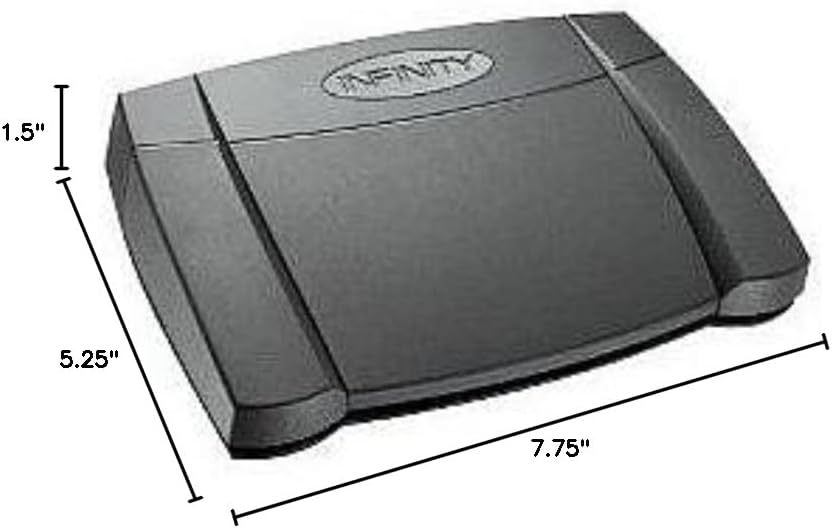
This image displays the Infinity IN-USB-2 Digital Foot Control, highlighting its physical dimensions. The device measures approximately 7.75 inches in width, 5.25 inches in depth, and 1.5 inches in height, providing a clear understanding of its compact and ergonomic form factor.
Operating Instructions
The Infinity IN-USB-2 foot control features three pedals for intuitive control during dictation or transcription:
- Center Pedal (Play): Press this pedal to play audio. Its wide, sloping design allows for comfortable and easy activation.
- Left Pedal (Rewind): Press this pedal to rewind the audio.
- Right Pedal (Fast Forward): Press this pedal to fast forward through the audio.
The design incorporates a mechanical stop to prevent accidental triggering of the center pedal while stepping on the side pedals, ensuring precise control.
Maintenance
To ensure the longevity and optimal performance of your Infinity IN-USB-2 Digital Foot Control, follow these maintenance guidelines:
- Cleaning: Wipe the surface of the foot control with a soft, dry cloth. Avoid using harsh chemicals or abrasive cleaners, which can damage the finish.
- Storage: When not in use, store the device in a clean, dry environment away from extreme temperatures and direct sunlight.
- Durability: The foot control is built with heavy-duty components and precision switches designed for up to 2,000,000 depressions, ensuring long-lasting reliability.
- Cable Care: Avoid bending or crimping the USB cable excessively to prevent internal damage. The cable is hard-wired to prevent accidental unplugging.
Troubleshooting
If you encounter issues with your Infinity IN-USB-2 Digital Foot Control, consider the following troubleshooting steps:
- Device Not Recognized: Ensure the USB cable is securely plugged into both the foot control and the computer. Try plugging it into a different USB port.
- Pedals Not Responding: Verify that your dictation or transcription software is running and correctly configured to use the foot control. Restart the software or your computer if necessary.
- Intermittent Functionality: Check for any physical damage to the cable or the foot control. Ensure no debris is obstructing the pedals.
- Software Compatibility: Confirm that your operating system and transcription software are compatible with the IN-USB-2. Updates to either may sometimes resolve compatibility issues.
If problems persist after attempting these steps, please refer to the support section below.
Specifications
| Feature | Description |
|---|---|
| Brand | Infinity |
| Model Number | IN-USB-2 |
| Hardware Interface | USB 2.0 |
| Compatible Devices | PC, desktop, laptop, or portable computer (Windows or Mac) with a USB Port |
| Product Dimensions (D x W x H) | 5.25" x 7.75" x 1.5" |
| Switch Durability | Designed for 2,000,000 depressions |
| Accidental Trigger Prevention | Mechanical stop prevents accidental triggering of center pedal |
| Cable Type | Hard-wired USB cable |
Warranty and Support
For warranty information, please refer to the documentation provided with your purchase or contact your retailer. For technical support or further assistance, please visit the official Infinity brand website or contact their customer service department. Keep your purchase receipt or proof of purchase handy when seeking support.