
Introduction
Thank you for choosing the DEWIN B6 80W LiPo Balance Charger. This intelligent digital balance charger is designed for safe and efficient charging and discharging of various battery types, including LiPo, Li-ion, Li-Fe, NiMH, NiCd, and Pb batteries. Please read this manual thoroughly before operation to ensure proper use and to maximize the performance and lifespan of your charger and batteries.
Safety Information
WARNING: Failure to follow these safety instructions can result in fire, property damage, or personal injury.
- Always operate the charger in a well-ventilated area, away from flammable materials.
- Never leave the charger unattended during operation.
- Ensure the charger is compatible with your battery type and cell count before connecting. Incorrect settings can cause severe damage.
- Do not charge damaged or swollen batteries.
- Keep the charger away from water, moisture, and extreme temperatures.
- Use only the original power adapter and cables provided with the charger.
- Keep out of reach of children.
- Disconnect the power supply immediately if any abnormal behavior is observed.
Package Contents
Verify that all items are present in your package:
- 1 x DEWIN B6 80W LiPo Balance Charger
- 3 x Cable Sets (various connectors for different battery types)
- 1 x Instruction Manual
- 1 x Power Adapter (EU Plug, if selected)
Product Overview
The DEWIN B6 80W LiPo Balance Charger features a robust metal casing for efficient heat dissipation and stable performance. Its intuitive LCD screen displays charging status and parameters, making it easy to monitor your battery's condition.
Key Features:
- Metal Casing: Provides strong heat dissipation for stable and reliable operation.
- Input Voltage Control: Protects the battery during charging.
- Wide Compatibility: Suitable for parallel charging of Li-Po, Li-ion, Li-Fe, NiMH, NiCd, and Pb batteries.
- LCD Display: Clear visualization of charging status and parameters.
- Versatile Power: Max. 80W charge power / Max. 10W discharge power.
Component Identification:

This image displays the front of the DEWIN B6 80W LiPo Balance Charger, highlighting its compact dimensions of 133mm (5.2 inches) in length, 87mm (3.4 inches) in width, and 33mm (1.3 inches) in height. The LCD screen is visible, along with the control buttons and balance charging ports on the side.

This image provides a detailed view of the charger's LCD screen, which displays charging information such as battery type, current, voltage, and cell count. Below the screen are four control buttons: "Batt Type/Stop", "Dec./Status", "Inc./Status", and "Start/Enter", used for navigation and selection.
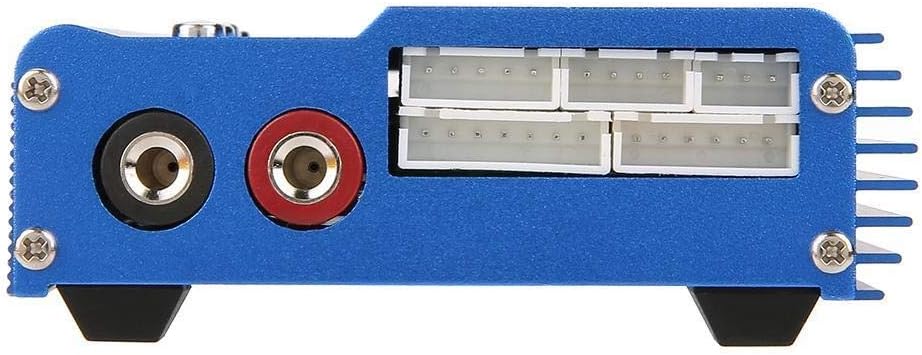
This image shows the side of the charger, specifically the balance charging ports. These ports are labeled for 2, 3, 4, 5, and 6 cell batteries, allowing for precise balancing during charging to ensure optimal battery health and performance.
Setup
- Unpack the Charger: Carefully remove all components from the packaging.
- Inspect for Damage: Check the charger and all accessories for any signs of damage. Do not use if damaged.
- Connect Power:
- Connect the power adapter to the DC input port on the side of the charger.
- Plug the power adapter into a suitable AC outlet (240V input).

Figure 4: The power adapter with an EU plug, used to power the charger. This image shows the power adapter, which typically comes with an EU plug, used to supply power to the DEWIN B6 charger. Ensure it is securely connected to both the charger and a power outlet.
- Initial Screen: The LCD screen will light up, displaying the initial menu or standby screen.
Operating Instructions
This section outlines the general steps for charging a battery. Specific settings will vary based on battery type.
General Charging Procedure:
- Connect Battery:
- Connect the main charging cable from the charger's output ports to your battery's main connector. Ensure correct polarity.
- For LiPo/Li-ion/Li-Fe batteries, also connect the battery's balance lead to the appropriate balance port on the side of the charger (e.g., 3 cells to the '3 cells' port).
- Select Battery Type:
- Press the "Batt Type/Stop" button to navigate through the main menu.
- Use the "Inc." and "Dec." buttons to select the correct battery type (e.g., LiPo, NiMH).
- Press "Start/Enter" to confirm your selection.
- Set Charging Parameters:
- After selecting the battery type, the screen will display options for charging mode (e.g., Balance Charge, Fast Charge, Storage, Discharge). Use "Inc." and "Dec." to select the desired mode.
- Press "Start/Enter" to enter parameter adjustment.
- Adjust the charging current (Amps) and cell count (Volts) using "Inc." and "Dec." buttons. Refer to your battery's specifications for recommended charging rates.
- Press "Start/Enter" to confirm each parameter.
- Start Charging:
- Once all parameters are set, long-press the "Start/Enter" button. The charger will perform a battery check.
- Confirm the battery information displayed on the screen. If correct, press "Start/Enter" again to begin charging.
- Monitor Progress:
- The LCD will display real-time charging status, including current, voltage, and elapsed time.
- Press "Status" (Inc. or Dec.) to cycle through detailed battery information during charging.
- End Charging:
- The charger will automatically stop when the battery is fully charged. An audible alert may sound.
- Press "Batt Type/Stop" to stop the charging process manually at any time.
- Disconnect the battery from the charger.
Maintenance
- Cleaning: Use a soft, dry cloth to clean the charger's exterior. Do not use liquid cleaners or solvents.
- Storage: Store the charger in a cool, dry place, away from direct sunlight and extreme temperatures.
- Cable Inspection: Regularly inspect all cables and connectors for wear, damage, or corrosion. Replace damaged cables immediately.
- Ventilation: Ensure the charger's ventilation slots are clear of dust and debris to maintain proper heat dissipation.
Troubleshooting
| Problem | Possible Cause | Solution |
|---|---|---|
| Charger does not power on. | No power supply; faulty adapter/cable. | Check power connections. Ensure adapter is plugged in and functional. Try a different outlet. |
| "Connection Break" error. | Battery not connected properly; faulty cable. | Ensure main and balance leads are securely connected. Inspect cables for damage. |
| "Input Voltage Error". | Input voltage is too high or too low. | Verify the power adapter output voltage is within the specified range (DC 10.0-20.0V). |
| Battery not charging/discharging. | Incorrect battery type/parameters selected; battery is fully charged/discharged. | Double-check battery type, cell count, and charging current settings. Ensure the battery is not already at its target state. |
| Charger gets excessively hot. | Poor ventilation; overcurrent charging. | Ensure adequate airflow around the charger. Reduce charging current if it exceeds battery specifications. Stop charging if overheating persists. |
Specifications
| Parameter | Value |
|---|---|
| Brand | DEWIN |
| Model Number | CONN829 |
| Operating Voltage Range | DC 10.0-20.0V |
| Circuit Power (Max Charge) | 80W |
| Circuit Power (Max Discharge) | 10W |
| Charge Current Range | 0.1-6.0A |
| Discharge Current Range | 0.1-2.0A |
| LiPo Balancing Current | 300mAh/cell |
| Li-ion/LiPo/Li-Fe Cell Count | 1-6 cells |
| NiCd/NiMH Cell Count | 1-15 cells |
| Pb Battery Voltage | 2-20V |
| Dimensions (L x W x H) | 133 x 87 x 33 mm (5.2 x 3.4 x 1.3 inches) |
| Weight | 661 Grams (approx.) |
| Color | Black |
| Certifications | CE |
Warranty and Support
DEWIN products are designed for reliability and performance. For warranty information or technical support, please refer to the contact details provided with your purchase or visit the official DEWIN website. Please retain your proof of purchase for warranty claims.
Note: Availability of spare parts is not specified. Software updates are not applicable for this device.