
Barkan TVA31
Barkan TV Wall Mount with Integrated HDTV Indoor Antenna
Model: TVA31
Product Overview
The Barkan TVA31 is an innovative TV wall mount that integrates a passive HDTV indoor antenna, providing a clean and efficient solution for mounting your television and receiving free over-the-air broadcasts. Designed for TVs ranging from 19 to 65 inches and supporting up to 110 lbs, this mount features a patented auto-locking mechanism for enhanced safety and a tool-free tilt function for optimal viewing angles.

Image: The Barkan TVA31 TV Wall Mount, showcasing its integrated HDTV antenna and coaxial cable connection.
Key Features:
- Integrated HDTV Antenna: World's first TV mount with a built-in passive antenna for free over-the-air HDTV broadcasts, eliminating the need for separate devices.
- Patented Auto-Locking Mechanism: Ensures secure attachment of the TV to the wall, preventing accidental disengagement.
- Tool-Free Tilt Function: Allows for easy adjustment of the TV's viewing angle from 0° to 15° by gently pushing the screen.
- Wide Compatibility: Fits most 19-65 inch TVs with VESA patterns up to 400x400 mm and non-VESA up to 400x400 mm.
- High Weight Capacity: Safely supports TVs up to 110 lbs (50 kg).
- Slim Profile: Maintains a distance of only 2.7 inches (6.8 cm) from the wall.
- Enhanced Stability: Features a high and wide wall plate for better weight distribution.
- Child Safety: Includes a Fall Proof system to prevent screen disengagement, enhancing safety in homes with children.
Installation Guide
This section provides a general overview of the installation process. For detailed step-by-step instructions, please refer to the complete Installation Manual PDF available on the product's support page or included with your product packaging.
Before You Begin:
- Ensure you have all components from the hardware kit.
- Verify your TV's VESA mounting pattern is compatible with the mount.
- This mount is designed for wood-stud drywalls in the US only. Do not install on brick or concrete walls without appropriate anchors (not included).
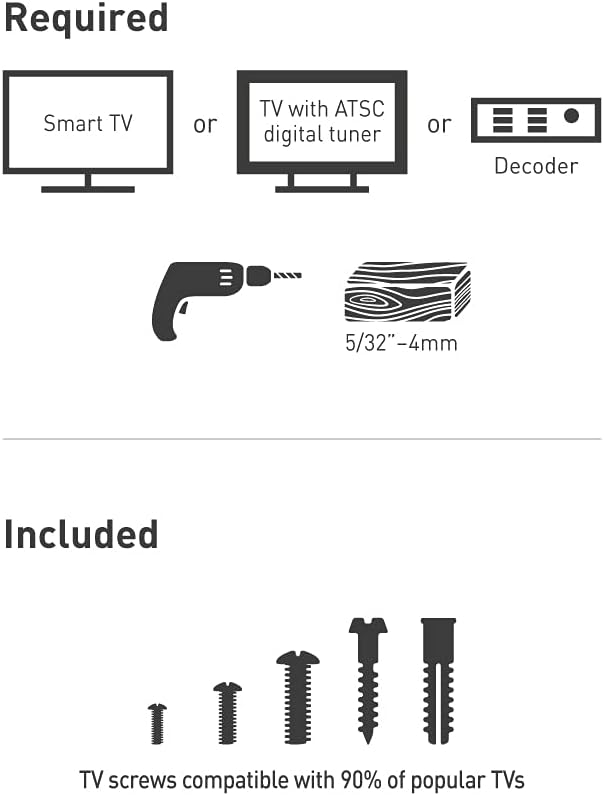
Image: Illustration of required components: Smart TV or TV with ATSC digital tuner/decoder, and a drill with a 5/32" (4mm) bit. Also shown are various TV screws included in the kit.
Assembly Steps (1-2-3 Process):
- Attach Adapters to TV: Secure the mounting adapters to the rear side of your television using the appropriate screws from the hardware kit. Ensure the adapters are aligned with your TV's VESA holes.

Image: Diagrams illustrating various backscreen connection positioning options for the TV rails (75x75mm to 600x400mm).
- Install Bracket on Wall: Locate the wood studs in your drywall. Position the wall bracket at the desired height and level, then securely fasten it to the wall studs using the provided Barkan wall screws and anchors.
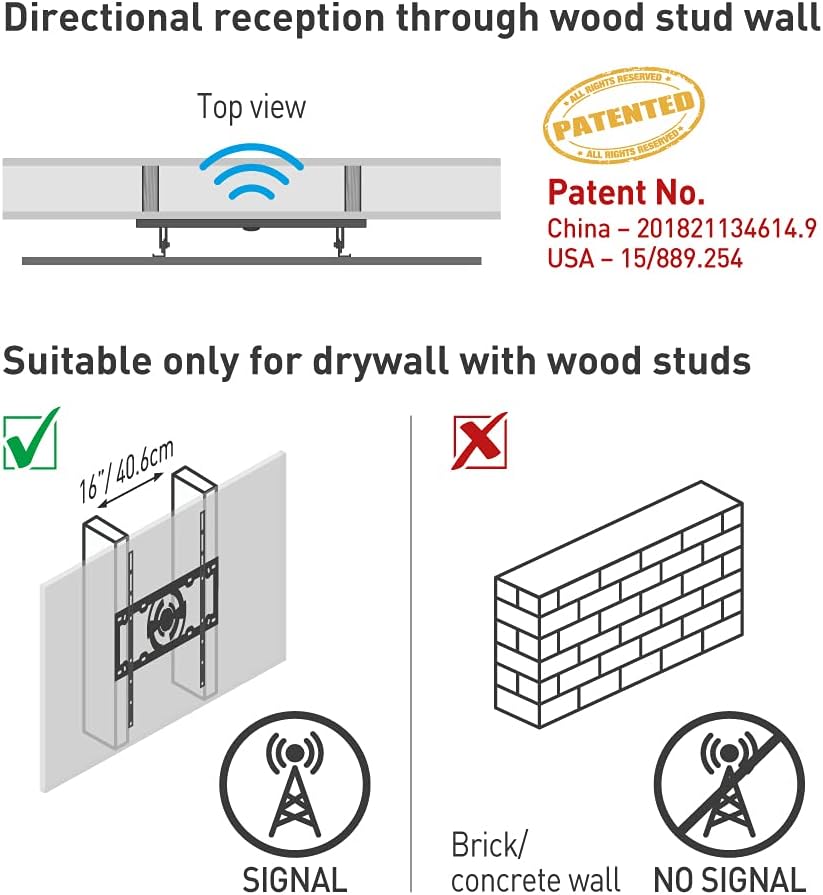
Image: Diagram showing how the mount is suitable for drywall with wood studs, indicating signal reception through the wall.
- Snap TV onto Bracket: Carefully lift the television and snap it onto the installed wall bracket. The patented auto-locking mechanism will engage, securing the TV in place.

Image: Detailed diagrams explaining the patented auto-locking safety mechanism, showing how the TV engages with the wall bracket and prevents disengagement.
- Connect Antenna Cable: Connect the integrated antenna's coaxial cable to the antenna input on your Smart TV or external decoder.
After installation, perform a channel scan on your TV to receive available HDTV broadcasts.
Operation
Adjusting the Tilt Angle:
The Barkan TVA31 mount allows for easy, tool-free tilt adjustment. To change the viewing angle, gently push the bottom of the TV forward or backward to achieve the desired tilt from 0° to 15°. The mount's design ensures the TV stays securely in place once adjusted.

Image: A television mounted on a wall, illustrating the upward tilt capability of the mount.
Using the Integrated HDTV Antenna:
The integrated antenna provides reception for free over-the-air HDTV channels. After connecting the coaxial cable to your TV or decoder, perform a channel scan through your TV's menu settings. The antenna supports frequencies 174-230MHz and 470-862MHz, with a maximum range of 35 miles.

Image: Logos of various free-to-air channels (FOX HD, CW, ABC HD, CBS, NBC, PBS, Univision, CNN, HSN) and icons indicating Free HDTV, Full HD 1080, and 4K Ultra HD support.
The large metal mass of the TV mount itself contributes to better reception compared to smaller, standalone indoor antennas.
Maintenance
The Barkan TVA31 TV Wall Mount is designed for durability and requires minimal maintenance. Periodically inspect the mount and TV for any signs of wear or loosening. Ensure all screws remain tight. Clean the mount with a soft, dry cloth. Avoid using abrasive cleaners or solvents, as these may damage the finish.
Troubleshooting
Poor or No Antenna Reception:
- Rescan Channels: After initial setup or if channels are lost, perform a new channel scan on your TV.
- Check Connections: Ensure the coaxial cable from the mount is securely connected to your TV's antenna input.
- Location: While the integrated antenna is powerful, signal strength can vary based on your location relative to broadcast towers and obstructions. Try adjusting the TV's tilt slightly or ensure no large metal objects are directly in front of the antenna.
- Wall Type: This antenna is optimized for wood-stud drywalls. Performance may be significantly reduced or non-existent if installed on brick, concrete, or metal-studded walls.
- External Interference: Other electronic devices can sometimes interfere with antenna signals. Try temporarily turning off nearby electronics to see if reception improves.
TV Not Level After Installation:
- While the mount includes a built-in level, it is recommended to use a separate, high-quality level during installation to ensure precise leveling of the wall bracket before mounting the TV.
- Minor adjustments can sometimes be made by slightly loosening and re-tightening the mounting screws on the TV rails, if applicable, or by carefully adjusting the wall plate.
Specifications
| Feature | Specification |
|---|---|
| Model Number | TVA31 |
| Screen Sizes Supported | 19" - 65" (48 - 165 cm) |
| Max. Load Capacity | 110 lbs (50 kg) |
| VESA Compatibility | 75x75, 100x100, 100x200, 200x100, 200x200, 300x300, 300x400, 400x200, 400x300, 400x400 mm |
| Distance from Wall | 2.7" (6.8 cm) |
| Tilt Angle | 0° to 15° |
| Antenna Gain | 5dB |
| Supported Antenna Frequencies | 174-230MHz, 470-862MHz |
| Antenna Max Range | 35 miles |
| Material | Metal |
| Color | Black |
| Item Weight | 3.29 lbs |

Image: Technical drawing showing dimensions, tilt range, and distance from wall, along with VESA compatibility details.

Image: A table summarizing key specifications including screen sizes, VESA, max broadcast distance, max load, distance from wall, and color.
Warranty and Support
Barkan Mounts is a global brand with over 30 years of experience in developing and manufacturing TV mounts. All Barkan products come with long warranties and are rigorously tested to ensure quality and safety.
Customer Service:
Our customer service experts are available to assist you with any questions or issues. For further information, FAQs, video demonstrations, and support, please visit the official Barkan website.
For specific inquiries regarding screen-connection screws not included or other hardware needs, you may contact Barkan directly at sales.usa@barkanmounts.com.
Safety Information:
For important safety guidelines and information, please refer to the Safety Information PDF document, which can be found on the product's support page or included with your product.
Barkan TV mounts include a Fall Proof system to prevent disengagement of the screen, emphasizing child safety and preventing tip-over hazards.
What's in the Box
- TV Mounts (Main Wall Plate and TV Rails)
- Hardware Kit (including various screws, anchors, washers, and spacers)
- Assembly Instructions

Image: A detailed view of the Barkan Hardware Kit, showing various screws for wall mounting and TV mounting, along with metal washers and plastic spacers.
Important Note on Videos
No official product videos with "Seller" as creator type were available in the provided product data to embed in this manual.
Ask a question about this manual
Ask about setup, troubleshooting, compatibility, parts, safety, or missing instructions. Manuals+ will review the question and use this page’s manual context to help answer it.