
1. Introduction
This manual provides essential information for the proper use and maintenance of your Washinglee 940-0024 Console Cable. This cable is designed as a cost-effective replacement for APC part numbers 940-0024C, 940-0024E, and APC9619, featuring a built-in FTDI chip for reliable performance.
It facilitates communication between APC Smart UPS devices and various computing systems such as laptops, servers, and firewall PCs. The cable supports power management, configuration, and monitoring functionalities for compatible UPS models.
The cable is compatible with a wide range of APC UPS models equipped with a DB9 serial port (female connector), including but not limited to SUA-1000ICH, SUA1000R2ICH, SURT10000UXICH, SUA-1500ICH, SUA2200R2ICH, SRC5000UXICH, 2200 XL, and 1400net.
It is also compatible with various software applications such as PowerChute, Freenas server, APCFIX, Apcupsd, and Netdata, and supports major operating systems including Windows, MacOS, and Linux.
2. Setup and Connection
The Washinglee 940-0024 Console Cable is designed for plug-and-play functionality. Follow these steps to connect your cable:
- Identify Connectors: The cable features a USB-A connector on one end and a DB9 (serial) connector on the other.
- Connect to Computer: Insert the USB-A connector into an available USB port on your laptop, desktop PC, or server.
- Connect to UPS: Insert the DB9 connector into the DB9 serial port on your APC Smart UPS device. Ensure a secure connection by tightening the screws on the DB9 connector if available.

Figure 2.1: Close-up view of the USB-A and DB9 connectors of the console cable.

Figure 2.2: Connection diagram illustrating the cable connecting a laptop to an APC UPS via the DB9 serial port, highlighting the internal FT232RL chip.

Figure 2.3: Example setup showing a desktop computer connected to an APC UPS using the 940-0024 console cable.
Driver Installation
While the cable supports plug-and-play, in some instances, your computer may not automatically recognize the device. If this occurs, you may need to manually update the driver. The cable features a built-in FTDI chip, and its drivers are widely available.
- Refer to the label on the cable's packaging for a QR code or link to download the necessary drivers.
- Alternatively, you can visit the FTDI website or contact Washinglee technical support for driver assistance.
3. Operating the Cable
Once connected and drivers are installed (if necessary), the cable enables various functionalities for your APC Smart UPS:
- Power Management: Monitor UPS status, battery levels, and power input/output.
- Configuration: Adjust UPS parameters, such as output voltage, transfer voltages, and power quality sensitivity.
- Maintenance Operations: Resume default settings, reset battery constants, and reset passwords.
- Firmware Updates: Facilitate firmware updates for your UPS device.
- Monitoring: Continuously monitor UPS performance and receive alerts.
- Debugging: Aid in functional debugging and diagnostics of the UPS.
- Alarm Control: Turn off or manage UPS alarms.
These operations are typically performed using compatible UPS management software. The cable is compatible with:
- PowerChute software (e.g., PowerChute Business Edition)
- Freenas server
- APCFIX
- Apcupsd
- Netdata
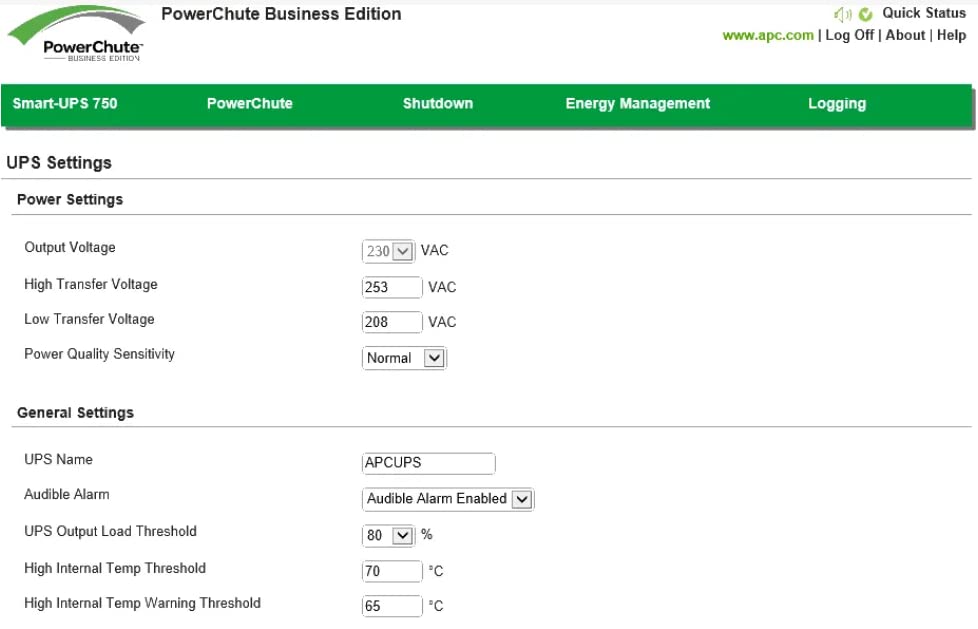
Figure 3.1: Example of the PowerChute Business Edition software interface, used for managing APC UPS settings and monitoring.
4. Maintenance
The Washinglee 940-0024 Console Cable requires minimal maintenance to ensure its longevity and reliable performance:
- Storage: Store the cable in a cool, dry place away from direct sunlight and extreme temperatures when not in use.
- Cleaning: If the cable becomes dirty, gently wipe it with a soft, dry cloth. Avoid using harsh chemicals or abrasive materials.
- Handling: Avoid kinking, bending sharply, or pulling the cable by the cord. Always grasp the connectors when plugging or unplugging.
- Inspection: Periodically inspect the cable and connectors for any signs of damage, such as frayed wires or bent pins. Do not use a damaged cable.
5. Troubleshooting
If you encounter issues while using the Washinglee 940-0024 Console Cable, consider the following troubleshooting steps:
- Cable Not Recognized: If your computer does not detect the cable, ensure the USB connector is fully inserted. If the issue persists, manually update the FTDI driver as described in the Setup section.
- No Communication with UPS: Verify that both the USB and DB9 connectors are securely attached. Ensure the correct serial port (COM port) is selected in your UPS management software. Confirm that your UPS model is compatible with the 940-0024 cable.
- Software Issues: Ensure your UPS management software (e.g., PowerChute) is up-to-date and correctly configured for your UPS model and the connected serial port.
- Intermittent Connection: Check for any physical damage to the cable or connectors. Try connecting the cable to a different USB port on your computer.
For further technical assistance, please refer to the Warranty and Support section.
6. Specifications
| Feature | Specification |
|---|---|
| Item Model Number | 940-0024C |
| Manufacturer | Washinglee |
| Connector Type | USB Type A to DB9 (Serial) |
| Cable Type | USB Console Cable |
| Special Feature | Data Transfer, Built-in FTDI Chip |
| Compatible Devices | APC UPS SUA-1000ICH, SUA1000R2ICH, SURT10000UXICH, SUA-1500ICH, SUA2200R2ICH, SRC5000UXICH, 2200 XL, 1400net, and others with DB9 serial port |
| Supported Operating Systems | Windows, MacOS, Linux |
| Package Dimensions | 5.51 x 4.61 x 0.63 inches |
| Item Weight | 2.12 ounces |
| Country of Origin | China |
| Date First Available | November 11, 2019 |
7. Warranty and Support
The Washinglee 940-0024 Console Cable comes with a 1-year warranty from the manufacturer, Washinglee.
For technical support, including driver downloads or any operational queries, please contact our engineers via email. User manuals and cable drivers are typically sent via the Amazon platform. If you did not receive them, please reach out to our support team.
Additionally, a printed label on the cable's packaging provides information on where to download drivers and includes the technical support email address.