Introduction
This manual provides detailed instructions for the installation, operation, and maintenance of your Sony DSX-M80 Digital Media Receiver. The DSX-M80 is a 1 DIN marine media receiver designed for high-quality audio output and versatile connectivity, including Bluetooth and SiriusXM readiness.
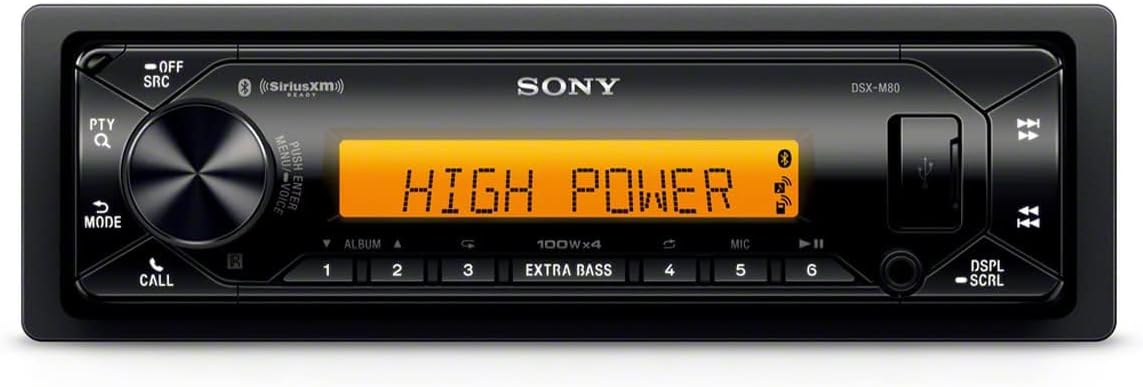
Image: Front view of the Sony DSX-M80 Digital Media Receiver, showcasing its display and control buttons.
What's in the Box
Upon opening the package, ensure all the following components are present:
- Sony DSX-M80 Digital Media Receiver
- Wire Harness
Setup and Installation
Proper installation is crucial for optimal performance. This unit is a standard single DIN receiver.
Wiring Considerations
For the high-power output of the DSX-M80, it is recommended to use 12-gauge hot and ground wires for power connections. Inadequate wiring may lead to reduced volume potential or unexpected shutdowns. If replacing an existing unit, verify the gauge of the current wiring and upgrade if necessary.
Connecting Components
The receiver features various connection points for power, speakers, and external amplifiers.

Image: Rear view of the Sony DSX-M80, illustrating the various RCA pre-outs, power harness connection, and antenna input.
- Power Connection: Use the provided wire harness to connect to your vehicle's power supply. Ensure correct polarity.
- Speaker Connections: Connect your speakers to the appropriate outputs on the wire harness.
- RCA Pre-amp Outputs: For expanding your sound system with external amplifiers, utilize the 5 Volt RCA pre-amp outputs for front, rear, and subwoofer channels.
- Subwoofer Direct Connection: A subwoofer can be connected directly to either side of the rear channel speaker output using the 2-ohm option.
- Antenna: Connect your radio antenna for AM/FM reception.
Mounting the Unit
Secure the DSX-M80 into a standard single DIN opening in your vehicle's dashboard. Ensure it is firmly seated to prevent movement, especially in marine environments.

Image: The Sony DSX-M80 receiver integrated into a boat's dashboard, showing a clean and secure installation.
Operating Instructions
This section details the primary functions and features of your DSX-M80 receiver.
Power On/Off and Source Selection
Press the OFF/SRC button to power the unit on or off, and to cycle through available audio sources (e.g., Bluetooth, USB, SiriusXM, Radio).

Image: Close-up of the Sony DSX-M80's front panel, displaying "HIGH POWER" on the screen, indicating its robust audio capabilities.
Bluetooth Connectivity
The DSX-M80 supports dual Bluetooth connections, allowing two smartphones to be paired simultaneously.
- Pairing the First Phone: Access the Bluetooth settings on your smartphone and select "DSX-M80" from the list of available devices. Confirm the pairing on both devices. This provides full access to navigation, music playback, and communication features.
- Pairing the Second Phone: Follow the same procedure for the second phone. The second phone will typically be for music playback only, while the first maintains primary control.

Image: The Sony DSX-M80 unit in a boat, with two smartphones connected via Bluetooth, demonstrating its dual connectivity feature.
Audio Features
- Built-in Amplifier: The unit features a built-in 4x45W RMS Class-D amplifier for powerful audio output.
- EXTRA BASS: Utilize the EXTRA BASS button for enhanced low-frequency sound.
- Equalizer: Adjust audio settings using the built-in equalizer to customize your sound profile.
Display and Illumination
Customize the unit's appearance to match your vehicle's interior.
- Color Customization: Browse through 35,000 colors to set the two-zone illumination.
- Display Scroll: Use the DSPL/SCRL button to change display information or scroll through text.

Image: The Sony DSX-M80's display showing song information, with the blue backlighting active.
SiriusXM Ready
The DSX-M80 is SiriusXM ready. A SiriusXM Connect Vehicle Tuner and subscription are required (sold separately) to access SiriusXM satellite radio.
Maintenance
To ensure the longevity and optimal performance of your DSX-M80 receiver, follow these maintenance guidelines:
- Cleaning the Unit: Use a soft, dry cloth to wipe the front panel. For stubborn dirt, dampen the cloth lightly with water. Avoid abrasive cleaners or solvents.
- Protect from Moisture: Although designed for marine use, avoid direct exposure to excessive water spray or submersion. Ensure all covers and seals are properly secured.
- Connection Checks: Periodically check all wiring connections to ensure they are secure and free from corrosion, especially in marine environments.
- Software Updates: Check the Sony support website for any available firmware updates for your model.
Troubleshooting
If you encounter issues with your DSX-M80, refer to the following common problems and solutions:
| Problem | Possible Cause | Solution |
|---|---|---|
| No sound or sound cuts out at high volume. | Inadequate power wiring (e.g., thin gauge wires). | Ensure 12-gauge hot and ground wires are used for power connections. If wired to the vehicle's dedicated 12V power source for the factory radio, consider wiring directly to the battery if issues persist. |
| "Output Error" message appears, especially with vibration. | Loose speaker connections or internal component sensitivity to vibration. | Check all speaker wire connections for tightness. Ensure the unit is securely mounted to minimize vibration. If the problem persists, professional inspection may be required. |
| Remote control does not turn the radio on. | Remote battery depleted or remote signal obstruction. | Replace the remote control battery. Ensure there is a clear line of sight between the remote and the unit's IR receiver. |
| Unit does not power on. | No power supply or blown fuse. | Check the vehicle's fuse box and the fuse on the unit's wiring harness. Verify power connections. |
| Bluetooth connection issues. | Pairing error or interference. | Delete "DSX-M80" from your phone's Bluetooth device list and re-attempt pairing. Ensure no other devices are actively trying to connect. |
If these solutions do not resolve the issue, please contact Sony customer support.
Specifications
Below are the technical specifications for the Sony DSX-M80 Digital Media Receiver:
- Model Number: DSXM80
- Product Dimensions: 7 x 7.12 x 2 inches
- Item Weight: 3.2 pounds
- Manufacturer: Sony
- Connectivity Technology: Bluetooth, RCA
- Wireless Communication Technologies: Bluetooth
- Special Features: Built-In Wi-Fi (Note: This feature is listed in specifications but may refer to a general capability, not necessarily for internet access on the unit itself. Refer to operating instructions for specific Wi-Fi related functions if any.)
- Controller Type: Mechanical knob
- Compatible Devices: Smartphone, Speaker
- Audio Output Mode: Stereo
- Surround Sound Channel Configuration: 2.1
- Amplifier: Built-in 4x45W RMS Class-D amplifier
- Pre-amp Outputs: 5 Volt RCA (Front, Rear, Subwoofer)
- Subwoofer Connection: Direct connection with 2-ohm option
- Illumination: Two-zone, 35,000 color options
- SiriusXM Ready: Yes (requires tuner and subscription)
- Date First Available: January 25, 2020
Warranty and Support
Warranty Information
This product is covered by Sony's standard manufacturer warranty. For detailed information regarding warranty terms, conditions, and duration, please refer to the warranty card included with your product or visit the official Sony support website. Keep your proof of purchase for warranty claims.
Customer Support
For technical assistance, troubleshooting beyond this manual, or service requests, please contact Sony customer support. You can find contact information and additional resources on the official Sony website:
www.sony.com/electronics/support
When contacting support, please have your model number (DSX-M80) and serial number ready.


