
Introduction
This manual provides detailed instructions for the assembly, operation, maintenance, and troubleshooting of your ShowMaven Height Adjustable Student Desk and Chair Combo. Please read all instructions carefully before assembly and use to ensure safe and proper functionality of the product.
Safety Information
- Adult supervision is recommended during assembly and initial use.
- Ensure all parts are present and undamaged before beginning assembly.
- Do not overtighten screws during initial assembly; tighten securely only after the structure is fully aligned.
- This product is suitable for children aged 3-12 years old.
- Keep small parts away from young children to prevent choking hazards.
- Regularly inspect the desk and chair for loose fasteners or damaged components.
Parts List
Before assembly, verify that all components listed in your product packaging are present. If any parts are missing or damaged, please contact customer support immediately.
Setup and Assembly
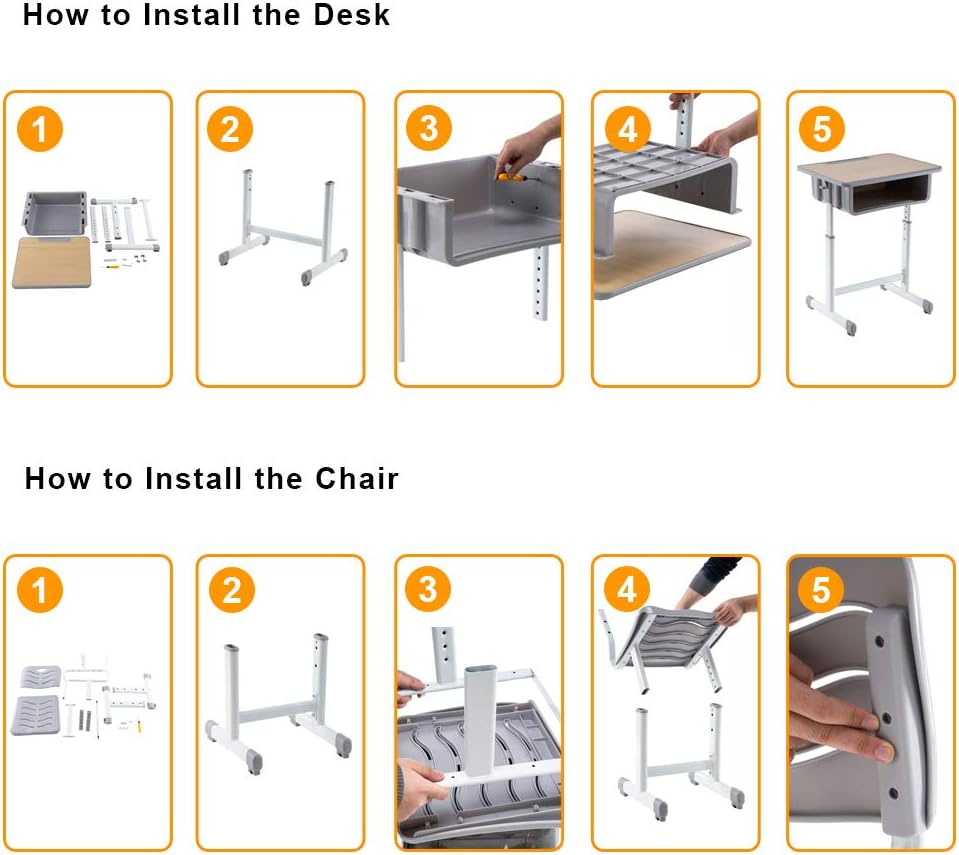
Follow these steps carefully for proper assembly. It is recommended not to overtighten screws until the structure is fully assembled for easier adjustment and alignment. Once the structure is installed, firm the interface for more stability.

This diagram illustrates the assembly process for both the desk and the chair. Ensure all parts are correctly oriented as shown in each step.
Desk Assembly
- Attach the desk legs to the desk frame using the provided hardware.
- Secure the desk drawer unit to the underside of the desktop.
- Attach the desktop to the leg assembly.
- Insert the plastic hooks into the designated slots on the desk frame before fully securing the desktop.
- Adjust the desk height to the desired level and tighten all fasteners securely.
Chair Assembly
- Attach the chair legs to the chair seat frame.
- Secure the chair backrest to the chair frame using the appropriate plastic pieces and hardware.
- Adjust the chair height to the desired level and tighten all fasteners securely.
Operating Instructions
Height Adjustment
Both the desk and chair are height adjustable to accommodate users of various ages (3-12 years old) and ensure an ergonomic setup.
To adjust the height, locate the adjustment mechanisms on the legs of the desk and chair. Loosen the fasteners, set to the desired height, and securely tighten them to prevent movement.

This image displays the adjustable height ranges for the desk (28-32.3 inches) and chair (16-18.5 inches seat height, 30.3-32.8 inches overall height), suitable for children aged 3-12.
Storage Features
The desk is designed with practical storage solutions to keep the workspace organized:
- Drawer: A large organized drawer is located beneath the desktop for storing items such as coloring utensils, books, and papers.
- Hanging Hooks: Handy hooks are situated on both sides of the desk, ideal for hanging backpacks or water bottles.
- Pencil Groove: A dedicated pen groove on the work surface provides convenient storage for pens, erasers, and other small stationery items.

This image highlights key features such as the convenient pen slot, rounded desk corners for safety, sturdy hooks for bags, a spacious desk drawer, and adjustable feet for stability on uneven surfaces.
Maintenance and Care
- Cleaning: Wipe the surfaces of the desk and chair with a damp cloth. Avoid using abrasive cleaners or harsh chemicals, which may damage the finish.
- Inspection: Periodically check all screws and fasteners to ensure they are tight. Re-tighten if necessary to maintain stability and safety.
- Protection: Anti-slip floor caps are installed on the desk and chair legs to prevent slipping and reduce noise. Ensure these caps are intact and properly positioned.
Troubleshooting
- Instability after assembly: Ensure all screws are fully tightened. If the structure feels wobbly, slightly loosen the screws, adjust the desk/chair to a level position, then re-tighten all fasteners securely.
- Difficulty adjusting height: Check for any obstructions in the adjustment mechanism. Ensure fasteners are sufficiently loosened before attempting to change height.
- Missing parts: If any pieces are missing upon receipt, please send relevant pictures to customer support for assistance.
Specifications
| Brand | ShowMaven |
| Model Number | G13002241 |
| Material | Engineered Wood (MDF, ABS, Steel) |
| Number of Drawers | 1 |
| Product Dimensions (L x W x H) | 23.5 x 17.7 x 32.3 inches |
| Item Weight | 33 pounds |
| Adjustable Table Height | 24.8 - 29.5 inches |
| Adjustable Chair Height (Overall) | 28.4 - 30.7 inches |
| Adjustable Chair Seat Height | 16 - 18.5 inches |
| UPC | 611890874802 |
This image illustrates the reinforced multi-layer desktop construction, designed for wear-resistance, heat-resistance, and water-proofing.
Warranty and Support
For specific warranty details or technical support, please refer to the documentation included with your purchase or visit the official ShowMaven website. For assistance with assembly or missing parts, please contact ShowMaven customer service directly.