
Introduction
This manual provides detailed instructions for the installation, operation, and maintenance of your NICREW Saltwater Aquarium Light, Model N14804. This LED lighting system is designed to provide optimal illumination for saltwater fish, live rock, and various corals in aquariums ranging from 30 to 36 inches in length. Please read these instructions thoroughly before use to ensure proper function and longevity of the product.
Product Features
- Features 445nm and 460nm blue, 10,000K white, and RGB LEDs, providing a balanced spectrum ideal for saltwater environments.
- Includes a dual-channel timer for adjusting the lighting spectrum and simulating gradual sunrise and sunset effects.
- Supports saltwater fish, live rock, soft corals, and LPS corals. For low light SPS corals, two units are recommended.
- Extendable brackets accommodate both rimless and framed aquariums with lengths from 30 to 36 inches.
- Designed for energy efficiency, providing natural daylight and nightlight effects.
Package Contents
- NICREW Saltwater Aquarium LED Light Fixture
- Digital Controller with integrated timer
- Power Adapter
- Adjustable Mounting Brackets (2 pieces)

The main components of the NICREW Saltwater Aquarium Light, including the LED light bar and the wired digital controller for programming.
Setup Instructions
1. Mounting the Light
- Attach the adjustable mounting brackets to each end of the light fixture.
- Extend the brackets to fit the length of your aquarium (30-36 inches). Ensure the light is centered and securely positioned on the tank edges.
- Verify that the light fixture is stable and level over the aquarium.

The light features sliding docking legs that allow for quick and easy adjustment to fit various aquarium lengths, accommodating both rimless and framed tanks.
2. Connecting the Controller and Power
- Connect the light fixture cable to the digital controller.
- Connect the power adapter to the digital controller.
- Plug the power adapter into a suitable electrical outlet.

The digital controller is the central unit for managing light settings and programming.
Operating Instructions
1. Setting the Clock
- Press the SET button (gear icon) to enter settings mode.
- Use the + and - buttons to adjust the hour. Press OK to confirm.
- Adjust the minute using + and -. Press OK to confirm.
2. Programming the Timer (Day/Night Cycle)
The controller allows for independent programming of white (W) and blue (B) light channels, including gradual ramp-up and ramp-down effects to simulate sunrise and sunset.
- From the main display, press SET (gear icon) repeatedly to cycle through programming options (e.g., W1, B1, W2, B2, etc.).
- For each setting (e.g., W1 for white light start time), use + and - to set the desired time and intensity (0-100%). Press OK to confirm each step.
- Typically, you will set a start time and intensity for white light (W1), then a start time and intensity for blue light (B1). Subsequent settings (W2, B2) can be used for evening dimming or moonlight phases.
- The controller automatically handles the gradual increase and decrease of light intensity between programmed points.
- Refer to the display for current settings and adjustments.

The digital controller features a display showing time, white and blue light intensity, and buttons for settings, adjustment, confirmation, return, and power. It allows for automatic on/off, brightness adjustment, daylight/moonlight alternation, and sunrise/sunset simulation.
3. Lighting Modes
The light offers three distinct lighting modes:
- Mode 1: All LEDs On - Provides a full spectrum of light, suitable for general viewing and coral growth.
- Mode 2: White LEDs On and Red+Green Components of RGB LEDs - Offers a balanced light appearance, enhancing natural colors.
- Mode 3: All Blue LEDs On and Blue Component of RGB LEDs - Creates a moonlight or actinic effect, ideal for nighttime viewing and promoting coral fluorescence.

The light offers three distinct modes: Mode 1 (all LEDs on for full spectrum), Mode 2 (white LEDs with red and green components of RGB for a balanced look), and Mode 3 (all blue LEDs with the blue component of RGB for moonlight or actinic effect).
Maintenance
- Regularly wipe the light fixture and LEDs with a soft, damp cloth to remove salt creep, dust, and water spots. Ensure the unit is unplugged before cleaning.
- A glass or acrylic canopy is highly recommended over your aquarium to protect the light from moisture and extend its operational life.
- Avoid using abrasive cleaners or solvents, as these can damage the light's surface or LED components.
Troubleshooting
- Light not turning on: Check all power connections. Ensure the power adapter is securely plugged into both the controller and the wall outlet.
- Controller display not working or flickering: Unplug the unit for 20 minutes, then plug it back in. If the issue persists, contact customer support.
- Difficulty programming the timer: Refer to the 'Operating Instructions' section carefully. If issues persist, try resetting the controller by unplugging it for a few minutes and then re-attempting programming.
- Timer settings lost after power outage: The controller may require the clock and timer settings to be re-entered after a power interruption.
- Inconsistent light intensity: Ensure the light is not obstructed and that the controller settings for white and blue channels are correctly configured.
Specifications
| Feature | Specification |
|---|---|
| Model Number | N14804 |
| Dimensions (Light Fixture) | 28.3"L x 4"W x 0.5"H |
| Adjustable for Aquarium Lengths | 30 - 36 inches |
| Total Power Consumption | 32 Watts |
| Light Source Type | LED (White, Blue, RGB) |
| Number of LEDs | 117 (57 Cool White, 24 445nm Blue, 24 460nm Blue, 12 RGB) |
| Total Luminous Flux | 1600 lm |
| PAR@12" in air | 110 |
| LUX@12" in air | 6300 |
| Beam Angle | 120° |
| Material | Aluminum, Acrylic, Glass |
| Power Source | Corded Electric |
| Voltage | 20 Volts |
| Item Weight | 3.04 pounds (1.38 kg) |

Detailed technical specifications for the 30-36 inch model, including LED types, PAR, Luminous Flux, Power Consumption, Beam Angle, and LUX. A graph illustrates the combined light spectrum.
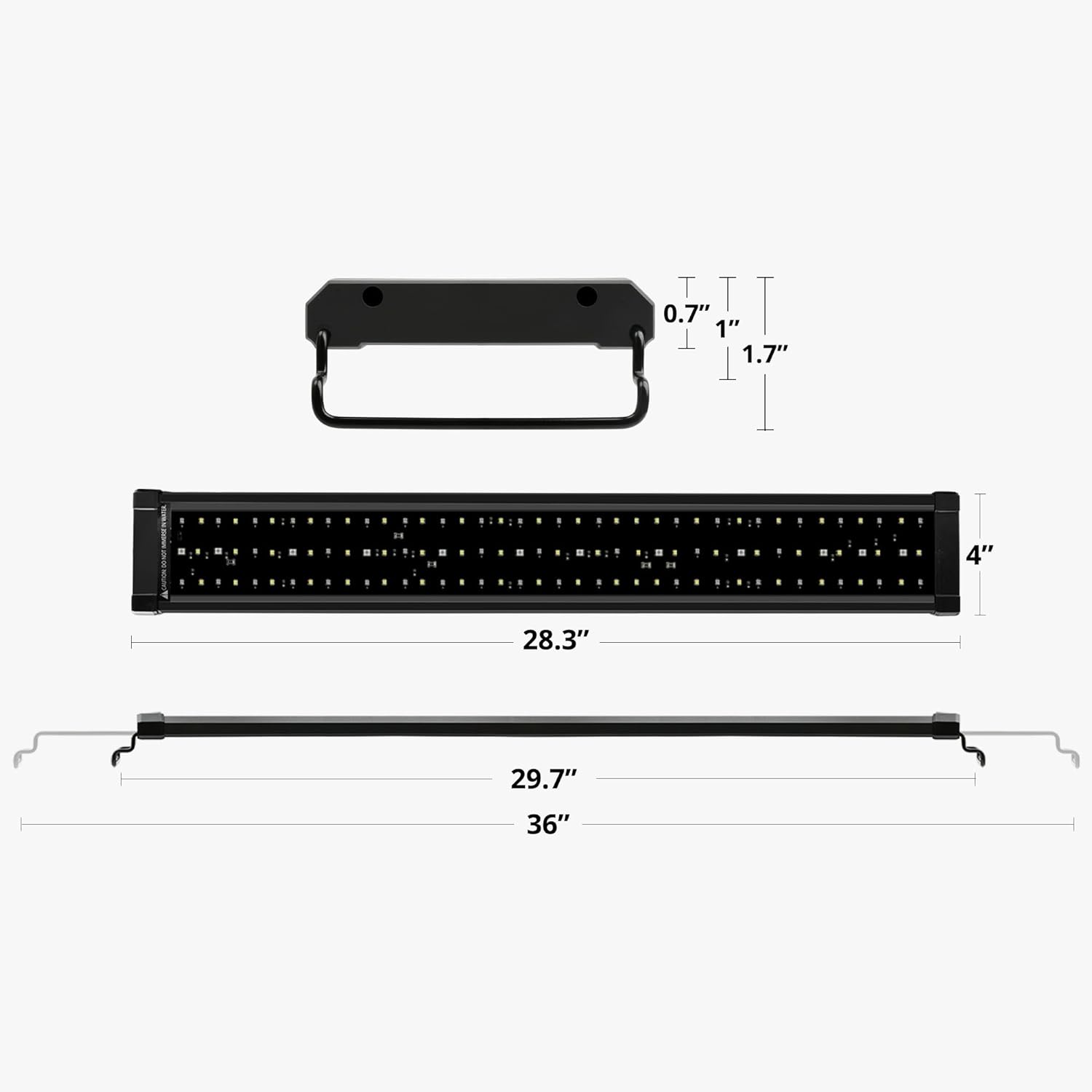
This diagram provides precise measurements of the light fixture, including its length (28.3 inches), width (4 inches), and height (0.5 inches), along with the extendable bracket dimensions, indicating suitability for aquariums from 30 to 36 inches.
Warranty and Support
NICREW products are backed by a hassle-free 12-month warranty. For any questions, technical assistance, or warranty claims, please contact NICREW customer service. Our team is dedicated to providing friendly and responsive support.
For further assistance, please visit the NICREW Store on Amazon or refer to the contact information provided with your product packaging.
Safety Information
- Always unplug the light fixture from the power outlet before performing any maintenance, cleaning, or when placing hands in the aquarium water.
- Do not operate the light if the cord or plug is damaged.
- This product is designed for indoor use only. Do not expose to direct water spray or immerse in water.
- Ensure a drip loop is created for all cords connected to the aquarium to prevent water from traveling along the cord and reaching electrical outlets.
- Keep out of reach of children.