1. Introduction
This manual provides essential information for the proper use, setup, operation, and maintenance of your SCUBAPRO MK25 EVO/D420 Dive Regulator System. Please read this manual thoroughly before using the equipment to ensure safe and optimal performance.
The SCUBAPRO MK25 EVO/D420 system combines the high-performance MK25 EVO air-balanced piston first stage with the advanced D420 second stage, designed for natural breathing and comfort in various diving conditions.
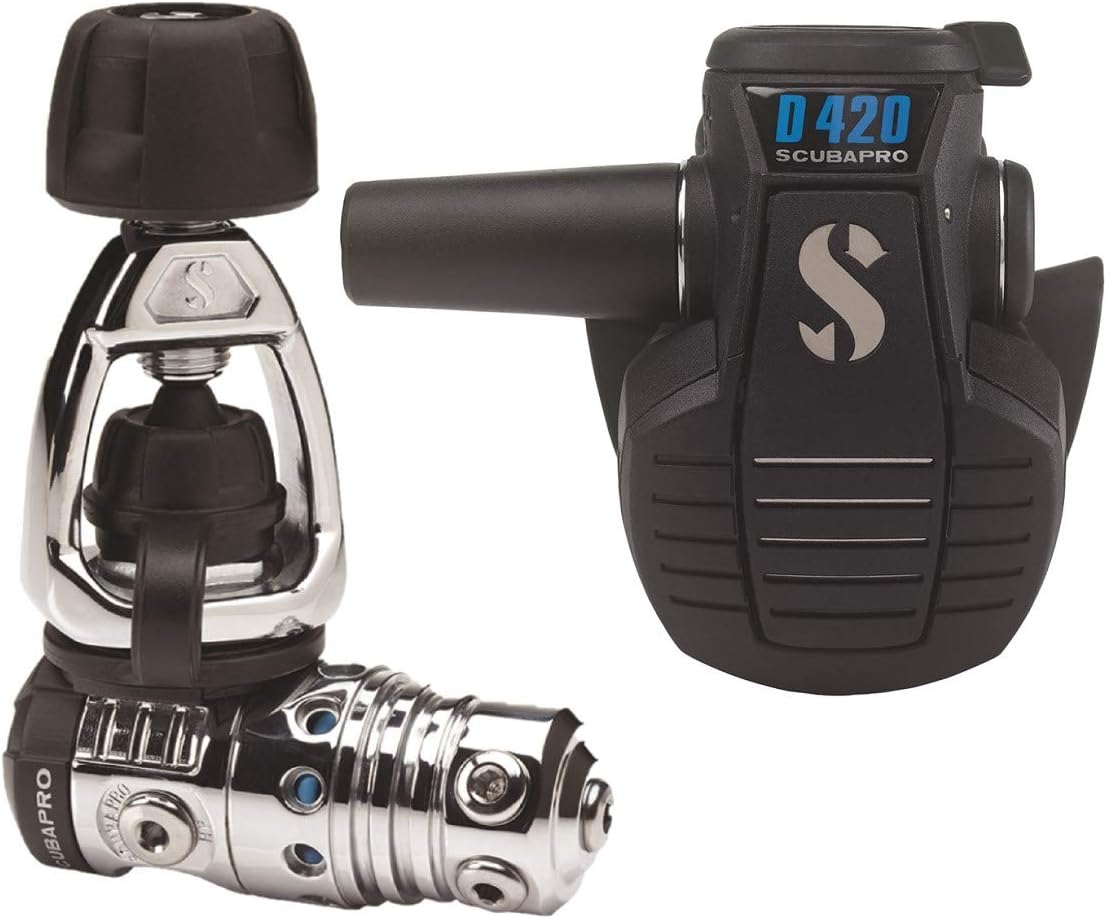
Image 1.1: The SCUBAPRO MK25 EVO first stage (left) and D420 second stage (right) components of the dive regulator system.
2. Key Features
- MK25 EVO First Stage: Air-balanced flow-through piston design for consistent and effortless airflow, regardless of depth or tank pressure. Features XTIS (Extended Thermal Insulating System) for enhanced cold-water resistance.
- D420 Second Stage: Uniquely shaped, fiberglass-reinforced nylon casing with an air-balanced Progressive Flow Control Valve for smooth, natural breathing.
- Flexible Hose Connection: The D420 allows the low-pressure hose to be connected on either the right or left side for optimal rigging.
- Dive/Pre-Dive System: Adjusts airflow direction for improved exhalation effort.
- Large Purge Button: Easily operated even with gloves.
3. Setup Instructions
3.1 Connecting the First Stage to the Cylinder Valve
- Ensure the cylinder valve is clean and free of debris.
- Align the MK25 EVO first stage with the cylinder valve. For DIN connections, screw the first stage directly into the valve. For Yoke connections, place the yoke over the valve and tighten the screw securely.
- Do not overtighten. Ensure a snug fit to prevent air leaks.
3.2 Connecting Hoses to the First Stage
The MK25 EVO first stage features multiple low-pressure (LP) and high-pressure (HP) ports. Connect your D420 second stage, alternate air source, pressure gauge, and BCD inflator hose to the appropriate ports.
- Low-Pressure Ports: Four high-flow and one axial super high-flow LP ports are available on a swivel turret. Connect the D420 second stage hose to one of these.
- High-Pressure Ports: Two HP ports are available for your pressure gauge and/or dive computer transmitter.

Image 3.1: The SCUBAPRO MK25 EVO first stage, highlighting its air-balanced piston design for consistent air delivery.
3.3 Connecting the Second Stage Hose
The D420 second stage can have its low-pressure hose connected on either the right or left side. Choose the side that provides the most comfortable and streamlined hose routing for your configuration.
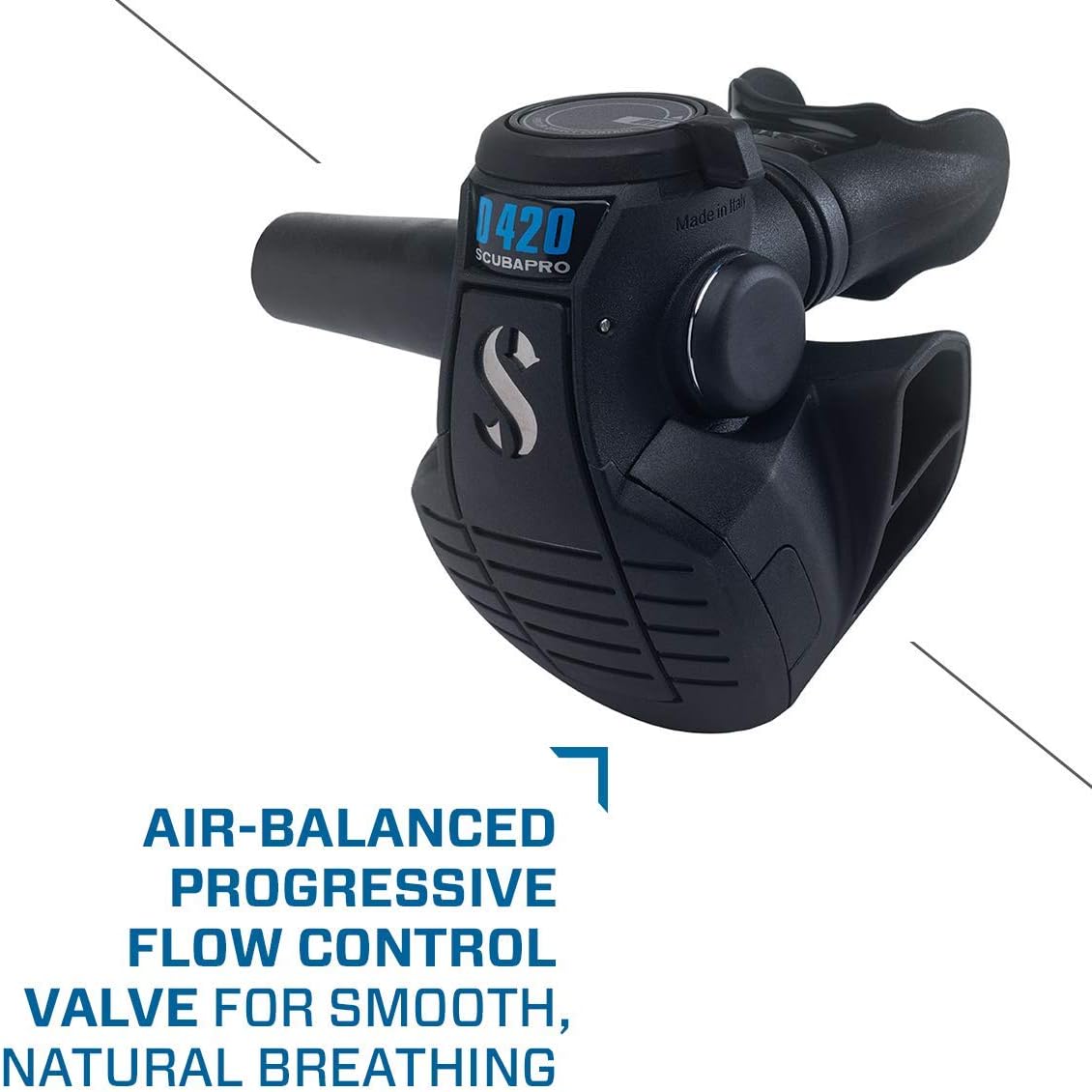
Image 3.2: The SCUBAPRO D420 second stage, featuring its air-balanced progressive flow control valve for smooth breathing.
4. Operating Instructions
4.1 Pre-Dive Checks
- Slowly open the cylinder valve and check your pressure gauge. Ensure the pressure is within safe limits for your dive plan.
- Listen for any air leaks. If leaks are detected, close the cylinder valve and re-check all connections.
- Test the D420 second stage by inhaling gently. The air should flow freely and easily.
- Press the purge button on the D420 to ensure it functions correctly and clears water effectively.
4.2 Dive/Pre-Dive System Adjustment (D420 Second Stage)
The D420 second stage features a Dive/Pre-Dive System, controlled by a thumb tab switch on top of the casing. This system adjusts the direction of airflow right out of the valve, optimizing breathing performance.
- Pre-Dive Position: Set the switch to "Pre-Dive" (or similar marking) before entering the water or when the regulator is not in use. This setting helps prevent free-flow at the surface.
- Dive Position: Once submerged and ready to breathe from the regulator, switch to "Dive." This optimizes airflow for easier breathing during your dive.

Image 4.1: The SCUBAPRO D420 second stage with the Dive/Pre-Dive system switch clearly visible.
4.3 Purge Button Operation
The large purge button on the D420 second stage is designed for easy operation, even with thick gloves. Press the button to clear water from the second stage or to test air delivery.
5. Maintenance
5.1 Post-Dive Care
- After each dive, ensure the dust cap is securely placed on the first stage inlet before rinsing.
- Rinse the entire regulator system thoroughly with fresh, clean water. Submerge the second stage and gently press the purge button several times to flush out any salt or debris.
- Allow the regulator to air dry completely in a shaded, well-ventilated area, away from direct sunlight.
- Store the regulator in a clean, dry place, protected from extreme temperatures and physical damage.
5.2 Professional Servicing
Your SCUBAPRO regulator system requires periodic professional servicing by an authorized SCUBAPRO technician. Refer to your warranty information or contact SCUBAPRO for recommended service intervals, typically annually or after a certain number of dives.
6. Troubleshooting
This section addresses common issues you might encounter with your regulator system. For problems not listed here or if solutions do not resolve the issue, contact an authorized SCUBAPRO service center.
| Problem | Possible Cause | Solution |
|---|---|---|
| Free-flow from second stage |
|
|
| Hard breathing / High work of breathing |
|
|
| Air leak from connections |
|
|
7. Specifications
| Feature | Detail |
|---|---|
| Model Name | MK25 Evo/D420 Dive Regulator System |
| Brand | Scubapro |
| First Stage Type | Air-balanced flow-through piston |
| Second Stage Type | Air-balanced Progressive Flow Control Valve |
| Low Pressure Ports | 4 high-flow, 1 axial super high-flow (on swivel turret) |
| High Pressure Ports | 2 |
| Anti-freeze Protection | XTIS (Extended Thermal Insulating System) |
| Item Weight | 2.6 Pounds (approximately 1.18 kg) |
| Item Dimensions (LxWxH) | 9.75 x 7.27 x 4.5 inches (approximately 24.77 x 18.47 x 11.43 cm) |
| Part Number | 12.420.000 |
8. Warranty and Support
8.1 Warranty Information
The SCUBAPRO MK25 EVO/D420 Dive Regulator System comes with a limited warranty. Please refer to the warranty card included with your product or visit the official SCUBAPRO website for full details regarding coverage, terms, and conditions.
8.2 Customer Support
For technical assistance, spare parts, or professional servicing, please contact an authorized SCUBAPRO dealer or visit the official SCUBAPRO website for support resources and contact information.
Manufacturer: SCUBAPRO
Website: www.scubapro.com


