Introduction
This manual provides instructions for the ZdalaMit Replacement Remote Control, model e77a30ea-612d-4ad8-be4c-2ede6a3567c0, designed for various Hannspree TV models. This remote control is a direct replacement and requires no programming or pairing.
Compatible Hannspree TV models include: HSG1075, HSG1141, HSG1114, ST289MUB, ST289MUBUFH2S, HSG1113, HSG1139, HSG1116, HSG1076, SJ28DMBB, HSG1142, HSG1117, HSG1074, HSG1102, HSG1131, ST558MBR, ST558MBW, HSG1297, HSG1067, HSG1150.
Setup
The ZdalaMit Replacement Remote Control is designed for immediate use with compatible Hannspree TV models. No complex programming or pairing procedures are required.
Installing Batteries
- Locate the battery compartment on the back of the remote control.
- Slide open the battery compartment cover.
- Insert two (2) 1.5V AA Alkaline batteries, ensuring the positive (+) and negative (-) terminals align with the indicators inside the compartment.
- Close the battery compartment cover securely.

Figure 1: Rear view of the remote control with the battery cover removed, illustrating the battery insertion process. Two AA batteries are required for operation.
Once batteries are installed, the remote control is ready for use with your Hannspree TV.
Operating Instructions
This remote control provides full functionality for your compatible Hannspree TV. Below is a general overview of common button functions.
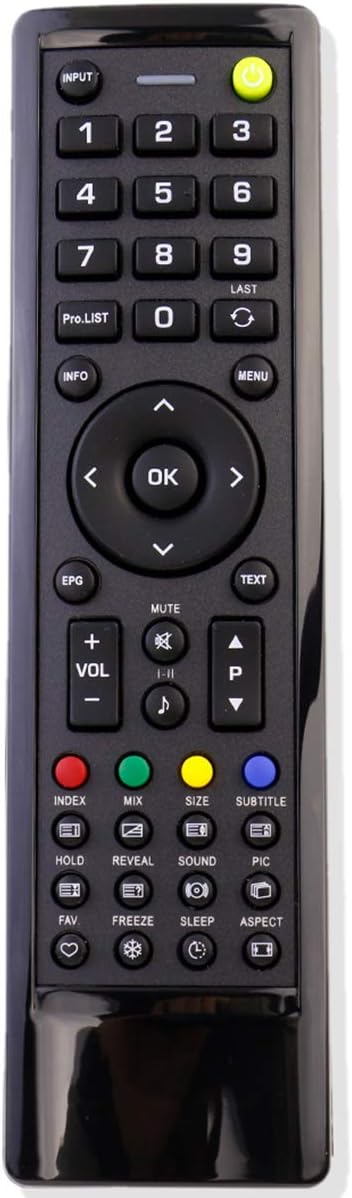
Figure 2: Front view of the remote control, displaying the layout of all functional buttons.
Key Functions
- POWER (●): Turns the TV on or off.
- INPUT: Selects the input source (e.g., HDMI, AV).
- Number Buttons (0-9): Directly selects TV channels.
- PRO.LIST: Accesses the program list.
- LAST: Returns to the previously viewed channel.
- INFO: Displays information about the current program.
- MENU: Opens the TV's main menu.
- Navigation Buttons (Up, Down, Left, Right, OK): Navigates through menus and confirms selections.
- EPG: Accesses the Electronic Program Guide.
- TEXT: Toggles Teletext display.
- VOL +/-: Adjusts the volume level.
- CH P +/-: Changes the TV channel up or down.
- MUTE: Mutes or unmutes the TV sound.
- I-II: Selects audio language or mode.
- Music Note Icon: Likely for audio settings or sound modes.
- Color Buttons (Red, Green, Yellow, Blue): Used for specific functions within menus or interactive services.
- INDEX: Accesses index functions.
- MIX: Activates mix mode.
- SIZE: Adjusts screen size/aspect ratio.
- SUBTITLE: Toggles subtitles on or off.
- HOLD: Holds the current screen.
- REVEAL: Reveals hidden text.
- SOUND: Accesses sound settings.
- PIC: Accesses picture settings.
- FAV: Accesses favorite channels.
- FREEZE: Freezes the current image.
- SLEEP: Sets the sleep timer.
- ASPECT: Changes the aspect ratio of the display.
For detailed functionality of each button, refer to your Hannspree TV's original user manual.
Maintenance
Battery Replacement
Replace batteries when the remote control's response becomes sluggish or stops working. Always replace both batteries simultaneously with new 1.5V AA Alkaline batteries. Do not mix old and new batteries, or different types of batteries.
Cleaning
To clean the remote control, gently wipe its surface with a soft, dry cloth. For stubborn dirt, slightly dampen the cloth with water. Avoid using abrasive cleaners, solvents, or alcohol, as these can damage the remote's finish or internal components.
Storage
If the remote control will not be used for an extended period, remove the batteries to prevent leakage and potential damage to the device.
Troubleshooting
| Problem | Possible Cause | Solution |
|---|---|---|
| Remote control not working. |
|
|
| Some buttons not responding. |
|
|
| Remote works intermittently. |
|
|
Specifications
- Product Dimensions: 6.5 x 1.8 x 0.6 inches
- Item Weight: 1.41 ounces
- Power Supply: 2 x 1.5V AA Alkaline Batteries (not included)
- Color: Black
- Max Number of Supported Devices: 1
- Compatible Devices: Hannspree Televisions (specific models listed in Introduction)
- Model Number: e77a30ea-612d-4ad8-be4c-2ede6a3567c0
- Brand: ZdalaMit
Warranty and Return Policy
This product is typically covered by a standard return policy. For specific details regarding returns or replacements, please refer to the purchase platform's return policy, which generally allows for returns within 30 days of purchase if the item is defective or not as described.
Customer Support
Should you encounter any issues or have questions regarding your ZdalaMit Replacement Remote Control, please do not hesitate to contact the seller or customer support through the platform where the purchase was made. Your satisfaction is important.