
Product Overview
The BIOS Professional Digital/Analog Kitchen Scale (Model 599SC) is designed for precise measurement of ingredients in grams or ounces. It features a dual display, combining a digital readout with an analog dial for clear and easy-to-read measurements. This scale is equipped with a tare function, overload indication, and low battery warning to ensure reliable performance.

Image: The BIOS Professional Digital/Analog Kitchen Scale, showcasing its unique dual display with both digital and analog readouts.
Setup
- Unpacking: Carefully remove the scale from its packaging. Inspect for any damage. Retain packaging for future storage or transport.
- Battery Installation: The scale requires 3 AAA batteries (included).
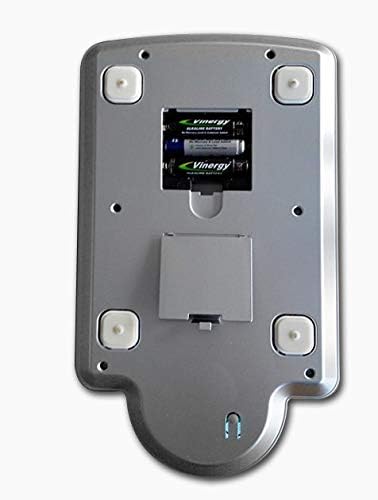
Image: The underside of the scale, illustrating the battery compartment where 3 AAA batteries are to be inserted.
- Locate the battery compartment on the underside of the scale.
- Open the battery cover.
- Insert 3 AAA batteries, ensuring correct polarity (+/-).
- Close the battery cover securely.
- Placement: Place the scale on a hard, flat, and stable surface to ensure accurate readings. Avoid placing it on soft or uneven surfaces.
Operating Instructions
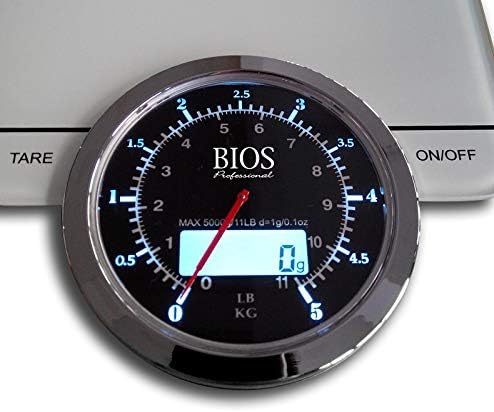
Image: A detailed view of the scale's display area, highlighting the 'ON/OFF' and 'TARE' touch sensor buttons.
- Power On/Off:
- To turn on, press the ON/OFF button. The display will show '0' or '0g'.
- To turn off, press and hold the ON/OFF button for a few seconds, or the scale will automatically shut off after a period of inactivity.
- Unit Conversion (g/oz):
- With the scale on, press the g/oz button (often integrated with the ON/OFF or TARE button, or a separate touch sensor) to switch between grams (g) and ounces (oz). The selected unit will be displayed.
- Tare Function (Zero Calibration):
- Place an empty container on the scale platform. The display will show the container's weight.
- Press the TARE button. The display will reset to '0', effectively subtracting the container's weight.
- You can now add ingredients to the container, and the scale will display only the weight of the added items.
- Weighing:
- Ensure the scale is on and displaying '0'.
- Place the item(s) to be weighed directly onto the scale platform or into a tared container.
- Read the weight displayed on the digital screen and indicated by the analog dial.

Image: The kitchen scale in use, accurately weighing a bowl of fresh strawberries, demonstrating its practical application.
Maintenance
- Cleaning: Wipe the scale surface with a soft, damp cloth. Do not immerse the scale in water or use abrasive cleaners.
- Storage: Store the scale in a cool, dry place. Avoid extreme temperatures and high humidity. Do not place heavy objects on the scale when not in use.
- Battery Replacement: If the display shows 'Lo' or becomes dim, replace the batteries promptly.
Troubleshooting
| Problem | Possible Cause | Solution |
|---|---|---|
| Scale does not turn on | Dead or incorrectly installed batteries | Check battery polarity or replace batteries. |
| Display shows 'Lo' | Low battery power | Replace all 3 AAA batteries. |
| Display shows 'O-Ld' | Overload (weight exceeds capacity) | Remove items immediately. Do not exceed the maximum capacity of 5000g / 11lbs. |
| Inaccurate readings | Uneven surface, scale not tared, or external interference | Place scale on a flat, stable surface. Ensure scale is tared to zero before weighing. Avoid strong electromagnetic fields. |
Specifications
- Model Number: 599SC
- Capacity: Max 5000 g / 11 lbs
- Readout Accuracy: 1 gram
- Units: Grams (g), Ounces (oz)
- Display Type: LCD, Touchscreen with Backlit Display
- Material: Stainless Steel platform, Plastic body
- Dimensions: 11.04 x 6 x 1.2 inches (28.04 x 15.24 x 3.05 cm)
- Item Weight: 1.11 pounds (0.5 kg)
- Power Source: 3 x AAA batteries (included)
- Special Features: Tare function, Overload indicator, Low battery indicator


