
1. Product Overview
The Taidacent W7500 Cloud Ethernet Module is designed for bidirectional transparent transmission between TTL serial devices and Ethernet networks. It integrates an industrial-grade W7500 chip, offering robust performance for various networking applications, including Modbus TCP communication.

Figure 1: Top-down view of the Taidacent W7500 Cloud Ethernet Module, showing the RJ45 port and main W7500 chip.
Key Features:
- TTL serial device to Ethernet bidirectional transparent transmission.
- Supports TCP Server, TCP Client, UDP Server, and UDP Client work modes.
- Configurable timeout restart function for enhanced reliability.
- MAC address modification capability for network integration.
- Integrated W7500 chip with ARM Coretex-MO core, 128KB Flash, and 16KB SRAM.
- Wide operating temperature range of -40°C to 85°C.
2. Specifications
Hardware Specifications:
- Chipset: W7500 (ARM Coretex-MO core)
- Memory: Embedded 128KB Flash, 16KB SRAM
- Operating Temperature: -40°C to 85°C
- TCP/IP Stack: Full hardware TCP/IP stack core
- Watchdog: Built-in for stable operation
Communication Specifications:
- Serial Interface: TTL
- Network Interface: RJ45 Ethernet
- Baud Rate: 1200bps to 115.2Kbps (configurable)
- Work Modes: TCP Server, TCP Client, UDP Server, UDP Client
- Protocols Supported: Modbus RTU/TCP
General Information:
- Manufacturer: Taida
- ASIN: B0816NJP2F
- First Available: November 8, 2019
3. Setup
3.1 Physical Connection
Connect the module to your microcontroller (MCU) or other TTL serial device using the appropriate serial pins. Ensure correct voltage levels and pin assignments (TX, RX, GND, VCC). Connect the RJ45 port to your Ethernet network using a standard Ethernet cable.

Figure 2: Side view of the module, illustrating the pin headers for serial connection.
3.2 Initial Configuration
The module requires initial configuration to set parameters such as IP address, subnet mask, gateway, serial port baud rate, and operating mode (TCP Server, TCP Client, UDP Server, UDP Client). This can typically be done using:
- Configuration Software: Dedicated software provided by the manufacturer (if available) for easy setup via a connected PC.
- AT Commands: Direct configuration via serial AT commands. Refer to the detailed AT command set documentation for specific commands.
- Virtual Serial Port Software: Utilize virtual serial port tools to establish a connection and configure the module.
The serial port baud rate can be set from 1200bps to 115.2Kbps. The MAC address of the module can also be modified if required for specific network environments.
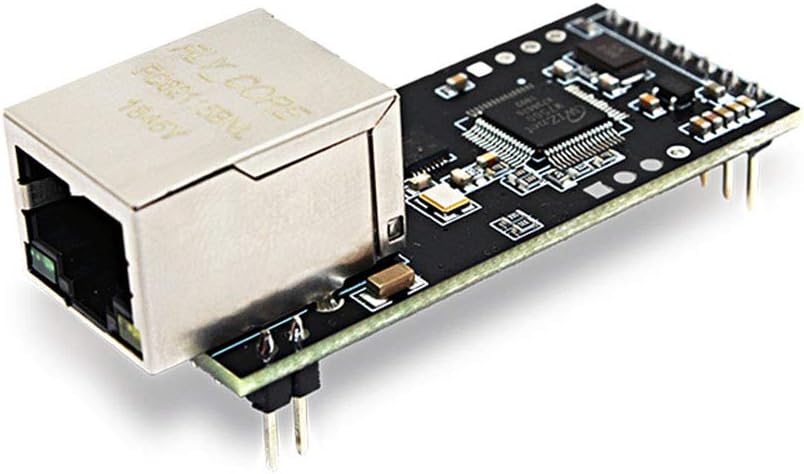
Figure 3: Angled view of the module, emphasizing the RJ45 Ethernet port for network connection.
4. Operating Instructions
4.1 Transparent Data Transmission
Once configured, the module facilitates transparent bidirectional data transmission between the connected TTL serial device and the Ethernet network. Data sent from the serial port will be encapsulated and transmitted over Ethernet, and vice-versa.
4.2 Work Modes
The module supports various operating modes to suit different network architectures:
- TCP Server: The module listens for incoming TCP connections from clients.
- TCP Client: The module initiates a TCP connection to a specified remote server.
- UDP Server: The module receives UDP packets on a specified port.
- UDP Client: The module sends UDP packets to a specified remote IP address and port.
4.3 Modbus RTU/TCP Protocol
The module supports the Modbus RTU/TCP protocol, enabling integration with industrial control systems and devices that use Modbus for communication. This allows Modbus RTU devices connected via serial to communicate over an Ethernet network using Modbus TCP.
4.4 Advanced Features
- Custom Registration Package: Allows for sending a custom data packet upon connection.
- Heartbeat Package Function: Configurable heartbeat packets to maintain connections and detect disconnections.
- TasTek Transparent Cloud IOT Technology: Enables mobile phone data viewing and cloud integration.

Figure 4: Top view of the module, providing a clearer look at the W7500 chip and other components.
5. Maintenance
5.1 Stable Operation
The module is designed for high stability with a built-in watchdog feature that helps prevent downtime. It is engineered for strong anti-interference and stable operation without frame drops, even during network fluctuations.
5.2 Timeout Restart Function
To ensure continuous operation, the module includes a configurable timeout restart function. If no data is transmitted or received for a specified period, the module can be set to automatically restart, resolving potential communication stalls.
5.3 Environmental Considerations
Operate the module within its specified temperature range of -40°C to 85°C. Avoid exposing the module to excessive moisture, dust, or corrosive environments to ensure its longevity and reliable performance.

Figure 5: Angled top view of the module, showing its full length and component layout.
6. Troubleshooting
6.1 No Network Connectivity
- Check Physical Connections: Ensure the Ethernet cable is securely connected to both the module and the network switch/router.
- Verify Network Settings: Confirm that the module's IP address, subnet mask, and gateway are correctly configured and compatible with your network.
- Ping Test: Attempt to ping the module's IP address from a connected computer to verify network reachability.
6.2 No Serial Communication
- Check Serial Wiring: Ensure TX, RX, and GND pins are correctly connected between the module and the serial device.
- Verify Baud Rate: Confirm that the serial baud rate configured on the module matches the baud rate of the connected serial device.
- Use Virtual Serial Port: Utilize virtual serial port software to test the serial communication independently.
6.3 Module Unresponsive
- Power Cycle: Disconnect and reconnect power to the module.
- Check Power Supply: Ensure the module is receiving adequate and stable power.
- Timeout Restart: If configured, the module should automatically restart after a period of inactivity. If not, consider enabling or adjusting this feature.
7. Warranty and Support
Specific warranty information for the Taidacent W7500 Cloud Ethernet Module is not provided in the product details. For warranty claims, technical support, or further assistance, please contact the manufacturer, Taidacent, or your point of purchase directly.
You may also visit the Taidacent Store on Amazon for additional product information or to contact their support channels.