
1. Introduction
The JJC RF Mount Auto Focus Macro Extension Tube Set is designed to enable your Canon RF mount lens to focus closer than its normal minimum focusing distance. This accessory is particularly useful for macro photography, allowing you to achieve greater magnification without altering the original optical quality of your lens. The set consists of two tubes, 11mm and 16mm in length, which can be used individually or combined to achieve various magnification levels.
These extension tubes contain no optical elements, ensuring that the image quality of your lens is not degraded. They are mounted between the camera body and the lens, increasing the distance between the lens and the camera's sensor, which forces the lens to focus much closer than normal. The greater the length of the extension tube, the closer the lens can focus.

Image 1: JJC Macro Extension Tube Set for Canon RF Mount.
2. Product Features
- Enhanced Macro Capability: Shortens the minimum focusing distance of your lens, converting almost any lens into a macro lens for detailed close-up photography.
- Full Electronic Compatibility: Maintains full autofocus (AF) and auto exposure (AE) functionality between the camera and lens, thanks to built-in gilt metal contacts.
- Optical Quality Preservation: Designed without optical elements to ensure no degradation of your lens's original image quality.
- Durable Construction: Features an aluminum camera mount and high-quality brass lens mount for secure attachment, with the tube body made of high-quality ABS plastic.
- Versatile Lengths: Includes 11mm and 16mm tubes that can be used independently or combined for varied magnification levels.
- Non-Glare Interior: The interior is designed with a non-glare matte finish to prevent reflections and maintain image contrast.

Image 2: Detailed view of the extension tube, highlighting its metal bayonets, gilt metal contacts for electronic communication, dismounting button, guide pin, and anchor point for secure attachment.

Image 3: Key features of the extension tube, including brass contacts for signal transmission, retained AF/AE, absence of optical elements, and durable internal construction.
3. Package Contents
The JJC RF Mount Auto Focus Macro Extension Tube Set includes:
- 1x 11mm Macro Extension Tube
- 1x 16mm Macro Extension Tube
- 1x Body Cap
- 1x Rear Lens Cap
- 1x Storage Pouch

Image 4: The extension tube set, including protective caps and a storage pouch.
4. Setup and Installation
Follow these steps to properly attach the extension tubes to your Canon RF mount camera and lens:
- Remove the Lens: Ensure your camera is powered off. Carefully remove the lens from your camera body by pressing the lens release button and rotating the lens counter-clockwise.
- Attach Extension Tube to Camera: Align the dot mark on the extension tube (either 11mm or 16mm, or both stacked) with the corresponding dot mark on your camera body. Rotate the tube clockwise until it clicks into place, indicating a secure lock.
- Attach Lens to Extension Tube: Align the dot mark on your lens with the dot mark on the attached extension tube. Rotate the lens clockwise until it clicks into place.
- To Remove: To remove the lens, press the lens release button on the extension tube and rotate the lens counter-clockwise. To remove the extension tube from the camera, press the camera's lens release button and rotate the tube counter-clockwise.
Important Note: The extension tubes are compatible with Canon RF mount mirrorless cameras and RF mount mirrorless lenses. They are not compatible with Canon RF teleconverters or extenders, such as Canon Extender RF 1.4X or Canon Extender RF 2X.

Image 5: Step-by-step guide for attaching and detaching the extension tubes.
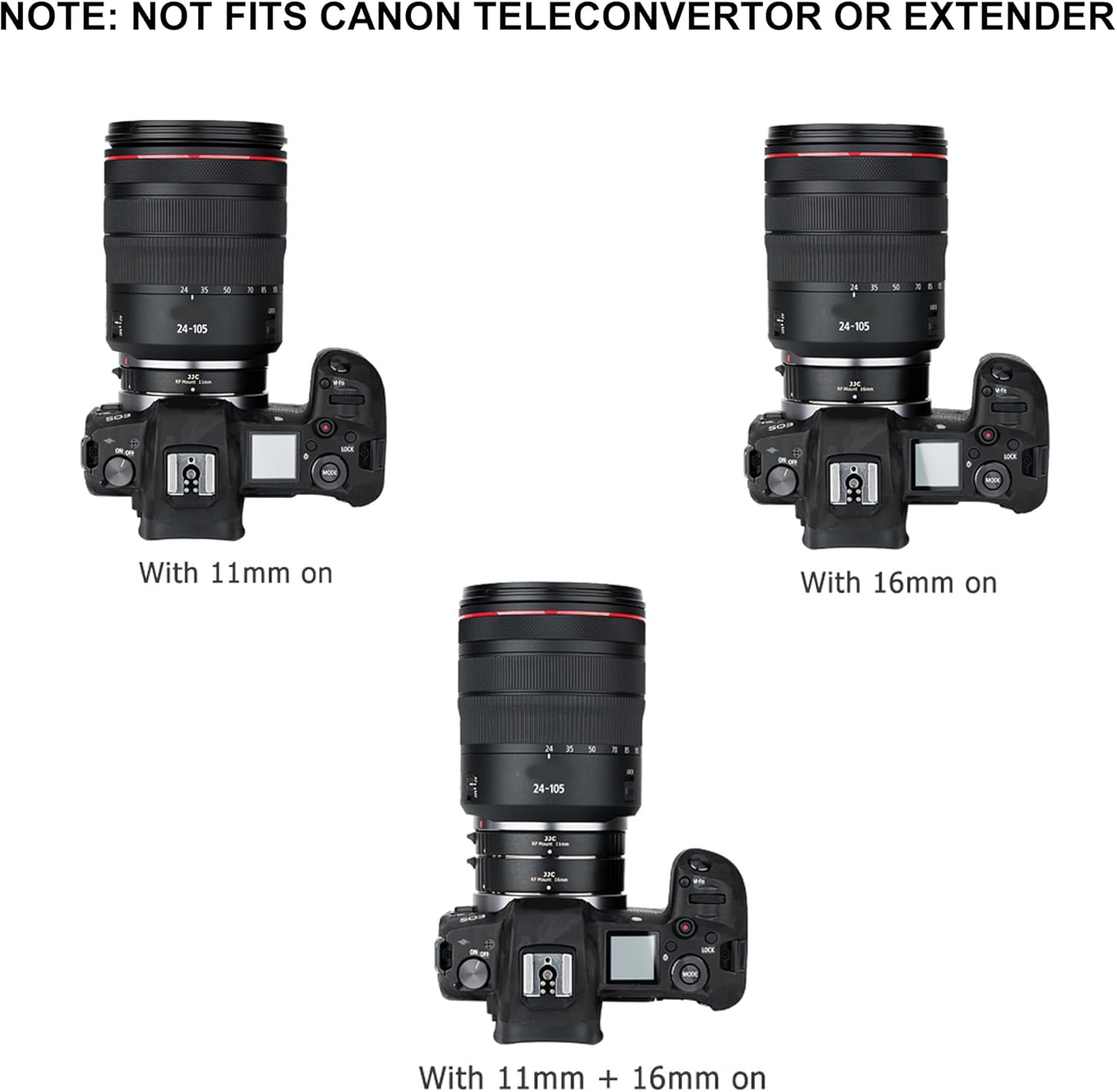
Image 6: Visual representation of the camera and lens with different extension tube configurations.
5. Operating Instructions
Once the extension tubes are securely attached, you can begin exploring macro photography:
- Magnification: Use the 11mm tube for moderate magnification, the 16mm tube for greater magnification, or combine both (11mm + 16mm) for maximum close-up effect. Experiment with different combinations to achieve your desired shot.
- Focusing: Due to the significantly reduced focusing distance, you will need to move your camera closer to the subject to achieve focus.
- Autofocus Performance: While full autofocus is retained, its performance may be affected, especially when multiple tubes are stacked or in low light conditions. The depth of field becomes very shallow at macro distances, making precise autofocus challenging.
- Manual Focus: For critical focus, particularly with high magnification, manual focus is often recommended. Consider using your camera's focus peaking or magnification features to assist with manual focusing.
- Aperture: As you add more extension tubes, the effective aperture of your lens decreases, meaning less light reaches the sensor. You may need to increase your ISO or use a wider aperture (smaller f-number) to compensate for light loss.
- Stability: For best results in macro photography, especially with longer exposure times or high magnification, using a tripod and a focusing rail is highly recommended to ensure stability and precise adjustments.
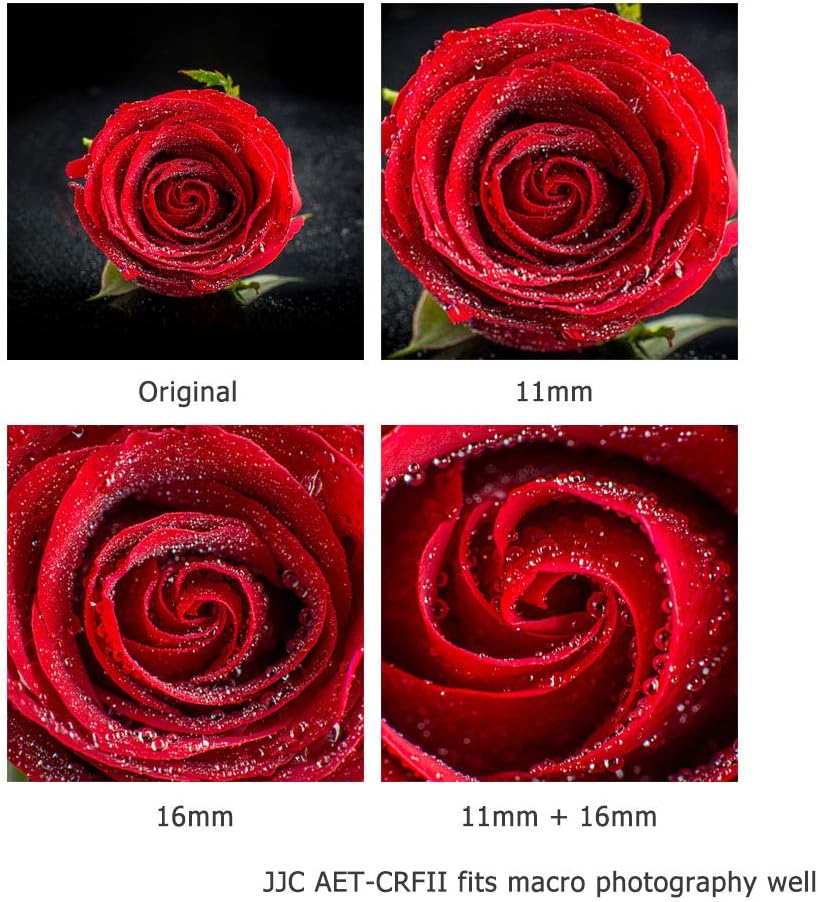
Image 7: Examples of macro photography achieved with different extension tube lengths, demonstrating increased magnification.

Image 8: Macro results for a flower, illustrating the effect of individual and combined extension tubes.
Video 1: Official product video demonstrating the JJC Auto Focus Macro Extension Tube Set for Canon RF Mount, showing its features and how it functions in macro photography. This video highlights the ease of attachment and the close-up capabilities.
6. Maintenance
To ensure the longevity and optimal performance of your JJC Macro Extension Tube Set, follow these maintenance guidelines:
- Cleaning: Use a soft, lint-free cloth to gently wipe the exterior of the tubes. For the metal contacts, use a clean, dry microfiber cloth. Avoid using harsh chemicals or abrasive materials.
- Dust Removal: Use an air blower to remove any dust or debris from the interior of the tubes and the metal contacts.
- Storage: When not in use, store the extension tubes in the provided storage pouch with the body and rear lens caps attached to prevent dust accumulation and scratches. Store in a cool, dry place away from direct sunlight and extreme temperatures.
- Handling: Always handle the tubes by their body, avoiding touching the metal contacts or the interior surfaces.
7. Troubleshooting
If you encounter issues while using your extension tube set, consider the following:
- Autofocus Not Working or Slow:
- Ensure the tubes and lens are securely attached and the metal contacts are clean.
- Autofocus performance can be reduced with extension tubes, especially when multiple tubes are stacked. This is a common characteristic of extension tube sets across brands.
- In such cases, switch to manual focus. Use your camera's focus peaking or magnification features for precise focusing.
- Ensure sufficient lighting. Macro photography often requires more light due to the reduced effective aperture.
- No Communication Between Camera and Lens:
- Check that all connections are firm and properly aligned.
- Clean the gilt metal contacts on both the tubes and your camera/lens with a clean, dry cloth.
- Vignetting or Dark Corners:
- This can occur with certain lens and tube combinations, especially at wider focal lengths. Experiment with different tube lengths or slightly zoom in if using a zoom lens.
8. Specifications
| Model Number | AETCRFII |
| Tube Lengths | 11mm, 16mm |
| Compatible Mountings | Canon RF Mount (Mirrorless Cameras & Lenses) |
| Material | Aluminum (camera mount), Brass (lens mount), ABS Plastic (tube body) |
| Electronic Contacts | Yes, Gilt Metal Contacts for AF/AE |
| Optical Elements | None |
| Item Weight | 0.634 ounces |
| Package Dimensions | 3.6 x 3.4 x 3.2 inches |
9. Warranty and Support
JJC products are manufactured to high-quality standards. For specific warranty information and customer support, please refer to the warranty card included with your product or visit the official JJC website. Keep your purchase receipt as proof of purchase for any warranty claims.