
1. Introduction
This manual provides detailed instructions for the setup, operation, maintenance, and troubleshooting of your New Direction Tackle Smart Bite Alarm 3 + 1 (K9 + R9s) Set. Please read this manual thoroughly before using the product to ensure proper function and longevity.
2. Product Overview
The New Direction Tackle Smart Bite Alarm Set is designed to enhance your carp fishing experience with advanced features and connectivity. The set includes K9s bite alarms and an R9s receiver, offering remote control capabilities and smart integration.
Key Features:
- Remote Control: Adjust volume, tone, and sensitivity of the bite alarms directly from the receiver.
- Halo Night Light: Features a night light with five selectable colors for visibility in low-light conditions.
- Smartphone Application: Optional app for modifying bite detector settings via your smartphone.
- Smart Link Connectivity: Connects bite detectors with other ND devices such as headlamps, bivouac lights, air light sounders, and smartwatches.
- Receiver with Display: Provides information on charge status and settings with convenient text-based menu navigation.
- Optional Snag Ears: Screw-in snag ears are included for enhanced rod stability.
- High-Quality Speaker: Ensures clear sound indication.
- Extended Range: Operates effectively over 200 meters.
- Mute Function: A 30-second mute option is available.
- Customizable LED Colors: Choose from red, green, blue, yellow, or white LED colors.
- Adjustable Settings: 10 volume settings and 10 sensitivity settings for precise control.
- Drop Back Indication: Luminous roller provides visual indication for drop-back bites.

Figure 2.1: Front view of the K9s Smart Bite Alarm, showing volume and sensitivity dials, and the central ND logo with LED ring.

Figure 2.2: Side view of the K9s Smart Bite Alarm, highlighting its compact profile and power button.

Figure 2.3: Back view of the K9s Smart Bite Alarm, showing battery compartment access and regulatory markings.

Figure 2.4: The R9s Receiver, featuring a clear display for settings and status information.
3. Package Contents
Verify that all items are present in your package:
- K9s Smart Bite Alarms (Quantity: 3)
- R9s Receiver (Quantity: 1)
- Optional Screw-in Snag Ears
- Protective Carrying Case

Figure 3.1: The complete Smart Bite Alarm set, including alarms, receiver, and snag ears, neatly organized in its protective carrying case.
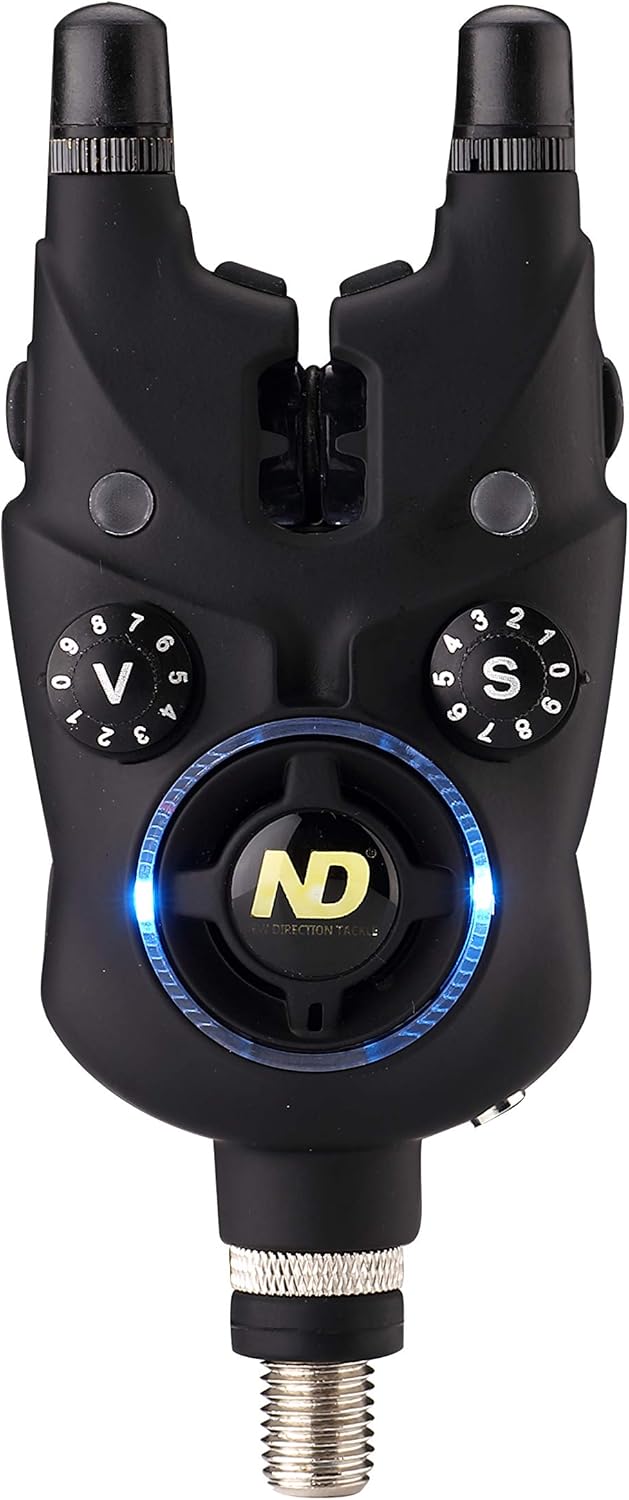
Figure 3.2: Close-up of the optional screw-in snag ears, designed to provide additional rod security.
4. Setup
4.1 Battery Installation
Each K9s bite alarm requires two CR2 batteries. The R9s receiver also requires batteries (type not specified in product data, refer to receiver manual for details). Ensure correct polarity when inserting batteries. Replace the battery compartment cover securely after installation.
4.2 Attaching Snag Ears
The optional snag ears can be screwed into the designated ports on the top of each bite alarm. These provide additional stability for your fishing rod, preventing it from being pulled off the alarm during aggressive bites.
4.3 Mounting the Alarms
Screw each bite alarm securely onto your rod pod or bankstick. Ensure they are stable and positioned correctly to allow free movement of your fishing line through the roller wheel.

Figure 4.1: A K9s bite alarm mounted on a rod pod, demonstrating its robust design even in wet conditions.
4.4 Pairing Alarms and Receiver
To pair your bite alarms with the R9s receiver, follow the specific pairing instructions provided in the full product manual. Generally, this involves putting both devices into a pairing mode and confirming the connection. Once paired, the receiver will display the status of each alarm.
4.5 Smartphone App Connection
Download the New Direction Tackle smartphone application from your device's app store. Follow the in-app instructions to connect your K9s bite alarms and R9s receiver. This allows for advanced control and customization of settings.
5. Operating Instructions
5.1 Power On/Off
Press and hold the power button on each bite alarm and the receiver to turn them on or off. A confirmation sound or light indication will typically occur.
5.2 Adjusting Settings via Receiver
The R9s receiver allows remote adjustment of bite alarm settings. Use the receiver's menu navigation to select the desired alarm and modify its volume, tone, and sensitivity. The display provides clear, text-based feedback.
5.3 Halo Night Light
The Halo night light feature provides illumination around the bite alarm. You can select from five different LED colors (red, green, blue, yellow, white) to suit your preference or fishing conditions. This feature is particularly useful during night fishing sessions.

Figure 5.1: A K9s bite alarm illuminated with its blue Halo night light, set up on a rod at the water's edge during nighttime.

Figure 5.2: Several K9s bite alarms showcasing their customizable LED colors, including red, orange, and green.
5.4 Smartphone App Control
Once connected, the smartphone application provides a comprehensive interface for managing your bite alarm settings. This includes fine-tuning sensitivity, adjusting volume and tone, and customizing LED colors.
5.5 Smart Link Functionality
The Smart Link feature allows your bite alarms to communicate with other compatible New Direction Tackle devices. This creates an integrated system where a bite detection can trigger actions on devices like headlamps or bivouac lights, enhancing your overall fishing setup.
5.6 Mute Function
Activate the 30-second mute function when you need to adjust your line or rod without triggering an alarm sound. This can be controlled via the receiver or potentially the smartphone app.
5.7 Drop Back Indication
The luminous roller on the bite alarm provides a visual indication for drop-back bites, in addition to the audible alert and receiver notification. This helps distinguish between different types of bites.
6. Maintenance
6.1 Cleaning
Regularly clean the bite alarms and receiver with a soft, damp cloth. Avoid using abrasive cleaners or solvents, as these can damage the casing and electronic components. Ensure the roller wheel on the bite alarm is free from debris to maintain accurate sensitivity.
6.2 Battery Replacement
When the low battery indicator appears on the receiver or an individual alarm, replace the batteries promptly. Always use new CR2 batteries for the alarms and the recommended type for the receiver. Dispose of used batteries according to local regulations.
6.3 Storage
When not in use, store the bite alarm set in its protective carrying case in a cool, dry place, away from direct sunlight and extreme temperatures. Remove batteries if storing for extended periods to prevent leakage.
7. Troubleshooting
If you encounter issues with your Smart Bite Alarm Set, refer to the following common problems and solutions:
| Problem | Possible Cause | Solution |
|---|---|---|
| No signal from alarm to receiver | Low batteries; Out of range; Not paired correctly | Check and replace batteries. Ensure devices are within 200m range. Re-pair alarms with the receiver. |
| Alarm not detecting bites | Sensitivity too low; Roller wheel obstructed | Increase sensitivity setting. Clean the roller wheel to remove any debris. |
| Receiver display not working | Low battery in receiver; Power issue | Check and replace receiver batteries. Ensure the receiver is powered on. |
| Smartphone app not connecting | Bluetooth off; App permissions; Pairing issue | Ensure Bluetooth is enabled on your phone. Check app permissions. Re-attempt pairing through the app. |
If the problem persists after trying these solutions, please contact New Direction Tackle customer support.
8. Specifications
- Model: K9 + R9s
- Brand: New Direction Tackle
- Alarm Colors: Red, Green, Blue, Yellow (LED options)
- Battery Type (Alarms): CR2 (2 batteries required per alarm)
- Operating Range: Over 200 meters
- Package Dimensions: 26 x 21.9 x 8.1 cm
- Package Weight: 780 grams
- Volume Settings: 10 levels
- Sensitivity Settings: 10 levels
9. Safety Information
- Keep the device away from extreme temperatures, direct sunlight, and moisture.
- Do not attempt to disassemble or modify the device, as this will void the warranty and may cause damage.
- Keep batteries out of reach of children. If swallowed, seek immediate medical attention.
- Dispose of electronic waste and batteries responsibly according to local regulations.
- Ensure all components are securely fastened when in use to prevent loss or damage.
10. Warranty and Support
New Direction Tackle products are manufactured to high-quality standards. For warranty information, technical support, or service inquiries, please refer to the official New Direction Tackle website or contact their customer service department directly. Please retain your proof of purchase for warranty claims.


