
1. Introduction
This manual provides essential information for the setup, operation, and maintenance of your Xtrfy K4 RGB Mechanical Gaming Keyboard. Please read these instructions carefully to ensure optimal performance and longevity of your device. The Xtrfy K4 RGB is designed for high-performance gaming and typing, featuring durable mechanical switches and customizable RGB illumination.
2. Package Contents
Verify that all items are present in your package:
- Xtrfy K4 RGB Mechanical Gaming Keyboard
- USB Cable (attached)
- User Manual (this document)
3. Setup
Follow these steps to set up your Xtrfy K4 RGB keyboard:
- Unpack the Keyboard: Carefully remove the keyboard from its packaging.
- Connect to Computer: Plug the attached USB-A cable from the keyboard into an available USB port on your computer. The keyboard is plug-and-play and does not require additional drivers for basic functionality.
- Placement: Position the keyboard comfortably on your desk. Ensure stable placement for optimal use.
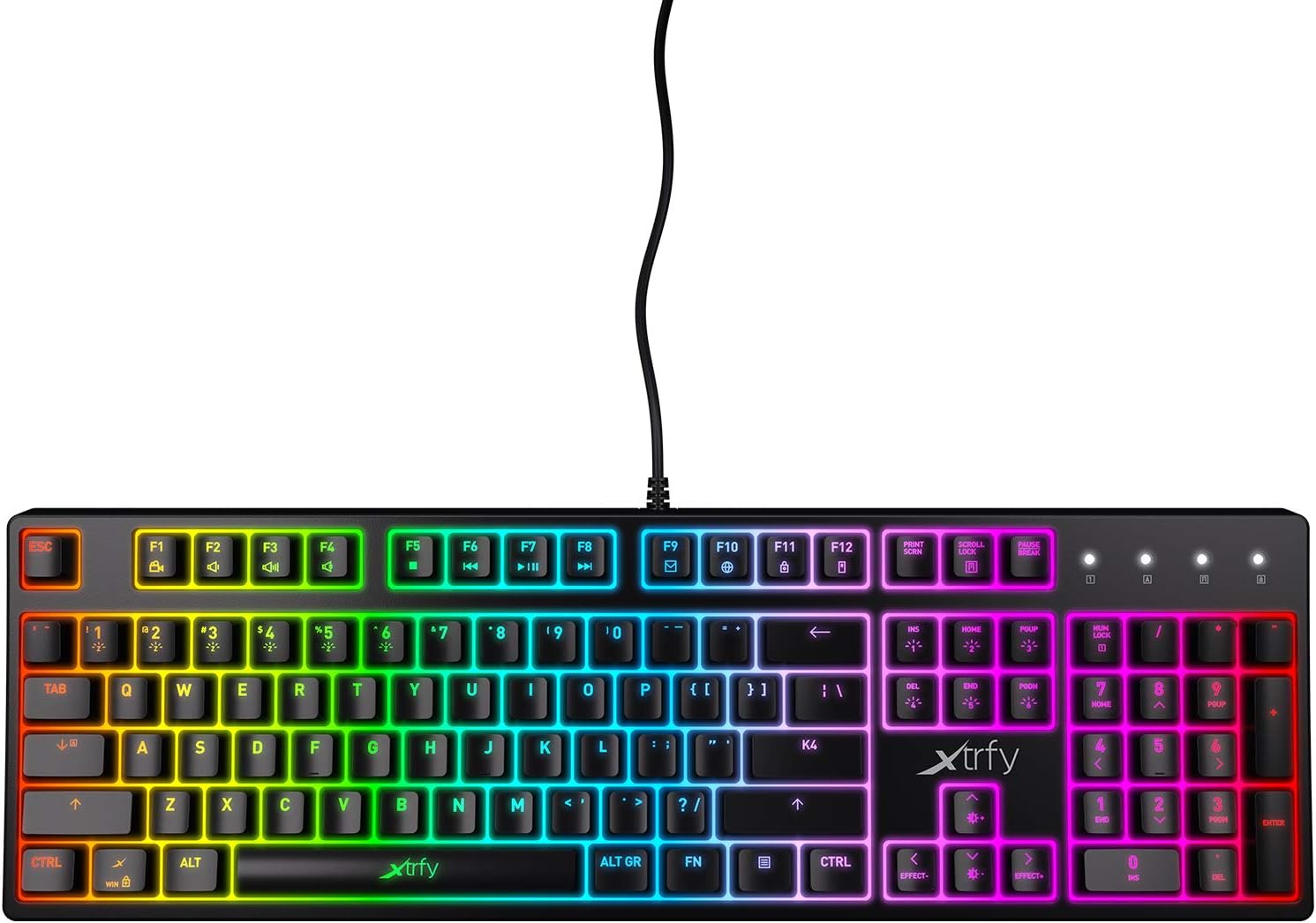
Figure 3.1: Top-down view of the Xtrfy K4 RGB keyboard, showing key layout and attached USB cable.
4. Operating Instructions
4.1 Basic Keyboard Functions
The Xtrfy K4 RGB functions as a standard mechanical keyboard. All keys are pre-programmed for their respective characters and functions. It features full N-key rollover and a 1000 Hz polling rate for precise and responsive input.
4.2 RGB Illumination Control
The keyboard features customizable RGB illumination. Use the Function (FN) key in combination with specific keys to adjust lighting effects, brightness, and colors. Refer to the keycap legends for specific lighting controls.
- FN + F1-F12: These keys often control media functions or system shortcuts. Specific functions are indicated by icons on the keycaps.
- FN + Arrow Keys: Typically used to adjust brightness or change lighting directions/patterns.
- FN + Insert/Home/Page Up/Delete/End/Page Down: These keys are commonly used to cycle through different RGB lighting modes and effects.

Figure 4.1: The Xtrfy K4 RGB keyboard showcasing its customizable RGB lighting.
5. Maintenance
Proper maintenance ensures the longevity and performance of your keyboard:
- Cleaning: Use a soft, dry cloth to wipe the surface of the keyboard. For deeper cleaning, use compressed air to remove dust and debris from between the keycaps. Avoid using harsh chemicals or abrasive materials.
- Keycap Removal (Advanced): If necessary, keycaps can be carefully removed using a keycap puller for thorough cleaning. Exercise caution to avoid damaging the switches.
- Storage: When not in use, store the keyboard in a clean, dry environment away from direct sunlight and extreme temperatures.
6. Troubleshooting
If you encounter issues with your Xtrfy K4 RGB keyboard, refer to the following common solutions:
- Keyboard Not Responding:
- Ensure the USB cable is securely plugged into both the keyboard and the computer.
- Try plugging the keyboard into a different USB port.
- Restart your computer.
- RGB Lighting Not Working/Incorrect:
- Check if the lighting is turned off or set to a very low brightness using the FN key combinations.
- Ensure no software conflicts are present if you are using third-party lighting control applications.
- Keys Not Registering:
- Clean the affected key area to remove any debris that might be obstructing the switch.
- If the issue persists, contact Xtrfy support.
7. Specifications
| Feature | Detail |
|---|---|
| Brand | Xtrfy |
| Model Number | XG-K4-RGB-R-US |
| Series | K4 RGB |
| Keyboard Description | Mechanical |
| Key Switches | Mechanical key switches (e.g., Kailh Red, depending on variant) |
| Illumination | Customizable RGB |
| Polling Rate | 1000 Hz |
| N-Key Rollover | Full N-key rollover |
| Connectivity | USB-A (Corded Electric) |
| Compatible Devices | PC/Mac |
| Item Weight | 2.2 pounds (approx. 1 kg) |
| Product Dimensions (LxWxH) | 17.44" x 17.44" x 1.54" (approx. 44.3 x 44.3 x 3.9 cm) |
| Color | Black |
8. Warranty and Support
Xtrfy products are manufactured to high standards and come with a limited warranty. For specific warranty terms and conditions, please refer to the official Xtrfy website or contact their customer support.
For technical assistance, troubleshooting beyond this manual, or warranty claims, please visit the official Xtrfy support page or contact their customer service directly. Keep your purchase receipt as proof of purchase.
Online Support: www.xtrfy.com/support


