1. Introduction
The Alcatel 2019G is a mobile phone designed for essential communication, offering calls, text messaging, and basic multimedia functions. It features a 2.4-inch display for clear readability and a 2MP camera for capturing moments.
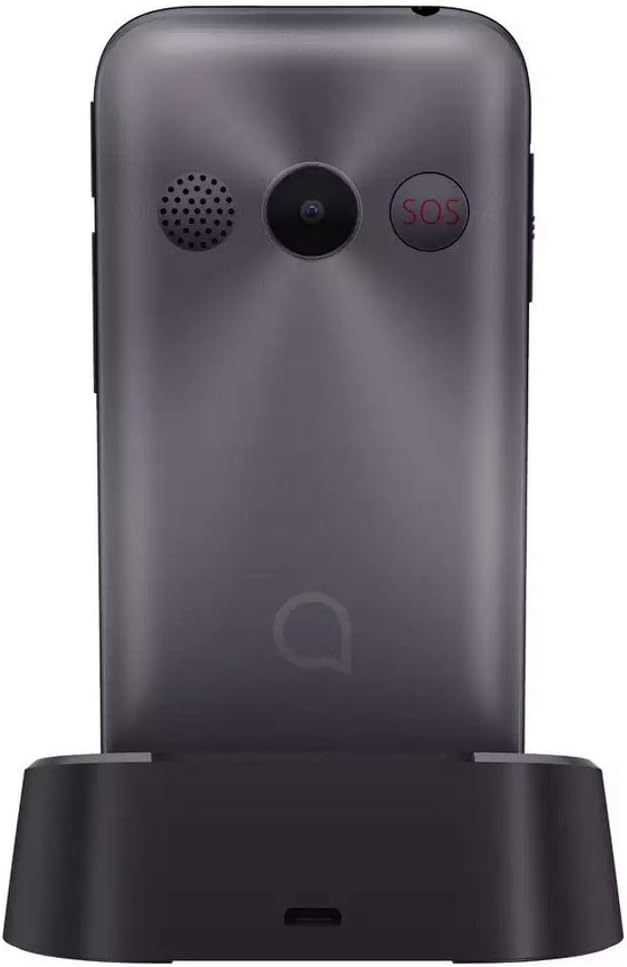
Image: Front view of the Alcatel 2019G mobile phone, showing the display and physical keypad.
2. Setup
2.1. Inserting the SIM Card
The Alcatel 2019G supports a single SIM card. Ensure the phone is powered off before inserting or removing the SIM card.
- Carefully remove the back cover of the phone.
- Locate the SIM card slot.
- Insert the SIM card with the gold contacts facing down and the cut corner aligned with the slot's orientation.
- Gently push the SIM card until it clicks into place.
- Replace the back cover.
2.2. Battery Installation and Charging
The phone comes with a Lithium-Ion battery. For optimal performance, fully charge the battery before first use.
- With the back cover removed, align the battery contacts with the terminals inside the battery compartment.
- Gently press the battery into place.
- Replace the back cover.
- Connect the charging cable to the phone's charging port or place the phone in the charging dock.
- Plug the charger into a power outlet. The charging indicator will appear on the screen.

Image: Back view of the Alcatel 2019G phone placed in its charging dock.

Image: The Alcatel 2019G phone securely seated in its charging cradle.
2.3. Powering On/Off
- To power on: Press and hold the Power/End Call button until the screen lights up.
- To power off: Press and hold the Power/End Call button, then select 'Power off' from the options on the screen.
3. Operating Instructions
3.1. Basic Navigation
- Navigation Keys: Use the directional keys (up, down, left, right) around the center button to navigate through menus and options.
- Center Key: Press the center key to confirm a selection or open an item.
- Left/Right Soft Keys: These keys perform the actions indicated by the text labels directly above them on the screen.
- Call Key: Press to make a call or answer an incoming call.
- End Call/Power Key: Press to end a call, return to the idle screen, or power the phone on/off.
3.2. Making and Receiving Calls
- To make a call: Enter the phone number using the keypad and press the Call key.
- To answer a call: When the phone rings, press the Call key.
- To end a call: Press the End Call key.
3.3. Sending and Receiving SMS Messages
- To send an SMS: Go to 'Menu' > 'Messages' > 'Create new message'. Enter the recipient's number and your message, then select 'Send'.
- To read an SMS: When a new message arrives, a notification will appear. Select 'Read' or go to 'Menu' > 'Messages' > 'Inbox'.
3.4. Using the Camera
The phone is equipped with a 2MP camera.
- Go to 'Menu' > 'Camera'.
- Frame your subject using the display.
- Press the center key to take a photo.
3.5. Alarm and Calendar
- Alarm: Set alarms via 'Menu' > 'Tools' > 'Alarm'. You can set multiple alarms with custom tones.
- Calendar: Access the calendar via 'Menu' > 'Tools' > 'Calendar' to view dates and add events.
4. Maintenance
4.1. Cleaning the Device
- Use a soft, dry cloth to clean the phone's screen and body.
- Avoid using liquid cleaners, aerosols, or harsh chemicals, as these can damage the device.
4.2. Battery Care
- Do not expose the battery to extreme temperatures.
- Avoid fully discharging the battery frequently. Charge it regularly.
- If the phone will not be used for an extended period, charge the battery to about 50% before storing.
5. Troubleshooting
5.1. Common Issues and Solutions
| Issue | Possible Solution |
|---|---|
| Phone does not power on | Ensure the battery is correctly installed and charged. Connect the charger and try again. |
| No network signal | Check if the SIM card is properly inserted. Move to an area with better network coverage. Contact your service provider. |
| Cannot make or receive calls | Verify network signal. Check if call barring is active. Ensure sufficient credit if using a prepaid SIM. |
| Battery drains quickly | Reduce screen brightness. Close unused applications. Limit background activities. Consider replacing an old battery. |
| Phone freezes or becomes unresponsive | Remove and reinsert the battery to perform a soft reset. |
5.2. Factory Reset
A factory reset will erase all user data and settings, restoring the phone to its original state. Back up any important data before proceeding.
- Go to 'Menu' > 'Settings' > 'Restore factory settings' or similar option.
- You may be prompted to enter a security code (default is often 1234 or 0000).
- Confirm the reset. The phone will restart.
6. Specifications
| Feature | Detail |
|---|---|
| Model Name | 2019G |
| Item Model Number | 20.19 |
| Brand | Alcatel |
| Screen Size | 2.4 Inches |
| Resolution | 240 x 320 |
| Installed RAM Memory Size | 10 MB |
| Cellular Technology | 2G (GSM 850 / 900 / 1800 / 1900) |
| Wireless Carrier | Unlocked for All Carriers |
| Operating System | Symbian 9.3 |
| CPU Model | Cortex A7 |
| CPU Speed | 1.2E+3 MHz |
| Batteries | 1 Lithium Ion battery (included) |
| Package Dimensions | 13.2 x 10.7 x 6.9 cm |
| Item Weight | 80 g |
7. Warranty & Support
7.1. Warranty Information
This product is covered by a standard manufacturer's warranty. Please refer to the warranty card included in the product packaging for specific terms, conditions, and duration. Keep your proof of purchase for warranty claims.
7.2. Customer Support
For further assistance, technical support, or service inquiries, please contact Alcatel customer service. Contact details can typically be found on the official Alcatel website or in the documentation provided with your phone.
- Visit the official Alcatel support website.
- Refer to the contact information provided in your product's packaging.


