
Browning BTCTM_K1
Browning BTC-TM Steel Gimbal Tree Mount Instruction Manual
Model: BTCTM_K1
Introduction
This manual provides instructions for the proper setup, operation, and maintenance of your Browning Steel Gimbal Tree Mount. This mount is designed to securely attach your trail camera to a tree, allowing for flexible positioning and stability. It is compatible with most Browning trail cameras and features a durable steel construction.
Package Contents
Please verify that all items listed below are present in your package:
- 2 x Steel Mounting Plate
- 2 x Gimbal Arm with Threaded Screw
- 2 x Gimbal Base Plate
- 4 x Thumb Screws
- 4 x Green Nylon Straps

Image: All components of the Browning Steel Gimbal Tree Mount. This includes the main brown steel mounting plate, a smaller brown gimbal base plate, a brown L-shaped gimbal arm with a threaded screw, two black thumb screws, and two green nylon straps.
Setup Instructions
Follow these steps to properly install your tree mount and trail camera:
- Assemble the Gimbal Arm: Attach the gimbal arm to the main steel mounting plate. Place the smaller gimbal base plate over the central hole on the main mounting plate. Insert the gimbal arm's ball end through the base plate and main plate. Secure it from the back with one of the thumb screws, allowing for movement but ensuring it is firm.
- Secure Mount to Tree: Choose a sturdy tree or post at the desired height and location. Wrap the green nylon straps around the tree and through the slots on the steel mounting plate. Pull the straps tight and secure them using the buckles. Ensure the mount is level and firmly attached to prevent movement.
- Attach Trail Camera: Carefully screw your trail camera onto the threaded screw at the end of the gimbal arm. Hand-tighten until the camera is secure.

Image: The assembled Browning Steel Gimbal Tree Mount, showing the main plate with the gimbal arm attached and the green nylon straps ready for securing to a tree.
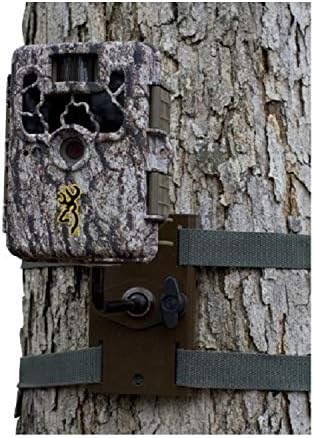
Image: A Browning trail camera is shown securely attached to a tree trunk. The brown steel tree mount is visible behind the camera, fastened to the tree with green straps. The camera is positioned to capture wildlife activity.
Operating Instructions
Once your camera is attached to the mount, you can adjust its angle:
- Adjusting Camera Angle: Loosen the thumb screw on the back of the main mounting plate that secures the gimbal arm. This will allow you to pivot and tilt the camera to achieve the desired viewing angle.
- Securing Camera Angle: Once the camera is positioned correctly, tighten the thumb screw firmly to lock the gimbal arm in place. Ensure the camera does not move freely after tightening.
Maintenance
To ensure the longevity and optimal performance of your Browning Steel Gimbal Tree Mount, follow these maintenance guidelines:
- Cleaning: Periodically wipe down the mount with a damp cloth to remove dirt, dust, and debris. Avoid using harsh chemicals or abrasive cleaners that could damage the finish.
- Inspection: Regularly inspect the steel components, straps, and screws for any signs of wear, corrosion, or damage. Ensure all screws and buckles are tight and secure.
- Storage: When not in use, store the mount in a clean, dry place away from extreme temperatures and direct sunlight.
Troubleshooting
If you encounter issues with your tree mount, refer to the following common problems and solutions:
- Camera is not stable or sags:
- Ensure the thumb screw securing the gimbal arm is fully tightened.
- Verify that the trail camera is securely screwed onto the gimbal arm.
- Mount slips on the tree:
- Check that the nylon straps are pulled taut and securely buckled.
- Ensure the tree surface is not excessively smooth or covered in loose bark.
- Difficulty adjusting camera angle:
- Loosen the gimbal arm thumb screw sufficiently to allow free movement. Do not force adjustments.
Specifications
| Feature | Detail |
|---|---|
| Model Number | BTCTM_K1 |
| Mounting Type | Tree Mount |
| Material | Steel (main mount), Plastic (some components) |
| Item Weight | 1 pound (per mount) |
| Product Dimensions | 10.2 x 8.4 x 6.6 inches (packaging) |
| Unit Count | 2.0 Count (per package) |
| UPC | 657379058035 |
| Manufacturer | Browning Trail Cameras |
Warranty and Support
For warranty information or technical support regarding your Browning Steel Gimbal Tree Mount, please refer to the documentation included with your original purchase or visit the official Browning Trail Cameras website. You may also contact Browning customer service directly for assistance.
Browning Official Website: www.browningtrailcameras.com
Related documentsBTCTM_K1


Ask a question about this manual
Ask about setup, troubleshooting, compatibility, parts, safety, or missing instructions. Manuals+ will review the question and use this page’s manual context to help answer it.