
Product Overview
The YONGNUO YN300 Air II is a versatile LED video light panel designed for photography and videography. It features both RGB full-color mode and bi-color temperature adjustment from 3200K to 5600K. Equipped with 108 high-quality LED lamp beads and 100 RGB full-color patch lights, it offers a high Color Rendering Index (CRI) of 95+ for accurate color reproduction. The light panel is designed to be super slim and lightweight, making it portable for various shooting environments. It includes a touch control remote for easy adjustment of lighting modes and brightness, and offers 10 special lighting effects to enhance creative photography.
Key Features:
- High Color Rendering: 108 selected high-quality patch LEDs with CRI 95+ for accurate color.
- Touch Control Remote: Easily adjust light modes and brightness via a proprietary touch panel remote.
- Special Scene Modes: 10 unique lighting effects including lightning, sunrise, police car, and ambulance light.
- RGB Dual Mode: Combines gorgeous RGB full-color mode with natural bi-color temperature (3200K-5600K).
- Dual Power Options: Supports NP-F series lithium battery (not included) or external 12V2A AC Adapter (not included).
- Slim & Lightweight Design: Approximately 2.5cm thick and 530g, ideal for portability.
Setup
Package Contents:
- YONGNUO YN300 Air II LED Video Light Panel
- Cold Shoe Mount
- Mini Stand
- Storage Bag
- User Manual

Image: The YN300 Air II light panel shown with its included accessories, including the cold shoe mount, mini stand, and storage bag.
Powering the Device:
The YN300 Air II offers two power supply options:
- NP-F Series Lithium Battery: Insert a compatible NP-F series lithium battery into the battery slot on the back of the panel. (Battery not included).
- External AC Adapter: Connect a 12V2A AC adapter to the DC input port on the side of the panel. (AC adapter not included).
Mounting the Light:
The YN300 Air II comes with an exclusive hot shoe mount, allowing it to be fixed onto a camera, tripod, or other compatible equipment. Attach the cold shoe mount to the bottom of the light panel, then secure it to your desired device.
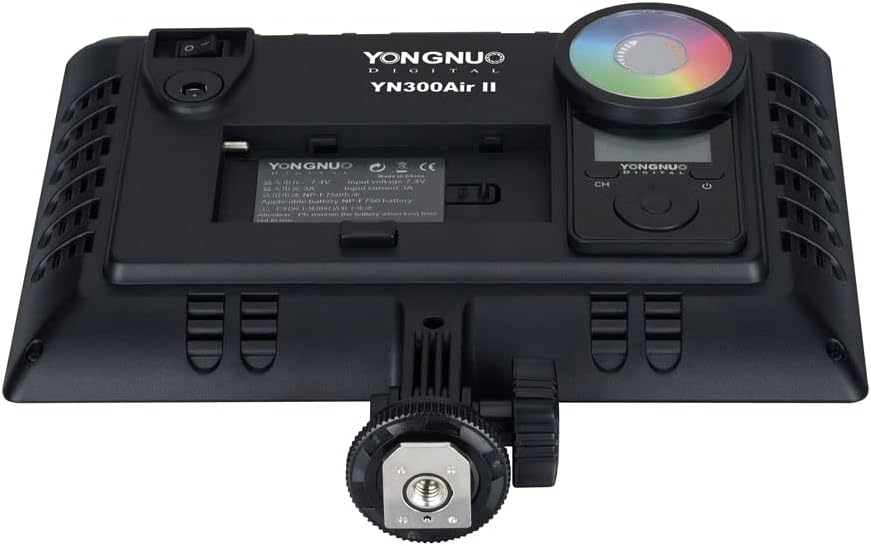
Image: Rear view of the YN300 Air II light panel, highlighting the battery compartment and the attached cold shoe mount for camera or tripod use.
Operating Instructions
Controls Overview:
The YN300 Air II features an intuitive control interface on the back of the unit, along with a touch control remote for convenient adjustments.
- On/Off Switch: Located on the side of the panel.
- Brightness Adjustment: Use the dedicated control to increase or decrease light intensity.
- Color Temperature Adjustment: Adjust the color temperature between 3200K and 5600K.
- RGB Full-Color Mode: Switch to RGB mode for a wide spectrum of colors.
- Display Screen: Shows current brightness, color temperature, and battery status.
Adjusting Brightness:
Use the brightness control on the panel or the touch panel remote to precisely adjust the light output from 0% to 100%. This allows for fine-tuning the illumination to suit your specific needs.
Adjusting Color Temperature:
The YN300 Air II supports bi-color temperature adjustment from 3200K (warm light) to 5600K (cool light). Use the dedicated control to select the desired color temperature for your scene. Additionally, the RGB full-color mode allows for a rich spectrum of colored light.

Image: The YN300 Air II light panel showcasing its capability to produce a wide range of RGB colors, illustrating its versatility for creative lighting.
Special Lighting Modes:
The light panel includes 10 special lighting modes to simulate various environmental effects, enhancing creative photography and videography. These modes can be easily accessed and adjusted via the touch control remote.
- Lightning Simulation
- Sunrise Simulation
- Police Car Light
- Ambulance Light
- Fire Truck Light
- Candlelight
- Screenlight
- RGB Fast Cycle
- RGB Slow Cycle
- Fireworks

Image: A visual representation of the YN300 Air II light panel in use, demonstrating its ability to create various special lighting effects for different scenarios.
Official Product Video:
Video: An official product video from YONGNUO showcasing the features and capabilities of the YN300 Air II LED Video Light, including its bi-color and RGB full-color modes.
Maintenance
- Cleaning: Use a soft, dry cloth to clean the light panel. Avoid using harsh chemicals or abrasive materials.
- Storage: Store the light panel in its provided storage bag in a cool, dry place when not in use.
- Battery Care: If using NP-F series batteries, ensure they are charged regularly and stored properly to prolong their lifespan. Remove batteries if the device will not be used for an extended period.
Troubleshooting
- Light Not Turning On: Check if the battery is properly inserted and charged, or if the AC adapter is securely connected and receiving power. Ensure the on/off switch is in the 'on' position.
- Incorrect Color Output: Verify the color temperature and RGB settings. Reset to default if necessary and re-adjust.
- Remote Control Issues: Ensure the remote control has fresh batteries and is within range of the light panel. Check for any obstructions.
Specifications
| Brand | YONGNUO |
| Model | YN300 Air II |
| Product Dimensions | 8.62 x 7.56 x 2.28 inches |
| Item Weight | 1.32 pounds |
| Color Temperature | 3200K-5600K (Bi-Color) + RGB Full Color |
| Color Rendering Index (CRI) | ≥ 95 |
| Power Supply | NP-F series lithium battery (not included) or external 12V2A AC Adapter (not included) |
| Connectivity Technology | Infrared (for remote control) |
| UPC | 783919128873 |
| Manufacturer | HK YONGNUO LIMITED |
Warranty and Support
For warranty information and technical support, please refer to the official YONGNUO website or contact the manufacturer directly. Specific warranty terms may vary by region and retailer. Please retain your proof of purchase for any warranty claims.
Manufacturer: HK YONGNUO LIMITED


