
1. Introduction
Thank you for purchasing the JJRC Q39 HIGHLANDER 1:12 4WD RC Desert Truck. This high-performance remote control vehicle is designed for off-road adventures, offering excellent speed, control, and durability. Equipped with a powerful motor and high-torque servo, it is capable of climbing slopes, accelerating rapidly, drifting, and braking effectively on various terrains. Please read this manual thoroughly before operating the vehicle to ensure safe and optimal performance.

The JJRC Q39 HIGHLANDER 1:12 4WD RC Desert Truck, showcasing its dynamic capabilities on a dusty track.
2. Safety Information
- Always operate the RC truck in open areas, away from people, pets, and obstacles.
- Do not operate near roads, water, or high-voltage power lines.
- Keep hands, hair, and loose clothing away from moving parts.
- Adult supervision is recommended for users under 14 years of age.
- Ensure the battery is fully charged before use and disconnect it after operation.
- Do not attempt to modify the vehicle or its components, as this may void the warranty and cause damage.
- Store the vehicle and remote control in a cool, dry place when not in use.
3. Package Contents
The package typically includes the following items:
- JJRC Q39 HIGHLANDER RC Desert Truck
- 2.4GHz Remote Control Transmitter
- 7.4V 1500mAh LiPo Battery
- USB Charging Cable
- Cross Wrench
- User Manual
4. Setup
4.1 Battery Charging
- Connect the 7.4V 1500mAh LiPo battery to the USB charging cable.
- Plug the USB charging cable into a suitable USB power adapter (e.g., computer USB port, phone charger).
- The charging indicator light will show the charging status. A full charge typically takes approximately 2.5 hours.
- Do not leave the battery unattended while charging.

The 7.4V 1500mAh LiPo battery, providing approximately 15 minutes of run time with a 2.5-hour charging duration.
4.2 Truck Battery Installation
- Locate the battery compartment on the RC truck.
- Open the battery compartment cover.
- Carefully insert the fully charged 7.4V 1500mAh LiPo battery into the compartment.
- Connect the battery connector to the truck's power connector.
- Close the battery compartment cover securely.
4.3 Remote Control Battery Installation
- Locate the battery compartment on the back of the 2.4GHz remote control.
- Open the battery compartment cover.
- Insert three (3) 1.5V AA batteries (not included), ensuring correct polarity (+/-).
- Close the battery compartment cover securely.

The 2.4GHz remote control, showing the indicator light, servo fine-tuning, power light, turn left/right wheel, forward/backward trigger, and battery compartment for three AA batteries.
4.4 Pairing the Remote Control and Truck
- Turn on the RC truck using the power switch. The truck's indicator light will flash.
- Turn on the remote control. The remote's indicator light will flash.
- Wait a few seconds for the remote control and truck to automatically pair. Once paired, both indicator lights will become solid.
- If pairing fails, turn off both devices and repeat the steps.
5. Operating the RC Truck
5.1 Remote Control Functions
- Forward/Backward Trigger: Pull the trigger to move forward, push it to move backward.
- Turn Left/Right Wheel: Rotate the wheel left to turn the truck left, rotate right to turn right.
- Servo Fine-tuning: Use this dial to adjust the steering trim if the truck does not drive straight when the steering wheel is centered.
- Power Light: Indicates the remote control's power status.
- Indicator Light: Shows pairing status and signal strength.
5.2 Driving Tips
- Start with slow speeds to get accustomed to the controls.
- The truck is designed for off-road use and performs well on dirt, gravel, and uneven surfaces.
- Avoid driving in deep water or extremely muddy conditions to prevent damage to electronic components.
- Practice turning and braking to master drifting and precise control. The high-torque servo provides excellent responsiveness.

The JJRC Q39 HIGHLANDER RC Desert Truck demonstrating its maximum speed capability of 40 KM/H on various surfaces.
6. Maintenance
6.1 Cleaning
- After each use, especially in dusty or dirty conditions, clean the truck with a soft brush or compressed air to remove debris.
- Wipe the body with a damp cloth. Do not use harsh chemicals or solvents.
- Ensure all moving parts are free from obstructions.
6.2 Battery Care
- Always disconnect the battery from the truck when not in use.
- Store LiPo batteries in a cool, dry place, away from direct sunlight and heat sources.
- Do not overcharge or over-discharge the battery.
6.3 Component Overview
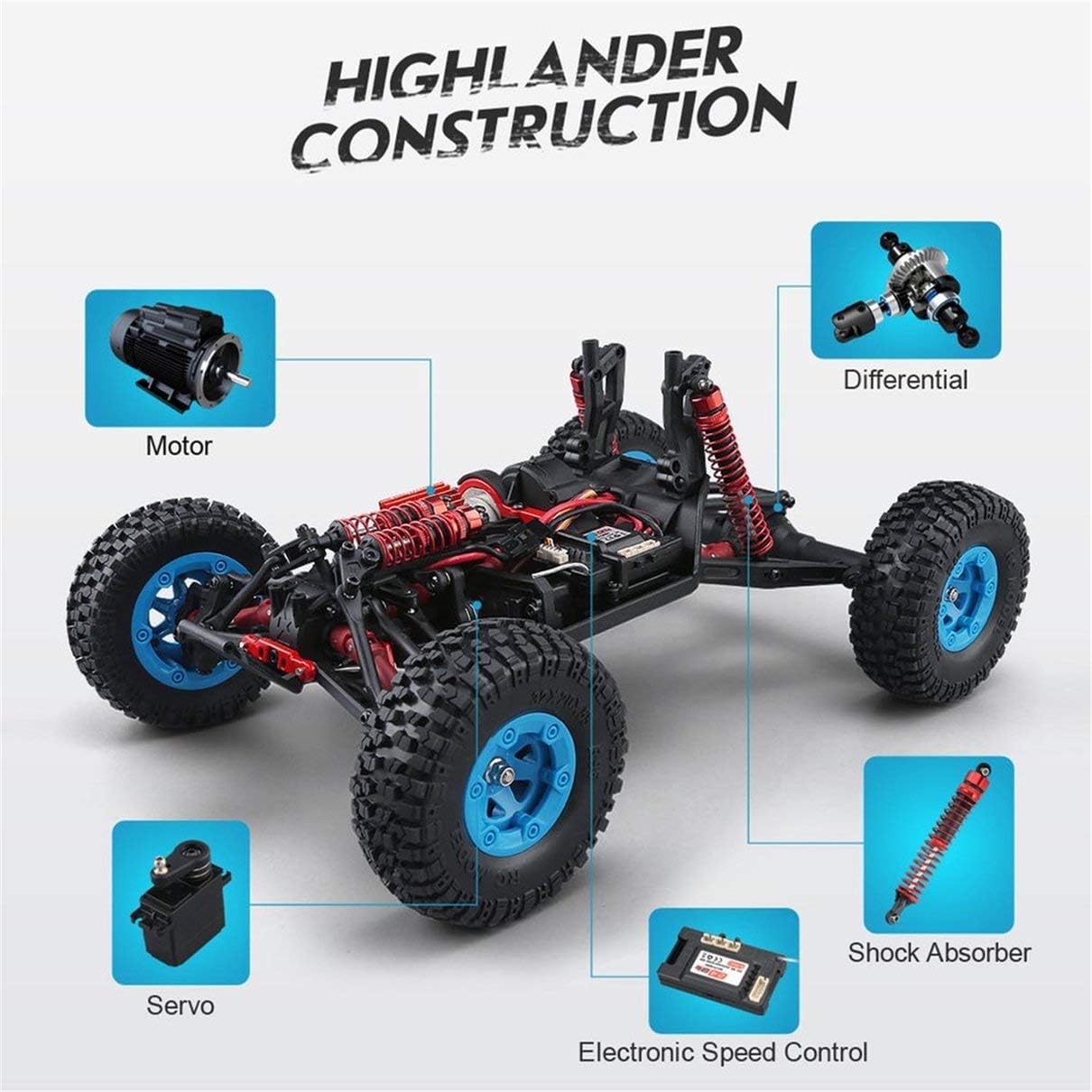
An exploded view of the JJRC Q39 HIGHLANDER's internal components, including the motor, differential, shock absorbers, electronic speed control, and servo.

The 390 Powerful High Speed Magnetic Motor, responsible for the truck's acceleration and climbing capabilities.

The 19G High Speed Servo, providing 10 N.m of torque for precise steering control and immediate feedback.
7. Troubleshooting
- Truck not responding: Ensure both the truck and remote control are powered on and properly paired. Check battery levels in both devices.
- Short run time: The battery may not be fully charged, or it may be nearing the end of its lifespan. Ensure proper charging procedures are followed.
- Poor steering control: Adjust the servo fine-tuning dial on the remote control. Check for any obstructions in the steering mechanism.
- Loss of range: Ensure there are no strong interference sources nearby. Check remote control battery level.
8. Specifications
| Feature | Specification |
|---|---|
| Model Name | Q39 HIGHLANDER |
| Scale | 1:12 |
| Drive System | 4WD (Four-Wheel Drive) |
| Max Speed | Up to 35km/h (40km/h as per some images) |
| Motor Type | 390 Powerful High Speed Magnetic Motor |
| Servo | 19G High Speed Servo (10 N.m torque) |
| Battery | 7.4V 1500mAh LiPo (Lithium Polymer) |
| Charging Time | Approx. 2.5 hours |
| Run Time | Approx. 15 minutes |
| Remote Control Frequency | 2.4GHz |
| Remote Control Batteries | 3 x 1.5V AA batteries (not included) |
| Material | Polyester (Body/Chassis components) |
| Color | Blue and Black |
| Dimensions (Shipping) | 39.9 x 27.7 x 20 cm |
| Weight (Shipping) | 2.08 kg |
9. Warranty and Support
For warranty information, technical support, or replacement parts, please contact the retailer or manufacturer directly. Keep your purchase receipt as proof of purchase. Refer to the official JJRC website or product packaging for specific contact details.


