
1. Introduction
Welcome to the user manual for your Lenovo Yoga C740-14 FHD Touch 2-in-1 laptop. This device combines the functionality of a traditional laptop with the versatility of a tablet, featuring a 14-inch Full HD touchscreen display. Powered by a 10th Generation Intel Core i5-10210U processor, 8GB DDR4 RAM, and a 256GB SSD, it is designed for efficient performance and adaptability. This manual provides essential information for setting up, operating, maintaining, and troubleshooting your device.
2. Product Overview
The Lenovo Yoga C740-14 is a convertible laptop engineered for flexibility and performance. Its 360-degree hinge allows it to transition seamlessly between laptop, tent, stand, and tablet modes, adapting to various tasks and environments. Key features include a responsive touchscreen, a backlit keyboard, and an integrated fingerprint reader for enhanced security.

Figure 2.1: Lenovo Yoga C740-14 in standard laptop mode, showcasing its sleek design and Windows 10 interface.
2.1 Key Components and Ports
- Display: 14-inch FHD (1920 x 1080) Touch-Screen.
- Processor: Intel 10th Generation Core i5-10210U.
- Memory: 8GB DDR4 2666 MHz RAM.
- Storage: 256GB SSD.
- Graphics: Integrated Intel UHD Graphics.
- Operating System: Windows 10 Home.
- Ports: 1x USB 3.0 Type-A, 2x USB 3.1 Type-C, 1x Headphone/microphone combo jack.
- Security: Fingerprint reader.
- Keyboard: Backlit.

Figure 2.2: Side view of the Lenovo Yoga C740-14, highlighting the various connectivity ports including USB-C, USB-A, and the headphone/microphone combo jack.
3. Setup
- Unboxing: Carefully remove the laptop and all accessories from the packaging.
- Initial Charge: Connect the power adapter to the USB-C port on your laptop and a power outlet. Allow the battery to charge fully before first use.
- Power On: Press the power button, typically located on the side or top right of the keyboard deck.
- Windows Setup: Follow the on-screen instructions to complete the Windows 10 Home setup, including language, region, network connection, and user account creation.
- Updates: After initial setup, connect to the internet and check for Windows updates to ensure your system has the latest security patches and features.
4. Operating Instructions
4.1 Convertible Modes
Your Yoga C740-14 features a 360-degree hinge, allowing for multiple usage modes:
- Laptop Mode: Standard laptop configuration for typing and productivity.
- Tent Mode: Fold the display back to form an inverted 'V' shape, ideal for watching videos or presentations in confined spaces.
- Stand Mode: Fold the display back so the keyboard faces down, with the screen facing outwards, suitable for touch-based interaction or media consumption.
- Tablet Mode: Fold the display completely back against the base, transforming the laptop into a tablet for drawing, browsing, or reading.
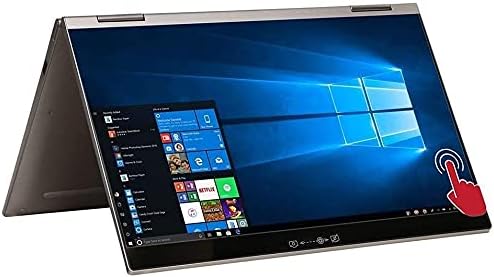
Figure 4.1: The Lenovo Yoga C740-14 configured in tent mode, suitable for media viewing or presentations.

Figure 4.2: The Lenovo Yoga C740-14 fully folded into tablet mode, demonstrating its versatility for touch-based tasks.
4.2 Touchscreen and Keyboard
- Touchscreen: Use familiar gestures like tap, swipe, pinch-to-zoom, and scroll directly on the display.
- Backlit Keyboard: Adjust keyboard backlight brightness using the function keys (Fn + Spacebar, typically).
- Fingerprint Reader: Set up Windows Hello to use the integrated fingerprint reader for secure and quick login.

Figure 4.3: Close-up view of the Lenovo Yoga C740-14 keyboard and touchpad, highlighting the backlit keys and integrated fingerprint reader.
4.3 Official Product Videos
The following videos provide additional insights into the features and usage of your Lenovo Yoga C740-14:
Video 4.1: An overview of the Lenovo Yoga C740 laptop, discussing its features and performance.
Video 4.2: An honest review of the Lenovo Yoga C740, highlighting its functionality as both a laptop and a tablet.
Video 4.3: A user's perspective on why they appreciate their Lenovo Yoga laptop.
5. Maintenance
Proper maintenance ensures the longevity and optimal performance of your laptop:
- Cleaning: Use a soft, lint-free cloth to clean the screen and exterior. For stubborn smudges, dampen the cloth with water or a screen-safe cleaner. Avoid harsh chemicals.
- Software Updates: Regularly check for and install Windows updates and Lenovo driver updates to maintain system stability and security.
- Battery Care: To prolong battery life, avoid extreme temperatures and try to keep the battery charge between 20% and 80% when possible.
- Storage Management: Periodically clear unnecessary files and applications to free up storage space and improve performance.
- Ventilation: Ensure the laptop's vents are not obstructed to prevent overheating. Use the laptop on a hard, flat surface.
6. Troubleshooting
Here are solutions for common issues you might encounter:
- Laptop not powering on: Ensure the power adapter is securely connected and the battery has sufficient charge. Try a different power outlet.
- Screen is blank or flickering: Restart the laptop. If using an external monitor, check the cable connection. Update graphics drivers.
- Slow performance: Close unnecessary applications, check for malware, ensure sufficient free storage space, and update your operating system.
- Wi-Fi connectivity issues: Restart your router and laptop. Check network settings and ensure Wi-Fi drivers are up to date.
- Touchscreen not responding: Restart the laptop. Ensure the display is clean and free of obstructions. Check for driver updates for the touchscreen.
- Fingerprint reader not working: Ensure your finger is clean and dry. Re-register your fingerprint in Windows Hello settings.
7. Specifications
Detailed technical specifications for the Lenovo Yoga C740-14IML 81TC:
| Feature | Specification |
|---|---|
| Model Name | 81TC000JUS |
| Standing Screen Display Size | 14 Inches |
| Screen Resolution | 1920 x 1080 pixels |
| Max Screen Resolution | 1920x1080 Pixels |
| Processor | 1.6 GHz core_i5_10210u (10th Gen Intel Core i5-10210U) |
| RAM | 8 GB DDR4 |
| Memory Speed | 2666 MHz |
| Hard Drive | 256 GB SSD |
| Graphics Coprocessor | Intel UHD Graphics |
| Card Description | Integrated |
| Wireless Type | 802.11ac |
| Average Battery Life | 16.5 Hours |
| Operating System | Windows 10 Home |
| Item Weight | 3.1 pounds |
| Product Dimensions | 12.7 x 8.4 x 0.7 inches |
| Special Feature | Fingerprint Reader |
8. Warranty and Support
Your Lenovo Yoga C740-14IML 81TC comes with a standard manufacturer's warranty. For specific warranty terms and conditions, please refer to the documentation included with your product or visit the official Lenovo support website. For technical assistance, driver downloads, or service inquiries, please contact Lenovo customer support.
Online Support: Visit www.lenovo.com/support