Introduction
This manual provides instructions for the VINABTY AKB74815301 replacement remote control. This remote is designed to be compatible with various LG Soundbar and Home Theater Soundbar models. It is pre-programmed and requires no additional setup beyond battery installation.
Compatible LG Soundbar Models include:
- S55A3-D, LAS454B, S45A1-D, LAS453B, SH3B, SPH3B-W, SH3K, SJ4Y, SPH4B-W, LAS485B
- SPH4BW, S45A1D, S55A3D, SPH3BW, SJ7, SK4D, LAS464B, SK3D, LAC553B, LAS260B, LAS465B, SH4, SH5B, SH7B
Setup
1. Battery Installation
The VINABTY AKB74815301 remote control requires two (2) AAA batteries for operation. Batteries are not included with the remote control.
- Locate the battery compartment on the back of the remote control.
- Slide the battery compartment cover downwards and remove it.
- Insert two AAA batteries, ensuring the positive (+) and negative (-) terminals align correctly with the markings inside the compartment.
- Replace the battery compartment cover by sliding it back into place until it clicks securely.

This image shows the VINABTY AKB74815301 remote control with its battery compartment open, indicating the placement for two AAA batteries. Batteries are not included with the remote.
2. Initial Use
This remote control is pre-programmed for the listed LG Soundbar models. No additional programming or pairing is required. Once batteries are installed, the remote is ready for immediate use.
Operating Instructions
The VINABTY AKB74815301 remote control provides direct access to essential functions of your compatible LG Soundbar. Below is a general overview of the buttons and their functions:
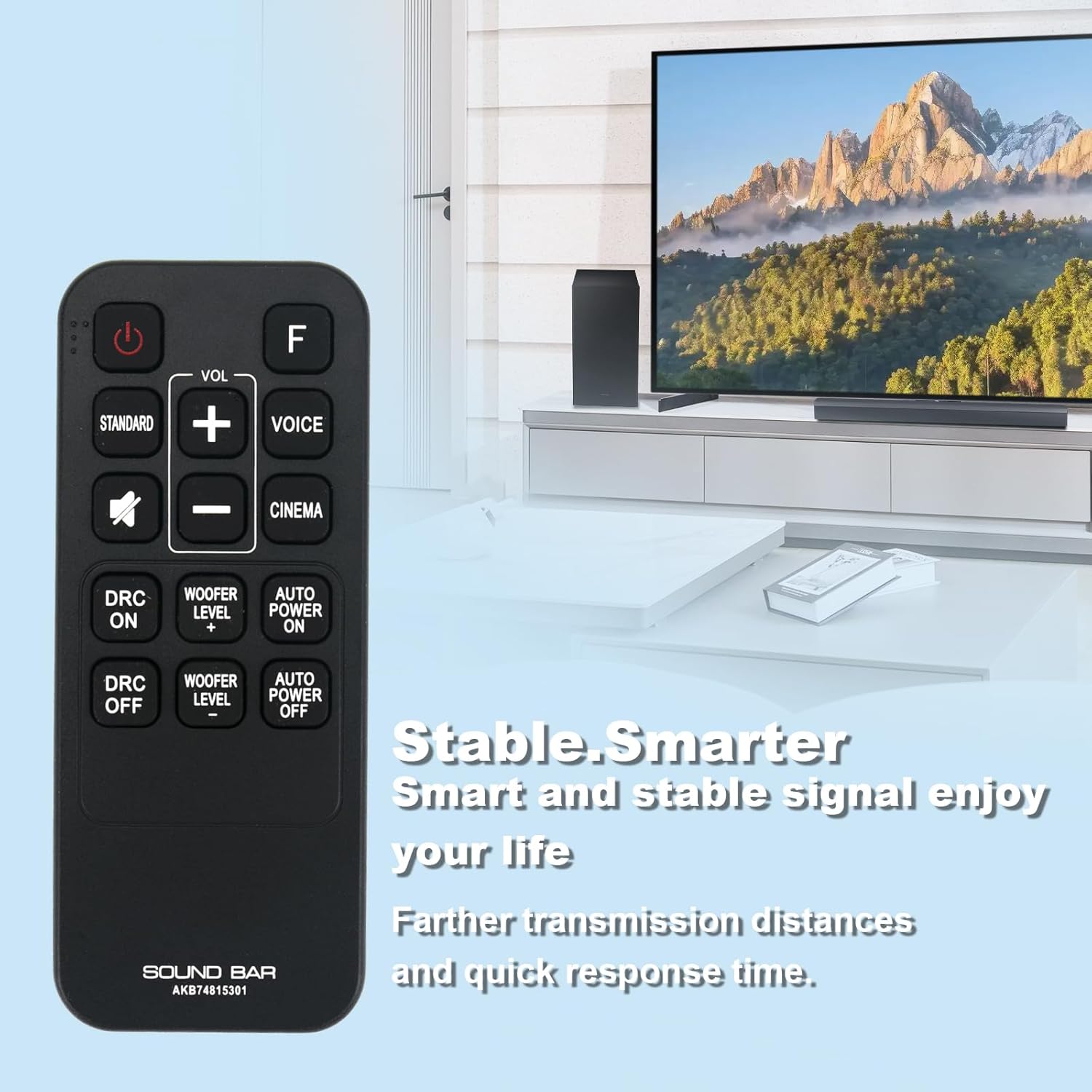
This image displays the VINABTY AKB74815301 remote control, highlighting its ergonomic design and button layout for various functions like power, volume, sound modes, and woofer level.
- Power Button (U): Turns the soundbar on or off.
- VOL (+/-): Increases or decreases the main volume level.
- Mute Button (🔇): Mutes or unmutes the sound.
- F Button: Function/Input selection. Press to cycle through available input sources (e.g., Optical, Bluetooth, HDMI).
- STANDARD: Activates the standard sound mode.
- VOICE: Activates the voice enhancement sound mode.
- CINEMA: Activates the cinema sound mode.
- DRC ON/OFF: Toggles Dynamic Range Control on or off.
- WOOFER LEVEL (+/-): Adjusts the subwoofer volume level.
- AUTO POWER ON/OFF: Toggles the auto power feature of the soundbar.

This image depicts a user operating the VINABTY AKB74815301 remote control to interact with an LG soundbar and television setup, demonstrating typical usage.
Maintenance
Battery Replacement
If the remote control's range decreases or it becomes unresponsive, replace both AAA batteries with new ones. Refer to the "Battery Installation" section for instructions.
Cleaning
To clean the remote control, use a soft, dry cloth. Do not use liquid cleaners, sprays, or abrasive materials, as these can damage the remote's surface or internal components.
Troubleshooting
- Remote not responding:
- Ensure fresh AAA batteries are correctly installed.
- Check for any obstructions between the remote control and the soundbar's sensor.
- Point the remote directly at the soundbar.
- Limited range:
- Replace batteries if they are low.
- Ensure there is a clear line of sight to the soundbar.
- Specific functions not working:
- Verify that your LG Soundbar model is listed as compatible with the AKB74815301 remote.
- Some advanced features of your original soundbar remote may not be present on this replacement remote if they are not standard functions.
Specifications
| Model Number | AKB74815301 |
| Brand | VINABTY |
| Compatible Devices | LG Soundbar Home Theater Systems (specific models listed in Introduction) |
| Batteries Required | 2 x AAA (not included) |
| Product Dimensions | 4.53 x 2 x 0.55 inches (approximately) |
| Item Weight | 1.23 ounces (approximately) |
| Color | Black |
| Special Feature | Ergonomic design |

This image illustrates the physical dimensions of the VINABTY AKB74815301 remote control, measuring approximately 4.53 inches in length and 1.77 inches in width.
Warranty and Support
For any issues or questions regarding your VINABTY AKB74815301 remote control, please refer to the retailer or manufacturer's support channels. Keep your purchase receipt for warranty claims, if applicable.
