
Introduction
This manual provides detailed instructions for the safe and proper installation and operation of your Suptek SPM201 Dual Clamp Bookshelf Speaker Wall Mounts. These mounts are designed to securely hold large surround sound speakers, offering adjustable positioning for an optimized listening experience.

Image: Before and after comparison showing speakers on a desk versus wall-mounted with Suptek mounts, illustrating space-saving and improved aesthetics.
Safety Information
- Wall Type Verification: Always verify your wall type (stud, concrete, brick/stone) before installation. Use appropriate mounting hardware for your specific wall construction.
- Weight Capacity: Ensure the wall can support the combined weight of the mount and your speaker. Each mount has a maximum load capacity of 25 kg (55 lbs). Do not exceed this limit.
- Professional Installation: If you are unsure about the installation process or your wall's capacity, consult a qualified professional.
- Secure Fastening: Ensure all screws and bolts are tightened securely to prevent accidental detachment.
- Cable Management: Route cables carefully to avoid pinching or damage, which could pose a safety hazard.
Package Contents
Please check that all components are present before beginning installation:
- 2 x Suptek Speaker Wall Mounts
- 1 x Mounting Hardware Kit (various screws, anchors, washers)
- 1 x User Manual

Image: The complete mounting hardware kit, including various screws, anchors, and washers required for installation.
Specifications
| Feature | Detail |
|---|---|
| Model Number | SPM201 |
| Material | Alloy Steel |
| Color | Black |
| Max Load Capacity (per mount) | 25 kg (55 lbs) |
| Adjustable Speaker Width | 135 mm - 280 mm (5.4 - 11 inches) |
| Tilt Adjustment | Up/Down 7.5 degrees |
| Swivel Adjustment | Left/Right 45 degrees |
| Product Dimensions (L x W x H) | 16.2 x 9.2 x 27 cm (6.38 x 3.62 x 10.63 inches) |
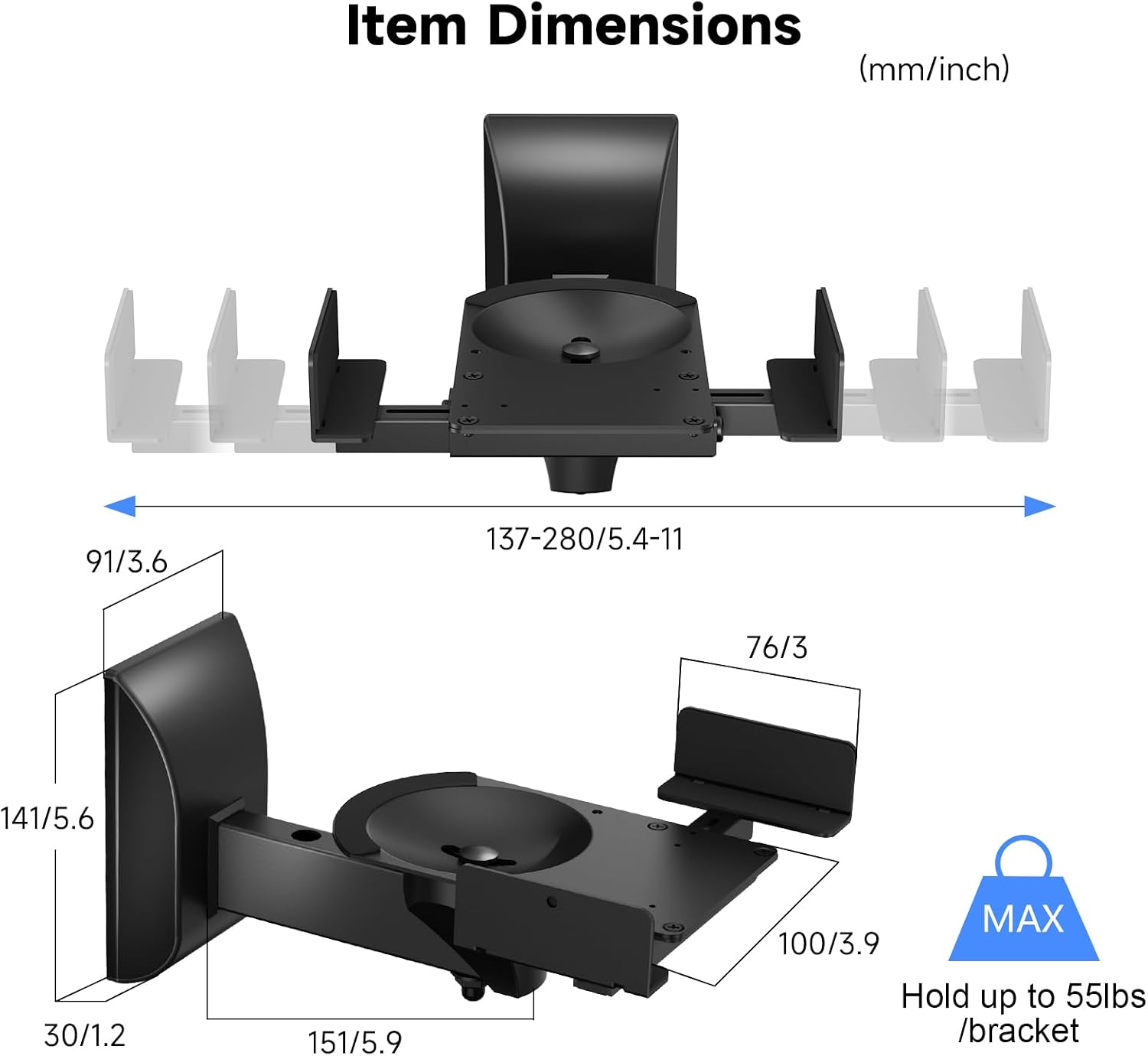
Image: Technical drawing detailing the dimensions and adjustable width range of the SPM201 speaker mount.
Setup and Installation
Tools Required (Not Included)
- Drill
- Drill bits (appropriate for wall type and anchors)
- Pencil
- Level
- Screwdriver
- Stud finder (for stud walls)
Step-by-Step Installation
- Prepare the Mounting Location: Select a suitable wall location. Use a stud finder to locate wall studs if mounting on drywall. Mark the desired height and position for the mounts. Ensure the location can support the weight and allows for optimal speaker placement.
- Mark Drilling Points: Hold the wall plate of the mount against the wall at the marked position. Use a level to ensure it is perfectly straight. Mark the drilling points through the holes on the wall plate.
- Drill Pilot Holes: Drill pilot holes at the marked points. The size of the drill bit will depend on your wall type and the anchors provided. For concrete or brick walls, use appropriate masonry drill bits and wall anchors.
- Attach Wall Plate: Secure the wall plate to the wall using the provided screws and anchors. Ensure it is firmly attached and stable.
- Assemble Speaker Clamp: Attach the speaker clamping mechanism to the main arm of the mount. Ensure all screws are tightened securely. The clamps feature anti-slip EVA pads to protect your speakers.
- Mount Speaker: Place your speaker onto the mount's platform. Adjust the side clamps to securely hold the speaker. The clamps are independently adjustable with fine-thread screws to accommodate speaker widths between 135mm and 280mm.
- Cable Management: Route speaker cables through the integrated cable management opening on the mount arm for a tidy and organized appearance.
- Install Plastic Wall Cover: Place the decorative plastic cover over the wall plate to conceal the mounting hardware for a clean and aesthetic finish.

Image: Detailed view highlighting the plastic wall cover, cable management, and anti-slip EVA pads on the speaker platform.
Operating and Adjustments
The Suptek SPM201 mounts offer flexible positioning to optimize your audio experience.
Tilt Adjustment
The speaker mount allows for vertical tilt adjustment of up to 7.5 degrees. To adjust, locate the adjustment knob/screw on the side of the mount. Loosen it, adjust the speaker to the desired upward or downward angle, and then firmly tighten the knob/screw to secure the position.
Swivel Adjustment
The mount can swivel horizontally up to 45 degrees left or right. To adjust, loosen the relevant adjustment knob/screw, rotate the speaker to the preferred direction, and then tighten the knob/screw firmly to lock it in place.

Image: Diagram showing the range of tilt (±7.5°) and swivel (±45°) adjustments available for precise speaker positioning.
Maintenance
- Regular Checks: Periodically inspect all mounting screws, speaker clamping screws, and adjustment mechanisms to ensure they remain tight and secure.
- Cleaning: Clean the mounts with a soft, dry cloth. Avoid using abrasive cleaners, solvents, or harsh chemicals, as these may damage the finish.
- Weight Limit: Always ensure that no excessive weight is placed on the mounts beyond the specified maximum capacity of 25 kg per mount.
Troubleshooting
Speaker feels unstable after mounting:
- Ensure all wall mounting screws are fully tightened into appropriate wall anchors.
- Verify the speaker clamping screws are securely holding the speaker on the platform.
- Confirm the wall type is appropriate for the installation and the anchors are correctly installed.
- Check that the speaker weight does not exceed the 25 kg (55 lbs) limit per mount.
Difficulty adjusting tilt/swivel:
- Ensure the adjustment knobs/screws are sufficiently loosened before attempting to reposition the speaker.
- Do not force adjustments. If resistance is met, re-check the loosening mechanism and ensure no cables are obstructing movement.
Warranty and Support
For warranty information or technical support regarding your Suptek SPM201 speaker wall mounts, please refer to the contact details provided with your purchase documentation or visit the official Suptek website. Please retain your purchase receipt as proof of purchase for any warranty claims.