
1. Introduction
This manual provides essential information for the proper use and care of your Lenovo Thinkpad X1 Yoga G1 laptop. This device is a versatile 2-in-1 convertible laptop designed for productivity and flexibility, featuring an Intel Core i5 processor, 8GB RAM, 256GB SSD, and running Windows 10 Pro.
Please read this manual thoroughly before operating your device to ensure optimal performance and longevity.
2. Setup
2.1 Unpacking and Initial Inspection
Carefully remove the laptop and any accessories from the packaging. Inspect the device for any visible damage. Ensure all components listed in the packaging are present.
2.2 Powering On for the First Time
- Connect the power adapter to the laptop's power port and then to a wall outlet.
- Press the power button, typically located on the side or top right of the keyboard deck.
- Follow the on-screen instructions to complete the initial Windows 10 Pro setup, including language, region, and user account creation.

Figure 2.2.1: The Lenovo Thinkpad X1 Yoga G1 laptop in its open position, ready for initial setup. A stylus is visible next to the device.
2.3 Connecting to a Wireless Network
- Once Windows is set up, click the Wi-Fi icon in the taskbar (bottom right corner).
- Select your desired wireless network from the list.
- Enter the network security key (password) if prompted, then click Connect.
3. Operating Your Laptop
3.1 Basic Functions
- Power On/Off: Press the power button to turn on. To turn off, click Start > Power > Shut down.
- Sleep Mode: Close the lid or click Start > Power > Sleep.
- Restart: Click Start > Power > Restart.
3.2 Using the Keyboard and Touchpad
The Thinkpad X1 Yoga G1 features a full-sized keyboard and a precision touchpad. The TrackPoint pointing device (red dot in the center of the keyboard) offers an alternative navigation method.

Figure 3.2.1: A user actively typing on the laptop's keyboard, demonstrating typical usage.
3.3 Convertible Modes
The Thinkpad X1 Yoga G1 is a 2-in-1 device, allowing it to transform into various modes:
- Laptop Mode: Traditional laptop configuration for typing and productivity.
- Stand Mode: Fold the keyboard back to use the screen for presentations or media viewing.
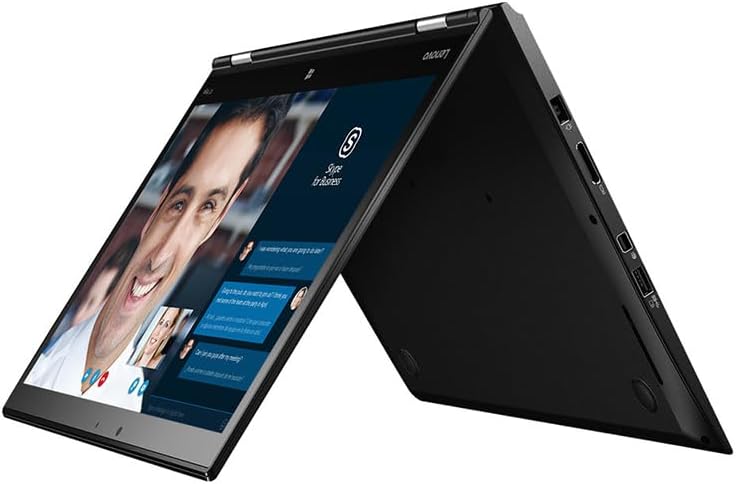
Figure 3.3.1: The laptop configured in stand mode, ideal for video conferencing or watching content.
- Tent Mode: Position the laptop like a tent for stable touch interaction or media consumption in confined spaces.

Figure 3.3.2: The laptop in tent mode, suitable for touch-based applications or presentations.
- Tablet Mode: Fold the keyboard completely back against the screen for a full tablet experience.

Figure 3.3.3: The laptop fully converted into tablet mode, offering portability and touch interaction.

Figure 3.3.4: An illustration of the Thinkpad X1 Yoga G1 showcasing its flexibility across different usage modes.
4. Maintenance
4.1 Cleaning Your Laptop
- Use a soft, lint-free cloth slightly dampened with water or a screen cleaner to wipe the display.
- For the keyboard and chassis, use a soft cloth. A can of compressed air can help remove dust from between keys.
- Avoid harsh chemicals, abrasives, or solvents.
4.2 Battery Care
- To prolong battery life, avoid fully discharging the battery frequently.
- Store the laptop in a cool, dry place if not used for extended periods.
- The average battery life is approximately 4 hours, depending on usage.
4.3 Software Updates
Regularly update your Windows operating system and drivers to ensure security and optimal performance. Windows Update can be accessed via Settings > Update & Security > Windows Update.
5. Troubleshooting
This section addresses common issues you might encounter with your Lenovo Thinkpad X1 Yoga G1.
5.1 Power Issues
- Laptop does not turn on: Ensure the power adapter is securely connected and the outlet is functional. Try a different power outlet. If the battery is completely drained, it may take a few minutes to respond after connecting to power.
- Battery not charging: Verify the power adapter is working. Check the charging port for debris.
5.2 Display Problems
- Screen is blank: Ensure the laptop is powered on. Try adjusting the screen brightness using the function keys. Connect an external monitor to check if the issue is with the laptop's display or graphics card.
- Touchscreen not responding: Restart the laptop. Ensure display drivers are up to date.
5.3 Connectivity Issues
- Wi-Fi not connecting: Check if Wi-Fi is enabled in Windows settings. Restart your router and modem. Ensure you are entering the correct Wi-Fi password.
- Bluetooth device not pairing: Ensure Bluetooth is enabled on both the laptop and the device. Place devices close to each other during pairing.
5.4 General Performance Issues
- Slow performance: Close unnecessary applications. Check for malware. Ensure sufficient free space on the SSD.
- System freezes: Press and hold the power button for 10-15 seconds to force a shutdown, then restart.
For more complex issues, refer to the official Lenovo support website or contact your product vendor.
6. Specifications
Key technical specifications for the Lenovo Thinkpad X1 Yoga G1:
| Feature | Specification |
|---|---|
| Brand | Lenovo |
| Model Name | ThinkPad X1 Yoga |
| Item Model Number | Lenovo Thinkpad X1 Yoga G1 |
| Screen Size | 14 Inches |
| Screen Resolution | 1920 x 1080 pixels |
| Processor | Intel Core i5 (2.4 GHz) |
| RAM | 8 GB DDR3 |
| Hard Drive | 256 GB SSD |
| Graphics Coprocessor | Intel Integrated Graphics 520 |
| Operating System | Windows 10 Pro (64-bit) |
| Wireless Type | Bluetooth |
| Average Battery Life | 4 Hours |
| Item Weight | 4 pounds |
| Product Dimensions | 13.03 x 8.94 x 0.73 inches |
| Color | Black |
| Special Features | Backlit Keyboard, Fingerprint Reader, Support Stylus |
7. Warranty & Support
This Lenovo Thinkpad X1 Yoga G1 is a renewed product. Warranty coverage for renewed products is typically provided by the seller or a third-party refurbisher, not directly by the original manufacturer (Lenovo) for the full original warranty period.
Please refer to the warranty information provided by your specific seller (e.g., TekRefurbs) at the time of purchase for details regarding coverage, duration, and claims process. Standard return policies may also apply.
For general technical support or driver downloads, you may visit the official Lenovo Support website. For issues specific to the renewed condition or seller-provided warranty, please contact your seller directly.