
Xiegu CE-19
Xiegu CE-19 Data Interface Expansion Card User Manual
Model: CE-19
1. Overview
The Xiegu CE-19 is a data interface expansion card designed to facilitate connections between Xiegu transceivers and external devices such as personal computers, data terminals, and modems. It expands the ACC port of compatible transceivers, providing convenient access for various digital modes and amplifier control.
Key features include:
- Compatibility with Xiegu transceivers including X5105, G90, and G1M via their ACC ports.
- Enables connection to the XPA125B 100W high-power amplifier for enhanced radio operation.
- Expands the MINI-DIN8 interface to commonly used 3.5mm stereo sockets for audio and data.
- Features digital isolation technology to ensure compatibility with different electrical power levels and stable operation when connected to a computer.

2. Package Contents
Verify that all items are present in the package:
- 1 x CE-19 Data Interface Expansion Card
- 3 x Audio Cables
- 3 x 3.5mm Stereo Plugs (for custom cable assembly)
- 1 x 8-pin Pair Cable

3. Setup and Connection
The CE-19 card expands the ACC port of your Xiegu transceiver, providing dedicated ports for Audio Frequency (AF), Data, and Push-To-Talk (PTT) control. Proper connection is crucial for stable operation.
3.1. Understanding the CE-19 Ports
The CE-19 features several connection points:
- "FROM X5105" (8-pin Mini-DIN): Connects to the ACC port of compatible Xiegu transceivers (G90, G1M, X5105).
- "TO XPA125" (6-pin Mini-DIN): Connects to the XPA125B amplifier.
- AF CON (3.5mm sockets): Audio Frequency input and output for connecting to a computer sound card.
- DATA CON (3.5mm sockets): Data input and output for digital modes.
- PTT CON (3.5mm socket): Push-To-Talk control for external devices or amplifiers.


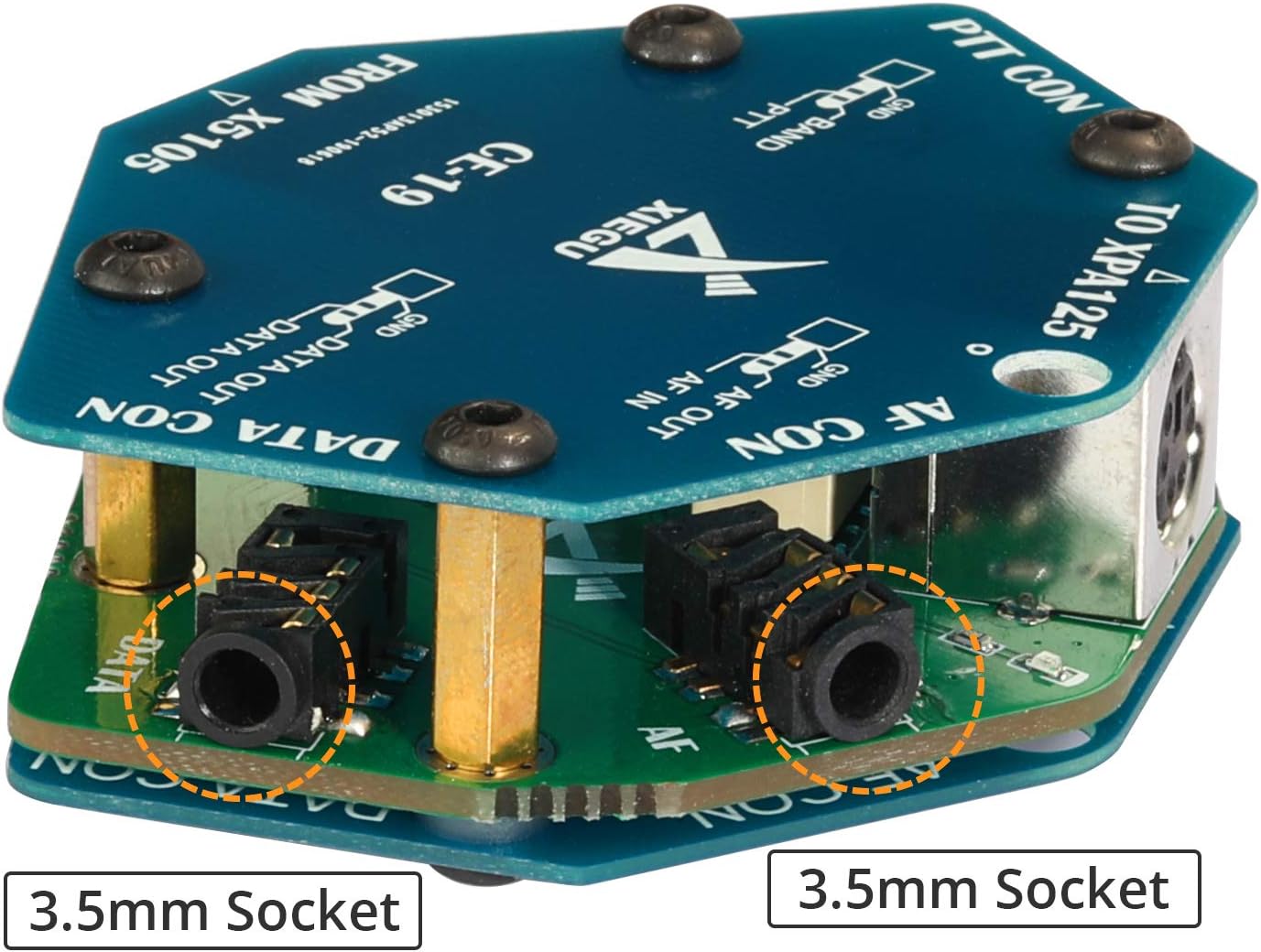
3.2. Connecting to a Xiegu Transceiver (G90, G1M, X5105)
Use the provided 8-pin pair cable to connect the "FROM X5105" port on the CE-19 to the ACC port of your Xiegu G90, G1M, or X5105 transceiver.


3.3. Connecting to the XPA125B Amplifier
Connect the "TO XPA125" 6-pin Mini-DIN port on the CE-19 to the corresponding input on your XPA125B amplifier. This enables the transceiver to control the amplifier's PTT and band data.
3.4. Connecting to a Computer for Digital Modes
For digital modes (e.g., FT8, PSK31), you will need to connect the AF CON and DATA CON 3.5mm sockets to your computer's sound card (or an external USB sound card). The provided 3.5mm stereo plugs can be used to create custom cables if needed, connecting the audio input/output and data lines to your sound card's microphone and speaker jacks.
Note:
- The CE-19 does not include an integrated sound card. An external USB sound adapter or a computer with dedicated speaker and microphone jacks is required for digital mode operation.
- Refer to your transceiver's manual and digital mode software documentation for specific sound card settings and configuration.
4. Operating Instructions
The Xiegu CE-19 acts as an interface, facilitating communication between your Xiegu transceiver, an amplifier, and a computer. Its operation is largely dependent on the configuration of the connected devices and software.
4.1. Digital Mode Operation
- Ensure the CE-19 is correctly connected to your transceiver and computer's sound card as described in Section 3.
- Install and configure your preferred digital mode software (e.g., WSJT-X, FLDIGI) on your computer.
- Within the software, select the appropriate sound card input/output devices corresponding to the CE-19 connections.
- Configure the PTT control. The CE-19 provides PTT signaling from the transceiver's ACC port, which can be used by the digital mode software or amplifier.
- Adjust audio levels on both the transceiver and computer to achieve optimal signal-to-noise ratio and prevent overdriving.
4.2. Amplifier Control
When connected to an XPA125B amplifier, the CE-19 relays PTT and band data signals from your transceiver to the amplifier, enabling automatic band switching and transmit/receive control. Consult the XPA125B manual for specific amplifier settings.
5. Maintenance
The Xiegu CE-19 is a low-maintenance device. Follow these guidelines to ensure its longevity:
- Keep the device clean and free from dust. Use a soft, dry cloth for cleaning.
- Avoid exposing the device to extreme temperatures, humidity, or direct sunlight.
- Ensure all cable connections are secure to prevent intermittent operation.
- Do not attempt to open the enclosure or modify the internal circuitry, as this will void the warranty and may damage the device.
6. Troubleshooting
If you encounter issues with your CE-19, consider the following troubleshooting steps:
| Problem | Possible Cause / Solution |
|---|---|
| No audio or data signal to/from computer. |
|
| PTT not activating amplifier or transceiver. |
|
| Device not recognized by computer (if applicable). |
|
| Difficulty with cable assembly. |
|
7. Specifications
| Feature | Detail |
|---|---|
| Model | CE-19 |
| Compatible Devices | Xiegu G90, G1M, X5105, XPA125B HF Transceiver |
| Hardware Interface | 8-pin Mini-DIN (Input), 6-pin Mini-DIN (Output), 3.5mm Audio Jacks (AF CON, DATA CON, PTT CON) |
| Data Link Protocol | USB (via connected computer) |
| Color | Blue (PCB) |
| Package Dimensions | 6 x 4 x 1.7 inches (approximate) |
| Item Weight | 7.2 ounces (approximate) |
| Manufacturer | Xiegu |
8. Warranty and Support
For warranty information and technical support, please refer to the official Xiegu website or contact your authorized dealer. Keep your purchase receipt as proof of purchase for warranty claims.
Online resources and community forums dedicated to Xiegu products can also provide valuable assistance and user-contributed solutions for common setup and operation questions.
Related documentsCE-19


Ask a question about this manual
Ask about setup, troubleshooting, compatibility, parts, safety, or missing instructions. Manuals+ will review the question and use this page’s manual context to help answer it.