Product Overview
This AULCMEET replacement remote control is designed to function as a direct substitute for various original Panasonic Blu-ray Disc Recorder remote controls. It offers full functionality without requiring any complex setup or programming. Simply insert batteries, and the remote is ready for immediate use with your compatible Panasonic device.
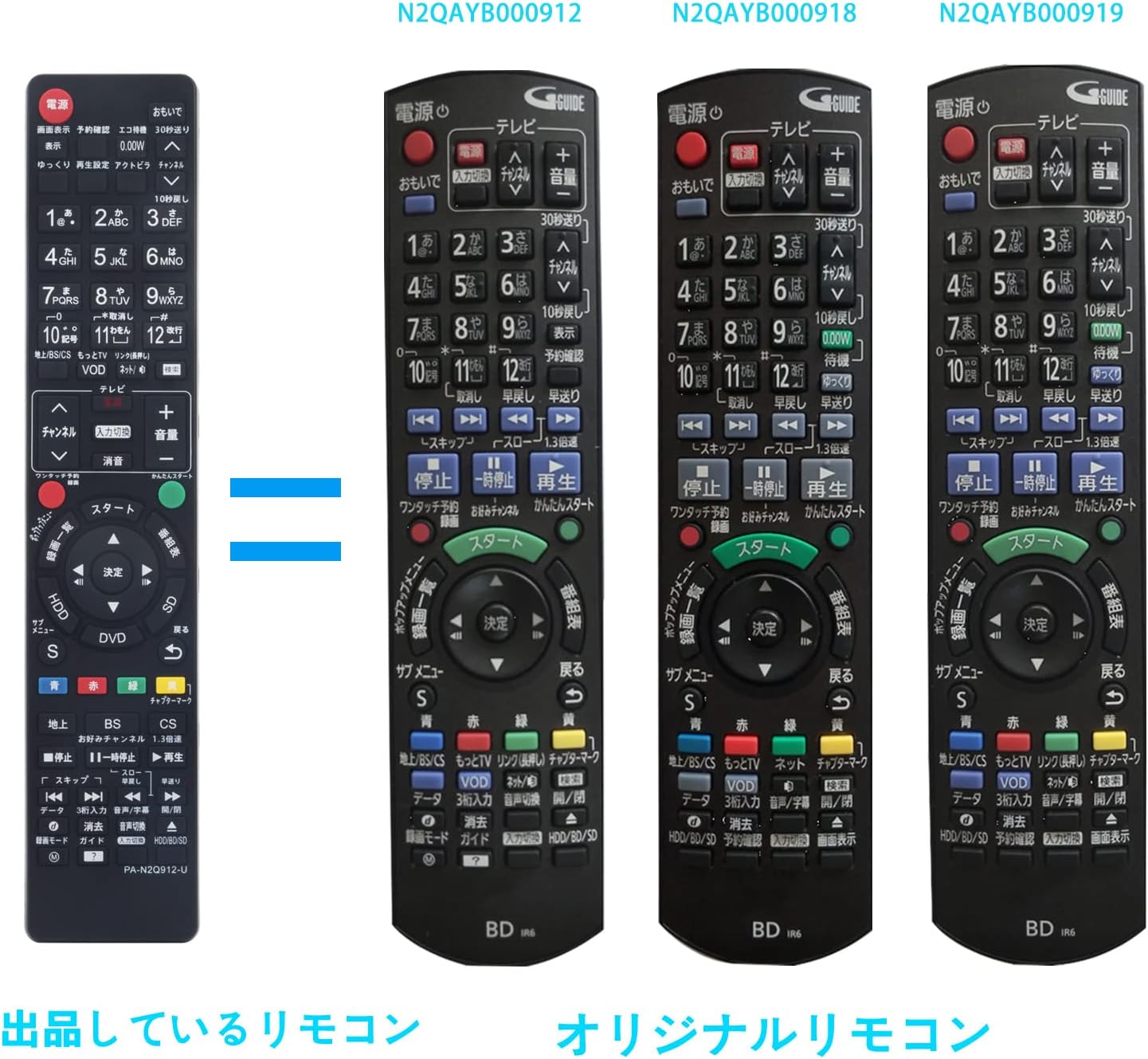
Image: Front view of the AULCMEET replacement remote control.
Compatible Panasonic Remote Control Models:
- N2QAYB000905
- N2QAYB000349
- N2QAYB000697
- N2QAYB000912
- N2QAYB000918
- N2QAYB000919
- N2QAYB000902
- N2QAYB000996
- TZT2Q011218
- N2QAYB001218
- N2QAYB000607
- N2QAYB000782
- N2QAYB000783
- N2QAYB000917
Compatible Panasonic Blu-ray Disc Recorder Models:
- DMR-BRT220, DMR-BRT230, DMR-XE1, DMR-BR30
- UN-JL10T1, UN-JL19T1, DMR-HRT300
- DMR-BWT650-S, DMR-BWT650, DMR-BWT550, DMR-BWT560-K, DMR-BWT560, DMR-BWT660
- DMR-BR130-K, DMR-BR160-K, DMR-BR130, DMR-BR160, DMR-BWT660-K, DMR-BWT550-S
- DMR-XE100, DMR-XE100-K, DMR-BRT230-K, DMR-BRT220-K, DMR-BRT250-K, DMR-BRT250
- DMR-SW2000, DMR-BRT260
The remote is designed to replicate the functionality of the original Panasonic remotes, providing a familiar user experience. The layout and button functions are similar to the original units, ensuring ease of transition.

Image: Comparison of the AULCMEET replacement remote (left) with original Panasonic remote models N2QAYB000912, N2QAYB000918, and N2QAYB000919 (right).

Image: Comparison of the AULCMEET replacement remote (left) with original Panasonic remote models N2QAYB000905, N2QAYB000349, and N2QAYB000697 (right).
Setup
Battery Installation
The remote control requires two AAA alkaline batteries (not included). Follow these steps to install the batteries:
- Locate the battery compartment cover on the back of the remote control.
- Press down on the tab and slide the cover downwards to open the compartment.
- Insert two AAA batteries, ensuring the positive (+) and negative (-) terminals align correctly with the markings inside the compartment.
- Slide the battery compartment cover back into place until it clicks securely.
No additional setup or programming is required. The remote is pre-configured for immediate use with compatible Panasonic Blu-ray Disc Recorders once batteries are installed.

Image: Back view of the remote control with the battery compartment open, showing where to insert AAA batteries.
Operating Instructions
This remote control provides standard functions for operating your Panasonic Blu-ray Disc Recorder. The button layout is designed to be intuitive and similar to original Panasonic remotes.
Basic Functions:
- Power Button: Turns the device on or off.
- Number Buttons (0-9): For direct channel selection or inputting numerical values.
- Channel Up/Down: Navigates through channels.
- Volume Up/Down: Adjusts the audio volume.
- Mute: Silences the audio output.
- Playback Controls (Play, Pause, Stop, Fast Forward, Rewind, Skip): Manages media playback.
- Directional Pad (Up, Down, Left, Right) & Enter/OK: For menu navigation and selection.
- Menu/Guide: Accesses the device's main menu or program guide.
- Input/Source: Switches between different input sources.
- Color Buttons (Red, Green, Yellow, Blue): Used for specific functions within menus or applications, as indicated on screen.
Maintenance
- Cleaning: To clean the remote, wipe it with a soft, dry cloth. Do not use liquid cleaners, sprays, or abrasive materials, as these can damage the remote's surface or internal components.
- Battery Replacement: Replace batteries when the remote's response becomes sluggish or stops working. Always replace both batteries at the same time with new ones of the same type.
- Storage: If the remote will not be used for an extended period, remove the batteries to prevent leakage and potential damage to the remote. Store the remote in a cool, dry place away from direct sunlight and extreme temperatures.
- Avoid Drops: Protect the remote from drops and impacts, which can cause internal damage.
Troubleshooting
- Remote not responding:
- Check if the batteries are inserted correctly with the correct polarity (+/-).
- Replace old batteries with new ones.
- Ensure there are no obstructions between the remote and the device's infrared sensor.
- Confirm the remote is pointed directly at the device.
- Specific buttons not working:
- Clean the remote's surface, especially around the unresponsive buttons, to remove any dirt or debris.
- If cleaning and battery replacement do not resolve the issue, the button may be faulty.
- Interference:
- Bright light sources, such as direct sunlight or fluorescent lights, can interfere with the remote's infrared signal. Try operating the remote in a different lighting condition.
Specifications
| Brand | AULCMEET |
| Model Identifier | PA-N2Q912 |
| Features | Replacement remote for Blu-ray Disc Recorders |
| Compatible Devices | DVD / Blu-ray Players (Panasonic Blu-ray Disc Recorders) |
| Communication Interface | Infrared (IR) |
| Number of Buttons | 70 |
| Controller Type | Button Control |
| Maximum Range | 33 feet (approx. 10 meters) |
| Batteries Required | 2 x AAA batteries (Alkaline recommended) |
| Product Weight | 80 grams |
| ASIN | B07ZYMB863 |
| GTIN/UPC | 754914024019 |
Warranty and Support
This product comes with a one-year warranty from the date of purchase. If you encounter any defects or issues with the product within this period, please contact the seller via email. The seller can provide support, including new product exchanges, to resolve any problems.
For further assistance or inquiries, please refer to the contact information provided by your retailer or the AULCMEET official support channels.


