
Yanmis DSE5110
Yanmis DSE5110 Generator Controller Module User Manual
Model: DSE5110
1. Product Overview
The Yanmis DSE5110 Generator Controller Module is an advanced microprocessor-controlled unit designed for automatic start-up and monitoring of generator sets. It features a clear LCD display for real-time parameter monitoring and incorporates various protection functions to ensure reliable operation.
Key Features:
- LCD Display: 132 x 64 pixel LCD for easy data readability and accurate time display.
- Automatic Start-Up: Microprocessor control for multi-function engine automatic start-up.
- Real-time Monitoring: Displays three-phase voltage, three-phase current, unit frequency, cooling water temperature, oil pressure, engine speed, battery voltage, accumulative running time, and fault reasons.
- Configurable Cycles: Multiple start and stop cycles can be preset.
- Maintenance Reminder: Preset maintenance cycle reminder function.
- Remote Monitoring: Capable of remote monitoring through the network (with DSE855).
- Protection Functions: Includes protection against generator overspeed/underspeed, low oil pressure, high water temperature, start failure, emergency stop, speed loss, and charging failure.
- System Compatibility: Compatible with intelligent building systems (BMS).
- IP65 Class: IP65 protection class (requires matching gasket).
- Adjustable Settings: Allows setting start time, frequency, remote start, auto-record stop fault, and query functions.
- Security: System password lock function for enhanced security.

Figure 1.1: Front view of the DSE5110 Generator Controller Module, showing the LCD display, control buttons, and included mounting screws.

Figure 1.2: Angled view of the DSE5110 controller, highlighting the LCD screen's detailed display capabilities and the side connection ports.
2. Specifications
| Attribute | Value |
|---|---|
| Model | DSE5110 |
| Display Type | 132 x 64 pixel LCD |
| Protection Class | IP65 (with matching gasket) |
| Start Relay Output | 16Amp DC system voltage |
| Fuel Relay Output | 16Amp DC system voltage |
| Auxiliary Relay Output | 5Amp DC system voltage |
| Item Weight | 1.85 pounds |
| Manufacturer | Yanmis |
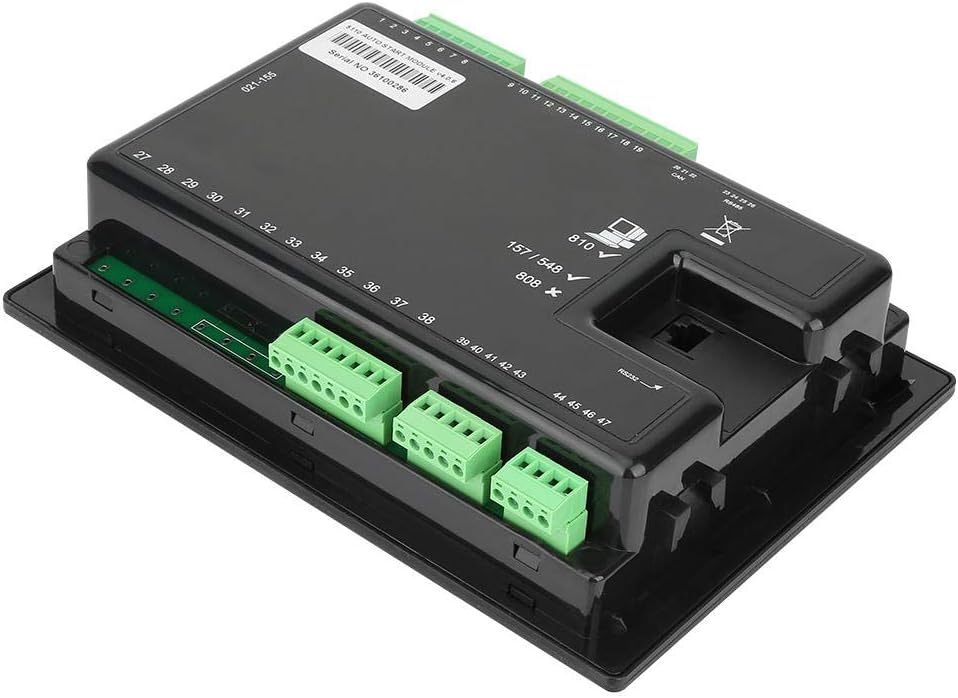
Figure 2.1: Rear view of the DSE5110 controller, illustrating the various connection terminals for power, sensors, and control signals.
3. Setup and Installation
Proper installation is crucial for the safe and effective operation of the DSE5110 controller. It should be mounted in a secure location, typically within a control panel, ensuring adequate ventilation and protection from environmental elements.
3.1 Mounting the Controller
The controller is designed for panel mounting. Use the provided mounting screws and brackets to secure the unit. Ensure the panel cutout matches the dimensions of the controller for a snug fit and to achieve the specified IP65 protection rating when a gasket is used.

Figure 3.1: Close-up view of the mounting screws and clips used to secure the DSE5110 controller to a panel.
3.2 Electrical Connections
Connect the generator's wiring to the appropriate terminals on the rear of the DSE5110 module. This includes connections for three-phase voltage, three-phase current, battery voltage, oil pressure sensor, water temperature sensor, engine speed sensor, and control signals for start, fuel, and auxiliary functions. Refer to the wiring diagram provided with your generator set and the DSE5110 for specific terminal assignments.
- Power Supply: Connect the DC power supply to the designated terminals.
- Generator Inputs: Connect voltage and current transformers (CTs) as per the system requirements.
- Engine Sensors: Connect oil pressure, water temperature, and speed sensors.
- Control Outputs: Connect the start, fuel, and auxiliary relay outputs to the generator's control circuits.
- Communication Ports: Utilize the RS232/RS485 ports for PC configuration or remote monitoring (DSE855).

Figure 3.2: Detailed rear view of the DSE5110 controller, showing the serial number, various numbered terminals for wiring, and communication ports (CAN, RS485, RS232).
4. Operating Instructions
The DSE5110 controller offers both manual and automatic operation modes, along with remote start capabilities. The LCD display provides comprehensive real-time data for easy monitoring.
4.1 Control Panel Layout
The front panel features an LCD display and several control buttons:
- LCD Display: Shows various generator parameters and status messages.
- Stop/Reset Button (Red 'O'): Stops the generator and resets any active alarms.
- Manual Start Button (Hand icon): Initiates a manual start sequence.
- Increase/Decrease Buttons (+/-): Used for navigating menus and adjusting settings.
- Auto Mode Button (Auto icon): Puts the controller into automatic mode, allowing for remote or scheduled starts.
- Start Button (Green 'I'): Initiates the generator start sequence in manual mode.

Figure 4.1: Angled front view of the DSE5110 controller, clearly showing the LCD screen and the array of control buttons for operation.
4.2 Starting the Generator
- Manual Start: Press the Stop/Reset button to ensure the controller is in a stopped state. Then, press the Manual Start button. The controller will initiate the start sequence.
- Automatic Start: Press the Auto Mode button. The controller will now respond to remote start signals or pre-programmed events (e.g., mains failure).
- Remote Start: Ensure the controller is in Auto Mode. A remote start signal (e.g., from a transfer switch or BMS) will trigger the generator to start.
4.3 Monitoring Parameters
The LCD display provides real-time data. Use the Increase/Decrease buttons to scroll through different screens and view parameters such as:
- Three-phase voltage (L1, L2, L3)
- Three-phase current
- Unit frequency
- Cooling water temperature
- Oil pressure
- Engine speed (RPM)
- Battery voltage
- Accumulative running time
- Active fault reasons
5. Maintenance
Regular maintenance ensures the longevity and reliable performance of your DSE5110 controller and the generator set it manages.
- Cleaning: Keep the controller's display and buttons clean using a soft, dry cloth. Avoid abrasive cleaners or solvents.
- Connections: Periodically check all electrical connections for tightness and signs of corrosion. Loose connections can lead to erratic behavior or damage.
- Firmware Updates: Check the manufacturer's website for any available firmware updates that may improve performance or add features.
- Maintenance Reminders: The DSE5110 has a preset maintenance cycle reminder function. Ensure this is configured to align with your generator's service schedule.
- Environmental Check: Ensure the operating environment remains within specified temperature and humidity ranges. Verify the IP65 seal (if gasket is used) is intact.
6. Troubleshooting
The DSE5110 controller is equipped with various protection functions and fault indicators to assist in troubleshooting. When a fault occurs, the LCD will display a fault reason, and the generator may shut down or issue a warning.
Common Faults and Solutions:
| Fault Indication | Possible Cause | Action |
|---|---|---|
| Generator Overspeed/Underspeed | Engine speed outside normal operating range. | Check engine governor settings. Inspect speed sensor and wiring. |
| Low Oil Pressure | Insufficient engine oil or faulty oil pressure sensor. | Check engine oil level. Inspect oil pressure sensor and wiring. |
| High Water Temperature | Engine overheating. | Check coolant level, radiator, fan, and water temperature sensor. |
| Start Failure | Generator fails to start after multiple attempts. | Check fuel supply, battery voltage, starter motor, and engine pre-heat system. |
| Emergency Stop | Emergency stop button activated or wiring fault. | Ensure emergency stop button is disengaged. Check emergency stop circuit wiring. |
| Charging Failure | Alternator not charging battery. | Check alternator, charging circuit wiring, and battery condition. |
Always press the Stop/Reset button after resolving a fault to clear the alarm and allow the controller to resume normal operation.
7. Warranty and Support
Yanmis products are designed for reliability and performance. For warranty information, technical support, or service inquiries, please refer to the contact details provided with your purchase or visit the official Yanmis website.
Please retain your proof of purchase for warranty claims. Unauthorized modifications or repairs may void the warranty.
Ask a question about this manual
Ask about setup, troubleshooting, compatibility, parts, safety, or missing instructions. Manuals+ will review the question and use this page’s manual context to help answer it.