1. Product Overview
The Aokeo Professional Studio Recording Microphone Isolation Shield is designed to enhance recording quality by minimizing unwanted sound reflections and external noise. It features a multi-layer design with absorbent foam to filter vocal and instrument sounds, ensuring clarity during recording sessions. This kit includes the isolation shield, an adjustable stand, and necessary adapters for various microphones.
2. Package Contents
Please verify that all components are present in your package:
- Microphone Isolation Shield x 1
- Metal Thread Adapter x 2 (compatible with most microphones)
- Adjustable Stand x 1
- Warranty Card and Instruction Manual
Note: Microphone is NOT included.

Image: All components included in the Aokeo Microphone Isolation Shield package, including the shield, stand, adapters, and pop filter.
3. Setup Instructions
Follow these steps to assemble your Aokeo Microphone Isolation Shield:
- Unpack Components: Carefully remove all stand accessories from the packaging.
- Assemble the Stand: Follow the diagram to connect the stand poles and base securely. Ensure all connections are tightened for stability.
- Attach Isolation Shield: Screw the Microphone Isolation Shield directly onto the top of the assembled stand. Use the isolation shield's backclip to fix it firmly to the floor stand.
- Install Accessories: Take out the isolation shield accessories and install them according to the provided figure. This includes any additional brackets or trays.
- Mount Microphone and Pop Filter: Bring your own microphone and mount it onto the adapter. Then, install the pop filter and storage tray (if included) onto the stand. The pop filter should be positioned in front of the microphone.
- Adjust Height: Adjust the height of the tripod microphone stand to your desired level. The isolation shield stand can be adjusted between 52.5 inches and 70.5 inches.

Image: Visual guide detailing the six steps for assembling the microphone isolation shield and stand.

Image: Close-up views of the bracket tray, rotational fixation mechanism, and the removable 5/8 inch adapter for microphone attachment.
4. Operating Instructions
The Aokeo Microphone Isolation Shield is designed to optimize your recording environment by reducing unwanted sound reflections and external noise.
4.1 Noise Suppression and Sound Clarity
The interior of the microphone cover is constructed with absorbent cotton material, which effectively filters vocal and instrument sounds. This design helps to eliminate interference from audio waves and the external environment, ensuring a clear and crisp recording.

Image: Diagram showing how the isolation shield prevents sound reflection and diffuse reflection, with layers for reflecting, filtering, and absorbing sound.

Image: Illustration of the multi-layer filtration system, showing absorber, filter, and reflective layers working together to reduce external noise reflection.
4.2 Optimal Placement for Recording
Position the isolation shield around your microphone to create a focused acoustic space. This is particularly effective for capturing clear vocals and instruments, as demonstrated in the image below.

Image: A musician recording with the Aokeo microphone isolation shield and stand, demonstrating its use for capturing clear sound.
4.3 Portability and Storage
The isolation shield is designed to be portable and foldable, allowing for easy angle adjustment and convenient storage. It can be folded inwards by 180 degrees.
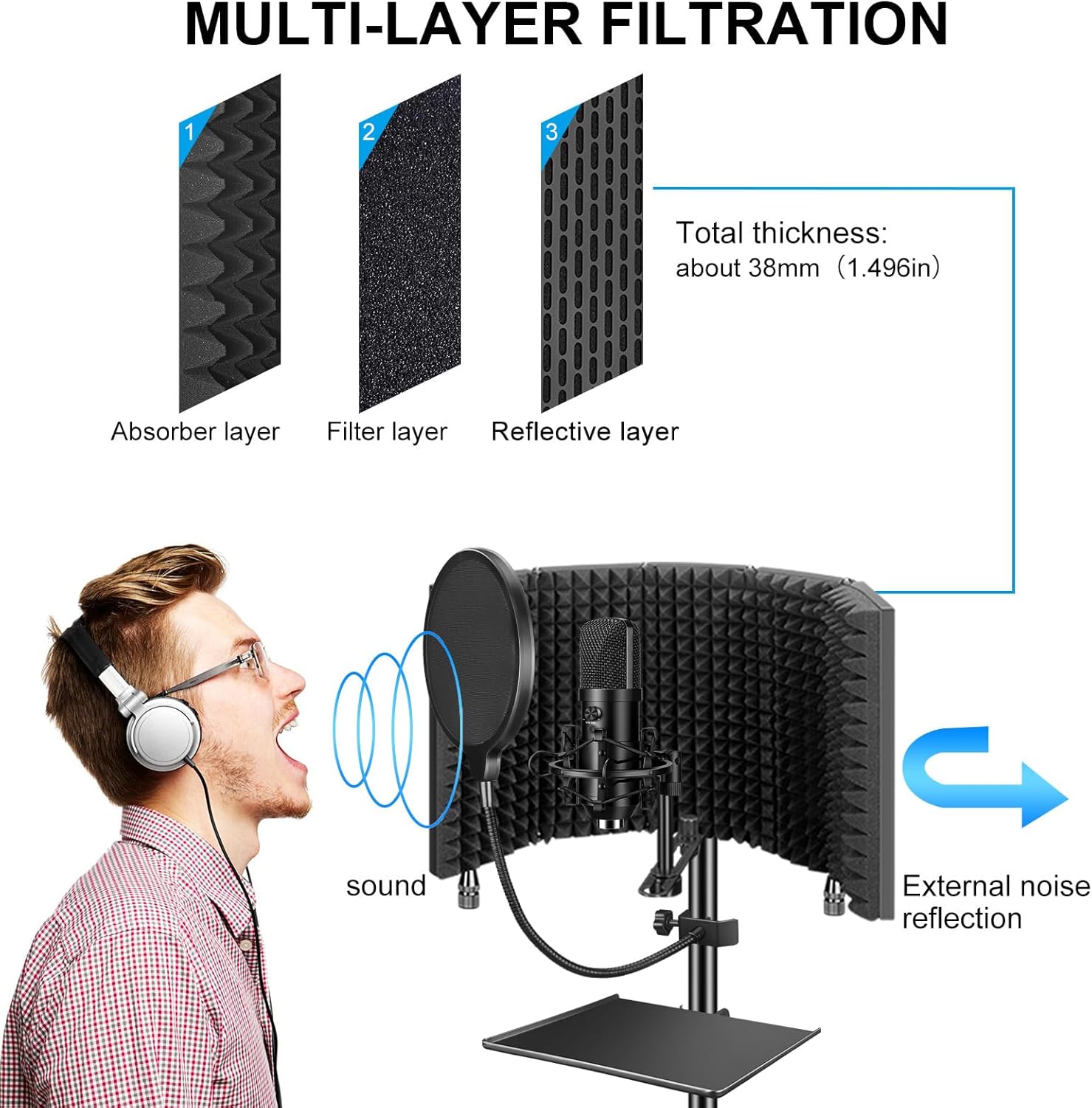
Image: Visual representation of the isolation shield's 180-degree inward fold feature, along with its fully expanded and folded dimensions.
4.4 Multi-Scenario Use
This microphone isolation shield and stand kit is versatile and can be used in various settings, including:
- Studio recording
- Recording rooms
- Broadcasting stations
- Radio stations
- Home studios
- Podcast setups
5. Maintenance
To ensure the longevity and optimal performance of your Aokeo Microphone Isolation Shield, follow these maintenance guidelines:
- Cleaning: Wipe the metal surfaces with a soft, dry cloth. For the sponge material, gently dust or use a soft brush to remove any debris. Avoid using harsh chemicals or abrasive cleaners, as they may damage the materials.
- Storage: When not in use, fold the isolation shield for compact storage. Store it in a dry, cool place away from direct sunlight and extreme temperatures to prevent material degradation.
- Inspection: Periodically check all screws and connections on the stand and shield to ensure they are tight and secure. Re-tighten if necessary.
6. Troubleshooting
If you encounter any issues with your Aokeo Microphone Isolation Shield, please refer to the following common solutions:
- Unstable Stand:
Solution: Ensure all sections of the adjustable stand are fully extended and locked into place. Verify that the tripod legs are spread wide and stable on a flat surface. Check that the isolation shield is securely screwed onto the stand and its backclip is engaged. - Poor Sound Isolation:
Solution: Confirm that the microphone is positioned correctly within the isolation shield, centered and facing the absorbent foam. Ensure the shield is fully expanded and positioned close enough to the microphone to effectively block reflections. Check for any gaps or misalignments in the shield panels. - Difficulty Attaching Microphone:
Solution: Ensure you are using the correct metal thread adapter for your microphone. The kit includes two adapters to fit most standard microphones. If the microphone still doesn't fit, consult your microphone's manual for thread size.
If the problem persists after attempting these solutions, please contact Aokeo customer support for further assistance.
7. Specifications
| Brand | Aokeo |
| Model | AO-505+stand+filter |
| Microphone Form Factor | Table Array |
| Item Dimensions (L x W x H) | 31 x 7.5 x 42.2 Centimetres |
| Product Dimensions | 30.99 x 7.49 x 42.16 cm; 3.6 kg |
| Material | Metal+sponge |
| Frequency Response | 15 KHz |
| Special Feature | Prevent noise from entering your microphone |
| Polar Pattern | Unidirectional |
| Manufacturer | Aokeo |
| Date First Available | Nov. 17 2019 |
8. Warranty and Support
8.1 Warranty Information
Aokeo provides one year's after-sales service free of charge for this product. This warranty covers manufacturing defects and ensures the quality of your purchase. Please retain your proof of purchase for warranty claims.
8.2 Customer Support
For any questions, technical assistance, or warranty inquiries, please contact Aokeo customer support. We are committed to providing quality products and services.
Email: lugoumou4633@163.com
You can also visit the official Aokeo store on Amazon for more information and support: Aokeo Amazon Store