
1. Introduction
The VOLTCRAFT DL-240K is a compact and reliable temperature data logger designed for precise temperature monitoring and recording. It features an integrated display, automatic PDF and CSV report generation, and compatibility with external K-type thermocouple sensors. Its robust IP65 rating ensures protection against water and dust, making it suitable for various industrial and environmental applications. This manual provides essential information for the safe and efficient operation of your DL-240K data logger.
2. Safety Instructions
- Read this manual thoroughly before operating the device.
- Do not expose the device to extreme temperatures outside its specified operating range (-200 to 1372 °C for measurement, device operating range may differ).
- Avoid strong impacts or vibrations.
- Do not attempt to open or modify the device, as this will void the warranty and may cause damage or injury.
- Ensure the K-type thermocouple is correctly connected before use.
- Dispose of batteries according to local regulations.
- Although IP65 rated, avoid prolonged submersion in water.
3. Package Contents
Please check the package contents upon receipt to ensure all items are present and undamaged:
- VOLTCRAFT DL-240K Temperature Data Logger
- K-type Thermocouple Sensor
- USB Protective Cap
- Instruction Manual (this document)
4. Product Overview
4.1. Key Features
- Temperature recording function
- Integrated LCD display for real-time readings
- Automatic generation of PDF and CSV reports
- Measurement via external K-type thermocouple sensor
- Water and dust resistant (IP65 rating)
- Alarm function for temperature thresholds
- Large, easy-to-read display
4.2. Components
The VOLTCRAFT DL-240K consists of the main data logger unit and an external K-type thermocouple sensor.

Figure 1: The VOLTCRAFT DL-240K data logger with its K-type thermocouple sensor and the USB protective cap removed, revealing the USB-A connector.
- Data Logger Unit: Main body with LCD display, control buttons, and internal memory.
- USB Connector: Integrated USB-A plug for connecting to a computer.
- K-Type Input: Port for connecting the external K-type thermocouple sensor.
- Protective Cap: Covers the USB connector when not in use, contributing to IP65 rating.
5. Setup
5.1. Battery Installation
The DL-240K is powered by internal batteries. Ensure they are correctly installed and charged for optimal performance. Refer to the battery compartment cover for polarity.
5.2. Connecting the K-Type Sensor
Insert the K-type thermocouple sensor into the designated K-type input port on the data logger. Ensure a secure connection for accurate measurements.

Figure 2: The VOLTCRAFT DL-240K data logger with the K-type thermocouple sensor properly connected to its input port.
5.3. Initial Configuration (Time/Date, Logging Interval)
Before first use, connect the data logger to a computer via USB. The device may appear as a removable storage drive. Configuration software (if provided by VOLTCRAFT) or a simple text file on the device will allow you to set the current time, date, and desired logging interval. This step is crucial for accurate data timestamps.
6. Operating Instructions
6.1. Starting a Recording Session
To begin recording temperature data, press and hold the START button (or equivalent, refer to device markings) until the recording indicator appears on the display. Ensure the sensor is placed in the environment to be monitored. Note that some models require saving a log file to the device's memory to activate recording.
6.2. Stopping a Recording Session
To stop recording, press and hold the STOP button (or equivalent). The recording indicator will disappear. All recorded data will be saved to the internal memory.
6.3. Viewing Data on Display
The integrated LCD display shows the current temperature reading. You may be able to cycle through minimum, maximum, and average recorded values by pressing specific buttons (refer to device markings).
6.4. Downloading Data and Report Generation
Remove the USB protective cap and connect the data logger to a computer's USB port. The device will automatically generate a PDF report and a CSV data file, which can be accessed directly from the device as a removable drive. Save these files to your computer for analysis.

Figure 3: The VOLTCRAFT DL-240K data logger connected to a personal computer via its USB port for data download and report generation.
6.5. Alarm Function
The DL-240K features an alarm function. Upper and lower temperature thresholds can be set via the configuration software. If the measured temperature exceeds or falls below these thresholds, an alarm will be triggered (e.g., visual indicator on the display).
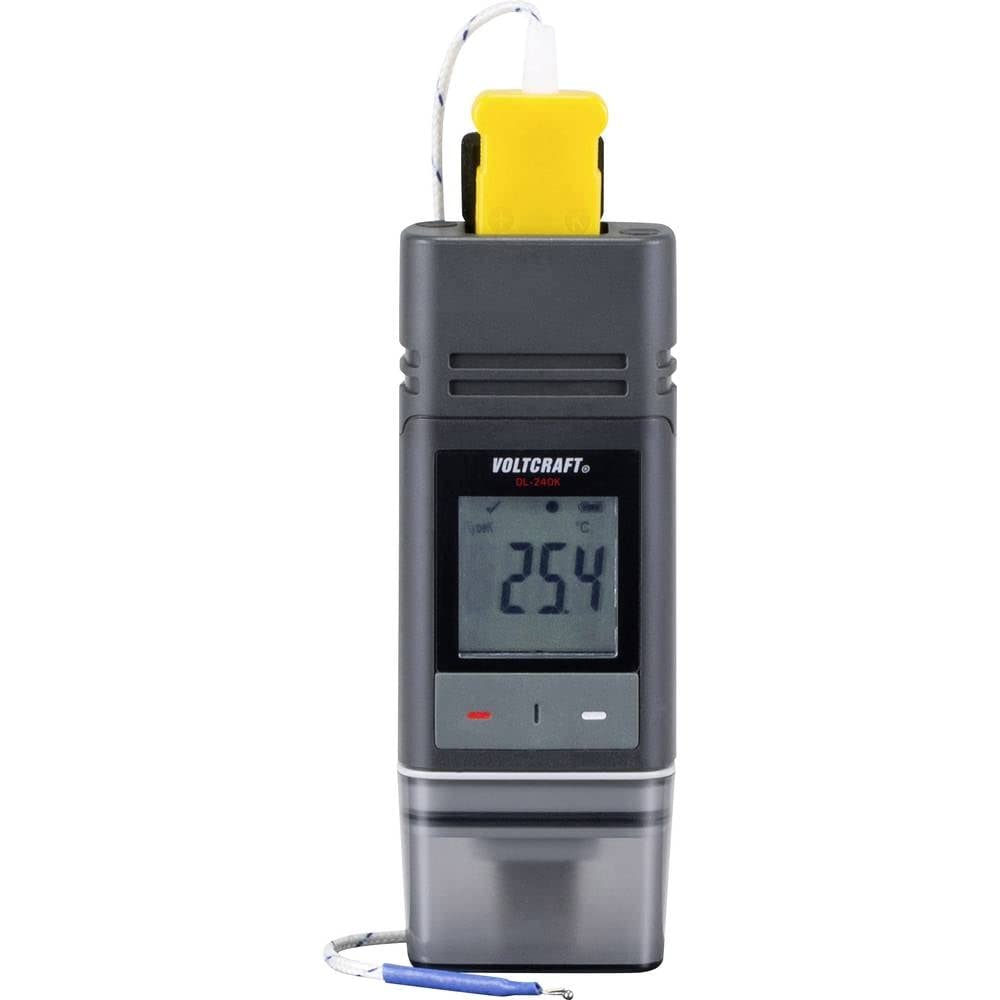
Figure 4: The VOLTCRAFT DL-240K data logger in an application setting, mounted on the side of a server rack to monitor ambient temperature.
7. Maintenance
7.1. Cleaning
To clean the device, use a soft, dry, lint-free cloth. Do not use abrasive cleaners, solvents, or harsh chemicals, as these can damage the casing or display. Ensure the USB protective cap is in place before cleaning to maintain IP65 rating.
7.2. Storage
When not in use for extended periods, store the data logger in a cool, dry place, away from direct sunlight and extreme temperatures. Ensure the USB protective cap is securely in place.
7.3. Battery Replacement
If the device indicates low battery or fails to power on, replace the internal batteries. Refer to the battery compartment for instructions on how to open it and replace the batteries, ensuring correct polarity.
8. Troubleshooting
- Device not turning on: Check battery level and ensure batteries are correctly installed.
- No data recorded: Verify that a recording session was properly initiated. Check the logging interval settings. Ensure the K-type sensor is securely connected.
- Cannot connect to PC / No PDF/CSV generated: Ensure the USB connection is secure. Try a different USB port. If applicable, check for necessary drivers (though often not required for automatic PDF generation).
- Inaccurate temperature readings: Ensure the K-type sensor is properly positioned and not damaged. Verify the sensor type matches the device's requirements. Consider if the sensor itself needs calibration.
- Display is blank or unreadable: Check battery level. If the issue persists, contact support.
9. Specifications
| Specification | Value |
|---|---|
| Model Name | DL-240K |
| Manufacturer Part Number | VC-9657630-P668G |
| Temperature Measurement Range | -200 to 1372 °C |
| Connectivity Technology | USB |
| Display Type | LCD |
| Special Features | Alarm, Large display |
| Ingress Protection (IP) Rating | IP65 (Water and dust resistant) |
| Product Dimensions (L x W x H) | 9.8 x 3.7 x 1.8 cm |
| Item Weight | 50 grams |
| Exterior Material | Polycarbonate (PC) |
| Power Source | Hand (Battery-powered) |
| Reusability | Rechargeable (implies rechargeable batteries or internal battery) |
10. Warranty and Support
10.1. Warranty Information
The VOLTCRAFT DL-240K comes with a 1-year availability for spare parts. For specific warranty terms and conditions, please refer to the documentation provided with your purchase or contact VOLTCRAFT directly.
10.2. Technical Support
For technical assistance, troubleshooting beyond this manual, or inquiries regarding your VOLTCRAFT DL-240K, please contact your retailer or the VOLTCRAFT customer support. Have your model number (DL-240K or VC-9657630-P668G) and purchase information ready when contacting support.