
1. Introduction
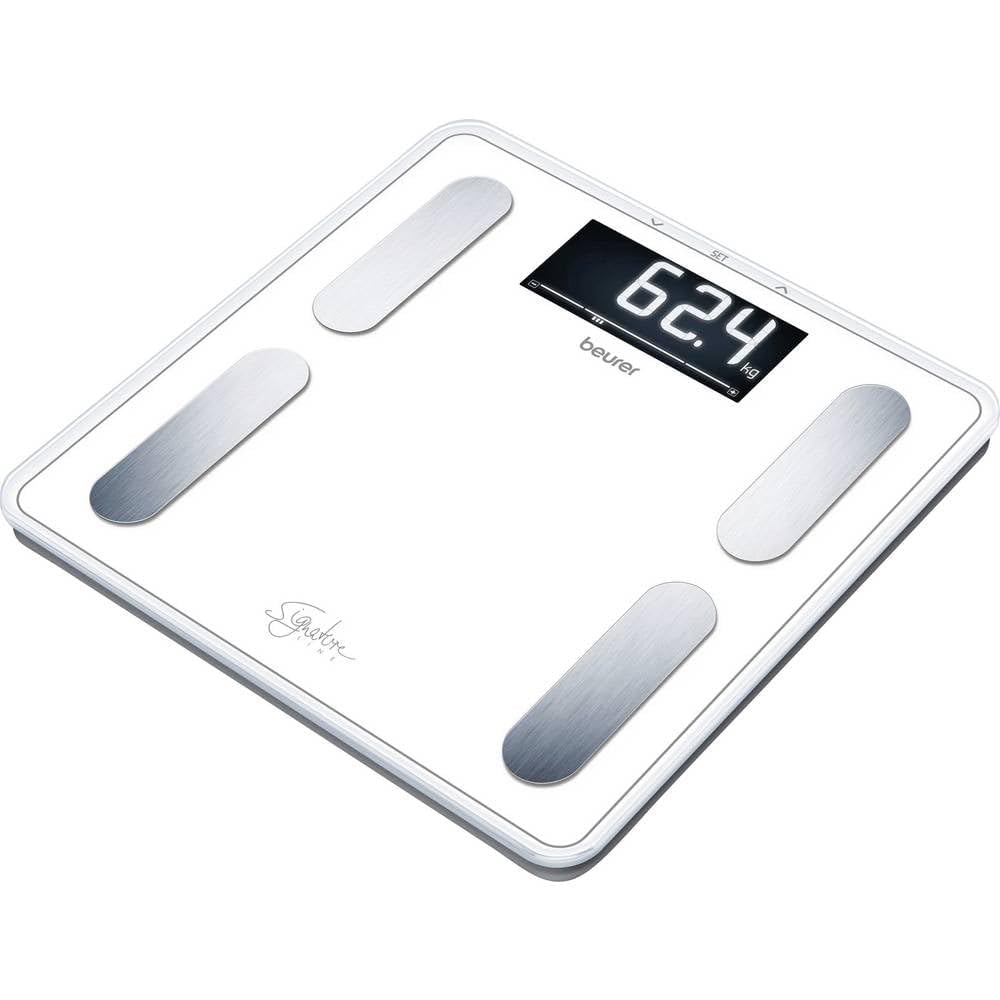
The Beurer BF 400 Signature Line Body Analysis Scale is designed to provide comprehensive body data beyond just weight. It utilizes Bioelectrical Impedance Analysis (BIA) to determine body fat, body water, muscle mass, and bone mass. Additionally, it calculates Basal Metabolic Rate (BMR), Active Metabolic Rate (AMR), and Body Mass Index (BMI). This scale supports up to 10 user profiles with automatic user recognition and offers 5 activity levels, making it suitable for the entire family. Its modern design features an extra-large inverted LCD display and brushed steel electrodes.
2. Safety Information
- This scale is not suitable for persons with medical implants (e.g., pacemakers).
- Do not use during pregnancy.
- Place the scale on a firm, level surface to ensure accurate measurements. Avoid carpets or uneven floors.
- Step onto the scale barefoot for body analysis measurements.
- Keep the scale dry and clean. Do not immerse in water.
- Maximum weight capacity is 200 kg (440 lb). Do not exceed this limit.
- Keep batteries out of reach of children.
3. Package Contents
Please check that all items are included in the delivery:
- 1x Beurer BF 400 Body Analysis Scale (White)
- 3x 1.5V AAA Batteries
- 1x Instruction Manual
4. Setup
4.1. Battery Installation
- Open the battery compartment on the underside of the scale.
- Insert the three 1.5V AAA batteries, ensuring correct polarity (+/-).
- Close the battery compartment securely.
4.2. Initial Setup and User Data Entry
Before first use, you need to set up your personal data. The scale can store data for up to 10 users.
- Press the SET button to enter setup mode.
- Select a user memory slot (P1-P10) using the UP or DOWN buttons, then confirm with SET.
- Enter your gender, height, age, and activity level (1-5) using the UP or DOWN buttons and confirm each selection with SET.
- The scale will save your data and switch to weighing mode.
You can change the weight unit (kg, lb, st) by pressing the unit button on the underside of the scale.
5. Operating Instructions
5.1. Taking a Measurement
- Place the scale on a flat, hard surface.
- Gently tap the scale with your foot to activate it (Quick Start technology). The display will show "0.0".
- Step onto the scale barefoot, ensuring your feet are positioned on the brushed steel electrodes. Stand still.
- The scale will first display your weight. Then, it will perform the body analysis.
- Your personal data (body fat, water, muscle, bone, BMR, AMR, BMI) will be displayed sequentially.
- The scale automatically recognizes the user based on their weight within a +/- 3 kg range. If multiple users are within this range, the scale may prompt you to select your profile.
- The scale will automatically switch off after approximately 20 seconds of inactivity.
5.2. Interpreting Results
The scale provides the following measurements:
- Body Weight: Your total weight in kg, lb, or st.
- Body Fat Percentage: The proportion of fat in your body.
- Body Water Percentage: The proportion of water in your body.
- Muscle Mass Percentage: The proportion of muscle in your body.
- Bone Mass: The weight of your bones.
- BMI (Body Mass Index): A measure of body fat based on height and weight.
- BMR (Basal Metabolic Rate): The number of calories your body burns at rest.
- AMR (Active Metabolic Rate): The total number of calories your body burns, including activity.
Consult a healthcare professional for interpretation of your body analysis results.
6. Display Information
The Beurer BF 400 features an extra-large inverted LCD display (52 x 119 mm) with a digit height of 35 mm for easy readability. The inverted display provides clear visibility in various lighting conditions.
- "Lo": Indicates low battery. Replace batteries.
- "Err": Indicates an error during measurement, often due to movement or incorrect foot placement. Step off and try again.
- "O-L": Indicates overload. The maximum capacity of 200 kg has been exceeded.
7. Maintenance and Care
- Clean the scale regularly with a damp cloth. Do not use abrasive cleaning agents or immerse the scale in water.
- If the scale is not used for an extended period, remove the batteries to prevent leakage.
- Store the scale in a dry, safe place, away from extreme temperatures and direct sunlight.
- Do not attempt to disassemble or repair the scale yourself. Contact authorized service personnel.
8. Troubleshooting
| Problem | Possible Cause | Solution |
|---|---|---|
| Scale does not turn on. | Batteries are dead or incorrectly inserted. | Check battery polarity or replace batteries. |
| Inaccurate measurements. | Scale on an uneven surface; user moved during measurement; scale not calibrated. | Place scale on a hard, flat surface. Stand still. Step off and on again to re-calibrate to "0.0". |
| Body analysis not displayed. | User not barefoot; feet not properly on electrodes; user data not entered. | Ensure bare feet are on electrodes. Check user profile settings. |
| "Lo" displayed. | Low battery. | Replace all three AAA batteries. |
| "O-L" displayed. | Overload. | The weight exceeds the maximum capacity of 200 kg. |
9. Specifications
- Model: BF 400
- Product Number: 73575
- Dimensions: 31 x 31 x 2.8 cm (L x W x H)
- Weight: Approximately 2.2 kg
- Weight Capacity: 200 kg (440 lb)
- Measurement Increments: 100g for weight/bone mass; 0.1% for body fat/water/muscle mass
- Display: Extra-large inverted LCD (52 x 119 mm), 35 mm digit height
- User Memories: 10
- Activity Levels: 5
- Power Supply: 3 x 1.5V AAA batteries (included)
- Material: Safety glass weighing surface, brushed steel electrodes
- Functions: Body weight, body fat, body water, muscle mass, bone mass, BMR, AMR, BMI
10. Warranty and Support
Beurer provides a warranty for this product. For detailed warranty conditions and support information, please refer to the warranty card included with your product or visit the official Beurer website. In case of technical issues or questions regarding the product, please contact Beurer customer service.
For further assistance, you may visit the Beurer Brand Store.