
1. Introduction
This manual provides essential instructions for the safe and efficient operation, maintenance, and troubleshooting of your Nestlé Gold Blend Barista Duo Premium Black Coffee Machine, model HPM9637. Please read this manual thoroughly before first use and retain it for future reference.
The Nestlé Gold Blend Barista Duo HPM9637 coffee machine is designed to prepare various coffee beverages, including lattes, with a single touch. It features separate tanks for coffee and creamer, allowing for the preparation of milk-based drinks without fresh milk, contributing to ease of use and hygiene. Compatible creamer products include 'Nestlé Bright Excreamy 110g' and 'Nestlé Bright 110g' for creating smooth, frothed beverages.
2. Safety Information
- Always read all instructions before operating the appliance.
- Do not immerse the appliance, power cord, or plug in water or other liquids.
- Ensure the voltage indicated on the appliance corresponds to your local mains voltage before connecting.
- Keep the appliance out of reach of children. Close supervision is necessary when the appliance is used by or near children.
- Avoid contact with hot surfaces. Use handles or knobs.
- Unplug from the outlet when not in use and before cleaning. Allow to cool before putting on or taking off parts, and before cleaning the appliance.
- Do not operate any appliance with a damaged cord or plug, or after the appliance malfunctions or has been damaged in any manner.
- Use only accessories recommended by the manufacturer.
3. Product Overview
The Nestlé Gold Blend Barista Duo HPM9637 is a compact coffee machine designed for ease of use and versatility. It features a sleek black design with intuitive controls.

Figure 1: Nestlé Gold Blend Barista Duo Premium Black Coffee Machine HPM9637
Components:
- Water Tank: Located at the rear, for holding water. Capacity: 2000 ml.
- Coffee Tank: For Nestlé Eco & System Packs.
- Creamer Tank: For Nestlé Bright Excreamy or Premium creamer packs.
- Control Panel: Front-facing panel with buttons for power and beverage selection.
- Drip Tray: Removable tray at the base to catch spills.
- Coffee Spout: Where the prepared beverage is dispensed.
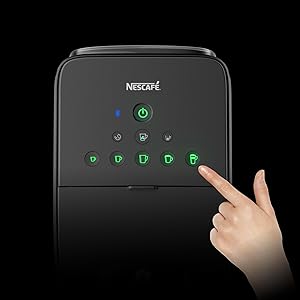
Figure 2: Control panel with beverage selection buttons
4. Setup
4.1 Unpacking
- Carefully remove the coffee machine and all accessories from the packaging.
- Remove any protective films or packaging materials from the appliance.
- Check that all parts are present and undamaged.
4.2 Placement
- Place the machine on a stable, flat, and heat-resistant surface.
- Ensure there is adequate space around the machine for ventilation and access to tanks.
- Avoid placing the machine near heat sources or in direct sunlight.
4.3 Initial Cleaning and Priming
- Wash the water tank, creamer tank, and drip tray with warm, soapy water. Rinse thoroughly and dry.
- Fill the water tank with fresh, cold drinking water up to the MAX level.
- Place an empty cup under the coffee spout.
- Plug the machine into a grounded power outlet.
- Press the power button to turn on the machine.
- Perform an initial rinse cycle by selecting a plain hot water option (if available) or by running a coffee cycle without coffee or creamer packs. This primes the system and cleans internal components.
- Discard the water from the cup and the drip tray.
5. Operating Instructions
5.1 Preparing for Brewing
- Ensure the water tank is filled with fresh water.
- Insert a compatible Nestlé Eco & System Pack into the coffee tank.
- If preparing a latte or other milk-based beverage, ensure the creamer tank contains Nestlé Bright Excreamy or Premium creamer.
- Place an appropriate cup or mug on the drip tray under the coffee spout.
5.2 Selecting and Brewing a Beverage
The machine offers 8 different beverage options, including:
- Espresso
- Black Coffee (various sizes)
- Cappuccino
- Cafe Latte
- Iced Coffee (various sizes)
- Iced Cafe Latte

Figure 3: Available beverage menu
To brew:
- Press the power button to turn on the machine. Wait for the indicator lights to stabilize.
- Select your desired beverage by pressing the corresponding button on the control panel.
- The machine will automatically begin the brewing process.
- Once brewing is complete, the machine will stop automatically. Carefully remove your cup.
5.3 Using the Nescafe App (if applicable)
This model is compatible with the 'Nescafe App'. Connect your machine to the app to customize beverage settings such as coffee strength and foam level for personalized recipes.
6. Maintenance and Cleaning
Regular cleaning ensures optimal performance and extends the lifespan of your coffee machine.
6.1 Daily Cleaning
- Drip Tray: Empty and rinse the drip tray after each use or when the indicator shows it is full.
- Water Tank: Empty any remaining water and rinse the water tank daily. Refill with fresh water before next use.
- Coffee Spout: Wipe the coffee spout with a damp cloth.
6.2 Regular Cleaning (Weekly/Bi-weekly)
- Coffee Tank: Remove and clean the coffee tank according to the instructions provided with your Nestlé Eco & System Packs.
- Creamer Tank: Remove and thoroughly clean the creamer tank with warm, soapy water. Rinse well and ensure it is completely dry before reassembling.
- Exterior: Wipe the exterior of the machine with a soft, damp cloth. Do not use abrasive cleaners or solvents.
6.3 Descaling
Over time, mineral deposits (limescale) can build up in the machine, affecting performance. Descale your machine regularly, depending on water hardness and usage frequency. Refer to the manufacturer's descaling solution instructions for the specific procedure. Generally, this involves:
- Emptying the water tank.
- Adding descaling solution mixed with water (as per solution instructions) to the water tank.
- Running several cycles through the machine without coffee or creamer.
- Rinsing the tank and running several cycles with fresh water to remove any descaling residue.
7. Troubleshooting
If you encounter issues with your coffee machine, refer to the table below for common problems and solutions.
| Problem | Possible Cause | Solution |
|---|---|---|
| Machine does not turn on | No power supply | Check if the power cord is securely plugged into the outlet and the machine. Test the outlet with another appliance. |
| No coffee dispensed | Water tank empty; Coffee pack not inserted correctly; Clogged spout | Fill water tank; Ensure coffee pack is correctly placed; Clean the coffee spout. |
| Weak coffee | Coffee pack nearly empty; Incorrect app settings | Replace coffee pack; Adjust strength settings via the Nescafe App. |
| No foam for latte | Creamer tank empty; Creamer tank/nozzle clogged | Refill creamer tank; Clean the creamer tank and nozzle thoroughly. |
| Water leakage | Water tank not seated correctly; Drip tray full | Ensure water tank is properly installed; Empty the drip tray. |
| Error indicator light | Specific malfunction | Refer to the full product manual or contact customer support for specific error code interpretations. |
If the problem persists after attempting these solutions, please contact Nestlé customer support.
8. Specifications
| Feature | Detail |
|---|---|
| Model Number | HPM9637 |
| Brand | Nestlé |
| Manufacturer | Nestlé Japan |
| Color | Premium Black |
| Coffee Maker Type | Espresso Machine |
| Product Dimensions (D x W x H) | 40.1 cm x 22.5 cm x 48.5 cm |
| Product Weight | 5.4 kg |
| Water Tank Capacity | 2000 ml |
| Capacity (Cups) | 7-8 cups |
| Human Interface Input | Buttons |
| Battery Use | No |

Figure 4: Machine dimensions as depicted in product imagery (Note: Dimensions may vary slightly from listed specifications)
9. Warranty and Support
For warranty information, product registration, or technical support, please refer to the official Nestlé website or contact Nestlé customer service directly. Keep your proof of purchase for warranty claims.