
1. Introduction
The NutriChef 15-Bottle Compressor Wine Cooler (Model PKCWC150) is designed to provide optimal storage conditions for your wine collection. This freestanding countertop cooler features advanced compressor fan cooling technology, ensuring your wines are kept at their ideal temperature. Its compact design and quiet operation make it a perfect addition to any home or kitchen.
Key features include a digital touch button display panel for precise temperature control, integrated LED lighting, reinforced glass door with an air-tight seal, and contoured chrome wine racks for secure bottle placement.

Figure 1.1: Front view of the NutriChef 15-Bottle Compressor Wine Cooler.
2. Safety Instructions
Please read all instructions carefully before using this appliance to ensure safe operation and to prevent damage to the unit or injury to yourself. Keep this manual for future reference.
- Ensure the appliance is placed on a stable, level surface to prevent tipping.
- Allow adequate ventilation around the unit. Do not block any ventilation openings.
- Do not place the appliance near heat sources such as radiators, heat registers, stoves, or direct sunlight.
- Do not use the appliance in wet or damp locations.
- Always unplug the appliance before cleaning or performing any maintenance.
- Do not allow children to play with or inside the appliance. The child safety auto-lock feature helps prevent unintended changes to settings.
- This appliance uses Cyclopentane as a blowing agent in its insulation. Dispose of the unit according to local regulations.
- Do not store explosive substances such as aerosol cans with a flammable propellant in this appliance.
3. Setup and Installation
Follow these steps for proper setup of your wine cooler:
- Unpacking: Carefully remove all packaging materials. Inspect the unit for any shipping damage.
- Placement: This unit is designed for freestanding installation. Place it on a firm, level floor, table, or countertop that is strong enough to support the unit when fully loaded. Ensure there is at least 5 inches (12.7 cm) of space on the back and sides for proper air circulation. Avoid direct sunlight or heat sources.
- Initial Cleaning: Before first use, clean the interior and exterior of the unit with a soft cloth and mild detergent. Wipe dry thoroughly.
- Power Connection: Plug the unit into a dedicated 120V AC, 60Hz grounded electrical outlet. Do not use extension cords or adapters. Allow the unit to stand upright for at least 2-4 hours before plugging it in to allow the refrigerant to settle.
- Loading Bottles: The wine cooler includes contoured, polished chrome wine racks. Carefully slide bottles onto the racks. The bottom tall shelf is designed for standing wine bottle storage.

Figure 3.1: The wine cooler is designed for versatile freestanding placement on floors, tables, or countertops.

Figure 3.2: The interior features contoured chrome racks and a bottom shelf, accommodating up to 15 standard wine bottles.
4. Operating Instructions
Your NutriChef wine cooler is equipped with an intuitive digital touch button control panel located on the glass door for easy operation.
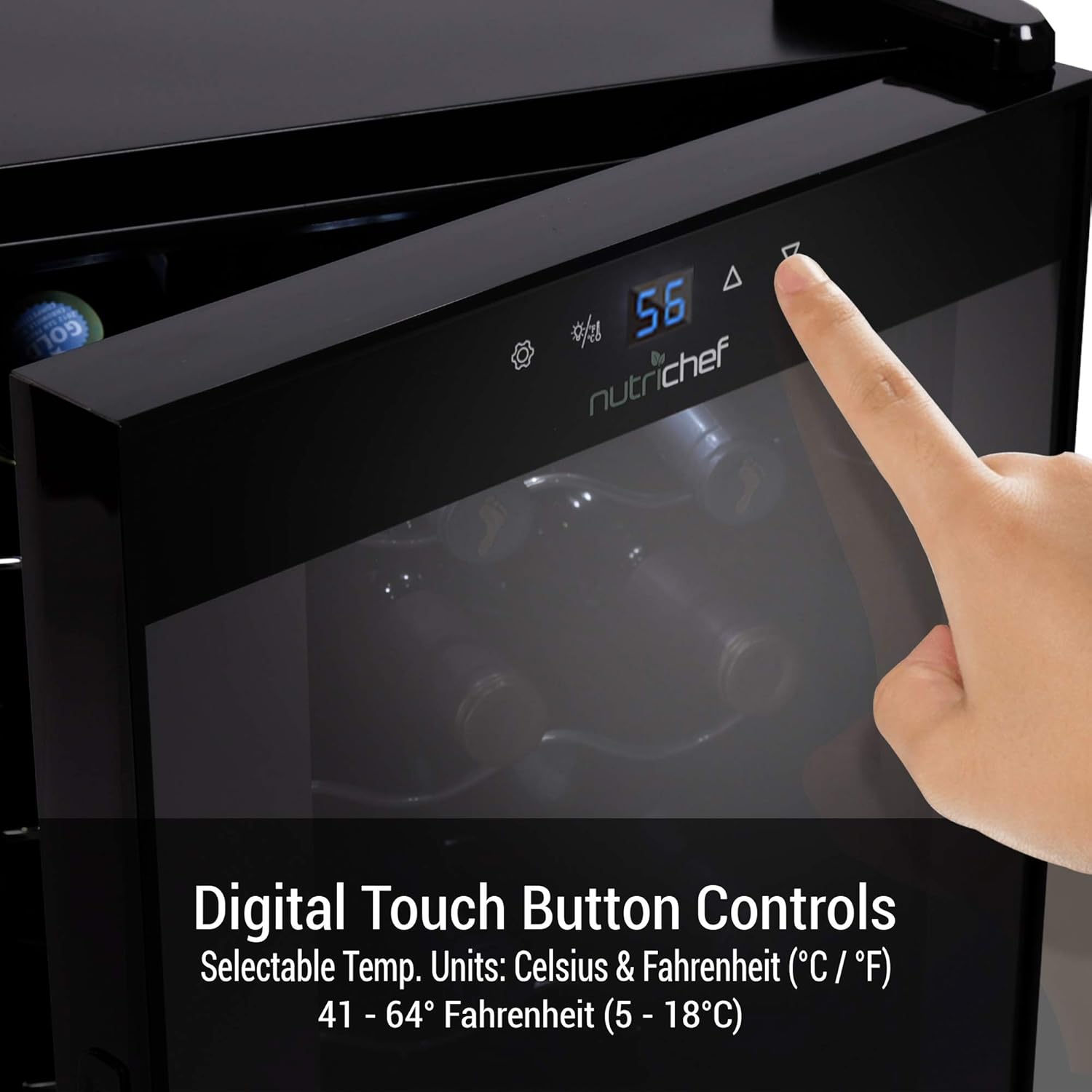
Figure 4.1: The digital touch control panel allows for easy temperature adjustments and light control.
4.1. Temperature Control
- Adjusting Temperature: Use the UP (▲) and DOWN (▼) arrows on the control panel to set your desired temperature. The temperature range is 41-64°F (5-18°C).
- Celsius/Fahrenheit Selection: Press the °C/°F button to switch between Celsius and Fahrenheit display.
- Digital Display: The current internal temperature is displayed on the blue LED screen.
4.2. Interior LED Light
- Turning Light On/Off: Press the Light Bulb (💡) icon on the control panel to turn the interior LED light on or off.
- The light automatically turns off after a few minutes of non-use to conserve energy.

Figure 4.2: The unit features built-in compressor cooling and an interior LED light for visibility.
4.3. Child Safety Auto-Lock
- The control panel will automatically lock itself 20 seconds after the last button press. This feature prevents accidental changes to settings, especially by children.
- To unlock, simply touch any button on the panel.
4.4. Quiet Operation
The advanced cooling system is designed for ultra-quiet operation, ensuring minimal disturbance in your living space. The vibration-free system helps preserve the quality of your wine.

Figure 4.3: The wine cooler operates silently, ensuring a peaceful environment.
5. Maintenance and Care
Regular cleaning and proper care will extend the lifespan of your wine cooler.
- Cleaning the Interior: Unplug the unit. Remove all bottles and racks. Wash the interior with a solution of mild detergent and warm water. Rinse thoroughly and wipe dry with a soft cloth. Do not use abrasive cleaners or solvents.
- Cleaning the Exterior: Clean the exterior surface with a soft cloth and mild detergent. For the glass door, use a glass cleaner.
- Wine Racks: The chrome wine racks can be removed and washed with mild soap and water. Ensure they are completely dry before placing them back into the unit.
- Defrosting: This unit features an automatic defrost system, minimizing the need for manual defrosting. Any accumulated frost will melt and evaporate.
- Power Outage: In case of a power outage, the unit will retain its last temperature setting. However, prolonged outages may affect the internal temperature.
6. Troubleshooting
If you experience issues with your wine cooler, refer to the following common problems and solutions:
| Problem | Possible Cause | Solution |
|---|---|---|
| Unit does not operate. | Not plugged in; circuit breaker tripped; power outage. | Ensure plug is secure; check circuit breaker; verify power supply. |
| Unit is not cold enough. | Temperature setting too high; door not closed properly; excessive door opening; poor ventilation; warm ambient temperature. | Lower temperature setting; ensure door is sealed; reduce door openings; ensure adequate clearance around unit; move unit to cooler location. |
| Excessive noise. | Unit not level; loose parts; fan obstruction. | Adjust leveling feet; check for loose components; ensure fan is clear of obstructions. |
| Interior light not working. | Light function turned off; LED malfunction. | Press the light button on the control panel; if issue persists, contact customer support. |
| Door does not close properly. | Unit not level; gasket dirty/damaged; bottles obstructing closure. | Adjust leveling feet; clean or replace gasket; rearrange bottles. |
7. Specifications
| Feature | Detail |
|---|---|
| Brand | NutriChef |
| Model Number | PKCWC150 |
| Capacity | 15 Wine Bottles (44.3 Liters) |
| Temperature Range | 41-64°F (5-18°C) |
| Installation Type | Freestanding |
| Dimensions (D x W x H) | 13.6"D x 17.7"W x 27.2"H |
| Item Weight | 50 Pounds |
| Voltage | 120 Volts |
| Annual Energy Consumption | 130 Kilowatt Hours Per Year |
| Defrost System | Automatic |
| Door Material Type | Glass |
| Shelf Type | Wire (Chrome) |
| Certification | Energy Star (5 Star) |
| Country of Origin | China |

Figure 7.1: Detailed dimensions of the PKCWC150 wine cooler.

Figure 7.2: Multiple views showcasing the design and internal structure of the wine cooler.
8. Product Overview Video
Video 8.1: An official product overview video demonstrating the features and operation of the NutriChef 15-Bottle Compressor Wine Cooler.
9. Warranty and Support
For detailed warranty information, please refer to the official product documentation or contact NutriChef customer support.
- User Manual (PDF): A comprehensive PDF user manual is available for download here.
- Customer Support: For any questions, technical assistance, or service requests, please visit the official NutriChef website or contact their customer support channels.
- Protection plans are available for purchase separately to extend coverage beyond the standard warranty.