
PARKVISION ZL-191FR
PARKVISION ZL-191FR High Sensitivity Wide Angle Car Camera User Manual
Model: ZL-191FR | Brand: PARKVISION
Introduction
The PARKVISION ZL-191FR is a high-performance car camera designed to enhance driving safety and visibility. It features a high-sensitivity CMOS sensor for superior night vision, an ultra-wide 172° horizontal and 95° vertical viewing angle, and a robust IP69K waterproof and dustproof rating. This manual provides detailed instructions for installation, operation, maintenance, and troubleshooting to ensure optimal performance of your camera.

Image: PARKVISION ZL-191FR camera showcasing its high sensitivity, wide-angle view, and IP69K waterproof level.
Package Contents
Please check that all the following components are included in your package:
- PARKVISION ZL-191FR Camera Unit
- Video Cable (RCA output, 6m) with integrated red trigger wire
- Power Cable (2m)
- Mounting Bracket and Screws (stainless steel)
- Corrugated Tube (2m, heat resistant)
- User Manual (this document)
Installation Guide
Proper installation is crucial for optimal camera performance. Follow these steps carefully:
1. Mounting Location
Choose a mounting location that provides a clear, unobstructed view. The camera's bracket allows for flexible angle adjustment. For rear installation, typically above the license plate is recommended. For front installation, ensure it does not obstruct the driver's view or vehicle sensors.


Images: The camera features an adjustable bracket for optimal viewing angles and a compact design for discreet installation.
2. Wiring Connections
Refer to the wiring diagram below for correct connections. The camera is compatible with 12V vehicle power systems.

Image: Detailed wiring diagram showing connections from camera to monitor/navigation unit and power source.
- Camera Power Connection: Connect the camera's power cable (red wire for +12V, black wire for ground) to a suitable 12V power source. For a backup camera, connect the red wire to the reverse light power. For a front camera, connect to an ACC (Accessory) power source. Ensure a secure ground connection to the vehicle chassis.
- Video Signal Connection: Connect the yellow RCA connector from the camera's video cable to the video input of your monitor or navigation unit.
- Red Trigger Wire (Video Cable): The video cable includes a thin red wire at both ends. This wire acts as a power extension.
- If connecting the camera power near the reverse light (rear of the car) and the monitor power near the dashboard (front of the car), connect the red wire at the camera end to the reverse light's +12V. Connect the red wire at the monitor end to the monitor's reverse trigger input. This signals the monitor to switch to the camera view when reversing.
- If both camera and monitor power are sourced from the same location (e.g., near the monitor for a front camera), the red trigger wire on the video cable may not be necessary for power, but can still be used for the monitor's trigger function. Ensure unused wires are properly insulated.
- Cable Protection: Use the provided 2m heat-resistant corrugated tube to protect the camera cable, especially in areas exposed to high temperatures within the vehicle.
3. Image Switching (Normal/Mirror Image)
The camera supports switching between normal image (front view) and mirror image (rear view). By default, the camera is set to normal image. To switch to mirror image, locate the thin blue wire on the camera cable. Cut this blue wire to activate the mirror image mode. Ensure the cut ends are insulated to prevent short circuits.

Image: Illustration of how cutting the blue wire on the camera cable switches between normal (front view) and mirror (backup view) images.
Operation
1. High Sensitivity Night Vision
The ZL-191FR camera utilizes a military-grade chip and proprietary noise reduction technology to achieve ultra-strong night vision with a minimum illumination of 0 Lux. This allows for clear visibility even in completely dark environments, requiring only minimal ambient light. The high-sensitivity CMOS sensor ensures high-definition images day and night.
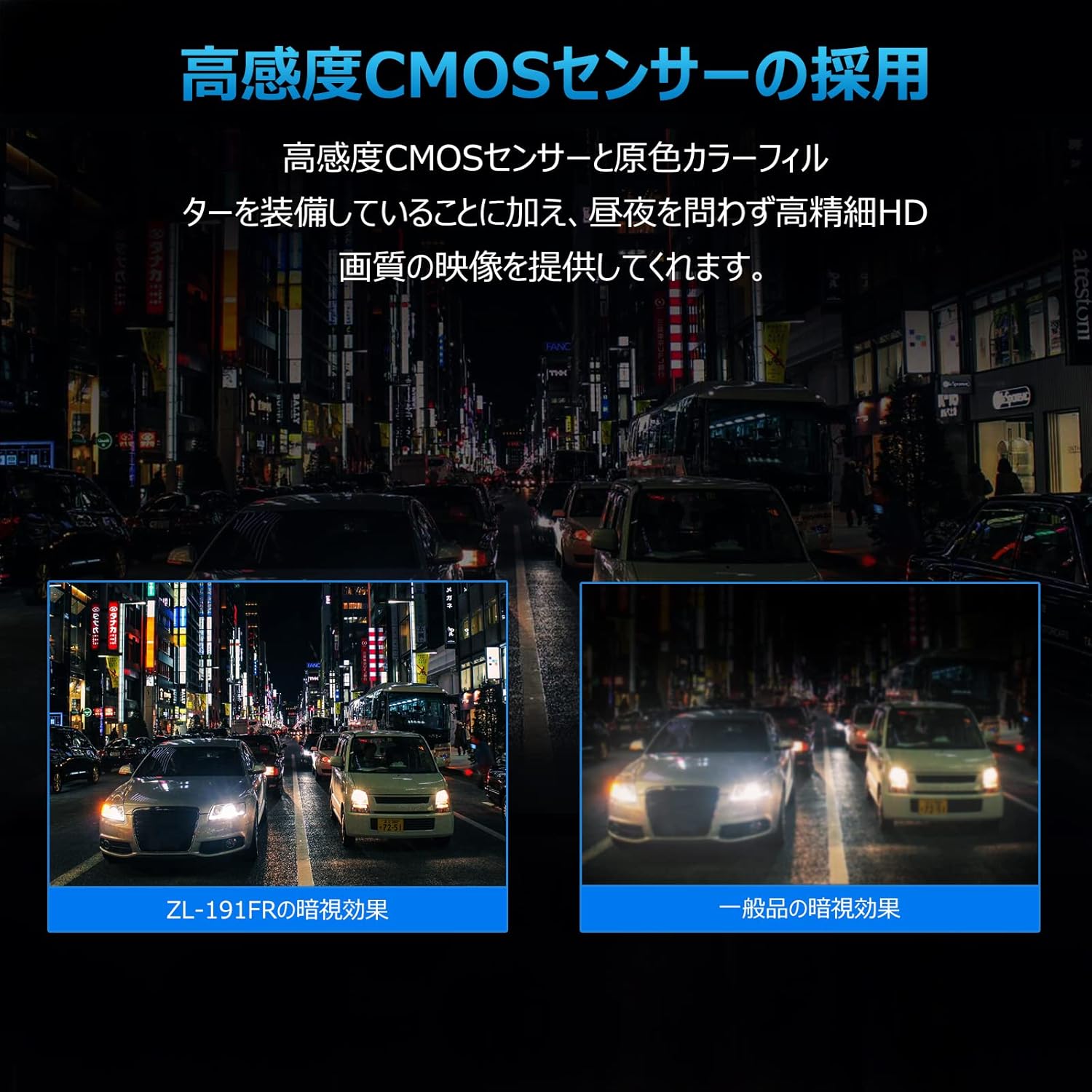
Image: A comparison demonstrating the superior night vision performance of the ZL-191FR camera compared to a conventional camera.
2. Ultra-Wide Viewing Angle
Equipped with a wide-angle lens providing a real horizontal 172° and vertical 95° field of view, the camera captures a broad perspective of the road ahead or behind, significantly reducing blind spots. This is particularly beneficial for navigating tight spaces or areas with limited visibility from the driver's seat.
Care and Durability
1. IP69K Waterproof and Dustproof Rating
The ZL-191FR camera boasts an international IP69K waterproof and dustproof rating, preventing water droplets and dust from entering the camera. This makes it suitable for outdoor and harsh environments, ensuring reliable operation in rain, during car washes, and across a wide temperature range.

Image: The camera is shown partially submerged in water, illustrating its IP69K waterproof capability.

Image: The camera is designed to withstand extreme temperatures, from -20°C to 65°C.
2. High-Quality Materials
The camera features a metal casing and a freely adjustable metal bracket, offering a premium feel and superior durability compared to plastic alternatives. It uses a 6-layer all-glass lens, which is highly resistant to heat and scratches, ensuring long-term clarity and performance. The stainless steel screws and bracket prevent rust.

Image: A graph illustrating the superior clarity retention of a 6-layer all-glass lens over time compared to a plastic lens, along with images of the stainless steel mounting hardware.
Troubleshooting
If you encounter issues with your PARKVISION ZL-191FR camera, please refer to the following common problems and solutions:
- No Image/Black Screen:
- Check all power connections (+12V and ground) to ensure they are secure and receiving power.
- Verify the video cable (yellow RCA) is correctly connected to the monitor's video input.
- If using the red trigger wire, ensure it is correctly connected to both the power source (e.g., reverse light) and the monitor's trigger input.
- Confirm the monitor is switched to the correct video input channel.
- Distorted or Poor Image Quality:
- Ensure all connections are tight and free from corrosion.
- The camera outputs a composite video signal (RCA). While high-resolution, the final display quality is also dependent on your monitor's resolution and processing capabilities.
- Check for any interference from other electrical components in the vehicle.
- Clean the camera lens with a soft, damp cloth.
- Incorrect Image Orientation (Normal vs. Mirror):
- If the image is mirrored when it should be normal, or vice-versa, check the blue wire on the camera cable. Cut the blue wire to activate mirror image (backup camera use) or ensure it is intact for normal image (front camera use).
- Camera Angle Appears Off:
- Adjust the camera's mounting bracket to achieve the desired field of view. Ensure the bracket screws are tightened securely after adjustment.
- For optimal wide-angle performance, mount the camera as far out from the vehicle body as possible without violating local regulations for protrusions.
If problems persist, please contact PARKVISION customer support for assistance.
Specifications
| Feature | Detail |
|---|---|
| Model Number | ZL-191FR |
| Brand | PARKVISION |
| Color | Black |
| Optical Sensor Technology | CMOS |
| Optical Sensor Size | 1/3 inch |
| Lens Type | Wide Angle (6-layer all-glass) |
| Actual Angle of View | 172° (Horizontal) |
| Vertical Angle of View | 95° |
| Minimum Illumination | 0 Lux (Super Night Vision) |
| Voltage | 12 Volts |
| Connectivity Technology | RCA Output |
| Waterproof/Dustproof Rating | IP69K |
| Operating Temperature | -20°C to 65°C |
| Product Dimensions | 2.5 x 2.5 x 2.5 cm (approx.) |
| Product Weight | 330 g |
Warranty and Support
The PARKVISION ZL-191FR camera comes with a 12-month warranty from the date of purchase. This warranty covers manufacturing defects and malfunctions under normal use.
For technical support, warranty claims, or any questions regarding your product, please contact PARKVISION customer service through the retailer where you purchased the product or visit the official PARKVISION website for contact information.
Please retain your proof of purchase for warranty validation.
Related documentsZL-191FR


Ask a question about this manual
Ask about setup, troubleshooting, compatibility, parts, safety, or missing instructions. Manuals+ will review the question and use this page’s manual context to help answer it.