
Introduction
Thank you for choosing the XINJIA Digital Watch Model 2400018. This manual provides detailed instructions for the proper setup, operation, and maintenance of your new watch. Please read this manual thoroughly to ensure optimal performance and longevity of your device. Keep this manual for future reference.
Safety Information
- Avoid exposing the watch to extreme temperatures, direct sunlight for prolonged periods, or strong magnetic fields.
- Do not attempt to open the watch case or replace the battery yourself, as this may void the warranty and damage the watch. Seek professional service.
- Clean the watch with a soft, dry cloth. Avoid using chemical cleaners.
- While the watch is designed for daily wear, avoid direct contact with corrosive substances.
Product Overview
The XINJIA Digital Watch Model 2400018 features a digital display, date function, and a chronometer. It is designed with a durable silicone strap and a buckle clasp for secure wear.

Figure 1: Front View of the Watch. This image displays the watch face with its digital display, showing time and day of the week. The four buttons are visible: 'START' (top left), 'RESET' (top right), 'LIGHT' (bottom left), and 'MODE' (bottom right).
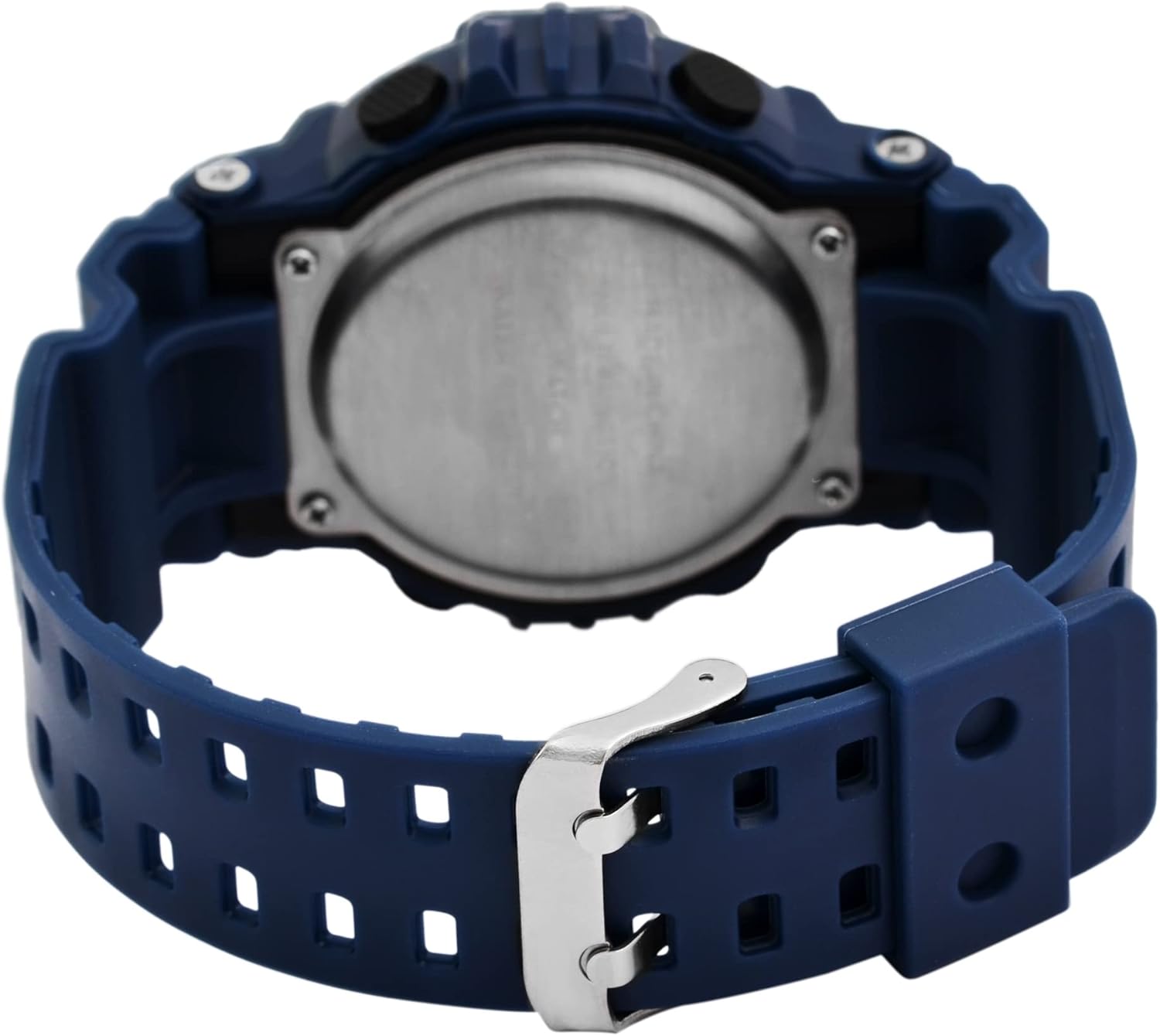
Figure 2: Back View of the Watch. This image shows the reverse side of the watch, highlighting the stainless steel case back and the blue silicone strap with its traditional buckle clasp.
Button Functions:
- MODE Button (Bottom Right): Cycles through display modes (Time, Date, Alarm, Chronometer). Used to select settings during adjustment.
- LIGHT Button (Bottom Left): Activates the backlight for visibility in low light conditions.
- START Button (Top Left): Starts/stops the chronometer. Used to increase values during setting.
- RESET Button (Top Right): Resets the chronometer. Used to select items or move to the next setting during adjustment.
Setup
Setting Time and Date:
- From the normal time display, press the MODE button three times to enter the time setting mode. The seconds digits will begin to flash.
- Press the RESET button to cycle through the settings: Seconds → Hours → Minutes → Month → Date → Day of the Week.
- While a digit is flashing, press the START button to adjust the value. Hold the START button to advance rapidly.
- Once all settings are correct, press the MODE button to exit the setting mode and return to the normal time display.
Operating Instructions
Using the Chronometer (Stopwatch):
- From the normal time display, press the MODE button once to enter Chronometer mode. The display will show "00:00:00".
- Press the START button to begin timing.
- Press the START button again to pause timing.
- Press the RESET button to reset the chronometer to "00:00:00".
- Press the MODE button to return to the normal time display.
Setting and Using the Alarm:
- From the normal time display, press the MODE button twice to enter Alarm mode. The alarm time will be displayed.
- Press the RESET button to select the hour or minute digits for adjustment. The selected digit will flash.
- Press the START button to adjust the flashing digit.
- To activate/deactivate the alarm, press the START and RESET buttons simultaneously while in Alarm mode. An alarm icon will appear/disappear on the display.
- Press the MODE button to exit Alarm mode.
Using the Backlight:
- Press the LIGHT button (bottom left) to illuminate the display for a few seconds.
Maintenance
Battery Replacement:
This watch uses one LR44 battery. When the display becomes dim or the watch stops functioning, the battery may need replacement. It is recommended to have the battery replaced by a qualified watch technician to ensure proper sealing and water resistance.
Cleaning:
Wipe the watch case and strap with a soft, slightly damp cloth. Avoid using harsh chemicals, solvents, or abrasive cleaners, as these can damage the watch's finish and materials.
Water Resistance:
The watch is designed to withstand splashes and brief immersion. However, it is not suitable for swimming, diving, or hot water activities (e.g., showering, sauna) as steam and hot water can compromise the seals. Do not operate buttons while the watch is wet.
Troubleshooting
| Problem | Possible Cause | Solution |
|---|---|---|
| Display is blank or dim. | Low or dead battery. | Replace the LR44 battery. Seek professional service. |
| Time is incorrect. | Time was not set correctly or reset accidentally. | Refer to the "Setting Time and Date" section to reset the time. |
| Buttons are unresponsive. | Watch may be in a locked mode or battery is very low. | Try pressing the MODE button to cycle modes. If still unresponsive, consider battery replacement. |
| Alarm does not sound. | Alarm is not activated or set incorrectly. | Ensure the alarm icon is displayed and the alarm time is set correctly. Refer to "Setting and Using the Alarm". |
Specifications
- Model Number: 2400018
- Brand: XINJIA
- Display Type: Digital
- Case Material: Not specified (implied plastic/resin with stainless steel back)
- Strap Material: Silicone
- Clasp Type: Buckle
- Case Diameter: 46 mm
- Case Thickness: 16 mm
- Band Width: 29 mm
- Product Dimensions (L x W x H): 26 x 4.6 x 1.6 cm
- Item Weight: 54.43 grams
- Battery Type: 1 x LR44 (included)
- Features: Time, Date, Day of Week, Chronometer, Alarm, Backlight
- Water Resistance: Splash resistant (general, not for swimming/diving)
Warranty and Support
For warranty information or technical support, please refer to the documentation provided at the time of purchase or contact your retailer. Keep your proof of purchase for any warranty claims.