
Introduction
This manual provides detailed instructions for the USARMT replacement remote control, designed for use with various Hitachi Roku TV models. This remote is pre-programmed and ready for use upon battery installation, offering direct access to popular streaming services.

Image: Front, side, and back views of the USARMT remote control. This image illustrates the ergonomic design and button layout from multiple angles.
Package Contents
- 1 x USARMT Remote Control
- Note: Batteries (AAA) are not included and must be purchased separately.
Setup
Battery Installation
- Locate the battery compartment cover on the back of the remote control.
- Slide the cover downwards or press the latch (if present) to open the compartment.
- Insert two (2) AAA batteries, ensuring the positive (+) and negative (-) terminals align correctly with the markings inside the compartment.
- Replace the battery compartment cover by sliding it back into place until it clicks securely.
Initial Use
This remote control is pre-programmed for compatible Hitachi Roku TV models. No additional setup or programming is required. Simply install the batteries, and the remote is ready for immediate use.
Operating Instructions
Familiarize yourself with the remote control's buttons and their functions:
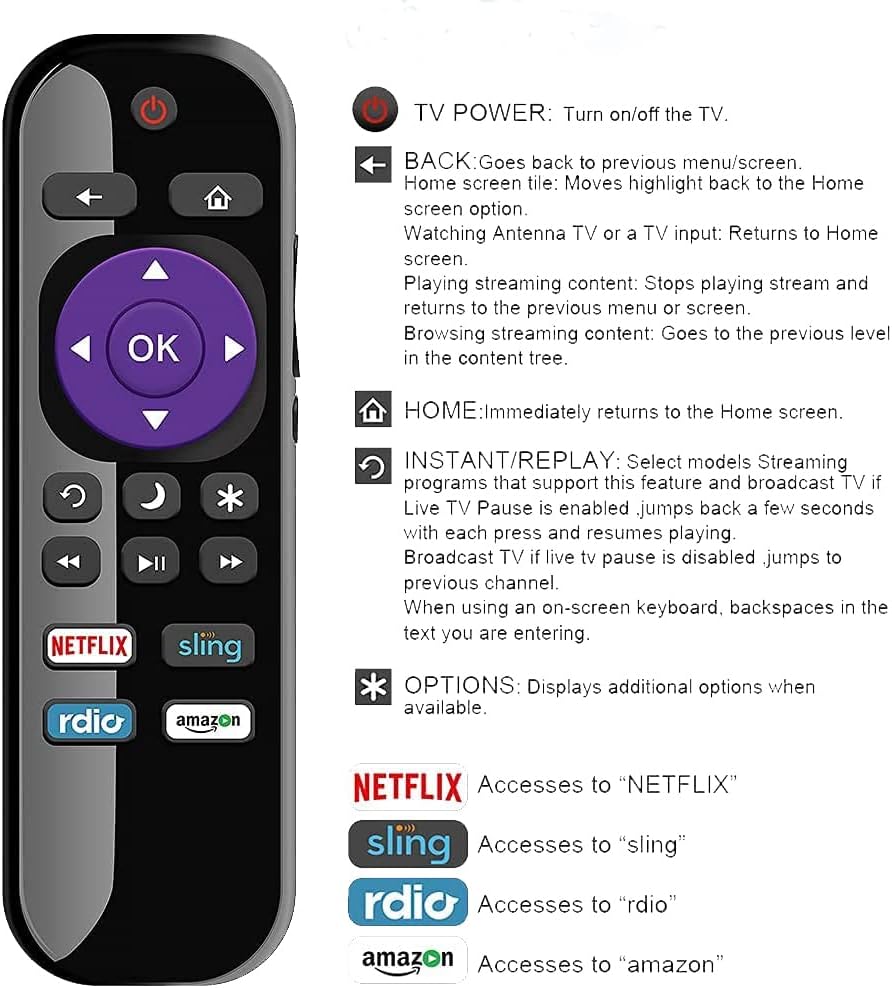
Image: Detailed view of the USARMT remote control with labels indicating the function of each button. This image serves as a visual guide for operating the remote.
- POWER (Red Button): Turns the TV on or off.
- BACK (Left Arrow): Navigates back to the previous menu or screen. When watching Antenna TV or a TV input, it returns to the Home screen. For streaming content, it stops playback and returns to the previous menu. When browsing streaming content, it goes to the previous level in the content tree.
- HOME (House Icon): Immediately returns to the Home screen.
- INSTANT REPLAY (Curved Arrow): For supported streaming programs, this feature allows you to jump back a few seconds with each press and resume playing. For Broadcast TV with live TV pause disabled, it jumps to the previous channel. When using an on-screen keyboard, it functions as a backspace.
- OPTIONS (Asterisk Icon): Displays additional options when available.
- Directional Pad (Up, Down, Left, Right Arrows) & OK Button: Used for navigating menus, selecting items, and confirming choices.
- Volume Up/Down (Side Buttons): Adjusts the TV's volume.
- Mute (Side Button): Mutes or unmutes the TV's audio.
- Fast Forward/Rewind/Play/Pause (Media Control Buttons): Controls media playback for streaming content.
- NETFLIX Button: Direct access to the Netflix application.
- SLING Button: Direct access to the Sling application.
- RDIO Button: Direct access to the Rdio application.
- AMAZON Button: Direct access to the Amazon application.
Maintenance
Cleaning
To clean the remote control, gently wipe it with a soft, dry cloth. For stubborn dirt, slightly dampen the cloth with water or a mild, non-abrasive cleaner. Avoid using harsh chemicals or abrasive materials, as these can damage the remote's surface or internal components.
Storage
When not in use for extended periods, remove the batteries to prevent leakage, which can damage the remote. Store the remote in a cool, dry place away from direct sunlight and extreme temperatures.
Troubleshooting
- Remote Not Responding:
- Ensure batteries are inserted correctly with the correct polarity.
- Replace old batteries with new AAA batteries.
- Check for any obstructions between the remote and the TV's infrared sensor.
- Ensure the TV is powered on. - Buttons Not Working:
- Clean the remote's surface, especially around the unresponsive buttons, to remove any dirt or debris.
- If only specific buttons are not working, the remote may be damaged and require replacement. - Limited Range:
- Ensure there are no objects blocking the line of sight between the remote and the TV.
- Replace batteries if they are low, as this can affect signal strength.
Specifications
| Brand | USARMT |
| Compatible Devices | Television (Hitachi Roku TV models) |
| Connectivity Technology | Infrared |
| Controller Type | Button Control |
| Special Feature | Ergonomic |
| Package Dimensions | 5.63 x 2.05 x 0.83 inches |
| Item Weight | 1.76 ounces |
Warranty and Support
This product comes with a 30-day hassle-free return policy. For any issues or questions regarding your USARMT remote control, please refer to the retailer's return and support policies where the product was purchased. Ensure you have your purchase details available when contacting support.