
1. Introduction
This document provides instructions for the HTZSAFE HB-806A Wireless Plug-in Receiver. This receiver is designed to expand your existing HTZSAFE wireless alarm system by providing an additional alert point. It functions as a central unit to receive signals from HTZSAFE sensors (sold separately) and notify you with an audible chime.
Important Note: This receiver is an accessory and cannot operate independently. It requires connection to HTZSAFE wireless sensors to function correctly.
Key features include:
- Support for up to 4 zones, allowing connection of multiple HTZSAFE sensors.
- 35 selectable melodies to customize alerts for different zones or sensors.
- 4 adjustable volume levels for personalized sound output.

This image displays the HTZSAFE Wireless Plug-in Receiver connected to a standard electrical outlet. The front panel features four illuminated indicators for zones 1 through 4. Below the device, key features are highlighted: 4 channels and expandability up to 4 sensors, 4 adjustable volume levels, and 35 optional melodies, designed to match different sensors.
2. Product Overview
Familiarize yourself with the components and controls of your HTZSAFE HB-806A Wireless Plug-in Receiver.

This diagram illustrates the various components and dimensions of the HTZSAFE Plug-in Alarm Receiver. It identifies the Power Plug, Volume button, Melody button, Zone Number indicators (1-4), and the Speaker. Dimensions are provided as 3.46 inches (width), 3.46 inches (height), 1.89 inches (depth), and 1.34 inches (plug depth).
Components:
- Power Plug: For connecting the receiver to a standard electrical outlet.
- Volume Button: Located on the side, used to adjust the sound level.
- Melody Button: Located on the side, used to cycle through the 35 available melodies.
- Zone Number Indicators (1-4): Illuminated numbers on the front panel that light up to indicate which zone has been triggered.
- Speaker: Emits the selected melody when a sensor is triggered.
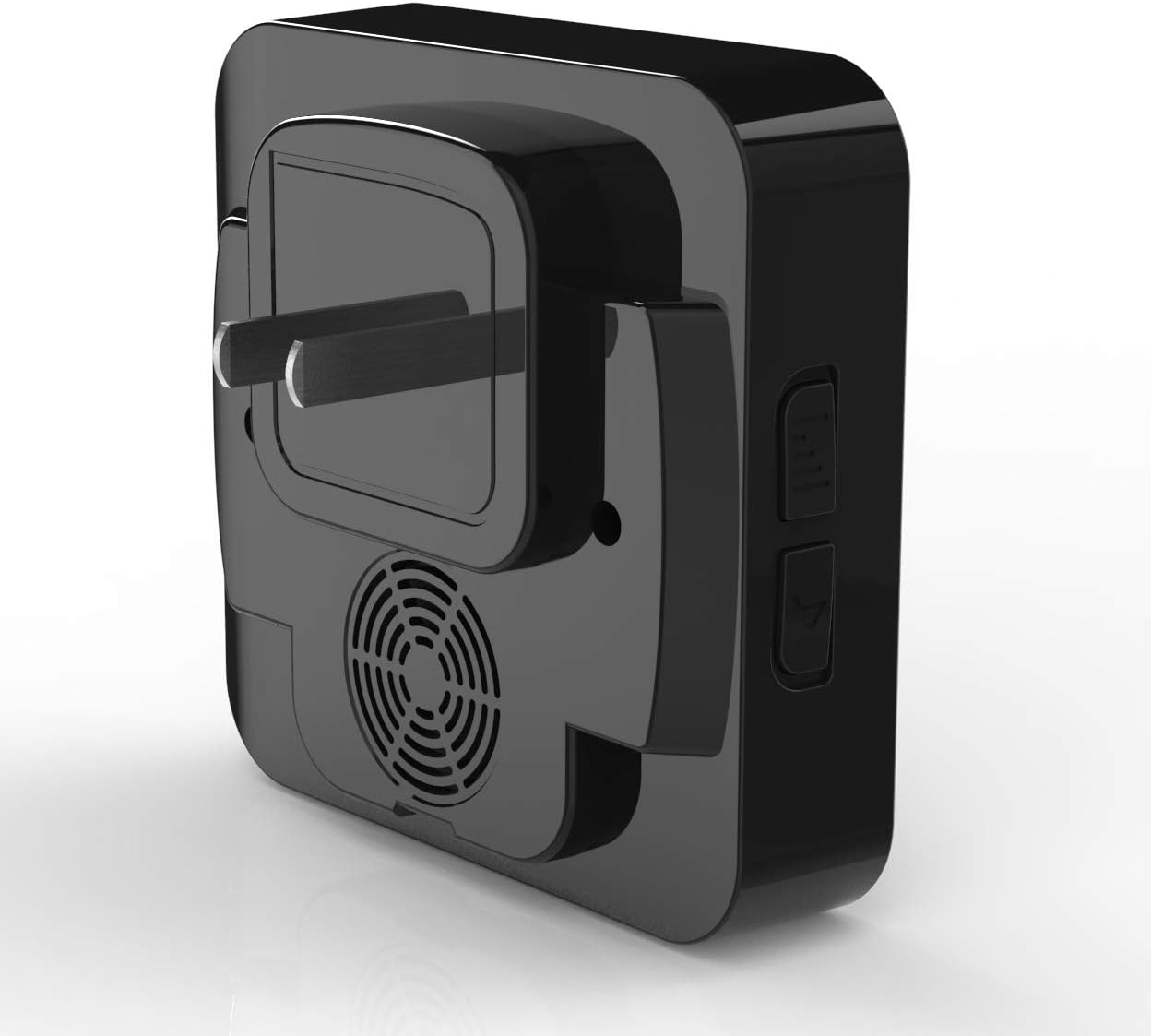
A side view of the HTZSAFE Wireless Plug-in Receiver, highlighting the two control buttons located on its right side. These buttons are used for adjusting volume and selecting melodies.
3. Setup
Follow these steps to set up your HTZSAFE HB-806A Wireless Plug-in Receiver and pair it with your HTZSAFE sensors.
- Power On: Plug the receiver into a standard 110-240V AC electrical outlet. The receiver will power on automatically.
- Enter Pairing Mode: Press and hold the Melody button for approximately 5 seconds until you hear a short beep and one of the zone indicators (e.g., '1') starts flashing. This indicates the receiver is in pairing mode for that specific zone.
- Trigger Sensor: Activate the HTZSAFE sensor you wish to pair. For example, if it's a motion sensor, wave your hand in front of it. The receiver will emit a chime and the corresponding zone indicator will stop flashing and remain lit, confirming successful pairing.
- Pair Additional Sensors (Optional): To pair another sensor to a different zone, briefly press the Melody button to cycle to the next flashing zone indicator (e.g., '2'). Then, trigger the next sensor. Repeat this process for up to 4 zones.
- Exit Pairing Mode: After pairing all desired sensors, press and hold the Melody button again for approximately 5 seconds, or wait for 30 seconds of inactivity. The receiver will exit pairing mode, and the zone indicators will turn off.
4. Operating Instructions
Once paired, the receiver is ready for operation.
- Adjusting Volume: Press the Volume button on the side of the receiver to cycle through the 4 available volume levels (Low, Medium, High, Mute).
- Changing Melodies: Press the Melody button on the side of the receiver (when not in pairing mode) to cycle through the 35 available melodies. You can select a different melody for each zone during the pairing process.
- Receiving Alerts: When a paired HTZSAFE sensor is triggered, the receiver will play the assigned melody and the corresponding zone number indicator will light up, providing visual and audible notification.
5. Maintenance
Proper care ensures the longevity and optimal performance of your receiver.
- Cleaning: Use a soft, dry cloth to clean the exterior of the receiver. Do not use liquid cleaners or abrasive materials.
- Placement: Ensure the receiver is plugged into a stable electrical outlet. Avoid placing it in areas with extreme temperatures, high humidity, or direct sunlight.
- Power: The receiver is designed for continuous operation when plugged in. No battery replacement is required for the receiver itself.
6. Troubleshooting
If you encounter issues with your receiver, refer to the following common problems and solutions.
- No Sound from Receiver:
- Ensure the receiver is properly plugged into a working electrical outlet.
- Check the volume level using the Volume button. It might be set to mute.
- Verify that the sensor is correctly paired and functioning.
- Sensor Not Triggering Receiver:
- Confirm the sensor is powered on and within range of the receiver.
- Re-attempt the pairing process (Section 3) to ensure the sensor is correctly linked to a zone.
- Check for potential interference from other wireless devices or large metal objects between the sensor and receiver.
- The maximum wireless range is specified as 35 meters (approximately 115 feet). Ensure your sensor is within this operational distance, considering environmental factors that may reduce range.
- False Alarms:
- False alarms are typically caused by the sensor, not the receiver. Refer to your specific HTZSAFE sensor's manual for troubleshooting false triggers (e.g., adjusting sensitivity, repositioning).
7. Specifications
| Brand | HTZSAFE |
| Model Number | HB-806A |
| Power Source | AC Plug-in (110-240V) |
| Item Weight | 6.3 ounces (0.18 Kilograms) |
| Maximum Wireless Range | 35 Meters (approximately 115 feet) |
| Mounting Type | Wall Mount (Plug-in) |
| Package Dimensions | 3.66 x 3.66 x 2.13 inches |
| Compatible Devices | HTZSAFE sensors |
8. Warranty and Support
For warranty information, technical support, or any questions not covered in this manual, please contact HTZSAFE customer service. Refer to the product packaging or the official HTZSAFE website for contact details.


