
Nilight TR-09
Nilight 3PCS 60 Inch Bed Light Strip
Instruction Manual
Brand: Nilight | Model: TR-09
1. Product Overview
The Nilight 3PCS 60 Inch Bed Light Strip system is designed to provide powerful and reliable illumination for various vehicle applications, including truck beds, cargo areas, RV awnings, and more. Each 60-inch strip features 90 high-efficiency 5050-SMD LED chips, delivering a super bright 6000K pure white light. The system is built for durability with IP67 sealed housing, protecting against water, dirt, and sand, ensuring a long lifespan of up to 30,000 hours.
Key Features:
- Impressive Brightness: 270 PCS 5050-SMD LED chips across 3 strips, outputting 3900LM 6000K super bright white light.
- Quick Installation: Features self-adhesive tape with enhanced adhesion and includes mounting hardware for extra security.
- Ease and Safe Electrical Hookup: Comes with a splitter cable, 5A inline blade fuse, and on/off switch for convenient and safe wiring.
- Flexible & Durable Design: IP67 sealed housing protects against rain, dirt, and sand, offering a lifespan of up to 30,000 hours.
- Wide Application: Suitable for RV Awning Light, truck bed light, step bar LED light, side door light, and other 12V DC power source applications.
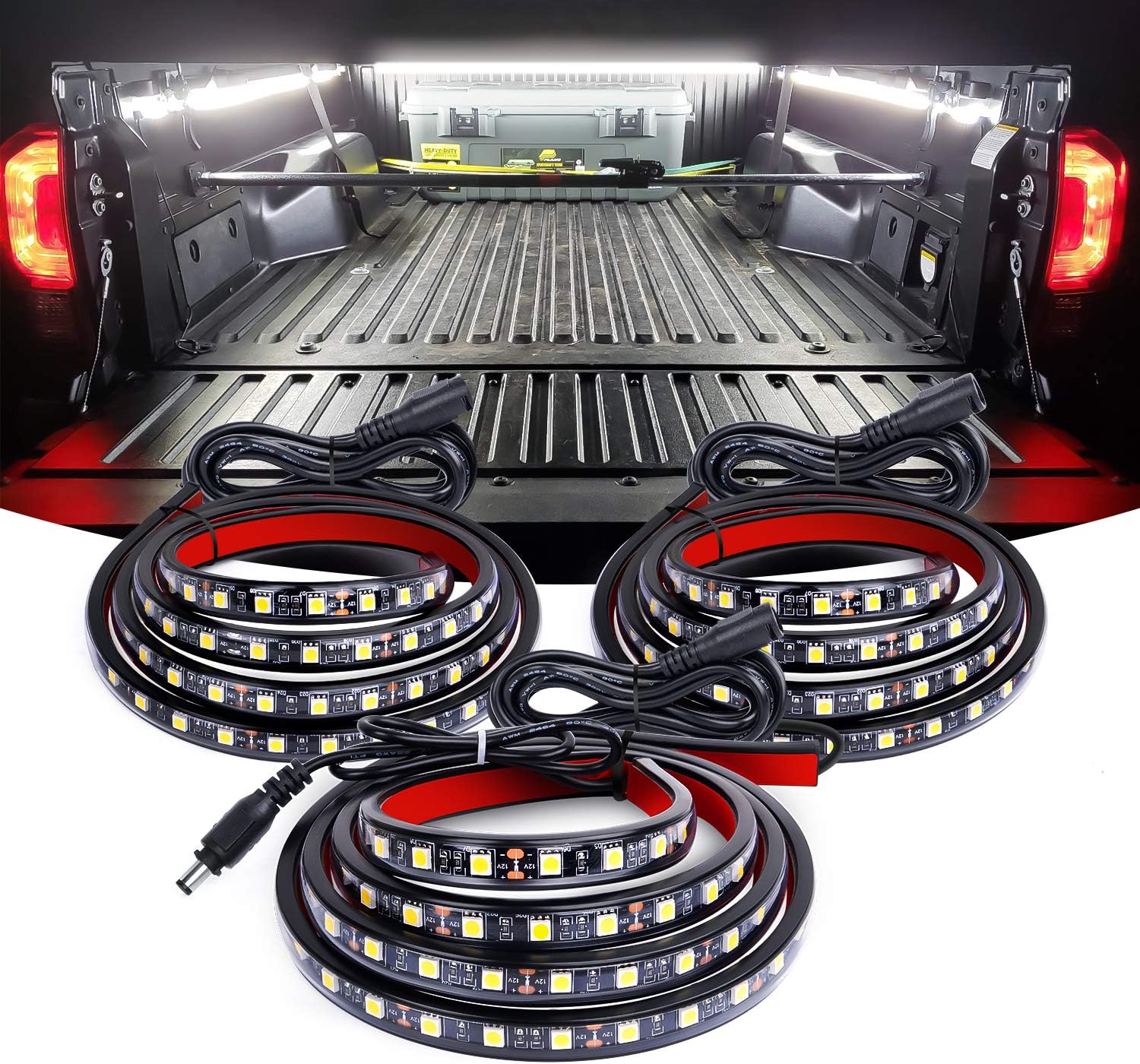
Image: Overview of the Nilight 3PCS 60 Inch Bed Light Strip components and an example of the illuminated truck bed.
2. What's Included
Your Nilight 3PCS 60 Inch Bed Light Strip package includes the following items:
- 3x LED light strip with wire bundle
- 1x On/off switch blade fuse wire bundle
- 1x Extension wire to power source
- 1x Hardware pack (for mounting)
3. Specifications
| Specification | Value |
|---|---|
| LED Strip Light Dimension | 60” x 3/5” x 1/4” |
| Light Strip Wire Bundle Length | 78” |
| On/Off Switch Wire with Splitter Cable | 55” |
| Extension Wire Length | 78” |
| LED Type | 5050-SMD |
| LED Quantity per Strip | 90 PCS |
| LED Lumen | 20-22LM/LED |
| Light Color | 6000K Pure White |
| Operating Voltage | 12V DC |
| Water Resistance Level | IP67 Sealed Housing |
| Item Weight | 1.46 pounds |
| Model Number | TR-09 |
4. Setup and Installation
Follow these steps for proper installation of your Nilight Bed Light Strips:
- Plan Placement: Determine the optimal location for your light strips within your truck bed or desired application area. Ensure the surface is clean, dry, and free of debris for best adhesion.
- Clean Surface: Thoroughly clean the mounting surface with an alcohol-based cleaner to remove any grease, dirt, or residue. Allow the surface to dry completely.
- Apply Adhesive: Peel the backing from the self-adhesive tape on the back of each LED light strip. Carefully press the strip firmly onto the prepared surface, ensuring good contact along the entire length.
- Secure with Hardware: For additional security and long-term durability, use the included mounting hardware (screws and zip ties) to further fasten the light strips.
- Electrical Hookup:
- Connect the light strips to the provided 2-way splitter cable.
- Connect the extension cable to the switch harness using crimp cap terminals.
- Connect the red wire to a positive (+) 12V DC power source and the black wire to a negative (-) ground connection. Ensure the 5A inline blade fuse is properly installed in the circuit for safety.
- Test Functionality: Once all connections are secure, use the on/off switch to test the lights.

Image: Quick and secure mounting process using adhesive and additional hardware.

Image: Components for safe electrical hookup, including the 5A inline blade fuse and on/off switch.

Image: Step-by-step guide for easy electrical hook-up of the light strips.
5. Operating Instructions
Operating your Nilight Bed Light Strip system is straightforward:
- Power On/Off: Use the integrated on/off push-button switch to turn the lights on or off.
- Application: These lights are designed for various 12V DC applications, providing bright illumination wherever needed.

Image: Various applications for the Nilight 12V DC LED light strips, including truck bed, running board, boat, and interior lighting.
6. Maintenance
To ensure the longevity and optimal performance of your Nilight Bed Light Strips, follow these maintenance guidelines:
- Regular Cleaning: Periodically clean the surface of the LED strips with a soft, damp cloth to remove any accumulated dirt, dust, or debris. Avoid using abrasive cleaners or solvents.
- Inspect Connections: Regularly check all electrical connections for tightness and signs of corrosion. Ensure the fuse holder is secure and the fuse is intact.
- Check for Damage: Inspect the light strips for any physical damage, such as cuts, cracks, or loose components. Although designed to be durable and flexible, extreme conditions can cause wear.
- Water Protection: The IP67 sealed housing provides excellent protection against water, dirt, and sand. However, avoid submerging the strips for extended periods or exposing them to high-pressure water jets directly.

Image: Detailed view of the IP67 waterproof sealed housing, highlighting its protective features.
7. Troubleshooting
If you encounter issues with your Nilight Bed Light Strips, consider the following common troubleshooting steps:
- Lights Not Turning On:
- Check the power connection to ensure it is securely connected to a 12V DC source.
- Verify that the ground connection is solid.
- Inspect the 5A inline blade fuse. If it is blown, replace it with a new 5A fuse.
- Ensure the on/off switch is in the 'On' position.
- Lights Are Dim or Flickering:
- Check for loose or corroded connections at the power source, switch, or splitter.
- Ensure your vehicle's battery voltage is stable and sufficient (12V DC).
- Inspect the wiring for any damage or pinches that might be causing resistance.
- Only One Strip Working:
- Check the connection of the non-working strip to the splitter cable.
- Inspect the non-working strip itself for any visible damage.
If these steps do not resolve the issue, please refer to the Warranty & Support section for further assistance.
8. Warranty & Support
Nilight stands behind the quality of its products. The Nilight 3PCS 60 Inch Bed Light Strip comes with a 2 Years Warranty honored by Nilight.
For additional support, you can refer to the official user manual in PDF format:
For more information about Nilight products and support, please visit the official Nilight Store:
Related documentsTR-09


Ask a question about this manual
Ask about setup, troubleshooting, compatibility, parts, safety, or missing instructions. Manuals+ will review the question and use this page’s manual context to help answer it.