
dasaita MAX10
Dasaita 10.2" Android Car Stereo Instruction Manual for Toyota Camry (2015-2017)
Model: MAX10
Introduction
This manual provides detailed instructions for the installation, operation, and maintenance of your Dasaita 10.2-inch Android Car Stereo, specifically designed for Toyota Camry models from 2015 to 2017. Please read this manual thoroughly before using the product to ensure proper function and safety.
Product Overview
The Dasaita 10.2-inch Android Car Stereo is an advanced multimedia navigation system featuring a high-performance Hexa-core PX6 CPU, 4GB RAM, and 64GB ROM, running on Android 10. It offers a responsive touch screen experience with integrated Wireless Carplay and Android Auto capabilities.
Key Features:
- Vehicle Compatibility: Designed for Toyota Camry 2015, 2016, 2017.
- High Performance: Hexa-core PX6 CPU, 64Bit, 4GB RAM, 64G ROM, Android 10 Operating System.
- Smartphone Integration: Wireless Apple CarPlay & Android Auto for navigation, calls, messages, and music.
- Display: QLED capacitive touchscreen with 1280*720 resolution.
- Audio: Built-in hands-free calling, music streaming, compatible with Hi-Res Audio Video files, 18FM & 12AM radio stations.
- Connectivity: Bluetooth, Wi-Fi, Auxiliary, Cellular.
- Retained Features: Supports factory steering wheel controls, reverse camera, OEM JBL amplifier, and factory antenna adapter.

Image: The Dasaita 10.2-inch Android Car Stereo seamlessly integrated into the dashboard of a Toyota Camry, showcasing its large display and user interface.
Setup and Installation
The Dasaita car stereo is designed for plug-and-play installation for compatible Toyota Camry models (2015-2017). It includes all necessary wiring harnesses and adapters to retain factory features.
Wiring Diagram and Connections:
Refer to the detailed wiring diagram for proper connection of all components. Ensure the car engine is turned off before making any connections.

Image: A comprehensive wiring diagram illustrating the connections for the Dasaita car stereo, including audio output, AUX in & Cam in, USB cables, WiFi antenna, GPS antenna, microphone, power cable, Canbus, and USB adapter.
Initial Power-Up:
After installation, turn on the car ignition. The system will boot up, displaying the Dasaita logo and then the main interface. Allow a few moments for the system to fully load.
Video: This video provides a detailed overview of the Dasaita 10.2" Android Car Stereo, demonstrating its features, user interface, and various functionalities after installation in a Toyota Camry 2015-2017.
Operating Instructions
User Interface (UI) Navigation:
The system features an enhanced touch UI design for intuitive operation. Swipe left or right to access different screens with various applications and widgets. Tap on icons to launch applications.

Image: The main screen of the Dasaita car stereo, showing a clean and organized layout of application icons for easy access to functions like navigation, music, and radio.
Music Playback:
The stereo supports various audio formats including MP3, WMA, WAV, AC3, and FLAC. You can play music from USB drives or stream via Bluetooth. Access the music player from the main menu.

Image: The music playback screen on the Dasaita stereo, displaying song information, playback controls, and a list of available tracks.
Radio Function:
Tune into your favorite FM/AM stations. The system supports automatic and manual channel selection, as well as RDS for station information. Select the Radio icon to access this feature.
Video Playback:
Enjoy 4K video formats including RMVB, AVI, MPG, MPEG, VOB, MOV, ASF, FLV, 3GP, and MP4. Videos can be played from connected USB devices. The system also supports split-screen functionality, allowing you to watch videos while using navigation.
Bluetooth Connectivity:
Connect your smartphone via Bluetooth for hands-free phone calls and A2DP music streaming. Access your phonebook and dial numbers directly from the stereo's screen.
GPS Navigation:
Utilize online Google Maps by connecting to a Wi-Fi hotspot or 3G dongle. Enter destinations and follow turn-by-turn directions displayed on the screen.
App Installation (Google Play Store):
Access the Google Play Store to download and install a wide variety of Android applications, games, music, and movies. Ensure the device is connected to the internet.

Image: The Google Play Store interface displayed on the Dasaita car stereo, showing various apps and games available for download.
Wireless Carplay & Android Auto:
Connect your iPhone or Android smartphone wirelessly to access Apple CarPlay or Android Auto. This allows for safer use of your phone's features, including navigation, calls, messages, and music, directly from the stereo display or via voice commands (Siri/Google Assistant).
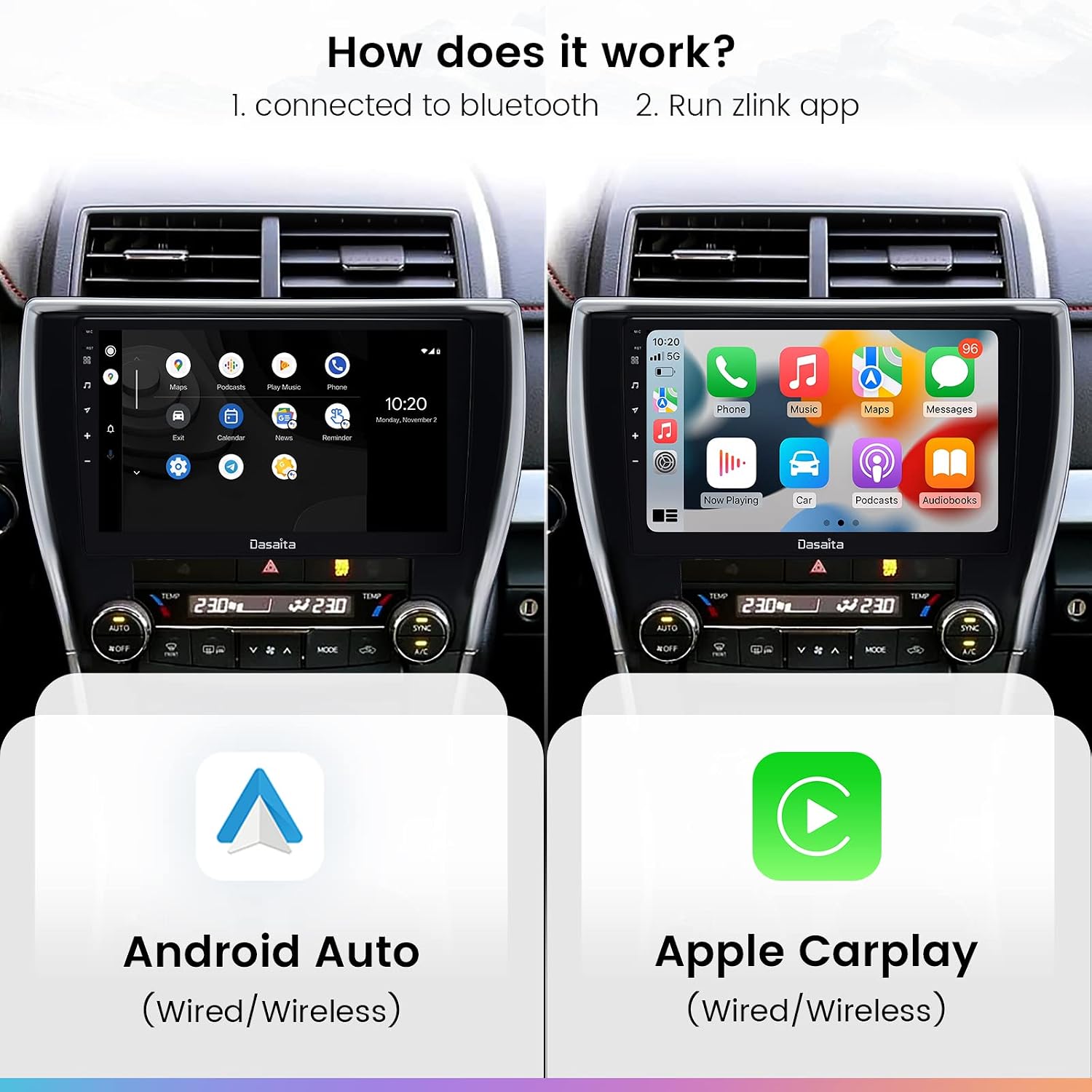
Image: The Dasaita car stereo screen showing both Android Auto and Apple CarPlay interfaces side-by-side, demonstrating seamless smartphone integration.
Digital Sound Processor (DSP):
The built-in DSP features a 15-band graphic equalizer, allowing for precise audio adjustments to customize your listening experience. Access the Amplifier settings to configure the DSP.
System Settings:
Navigate to the 'Settings' menu to configure various aspects of the stereo, including Wi-Fi, display brightness, button colors, and other advanced factory settings. This allows for personalization and optimization of the device's performance.
Maintenance
- Screen Cleaning: Use a soft, lint-free cloth to gently wipe the touchscreen. Avoid abrasive cleaners or harsh chemicals that may damage the screen.
- Software Updates: Periodically check for software updates from Dasaita to ensure optimal performance and access to new features. Updates can typically be downloaded to a USB drive and installed via the system settings.
- General Care: Keep the unit free from dust and debris. Avoid exposing the unit to extreme temperatures or direct sunlight for prolonged periods.
Troubleshooting
If you encounter issues with your Dasaita car stereo, refer to the following common troubleshooting steps:
- No Power: Check all power connections and fuses. Ensure the car ignition is on.
- No Sound: Verify speaker connections. Check volume levels and DSP settings. Ensure the correct audio source is selected.
- GPS Signal Loss: Ensure the GPS antenna is properly installed and has a clear view of the sky. Check network connectivity for online maps.
- CarPlay/Android Auto Connection Issues: Ensure Bluetooth and Wi-Fi are enabled on both the stereo and your smartphone. Restart both devices and try reconnecting.
- Screen Freezing/Crashing: Perform a system restart. If the issue persists, consider a factory reset (note: this will erase all user data and settings).
- Music Stops in Reverse: This may be a software setting. Check the "Driving settings" or "Extra settings" within the factory settings menu for options related to reverse gear behavior.
For persistent issues, please contact Dasaita customer support.
Specifications
| Feature | Detail |
|---|---|
| Item Weight | 6.44 pounds |
| Package Dimensions | 17 x 12.25 x 8 inches |
| Item Model Number | Toyota Camry 2015-2017 (MAX10) |
| Display Size | 10.2 Inches |
| Display Resolution | 1280*720 |
| Warranty | 1 year manufacturer |
| Voice Command | Touchscreen (via integrated smartphone features) |
| Brand | dasaita |
| Model Name | Vivid11 |
| Vehicle Service Type | Car |
| Special Feature | Bluetooth, Touchscreen, Wireless Carplay, Android Auto, GPS |
| Connectivity Technology | Auxiliary, Bluetooth, Cellular, Wi-Fi |
| Map Type | PX6+DSP+Carplay/Android Auto 4+64 (Camry 2015-2017) |
| Audio Output Mode | AUX, Speaker, Stereo |
| Mounting Type | Dashboard Mount |
What's in the Box
The following items are included with your Dasaita 10.2" Android Car Stereo:
- Headunit
- Audio Output Cable
- AUX In & Cam In Cable
- Single USB Cable
- Dual USB Cable
- WiFi Antenna
- GPS Antenna
- Microphone
- Power Cable
- Canbus Decoder
- USB Adapter

Image: A visual representation of the Dasaita car stereo's front and back, along with a diagram listing all included accessories and their corresponding numbers.
Optional Accessories
The Dasaita car stereo supports various optional accessories to enhance its functionality. These items are sold separately:
- TPMS (Tire Pressure Monitoring System): Available in external and internal sensor types.
- DTV (Digital TV Tuner): For receiving digital television broadcasts.
- Car DVR (Digital Video Recorder): For recording driving footage.
- Rear View Camera: For improved visibility when reversing.
- DAB (Digital Audio Broadcasting): For enhanced digital radio reception.
Warranty
The Dasaita 10.2" Android Car Stereo comes with a 1-year manufacturer's warranty. Please retain your proof of purchase for warranty claims. The warranty covers defects in materials and workmanship under normal use.
Support
For technical assistance, troubleshooting, or warranty inquiries, please contact Dasaita customer support. You can typically find contact information on the official Dasaita website or through your purchase platform.
When contacting support, please have your product model number (MAX10) and purchase details ready.
Related documentsMAX10


Ask a question about this manual
Ask about setup, troubleshooting, compatibility, parts, safety, or missing instructions. Manuals+ will review the question and use this page’s manual context to help answer it.